
1. Прадукт скончыўсяview
The VCOROS VR1 Motorcycle Helmet Bluetooth Headset is designed to provide clear audio communication, music playback, and voice assistant functionality for motorcyclists. It features a slim design, robust connectivity, and durable construction suitable for various riding conditions.

Figure 1: VCOROS VR1 Main Unit and Speaker/Microphone Assembly

Малюнак 2: Прадукт зверхуview з пазначанымі кампанентамі
- Кнопка «+»: Павышэнне гучнасці / наступная песня
- Кнопка «-»: Памяншэнне гучнасці / Папярэдняя песня
- Кнопка прайгравання/паўзы: Answer/Hangup/Call Back/Reject, Play/Pause Music
- AI Assistant Button: Актывуйце галасавой памочнік
- Кнопка харчавання: Уключэнне/выключэнне харчавання
- Індыкатар зарадкі: Чырвоны святлодыёд
- Bluetooth Working Indicator: Сіні святлодыёд
- Speaker/Microphone Interface: Connects headset components
- Порт для зарадкі Type-C: Для зарадкі прылады
2. Змесціва ўпакоўкі
Калі ласка, пераканайцеся, што ўсе пералічаныя ніжэй прадметы ўваходзяць у ваш пакет:

Малюнак 3: Камплектуючыя прыналежнасці
- 1 x Bluetooth Headset Unit
- 1 x Set of Earphones with Soft Microphone
- 1 х Кіраўніцтва карыстальніка
- 1 x Installation Clip Base
- 5 x Velcro Pads for Installation
- 1 х зарадны кабель Type-C
3. Ўстаноўка
The VCOROS VR1 headset offers two primary installation methods: clip-on and velcro. For enhanced stability, it is recommended to use both the clip base and velcro pads together.
3.1. Падрыхтоўка шлема
Ensure the inner lining of your helmet is clean and dry where the headset and speakers will be mounted.
3.2. Ўстаноўка дынамікаў
- Identify suitable locations inside your helmet for the speakers, typically within the ear pockets.
- Attach the velcro pads to the back of the speakers.
- Securely press the speakers into the helmet's ear pockets.
- Route the speaker wires discreetly under the helmet's padding to the desired location for the main unit.
3.3. Усталёўка мікрафона
The VR1 comes with a soft microphone, suitable for most full-face helmets. Position the microphone close to your mouth for optimal voice clarity, typically along the cheek pad or chin bar.
3.4. Усталёўка галоўнага блока
- Clip-on Method: Slide the clip base between the helmet shell and the inner padding on the left side of the helmet. Ensure it is firmly secured.
- Velcro Method: Attach the adhesive velcro pad to the exterior of the helmet where you wish to mount the main unit.
- Slide the main unit onto the clip base or press it firmly onto the velcro pad until it is securely attached.
- Connect the speaker/microphone cable to the interface port on the main unit.
Малюнак 4: Схема ўстаноўкі
Note: For optimal stability, it is recommended to use both the clip base and the velcro pads together for mounting the main unit.
4. Аперацыя
4.1. Уключэнне/выключэнне харчавання
- Уключэнне: Press and hold the Power button until the blue indicator light flashes and you hear a "Power On" voice prompt.
- Выключэнне: Press and hold the Power button until the red indicator light flashes and you hear a "Power Off" voice prompt.
4.2. Спарванне Bluetooth
- Пераканайцеся, што гарнітура адключана.
- Press and hold the Power button for approximately 5-7 seconds until the blue and red indicator lights flash alternately, indicating pairing mode. You will hear a "Pairing" voice prompt.
- On your mobile device, enable Bluetooth and search for "VR1".
- Select "VR1" to connect. Once connected, the blue indicator light will flash slowly, and you will hear a "Connected" voice prompt.
4.3. Музычны кантроль
- Прайграванне/Паўза: Кароткае націсканне кнопкі Прайграванне/Паўза.
- Наступная песня: Кароткачасова націсніце кнопку «+».
- Папярэдняя песня: Кароткачасова націсніце кнопку «-».
- Павялічыць гучнасць: Доўга націсніце кнопку «+».
- Паменшыць гучнасць: Доўга націсніце кнопку «-».
4.4. Кіраванне выклікамі
- Адказаць на званок: Кароткачасова націсніце кнопку прайгравання/паўзы, калі паступае ўваходны званок.
- Завяршыць выклік: Кароткачасова націсніце кнопку прайгравання/паўзы падчас размовы.
- Адхіліць выклік: Доўга націсніце кнопку прайгравання/паўзы, калі паступае ўваходны званок.
- Паўторны набор апошняга нумара: Двойчы націсніце кнопку Прайграванне/Паўза.
4.5. Галасавы памочнік са штучным інтэлектам
The VR1 supports AI voice control for both Android and Apple systems.
- Актываваць галасавы памочнік: Short press the AI Assistant button (microphone icon) to wake up your device's voice assistant (e.g., Siri, Google Assistant).

Figure 5: AI Voice Assistant in Use
5. Зарадка і тэрмін службы батарэі
The VCOROS VR1 headset is equipped with a rechargeable lithium-ion battery, providing extended usage times.
- Час зарадкі: Прыкладна 2.5 гадзіны для поўнай зарадкі.
- Час бесперапыннай працы: Up to 25 hours (music playback).
- Continuous Call Time: Да 20 гадзін.
- Час чакання: Да 270 гадзін.
5.1. Інструкцыі па зарадцы
- Падключыце зарадны кабель Type-C, які ўваходзіць у камплект, да зараднага порта на гарнітуры.
- Падключыце іншы канец кабеля да крыніцы сілкавання USB (напрыклад, камп'ютара, адаптара).
- The charging indicator (red LED) will illuminate during charging and turn off once fully charged.

Малюнак 6: Тэрмін службы батарэіview
6. Waterproof and Dustproof Features
The VCOROS VR1 headset boasts an IPX6 waterproof rating, ensuring reliable performance even in challenging weather conditions.
- Рэйтынг IPX6: Protected against powerful water jets. This means the device can withstand heavy rain and splashes, making it suitable for use during motorcycle rides in various weather.
- The tightly structured and solid waterproof design effectively blocks dust and rain from invading the internal components, allowing for worry-free travel.

Малюнак 7: Дэманстрацыя воданепранікальнасці IPX6
7. Audio Quality and Noise Cancellation
Experience high-definition sound with the VCOROS VR1, featuring advanced audio technologies for clear communication and immersive music.
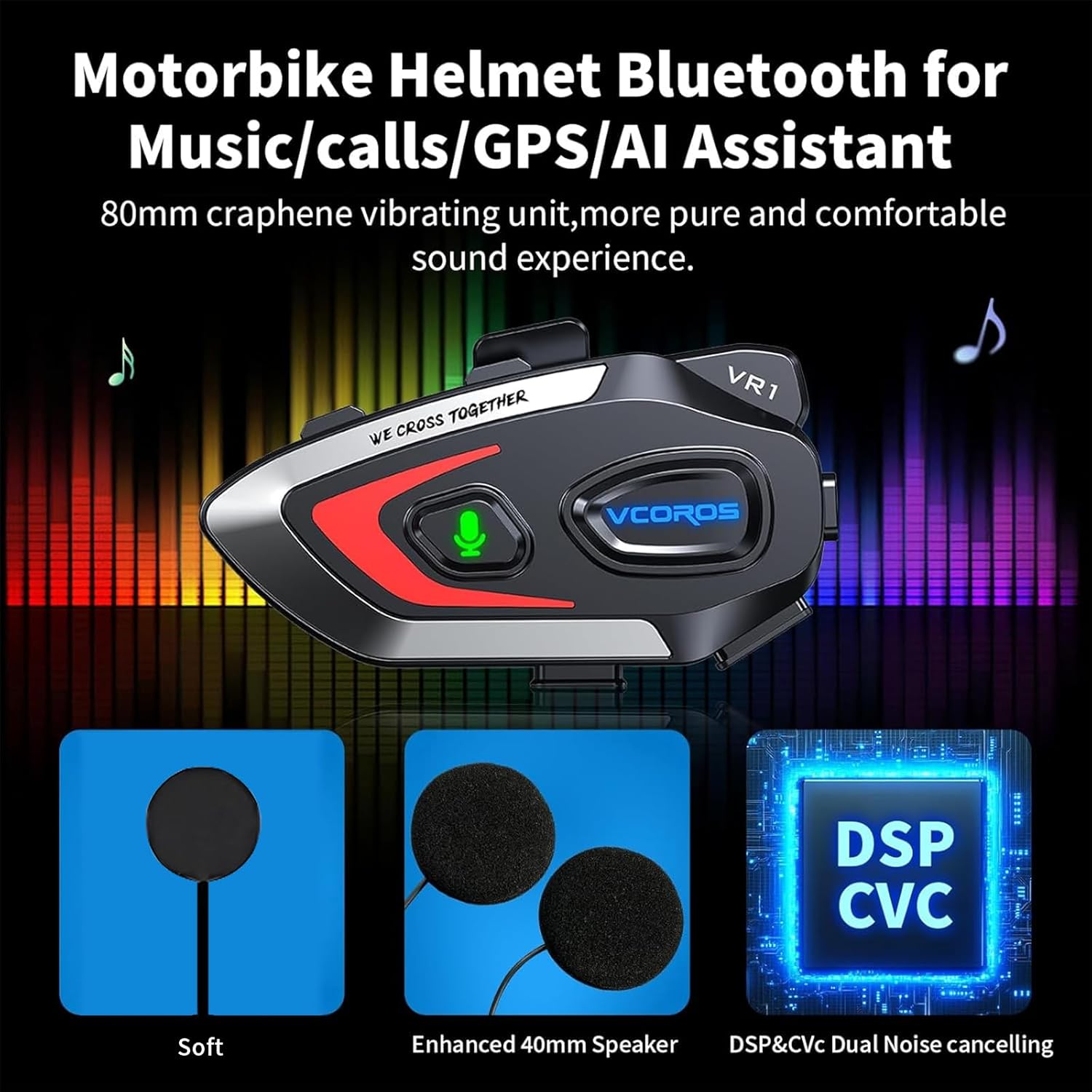
- Высокая якасць гуку: Equipped with an 80mm graphene vibrating unit for a pure and comfortable sound experience.
- Падвойнае падаўленне шуму: Adopts intelligent CVC and DSP dual filter noise reduction technology, effectively reducing ambient noise for clear audio transmission and reception, even at high speeds.
- Enhanced 40mm Speakers: Provides robust and clear audio output.

Figure 8: Audio Technology Details
8. Сумяшчальнасць
The VCOROS VR1 headset is designed for broad compatibility with various helmet types and smart devices.
- Сумяшчальнасць шлема: Suitable for all types of helmets, including Full-face, Modular, Off-road, Retro, and 3/4 helmets. The slim 0.3-inch thick headphones ensure a comfortable fit without pressing against the ears.
- Сумяшчальнасць прылад: Connects wirelessly via Bluetooth 5.3 to smartphones, tablets, and other Bluetooth-enabled devices.

Figure 9: Helmet Compatibility
9. Тэхнічныя характарыстыкі
| Асаблівасць | Дэталь |
|---|---|
| Марка | VCOROS |
| мадэль | VR1 (Soft Mic) |
| Тэхналогія падлучэння | Бесправадная сувязь (Bluetooth 5.3) |
| Рэйтынг воданепранікальнасці | IPX6 |
| Шумапрыглушэнне | CVC and DSP Dual Filter |
| Тып батарэі | Акумулятарная літыя-іённая |
| Час зарадкі | Прыбл. 2.5 гадзіны |
| Working Time (Music) | Да 25 гадзін |
| Час чакання | Да 270 гадзін |
| Дыяметр дынаміка | 40 мм |
| Headphone Thickness | 0.3 цалі (прыблізна 7.6 мм) |
| Вага | 180 грамаў |
| Сумяшчальныя прылады | Смартфоны, планшэты |
10. Інфармацыя па бяспецы
Warning: Use with caution while riding. Do not distract yourself from driving.
- Always prioritize road safety. Using the headset should not impair your ability to hear ambient sounds or focus on driving.
- Adjust volume to a level that allows you to hear emergency vehicles and other important sounds.
- Do not attempt to install or adjust the headset while riding.
- Трымайце прыладу далей ад экстрэмальных тэмператур, прамых сонечных прамянёў і агрэсіўных матэрыялаў.
- Do not disassemble or modify the device. This may void the warranty and pose safety risks.
11. Выпраўленне непаладак
If you encounter any issues with your VCOROS VR1 headset, please refer to the following common solutions:
11.1. Прылада не ўключаецца
- Ensure the battery is charged. Connect the headset to a power source using the provided Type-C cable and allow it to charge for at least 30 minutes.
- Press and hold the Power button for a few seconds to confirm it's not just a short press.
11.2. Немагчыма спалучыць прыладу
- Пераканайцеся, што гарнітура знаходзіцца ў рэжыме спалучэння (чырвоны і сіні індыкатары міргаюць па чарзе).
- Ensure Bluetooth is enabled on your mobile device and it is within range (typically 10 meters).
- Forget "VR1" from your device's Bluetooth settings and try pairing again.
- Restart both the headset and your mobile device.
11.3. Няма гуку або нізкі ўзровень гучнасці
- Праверце ўзровень гучнасці як на гарнітуры, так і на падлучанай прыладзе.
- Ensure the speaker wires are securely connected to the main unit.
- Verify that the speakers are correctly positioned within the helmet's ear pockets.
11.4. Poor Microphone Quality
- Ensure the microphone is positioned close to your mouth and not obstructed.
- Check for any damage to the microphone cable or connector.
11.5. Праблемы з зарадкай
- Пераканайцеся, што кабель Type-C цалкам устаўлены ў порт зарадкі.
- Паспрабуйце іншы USB-адаптар харчавання або порт.
- Пераканайцеся, што зарадны кабель не пашкоджаны.
12. Гарантыя і падтрымка
VCOROS products are manufactured to high quality standards. For warranty information, technical support, or service inquiries, please contact VCOROS customer support through the retailer where you purchased the product or visit the official VCOROS webсайт.
Калі ласка, захавайце доказы пакупкі для прэтэнзій па гарантыі.