
1. Уводзіны
This manual provides essential information for the safe and efficient operation of your ZDSSY ZD-L018AQ Smart Projector. This device offers 1080P native resolution with 4K support, 600 ANSI lumens brightness, electric focus, and auto keystone correction. It features integrated WiFi 6 and Bluetooth 5.2 for seamless connectivity and a built-in Smart TV OS with access to various applications.

Image 1.1: ZDSSY ZD-L018AQ Smart Projector, a compact device with a lens on the front and a stand for adjustable positioning.
2. Што ў скрынцы
Пераканайцеся, што ўсе прадметы наяўныя пасля распакавання:
- Міні-праектар
- Пульт дыстанцыйнага кіравання
- Шнур харчавання
- Кіраўніцтва карыстальніка (гэты дакумент)
3. Прадукт скончыўсяview
Азнаёмцеся з кампанентамі і партамі праектара.
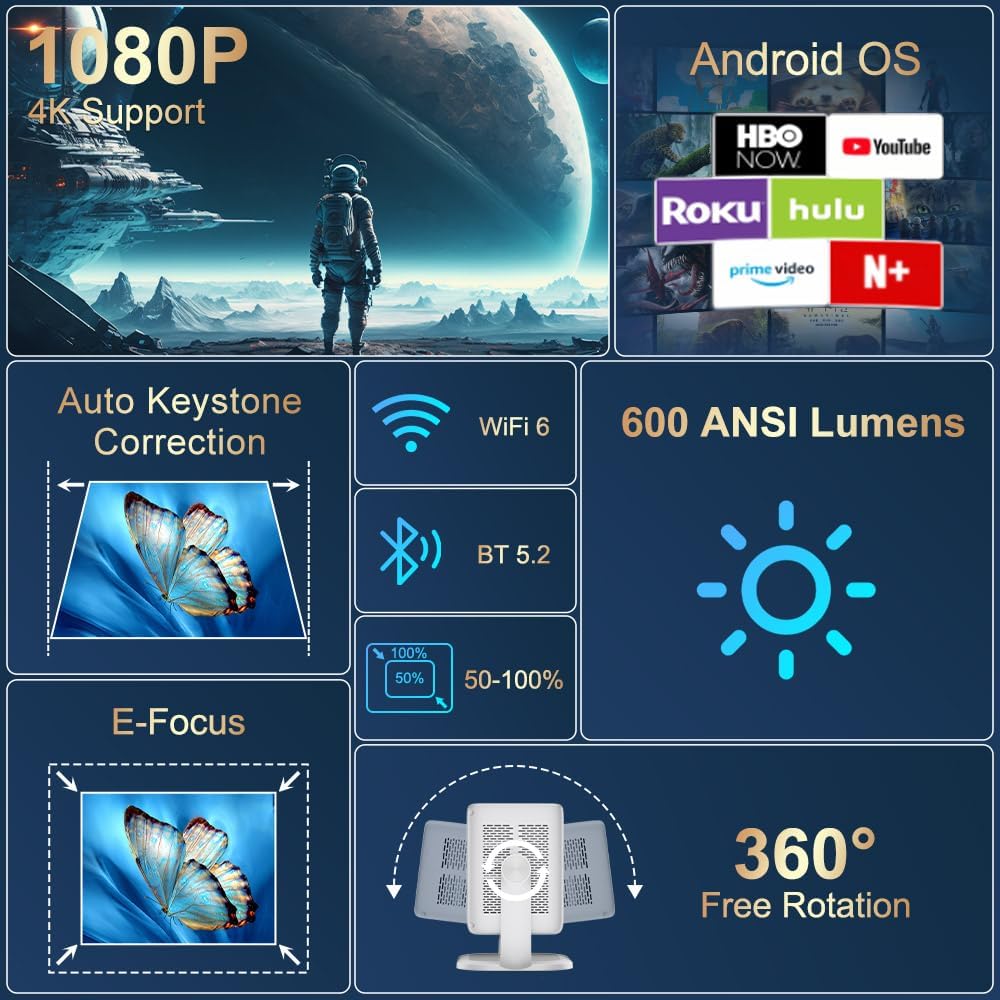
Выява 3.1: Канецview of the projector's key features including 1080P 4K support, Auto Keystone, WiFi 6, Bluetooth 5.2, E-Focus, 600 ANSI Lumens, and 360° Free Rotation.
3.1 Пярэдняя панэль
- Праекцыйны аб'ектыў: Emits the image onto the screen or surface.
- Кольца факусіроўкі: Manual adjustment for image sharpness (though electric focus is primary).
3.2 Задняя панэль
- Порт харчавання: Падключаецца да шнура харчавання, які ўваходзіць у камплект.
- Порт HDMI: Connects to external devices like laptops, gaming consoles, or DVD players.
- Порт USB: Для падлучэння USB-назапашвальнікаў або іншых перыферыйных прылад.
- Аўдыёвыхад (раздым 3.5 мм): Для падлучэння знешніх навушнікаў або дынамікаў.
- Кнопка харчавання: Уключае/выключае праектар.
4. Настройка
4.1 Падключэнне харчавання
- Connect the included power cord to the projector's power port.
- Падключыце другі канец шнура харчавання да звычайнай электрычнай разеткі.
4.2 Placement and Adjustment
Position the projector on a stable, flat surface. The integrated 360° rotatable and adjustable stand allows for flexible projection angles, including ceilings and walls.
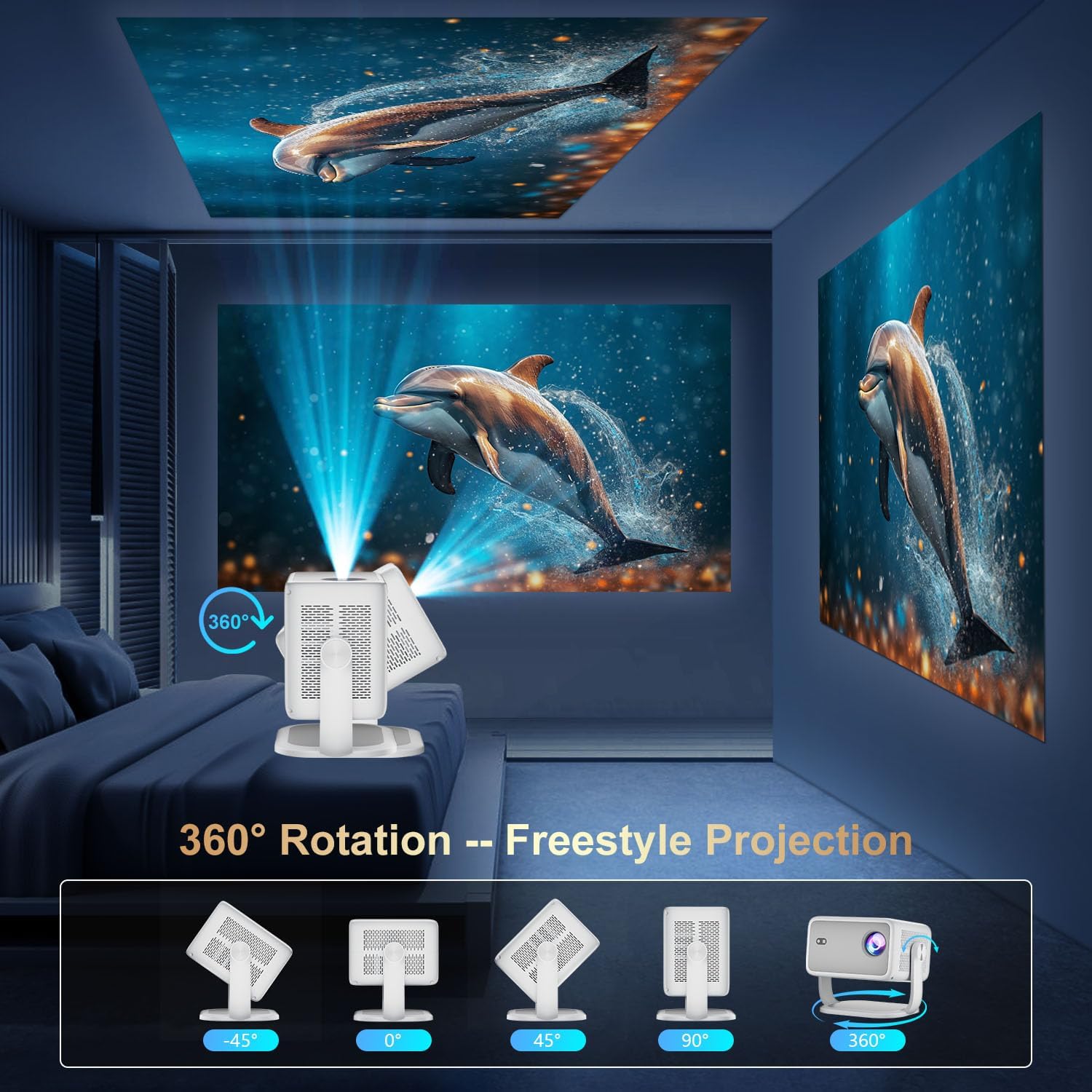
Image 4.1: The projector demonstrating its 360-degree rotation capability for versatile projection angles.
4.3 Фокус і карэкцыя трапецападобнага скажэння
The projector features automatic keystone correction and electric focus for quick image alignment and sharpness. Digital zoom (50%-100%) allows for image resizing without moving the unit.

Image 4.2: The projector automatically adjusting focus and keystone correction for a perfectly aligned and sharp image.
4.4 Пачатковая налада сеткі
- Power on the projector using the power button on the rear panel or the remote control.
- Navigate to 'Networking Setting' on the home screen using the remote.
- Select your WiFi network and enter the password to connect.
5. Аперацыйная
5.1 Выкарыстанне дыстанцыйнага кіравання
The included remote control is the primary interface for navigating the projector's Smart TV OS. It requires two AAA batteries (not included).
- Кнопка харчавання: Уключае/выключае праектар.
- Кнопкі навігацыі: Use the directional arrows to move between menu options.
- Кнопка ОК: Пацвярджае выбар.
- Кнопка "Назад": Вяртае да папярэдняга экрана.
- Кнопкі гучнасці: Adjusts audio output.
5.2 Smart TV OS and Applications
The projector runs on a Smart TV OS, providing access to various streaming applications.

Image 5.1: The projector's home screen displaying various built-in applications such as Netflix, YouTube, Prime Video, and Hulu.
- From the home screen, select the desired application (e.g., Netflix, YouTube, Hulu, Prime Video).
- Пры неабходнасці ўвайдзіце ў сістэму, выкарыстоўваючы ўліковыя дадзеныя вашага ўліковага запісу.
- Browse and enjoy content.
- Additional apps can be downloaded from the App Store.
5.3 Падключэнне знешніх прылад
Connect external devices via HDMI or USB:
- HDMI: Connect an HDMI cable from your external device to the projector's HDMI port. Select 'HDMI' input from the projector's home screen.
- USB: Insert a USB drive into the USB port. Navigate to 'Files' on the home screen to access content.
5.4 Wireless Screen Mirroring (Miracast/AirPlay)
The projector supports Miracast and AirPlay for wireless screen mirroring from compatible devices (Windows, iOS, Android).

Image 5.2: A smartphone wirelessly mirroring its screen content to the ZDSSY ZD-L018AQ Smart Projector via WiFi.
- Пераканайцеся, што ваша прылада і праектар падключаны да адной сеткі Wi-Fi.
- On the projector, select the 'AirPin' or 'ScreenCast' option (may vary by firmware version).
- On your mobile device, activate screen mirroring/casting and select the projector from the list of available devices.
5.5 Bluetooth Audio
Падключыце знешнія дынамікі або навушнікі Bluetooth для палепшанага гуку.

Image 5.3: The projector wirelessly connected to a soundbar via Bluetooth 5.2, enhancing the audio experience.
- Navigate to 'Bluetooth Setting' on the projector's home screen.
- Уключыце Bluetooth і знайдзіце даступныя прылады.
- Select your Bluetooth audio device to pair.
6. Тэхнічнае абслугоўванне
Рэгулярнае тэхнічнае абслугоўванне забяспечвае аптымальную прадукцыйнасць і даўгавечнасць вашага праектара.
- Ачыстка аб'ектыва: Use a soft, lint-free cloth specifically designed for optical lenses to gently wipe the projection lens. Avoid abrasive materials or harsh chemicals.
- Вентыляцыя: Ensure the projector's ventilation openings are clear of dust and obstructions to prevent overheating. Do not block the vents during operation.
- захоўванне: When not in use, store the projector in a cool, dry place, away from direct sunlight and extreme temperatures. Use the original packaging or a protective case if available.
- Выключэнне: Always power off the projector properly before unplugging it.
7. Выпраўленне непаладак
Звярніцеся да гэтага раздзела, каб знайсці рашэнні распаўсюджаных праблем.
| праблема | Магчымая прычына | Рашэнне |
|---|---|---|
| Няма сілы | Шнур харчавання не падключаны; праблема з разеткай. | Праверце падключэнне шнура харчавання; паспрабуйце іншую разетку. |
| Няма выявы | Input source not selected; external device not connected. | Select correct input source (HDMI, USB); ensure external device is on and connected. |
| Размытая выява | Фокус не адрэгуляваны; праектар занадта блізка/далёка. | Use electric focus or manual focus ring; adjust projector distance. |
| Без гуку | Гучнасць занадта нізкая; знешняя аўдыёпрылада не падключана/не спалучана. | Increase volume; check Bluetooth pairing or 3.5mm audio cable connection. |
| WiFi/Bluetooth Connectivity Issues | Incorrect password; device out of range; interference. | Re-enter password; move closer to router/device; reduce interference. |
8. Тэхнічныя характарыстыкі
| Асаблівасць | Дэталь |
|---|---|
| Марка | ZDSSY |
| Нумар мадэлі | ZD-L018AQ |
| Дазвол дысплея | 1920 x 1080 (роднае) |
| Падтрымка 4K | так |
| Яркасць | 600 прасветаў ANSI |
| Тэхналогія падлучэння | Bluetooth 5.2, HDMI, USB, Wi-Fi 6 |
| Асаблівасці | Auto Screen Alignment, Built-In Speaker, Built-In Wi-Fi, Portable, Electric Focus |
| Рэкамендуемае выкарыстанне | У памяшканні/на вуліцы |
| Памеры прадукту | 6.69 х 5.9 х 9.05 цалі |
| Вага прадмета | 2.97 фунта |
9. Гарантыя і падтрымка
ZDSSY is committed to providing high-quality products and customer satisfaction.
- Абслугоўванне кліентаў: 24/7 Professional Service is available for any inquiries or assistance.
- Вяртанне/абмен: A 30-day return or exchange policy is offered.
- Тэхнічная падтрымка: Для вашага прадукту прадастаўляецца пажыццёвая тэхнічная падтрымка.
For further assistance, please refer to the contact information provided with your purchase or visit the official ZDSSY webсайт.