
1. Уводзіны
This manual provides detailed instructions for the setup, operation, and maintenance of your ATTACK SHARK X11 Wireless Gaming Mouse and X60 HE Magnetic Switch Gaming Keyboard Combo. Please read this manual thoroughly before using the product to ensure optimal performance and longevity.
2. Змесціва ўпакоўкі
Праверце, ці ёсць усе прадметы ў вашай упакоўцы:
- ATTACK SHARK X60 HE Magnetic Switch Gaming Keyboard
- ATTACK SHARK X11 Wireless Gaming Mouse
- Кабель USB-C - USB-A (для зарадкі і праваднога падключэння)
- 2.4GHz USB Receiver Dongle
- RGB Charging Dock for X11 Mouse
- Кіраўніцтва карыстальніка (гэты дакумент)

3. Прадукт скончыўсяview
3.1. ATTACK SHARK X60 HE Keyboard
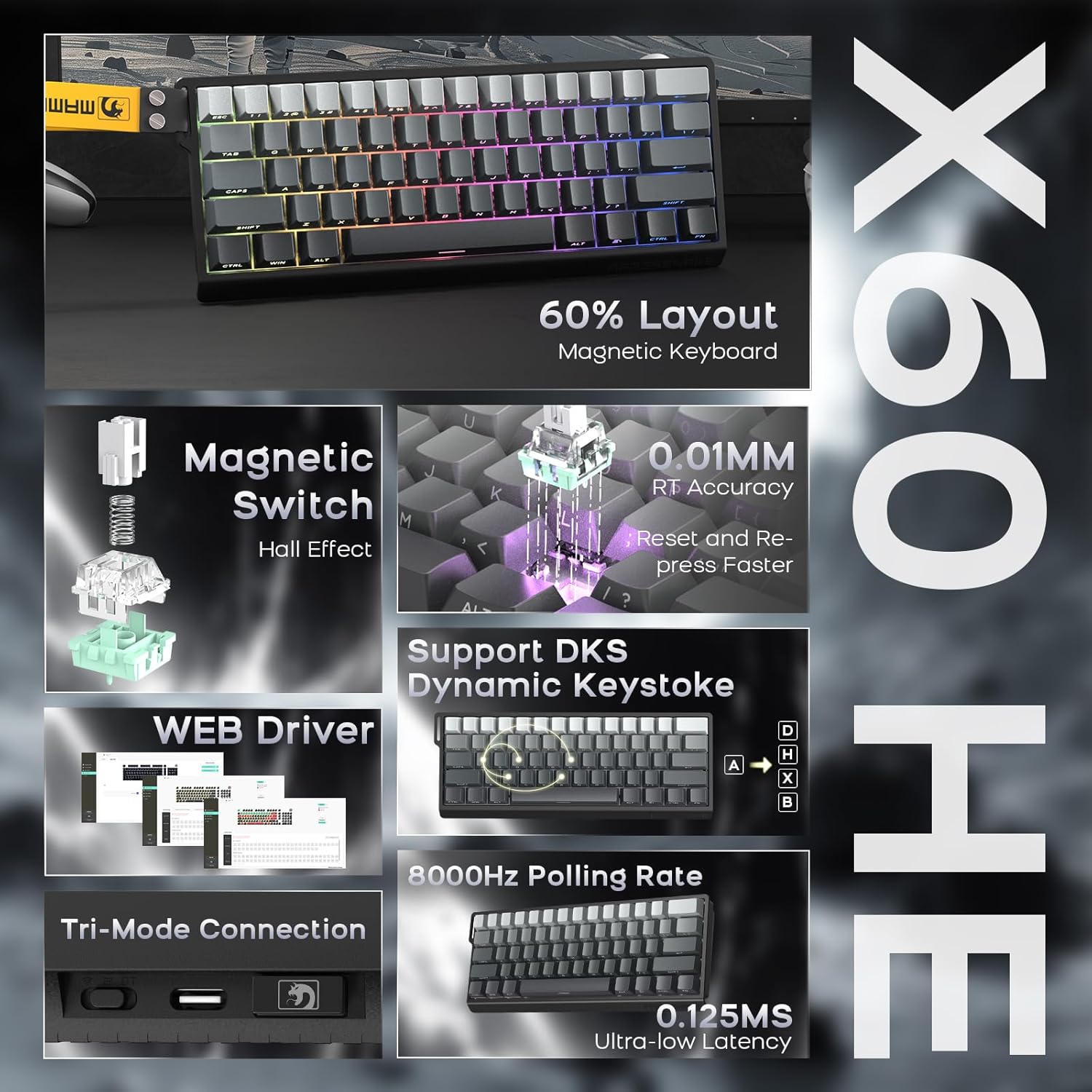
The X60 HE is a 60% layout magnetic switch keyboard designed for high-performance gaming. It features Hall effect switches with adjustable actuation points, rapid trigger functionality, and an 8000Hz polling rate for ultra-low latency response.
- Магнітныя перамыкачы: Hall effect switches with adjustable actuation from 0.1mm to 3.2mm.
- Хуткі запуск: Enables faster key resets and re-presses.
- Частата апытання 8000 Гц: Provides 0.125ms response time in wired mode.
- Дынамічнае націсканне клавішы (DKS): Supports advanced key functionalities.
- Трохрэжымнае падключэнне: USB-C wired, 2.4GHz wireless, and Bluetooth.
- RGB-падсветка: Customizable 16.8 million color RGB effects.
- Гарачая замена: Allows switch replacement without soldering.
- акумулятар: Integrated 4000mAh rechargeable battery.

3.2. ATTACK SHARK X11 Mouse
The X11 is a lightweight wireless gaming mouse equipped with a high-precision PAW3311 optical sensor and tri-mode connectivity. It features a magnetic charging dock that also functions as a 2.4GHz wireless receiver hub.
- Датчык: PAW3311 optical sensor.
- DPI: Up to 22,000 DPI with 6 adjustable levels.
- Хуткасць галасавання: 1000 Гц.
- Вага: Approximately 62g for effortless control.
- Пераключальнікі: HUYU switches with 20 million+ click lifespan.
- Трохрэжымнае падключэнне: USB-C wired, 2.4GHz wireless, and Bluetooth.
- Зарадка: Magnetic fast charging via RGB dock.
- Тэрмін службы батарэі: Up to 65 hours of interval usage.


4. Настройка
4.1. Пачатковая зарадка
Перад першым выкарыстаннем рэкамендуецца цалкам зарадзіць клавіятуру і мыш.
- Клавіятура: Connect the USB-C cable to the keyboard and a power source (e.g., computer USB port, USB wall adapter).
- Мыш: Place the X11 mouse onto its RGB charging dock. Connect the USB-C cable to the charging dock and a power source. The dock will also serve as the 2.4GHz wireless receiver hub.

4.2. Рэжымы падключэння
Both the X60 HE keyboard and X11 mouse support three connection modes: 2.4GHz wireless, Bluetooth, and USB-C wired.

4.2.1. Бесправадны рэжым 2.4 ГГц
- Клавіятура: Ensure the keyboard is in 2.4GHz mode (check indicator light). Plug the 2.4GHz USB receiver dongle into an available USB port on your computer.
- Мыш: The 2.4GHz USB receiver dongle is integrated into the RGB charging dock. Connect the charging dock to your computer via the USB-C cable. Ensure the mouse is in 2.4GHz mode.
4.2.2. Рэжым Bluetooth
- Клавіятура: Switch the keyboard to Bluetooth mode. Activate Bluetooth on your device (computer, tablet, etc.) and search for available devices. Select "ATTACK SHARK X60 HE" to pair.
- Мыш: Switch the mouse to Bluetooth mode. On your device, search for and select "ATTACK SHARK X11" to pair. The X11 mouse supports connecting to two Bluetooth devices (BT1/BT2) and can be switched between them.
4.2.3. Правадны рэжым USB-C
- Клавіятура: Падключыце кабель USB-C непасрэдна ад клавіятуры да кампутара. Клавіятура аўтаматычна пераключыцца ў правадны рэжым і пачне зараджацца.
- Мыш: Connect the USB-C cable directly from the mouse to your computer. The mouse will automatically switch to wired mode and begin charging.
5. Аперацыя
5.1. X60 HE Keyboard Functions
- Рэгуляваная кропка спрацоўвання: Use the dedicated software (web driver) to customize the actuation distance of each magnetic switch from 0.1mm to 3.2mm.
- Хуткі запуск: This feature allows keys to activate and deactivate based on movement rather than a fixed point, enabling faster repeated inputs. Configure via the web кіроўца.
- Дынамічнае націсканне клавішы (DKS): Assign up to four different actions to a single keypress based on how far the key is pressed.
- RGB-падсветка: Cycle through various preset RGB lighting effects using keyboard shortcuts (refer to the keyboard's specific function key combinations) or customize extensively via the web кіроўца.
- Web Кіроўца: Доступ да webкіроўца на базе www.gmk.top for advanced customization of key functions, actuation points, DKS, macros, and lighting effects.

5.2. X11 Mouse Functions
- Рэгуляванне DPI: The mouse features a DPI button (usually on the bottom or top) to cycle through 6 preset DPI levels: 800, 1600, 2400, 3200, 5000, and 22000 DPI.
- Tri-Mode Switching: Use the switch on the bottom of the mouse to select between 2.4GHz, Bluetooth (BT1/BT2), and wired modes.
- RGB Charging Dock: The dock provides magnetic charging and features customizable RGB lighting. It also acts as the 2.4GHz receiver.
- X11 Driver Software: Download the dedicated X11 driver software for advanced customization, including button remapping, macro creation, DPI fine-tuning, polling rate adjustment, and RGB lighting control.

6. Тэхнічнае абслугоўванне
Proper maintenance ensures the longevity and performance of your gaming combo.
- Уборка: Выкарыстоўвайце мяккую сухую тканіну для працірання клавіятуры і мышы. Для ўстойлівага бруду злёгкуamp cloth with mild soap can be used, ensuring no liquid enters the devices. Use compressed air to clear debris from between keycaps.
- Сыход за батарэяй: Avoid fully discharging the batteries frequently. For optimal battery health, charge the devices when the battery level is low, but avoid leaving them plugged in for extended periods after reaching full charge.
- захоўванне: Захоўвайце прылады ў прахалодным, сухім месцы, удалечыні ад прамых сонечных прамянёў і экстрэмальных тэмператур.
7. Выпраўленне непаладак
Калі ў вас узнікнуць праблемы, звярніцеся да наступных распаўсюджаных рашэнняў:
| праблема | Магчымае рашэнне |
|---|---|
| Device not connecting wirelessly |
|
| Затрымка ўводу або затрымка ўводу |
|
| Не працуе RGB-асвятленне |
|
| Keyboard keys not responding |
|
If the problem persists, please contact ATTACK SHARK customer support.
8. Тэхнічныя характарыстыкі
8.1. ATTACK SHARK X60 HE Keyboard
- Тып пераключальніка: Hall Effect Magnetic Switches (Linear)
- Пункт спрацоўвання: Adjustable 0.1mm - 3.2mm (via software)
- Хуткасць галасавання: 8000Hz (Wired), 1000Hz (2.4GHz Wireless/Bluetooth)
- Падключэнне: USB-C Wired, 2.4GHz Wireless, Bluetooth
- акумулятар: 4000mAh Акумулятарная
- Асаблівасці: Rapid Trigger, Dynamic Keystroke (DKS), RGB Backlighting, Hot-Swappable
8.2. ATTACK SHARK X11 Mouse
- Датчык: Аптычны датчык PAW3311
- DPI: Up to 22,000 (6 adjustable levels: 800/1600/2400/3200/5000/22000)
- Хуткасць галасавання: 1000 Гц
- Вага: Прыбл. 62 г
- Пераключальнікі: HUYU (20 Million+ Clicks)
- Падключэнне: USB-C Wired, 2.4GHz Wireless, Bluetooth
- Тэрмін службы батарэі: Up to 65 hours (interval usage)
- Зарадка: Magnetic Fast Charging Dock (with RGB)
8.3. Агульныя характарыстыкі
- Памеры ўпакоўкі: 14.75 х 7 х 4.75 цалі
- Вага прадмета: 2.94 фунта
- Сумяшчальныя прылады: Personal Computer, Laptop, Tablet (Windows, macOS, Switch, Xbox, PlayStation)
- вытворца: АТАКА АКУЛА
9. Гарантыя і падтрымка
For warranty information or technical support, please contact the seller or visit the official ATTACK SHARK webсайт. Захоўвайце чэк аб куплі як пацверджанне пакупкі.
Прадавец: ATTACK SHARK US
Афіцыйны Webсайт: ATTACK SHARK Store on Amazon