
ttec KM156
Кіраўніцтва карыстальніка бесправадных Bluetooth-навушнікаў ttec SoundFlow OWS KM156
Мадэль: KM156
1. Уводзіны
This manual provides instructions for the proper use and maintenance of your ttec SoundFlow OWS Wireless Bluetooth Earphones, model KM156. Please read this manual thoroughly before using the product to ensure optimal performance and longevity.
The ttec SoundFlow OWS earphones feature an open-ear design for situational awareness, dynamic acoustic system for clear sound, and Bluetooth 5.4 for stable wireless connectivity.
2. Змесціва ўпакоўкі
Праверце, ці ёсць усе прадметы ў камплекце з вашым прадуктам:
- ttec SoundFlow OWS Wireless Bluetooth Earphones (Left and Right)
- Чахол для зарадкі
- Зарадны кабель USB-C
- Кіраўніцтва карыстальніка
3. Прадукт скончыўсяview
Familiarize yourself with the components of your ttec SoundFlow OWS earphones.

Image 3.1: ttec SoundFlow OWS Earphones and Charging Case. The image displays the two black earphones with ear hooks, positioned above their open black charging case.
Кампаненты навушнікаў:
- Завушны кручок: Забяспечвае надзейную і камфортную фіксацыю на вуху.
- Дынамік: Забяспечвае выхад гуку.
- Мікрафон: Для званкоў і галасавых каманд.
- Плошча сэнсарнага датчыка: For controlling music, calls, and other functions.
- Кантакты для зарадкі: Падключаецца да зараднага чахла для харчавання.

Image 3.2: Close-up of an earbud highlighting the touch sensor area. The image shows a detailed view of the earbud's outer surface, indicating the touch-sensitive zone for controls.
Кампаненты зараднага чахла:
- Гнязда для навушнікаў: Securely holds and charges the earphones.
- Порт для зарадкі USB-C: Для зарадкі чахол.
- Святлодыёдны індыкатар: Паказвае стан зарадкі і ўзровень зарада батарэі.
4. Настройка
4.1 Зарадка навушнікаў і чахла
Перад першым выкарыстаннем цалкам зарадзіце навушнікі і зарадны футляр.
- Змесціце навушнікі ў зарадны чахол. Пераканайцеся, што кантакты зараднай прылады супадаюць.
- Падключыце зарадны кабель USB-C да порта зарадкі на корпусе, а другі канец — да крыніцы харчавання (напрыклад, да насценнага адаптара USB, порта USB кампутара).
- The LED indicator on the case will show the charging status. Once fully charged, the indicator will change or turn off.
A full charge provides up to 6 hours of earphone use, and the charging case provides up to 30 hours of additional battery life. The Charge&Go feature allows 2.5 hours of use from a 15-minute charge.
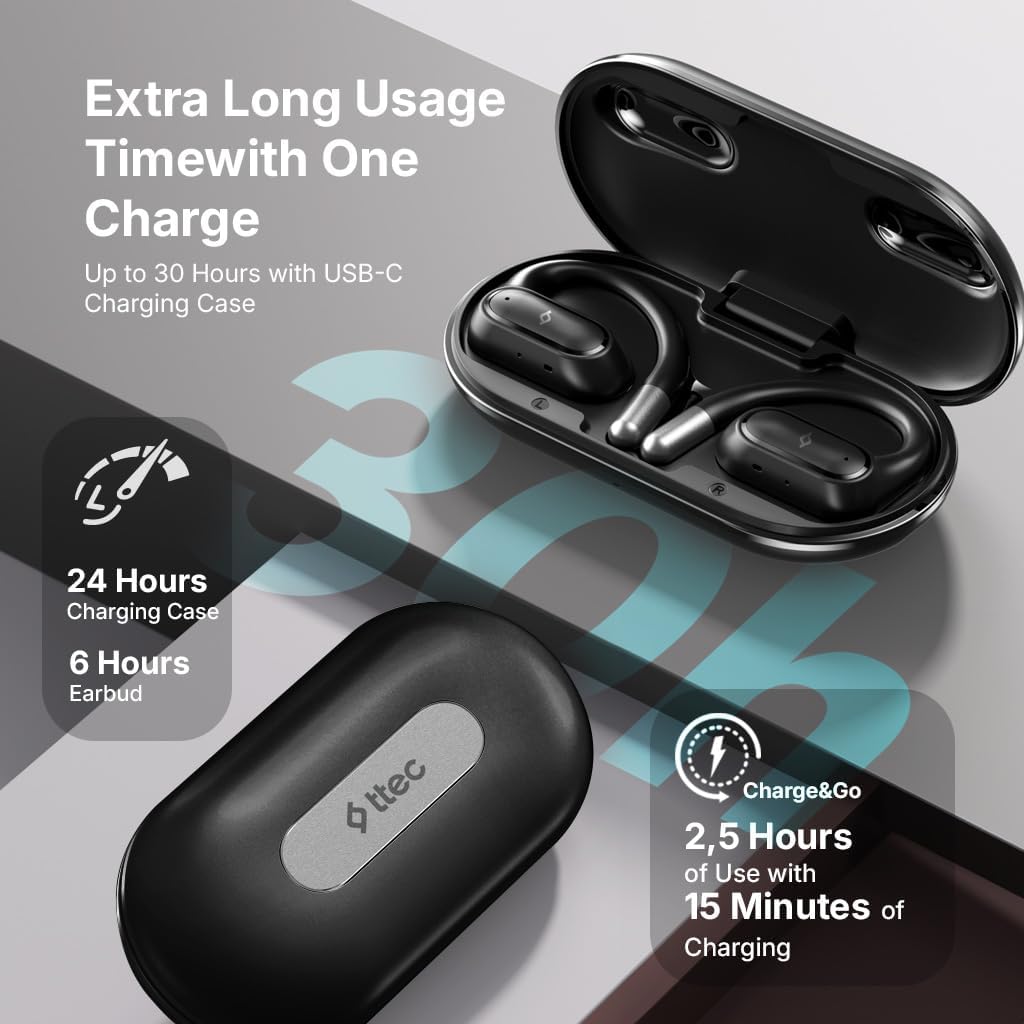
Image 4.1: Charging case displaying battery life. The image illustrates the charging case with text indicating 24 hours from the charging case, 6 hours from earbuds, and 2.5 hours of use from 15 minutes of charging.
4.2 Спалучэнне з прыладай Bluetooth
To connect your earphones to a smartphone or other Bluetooth-enabled device:
- Пераканайцеся, што навушнікі зараджаныя і змешчаныя ў зарадны кейс.
- Open the charging case. The earphones will automatically enter pairing mode, and their LED indicators will flash.
- На сваёй прыладзе ўключыце Bluetooth і знайдзіце даступныя прылады.
- Select "ttec SoundFlow" from the list of found devices.
- Once connected, the earphone LED indicators will stop flashing or turn off, and you will hear a confirmation tone.
Навушнікі аўтаматычна падключацца да апошняй спалучанай прылады пасля вымання з чахла, калі на прыладзе ўключаны Bluetooth.
5. Інструкцыя па эксплуатацыі
5.1 Нашэнне навушнікаў
Gently place the ear hook over your ear and position the speaker unit comfortably in front of your ear canal. The open-ear design allows you to remain aware of your surroundings.

Image 5.1: A person cycling while wearing the ttec SoundFlow OWS earphones. The image highlights the open-ear design, allowing the user to stay connected to their surroundings.

Image 5.2: A woman wearing a ttec SoundFlow earbud, demonstrating the comfortable and secure fit. The image also indicates the lightweight design: 8.2g per earbud and 52g for the charging case.
5.2 Сэнсарнае кіраванне
The earphones feature touch sensors for easy control of various functions:
| Дзеянне | Функцыя |
|---|---|
| Адно націсканне (Л/П) | Прайграванне/прыпыненне музыкі, адказ на выклік |
| Двойчы націснуць (L) | Папярэдні трэк |
| Двойчы націсніце (R) | Наступны трэк |
| Трайное націсканне (злева/зправа) | Актывуйце галасавой памочнік |
| Доўгі націск (Л/П) | Reject Call, End Call |
5.3 Рэжым гульні
The earphones feature a low-latency game mode for an enhanced gaming and video experience. This mode reduces audio delay to 50ms.
- To activate Game Mode: Refer to the specific instructions in the quick start guide or product packaging for the exact touch gesture to enable/disable game mode. (Typically a specific tap sequence or long press).
- When Game Mode is active, you may notice a slight change in audio profile, optimized for lower latency.

Image 5.3: ttec SoundFlow earphones and charging case, surrounded by gaming console symbols, highlighting the 50ms low latency feature for an optimized gaming and video experience.
6. Тэхнічнае абслугоўванне
6.1 Ачыстка
- Працярыце навушнікі і зарадны футляр мяккай, сухой тканінай без ворса.
- Не выкарыстоўвайце абразіўныя ачышчальнікі, спірт або хімічныя растваральнікі.
- Ensure charging contacts are clean and dry to prevent charging issues.
6.2 Воданепранікальнасць і потаўстойлівасць
The ttec SoundFlow OWS earphones are IPX6 rated, meaning they are resistant to high-pressure water jets from any direction. This makes them suitable for use during workouts and in light rain.
- Не апускайце навушнікі ў ваду.
- Перад тым, як змясціць навушнікі назад у зарадны футляр, пераканайцеся, што яны сухія, каб пазбегнуць пашкоджанняў.

Image 6.1: A man running outdoors, illustrating the sweat and water-resistant design of the ttec SoundFlow earphones, which are IPX6 rated.
6.3 Захоўванне
Калі навушнікі не выкарыстоўваюцца, захоўвайце іх у зарадным чахле, каб абараніць і падтрымліваць зарадку. Захоўвайце ў прахалодным, сухім месцы, удалечыні ад экстрэмальных тэмператур.
7. Выпраўленне непаладак
Калі ў вас узніклі праблемы з навушнікамі, звярніцеся да наступных распаўсюджаных рашэнняў:
| праблема | Рашэнне |
|---|---|
| Навушнікі не спалучаюцца | Ensure earphones are charged. Turn off and on Bluetooth on your device. Forget the device in your Bluetooth settings and re-pair. |
| Працуе толькі адзін навушнік | Place both earphones back in the case, close the lid, then open again. Ensure both are charged. |
| Няма гуку | Check device volume. Ensure earphones are connected. Try playing different audio. |
| Праблемы з зарадкай | Ensure charging cable is securely connected. Clean charging contacts on earphones and case. Try a different USB-C cable or power source. |
Калі праблема не знікне, звярніцеся ў службу падтрымкі кліентаў.
8. Тэхнічныя характарыстыкі
| Асаблівасць | Дэталь |
|---|---|
| Назва мадэлі | SoundFlow |
| Нумар мадэлі | КМ156 |
| Тэхналогія падлучэння | Бесправадная сувязь (Bluetooth 5.4) |
| Формаў-фактар | Сапраўдныя бесправадныя навушнікі з адкрытым дызайнам |
| Вага навушніка | 8.2 грам (кожны) |
| Вага зараднага кейса | 52 грамаў |
| Тэрмін службы батарэі навушнікаў | Да 6 гадзін (адной зарадкі) |
| Агульны тэрмін службы батарэі (з чахлом) | Да 30 гадзін |
| Хуткая зарадка | 15 min charge for 2.5 hours use (Charge&Go) |
| Воданепранікальнасць | IPX6 Rated (Sweat and Water Resistant) |
| Нізкая затрымка | 50 мс (гульнявы рэжым) |
| Вытворца | ttec |
9. Гарантыя і падтрымка
Your ttec SoundFlow OWS Wireless Bluetooth Earphones are covered by a manufacturer's warranty. For detailed warranty information, please refer to the warranty card included in your product packaging or visit the official ttec webсайт.
For technical support, troubleshooting assistance, or to inquire about replacement parts, please contact ttec customer service through their official channels. Contact information can typically be found on the product packaging or the official ttec webсайт.