
1. Уводзіны
Welcome to the user manual for your new FLEXISPOT 63x28 Inch Dual Motor Electric Standing Desk. This manual provides essential information for the safe assembly, operation, maintenance, and troubleshooting of your desk. Please read it thoroughly before use and retain it for future reference.
2. Інструкцыі па тэхніцы бяспекі
- Перад зборкай пераканайцеся, што ўсе кампаненты наяўныя і не пашкоджаныя. Не выкарыстоўвайце, калі якія-небудзь дэталі адсутнічаюць або пашкоджаныя.
- Трымайце дзяцей і хатніх жывёл далей ад стала падчас працы, каб пазбегнуць траўмаў.
- Не трымайце рукі ці іншыя часткі цела побач з рухомымі часткамі стала падчас рэгулявання вышыні.
- Пераканайцеся, што стол размешчаны на роўнай паверхні, каб пазбегнуць перакульвання.
- Не перагружайце стол. Глядзіце характарыстыкі, каб даведацца пра максімальную грузападымальнасць.
- Keep all electrical cords organized and away from moving parts to prevent damage or entanglement.
- Адключайце стол ад разеткі перад чысткай або любым тэхнічным абслугоўваннем.
- Only use the desk for its intended purpose as a workstation.
3. Змесціва ўпакоўкі
Праверце, ці ўсе пералічаныя ніжэй прадметы ўваходзяць у вашу ўпакоўку:
- Desktop Surface (Black)
- Desk Frame (Black, including dual motors and lifting columns)
- Control Panel with Memory Controller
- Адаптар сілкавання і кабель
- Зборныя дэталі (шрубы, інструменты і г.д.)
- Кіраўніцтва па эксплуатацыі

Выява: Зверхуview of the FLEXISPOT 63x28 Inch Dual Motor Electric Standing Desk, showing the desktop, frame, and control panel.
4. Інструкцыі па ўсталёўцы
4.1 Распакаванне
Carefully remove all components from the packaging. Place them on a soft, clean surface to prevent scratches or damage during assembly. Keep all packaging materials until assembly is complete and you are satisfied with the product.
4.2 Зборка рамы
Follow the detailed diagrams provided in the separate assembly guide to connect the lifting columns to the crossbar and attach the footings. Ensure all screws are tightened securely.
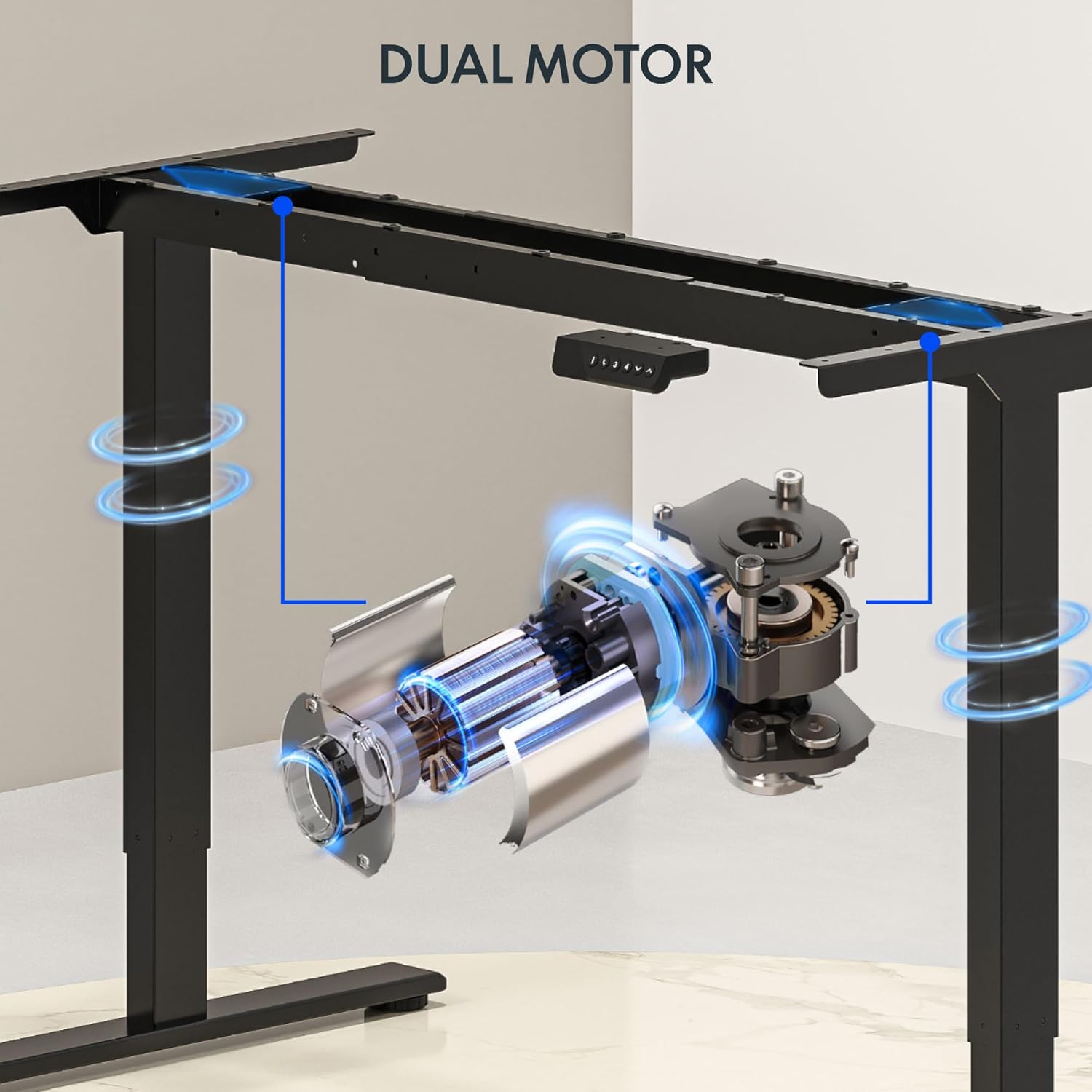
Выява: Падрабязная view of the dual motor desk frame, illustrating the motor placement and structural components.
4.3 Attaching the Desktop
Carefully place the desktop upside down on a soft surface. Align the assembled frame with the pre-drilled holes on the desktop. Secure the desktop to the frame using the provided screws. Once secured, carefully flip the desk upright with assistance.
4.4 Connecting the Control Panel and Power
Connect the control panel cable to the control box, and then connect the power adapter to the control box. Plug the power cable into a standard electrical outlet. The desk is now ready for initial operation.

Image: Close-up of the desk's control panel, showing the LED display and buttons for height adjustment and memory presets.
Video: Demonstrates the dual-motor strength and smooth operation of the FLEXISPOT standing desk, highlighting its robust design and functionality.
5. Інструкцыя па эксплуатацыі
5.1 Рэгуляванне вышыні
- Націсніце Уверх (∧) кнопка, каб падняць стол.
- Націсніце Уніз (∨) кнопка, каб апусціць стол.
- Release the button at your desired height. The LED display will show the current height.
5.2 Выкарыстанне прэсетаў памяці
The control panel features four memory presets (1, 2, 3, 4) to save and recall your preferred sitting and standing heights.
- Адрэгулюйце вышыню стала на патрэбную вышыню з дапамогай кнопак «Уверх»/«Уніз».
- Націсніце "М" button (or similar memory set button, indicated by 'i' on some models) once. The display will flash.
- Immediately press one of the number buttons (1, 2, 3, or 4) to save the current height to that preset.
- To recall a saved height, simply press the corresponding number button (1, 2, 3, or 4). The desk will automatically move to the saved position.

Image: Close-up of the memory controller, highlighting the numbered preset buttons and the up/down controls for precise height adjustments.
5.3 Сістэма прадухілення сутыкненняў
Стол абсталяваны сістэмай прадухілення сутыкненняў. Калі падчас рэгулявання вышыні стол сутыкнецца з перашкодай, ён аўтаматычна спыніцца і трохі павернецца назад, каб прадухіліць пашкоджанне. Гэтая функцыя павышае бяспеку падчас працы.
6. Тэхнічнае абслугоўванне
- Уборка: Працярыце паверхню стала і раму мяккай губкайamp тканінай. Пазбягайце абразіўных ачышчальнікаў або агрэсіўных хімічных рэчываў, якія могуць пашкодзіць пакрыццё.
- агляд: Regularly check all screws and connections to ensure they are tight. Re-tighten if necessary.
- Кабельнае кіраванне: Ensure all cables are neatly organized and not pinched or tangled, especially during height adjustments.
- Шнур харчавання: Inspect the power cord for any signs of damage. If damaged, discontinue use and contact customer support.
7. Выпраўленне непаладак
| праблема | Магчымая прычына | Рашэнне |
|---|---|---|
| Стол не рухаецца. | Кабель харчавання адключаны; кабель рухавіка аслаблены; перагрузка. | Check power connection; ensure all cables are securely plugged in; reduce weight on desk. |
| Стол рухаецца няроўна або выдае незвычайныя гукі. | Няроўная нагрузка; няшчыльныя злучэнні; перашкода. | Distribute weight evenly; check and tighten all screws; remove any obstructions. |
| Height presets not working. | Presets not properly set. | Re-program the memory presets following section 5.2. |
| Сістэма прадухілення сутыкненняў часта спрацоўвае. | Obstacles in the path of movement; sensitivity setting too high. | Clear the area around the desk; consult the full manual for adjusting anti-collision sensitivity if available. |
If you encounter issues not listed here or if the solutions do not resolve the problem, please contact FLEXISPOT customer support.
8. Тэхнічныя характарыстыкі
| Асаблівасць | Дэталь |
|---|---|
| Марка | ФЛЕКСІСПОТ |
| мадэль | 63x28 Inch Dual Motor Electric Standing Desk |
| Памеры працоўнага стала | 63"Ш х 28"Г |
| Дыяпазон вышыні | ад 28.3 да 47.6 цаляў |
| Максімальная грузападымальнасць | 198 фунта |
| Тып рухавіка | Двайны рухавік |
| Панэль кіравання | Кантролер памяці з 4 прадусталяванымі наладамі |
| Матэрыял для працоўнага стала | Engineered Wood (Black Top) |
| Матэрыял каркаса | Alloy Steel (Black Frame) |
| Асаблівасці | Dual Motor, 198 lbs Heavy-Duty Capacity, Memory Controller, 63"x28" Large Desktop |

Image: Diagram illustrating the dimensions of the FLEXISPOT 63x28 Inch Electric Standing Desk, including height range, width, and depth.
9. Гарантыя і падтрымка
9.1 Абмежаваная гарантыя
This FLEXISPOT product comes with a limited warranty against defects in materials and workmanship. The specific terms and duration of the warranty may vary. Please refer to the warranty card included in your package or visit the official FLEXISPOT webпадрабязную інфармацыю аб гарантыях.
The warranty typically covers the desk frame, motors, and control panel under normal use conditions. Damage resulting from misuse, accidents, unauthorized modifications, or improper assembly is not covered.
9.2 Падтрымка кліентаў
For technical assistance, warranty claims, or any questions regarding your FLEXISPOT standing desk, please contact our customer support team:
- Webсайт: www.flexispot.com
- электронная пошта: support@flexispot.com
- тэлефон: (Refer to your product packaging or webсайт для рэгіянальных кантактных нумароў)
Please have your model number (B0F29ZD4DN) and purchase date ready when contacting support.