
1. Уводзіны
The HUAWEI WATCH FIT 4 is a versatile smartwatch designed for fitness tracking and daily convenience. It features an ultra-thin design, a vibrant 1.82-inch AMOLED display, and comprehensive health monitoring capabilities. This manual provides essential information for setting up, operating, and maintaining your device.
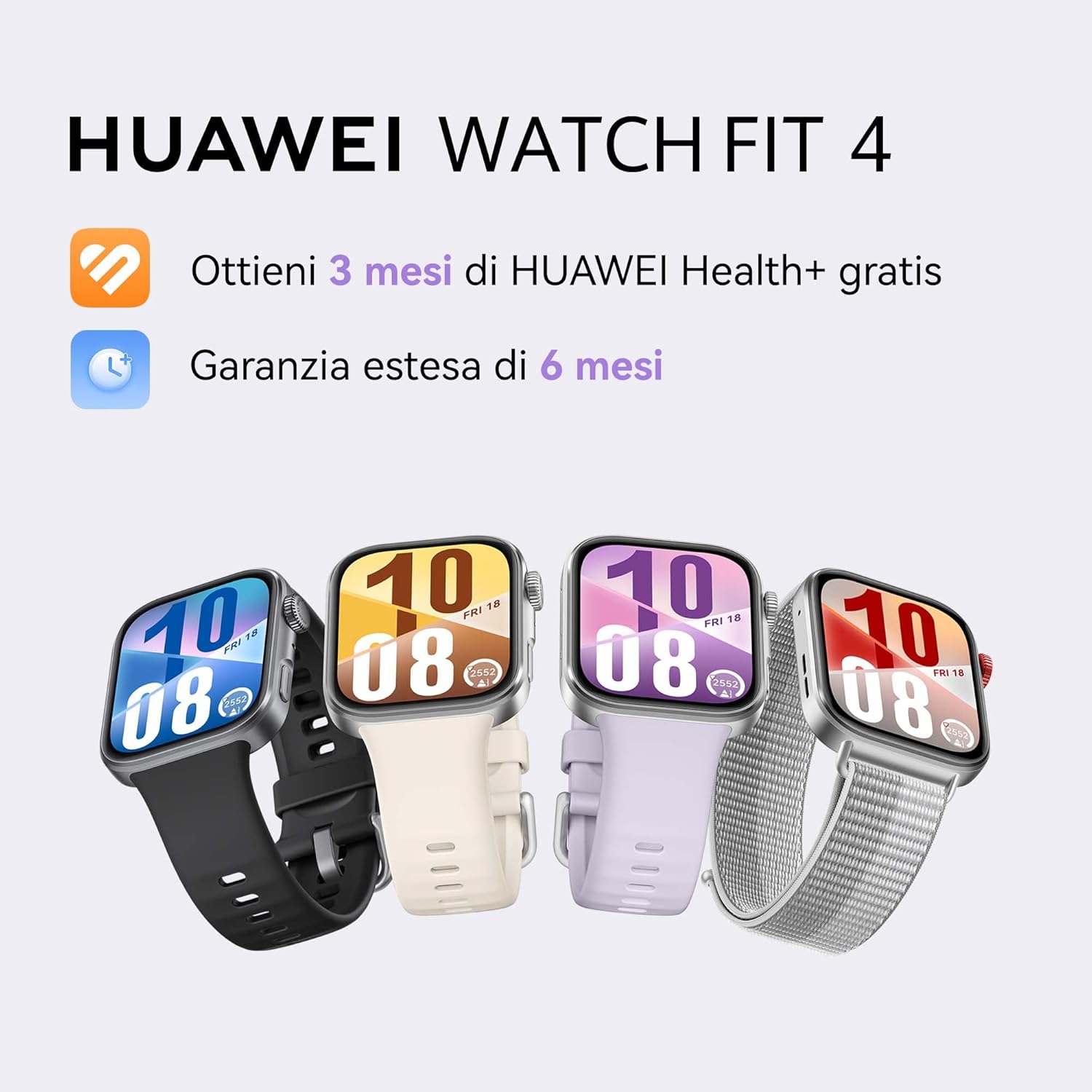
Image: HUAWEI WATCH FIT 4 smartwatches in various colors.
2. Настройка
2.1 Распакоўка і першапачатковы агляд
Carefully unbox your HUAWEI WATCH FIT 4. Ensure all components are present:
- HUAWEI WATCH FIT 4 Smartwatch
- Зарадны кабель
- Кароткае кіраўніцтва
- Гарантыйны талон
Video: Unboxing and initial setup of the HUAWEI WATCH FIT 4. This video demonstrates opening the box, removing the watch, and showing the included accessories.
2.2 Зарадка прылады
Before first use, fully charge your smartwatch. Connect the charging cable to the watch and a power source. A full charge takes approximately 75 minutes. A 10-minute charge can provide up to one day of typical use.
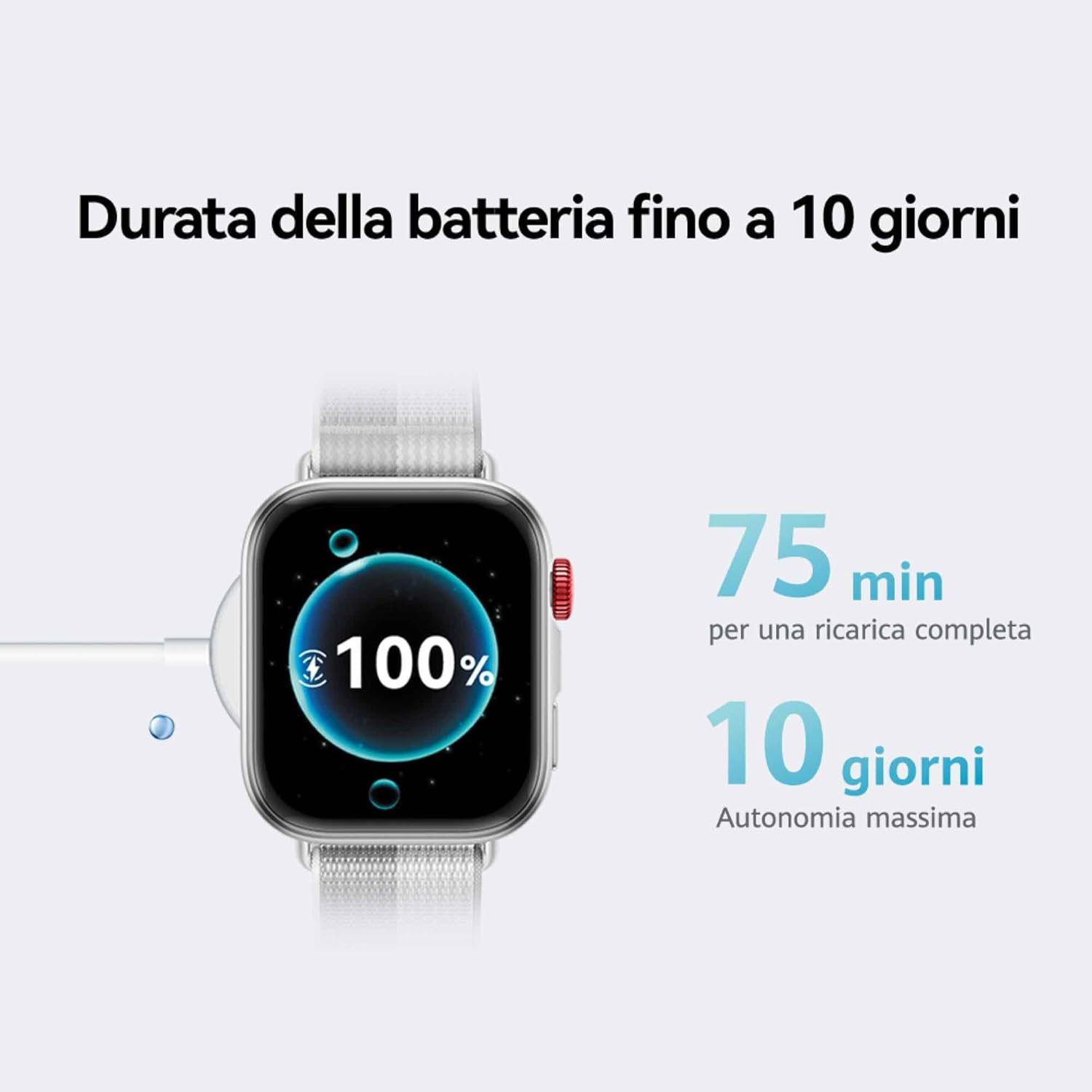
Image: The HUAWEI WATCH FIT 4 connected to its charging cable, displaying a full battery.
2.3 Спалучэнне са смартфонам
The HUAWEI WATCH FIT 4 is compatible with both iOS and Android devices. To pair your watch:
- Крок 1: Спампаваць the HUAWEI Health app from your device's app store.
- Крок 2: Пара Open the HUAWEI Health app, navigate to Devices > Add > Smartwatchі выберыце прыладу.
- Крок 3: Абнаўленне In the HUAWEI Health app, go to Personal > Check for Updates to ensure your watch has the latest software.
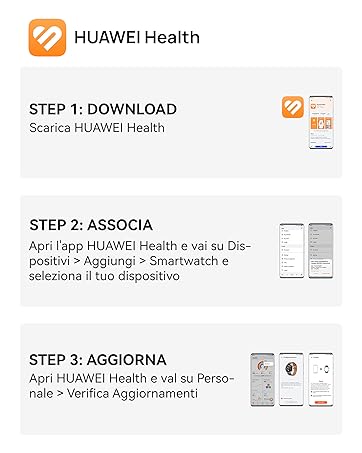
Image: Visual guide for connecting the HUAWEI WATCH FIT 4 to your smartphone using the HUAWEI Health app.

Image: HUAWEI WATCH FIT 4 successfully paired with a smartphone running the HUAWEI Health app.
3. Аперацыя
3.1 Дысплей і навігацыя
The HUAWEI WATCH FIT 4 features a 1.82-inch AMOLED display with a maximum brightness of 2000 nits, ensuring clear visibility in various lighting conditions. Navigate the watch using its touchscreen and physical buttons.

Image: The bright 1.82-inch AMOLED display of the HUAWEI WATCH FIT 4.
3.2 Налада цыферблатаў гадзінніка
Personalize your watch with a variety of watch faces available through the HUAWEI Health app. You can choose from different styles including personalized, geometric, animal, and emoji themes.
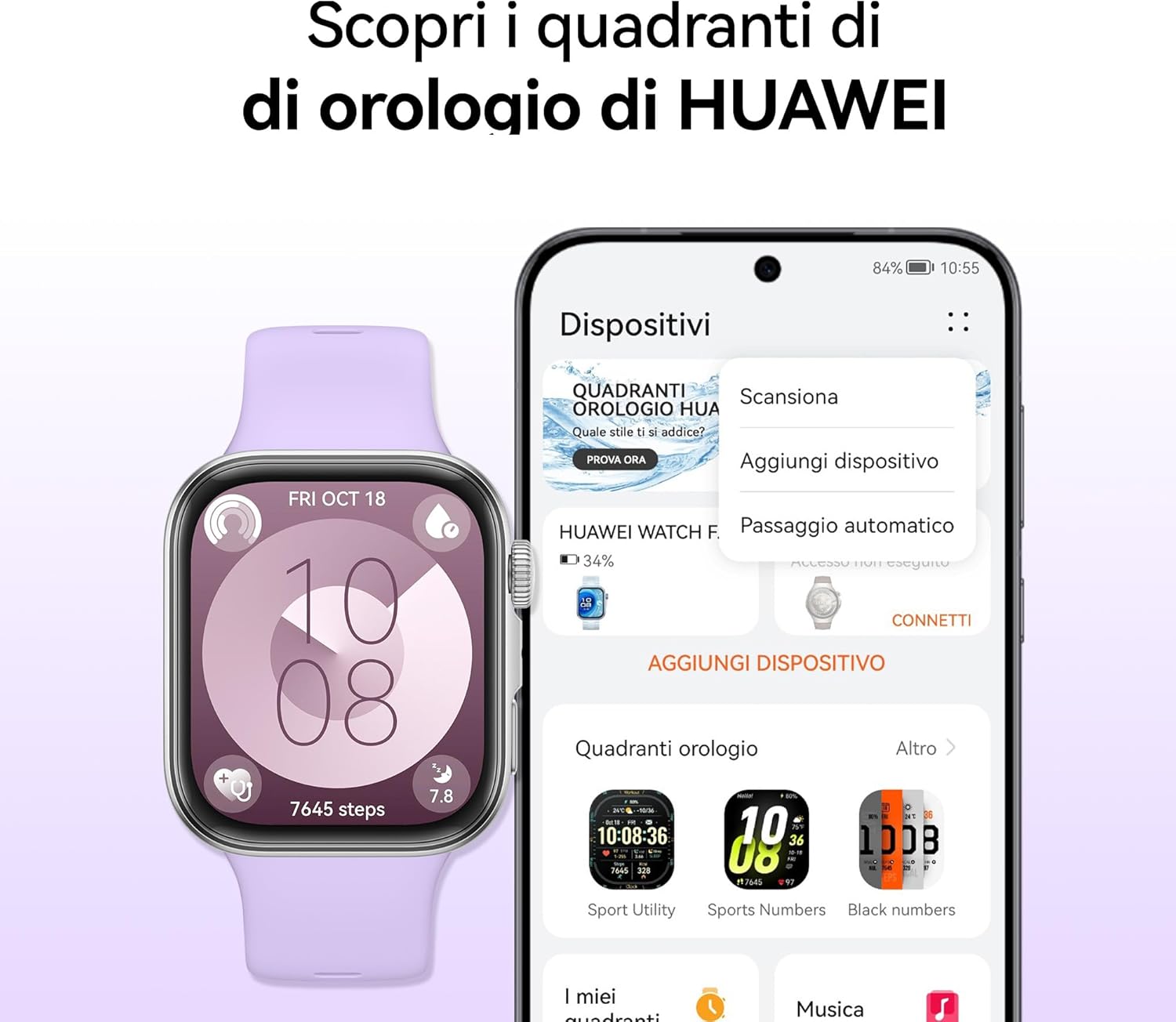
Image: Customizing watch faces on the HUAWEI WATCH FIT 4 via the HUAWEI Health app.
3.3 Sports Modes and GPS Tracking
The watch supports over 100 workout modes, including mountaineering, hiking, skiing, climbing, trail running, walking, running, and cycling. It provides high-level data such as altitude, accumulated ascent, and air pressure, supported by a powerful barometer. The HUAWEI Sunflower positioning system offers precise location tracking for outdoor activities.

Image: HUAWEI WATCH FIT 4 tracking outdoor cycling activity with GPS.

Image: Various sports modes available on the HUAWEI WATCH FIT 4.
3.4 Маніторынг здароўя
The Health Insights app provides guidance for a healthier lifestyle, including stress management, sleep improvement, and workout optimization. The watch tracks sleep levels, fatigue, and stress, utilizing HRV metrics and abnormal breathing alerts. It also includes a cycle calendar feature.
- Адсочванне сну: Маніторы снуtagі якасць.
- Маніторынг сардэчнага рытму: Бесперапыннае адсочванне пульса.
- Маніторынг SpO2: Blood oxygen saturation levels.
- Кіраванне стрэсам: Provides insights and guidance.
- Cycle Calendar: Helps track menstrual cycles.

Image: Health Insights app on HUAWEI WATCH FIT 4 showing sleep score and other health data.

Image: Cycle calendar feature on the HUAWEI WATCH FIT 4.
3.5 Daily Utility Features
The smartwatch offers several features for daily convenience:
- Галасавыя нататкі: Record quick voice memos.
- Quick Message Replies: Respond to messages directly from your wrist.
- Выклікі Bluetooth: Make and receive calls when connected to your phone.
- Дыстанцыйны затвор: Кіруйце камерай тэлефона дыстанцыйна.

Выява: Зверхуview of daily utility features on the HUAWEI WATCH FIT 4.
4. Тэхнічнае абслугоўванне
4.1 Кіраванне батарэяй
The HUAWEI WATCH FIT 4 offers up to 10 days of battery life with typical usage. To maximize battery longevity, avoid extreme temperatures and use the provided charging cable.

Image: Battery life and charging details for the HUAWEI WATCH FIT 4.
4.2 Воданепранікальнасць
The watch is water-resistant up to 50 meters. It is suitable for shallow-water activities like swimming in a pool or ocean. Avoid using it for diving, hot showers, or high-pressure water activities.
4.3 Чыстка і догляд
Regularly clean your watch and strap to prevent skin irritation and maintain performance. Use a soft, damp cloth to wipe the device. Ensure the watch is dry before charging.
5. Выпраўленне непаладак
If you encounter issues with your HUAWEI WATCH FIT 4, try the following common solutions:
- Прылада не ўключаецца: Пераканайцеся, што гадзіннік цалкам зараджаны.
- Праблемы спалучэння: Check Bluetooth on your phone, restart both devices, and ensure the HUAWEI Health app is updated.
- Недакладныя дадзеныя: Ensure the watch is worn correctly and the sensors are clean. Update the app and watch firmware.
- Кароткі тэрмін службы батарэі: Reduce screen brightness, disable unnecessary notifications, and close background apps on the watch.
- Праграма не сінхранізуецца: Check your phone's internet connection and ensure the HUAWEI Health app has all necessary permissions.
For further assistance, refer to the official HUAWEI support webсайт або звярніцеся ў службу падтрымкі.
6. Тэхнічныя характарыстыкі
| Асаблівасць | Дэталь |
|---|---|
| Назва мадэлі | Seiya-B19F |
| Аперацыйная сістэма | HarmonyOS |
| Памер дысплея | 1.82 цалі |
| Тып дысплея | OLED (AMOLED) |
| дазвол | 360 х 360 |
| Max Display Brightness | 2000 гнід |
| Ёмістасць памяці | 4 ГБ |
| Ёмістасць батарэі | 400 мАг |
| Сярэдні тэрмін службы батарэі | 10 дзён |
| Час зарадкі | 10 Minutes (for a day's use), 75 Minutes (full charge) |
| Тэхналогія падлучэння | Bluetooth |
| GPS | Інтэграваны GPS |
| Узровень воданепранікальнасці | 50 метраў |
| Матэрыял корпуса | Алюміній |
| Матэрыял гурта | Сілікон |
| Памеры (ДхШхВ) | 43P x 38l x 10H mm |
| Сумяшчальныя прылады | Смартфоны, планшэты (iOS і Android) |
7. Гарантыя і падтрымка
7.1 Гарантыя на выраб
The HUAWEI WATCH FIT 4 comes with a 2-гадовая гарантыя вытворцы. Additionally, you may be eligible for an extended 30-month warranty through HUAWEI WATCH FIT 4 promotions.
7.2 HUAWEI Health+ Subscription
Купляasing a HUAWEI WATCH FIT 4 may include a 3-month subscription to HUAWEI Health+. This subscription provides access to exclusive benefits such as beginner and expert workouts, guided meditations, Stay Fit Plans, and breathing exercises. Terms and conditions apply.
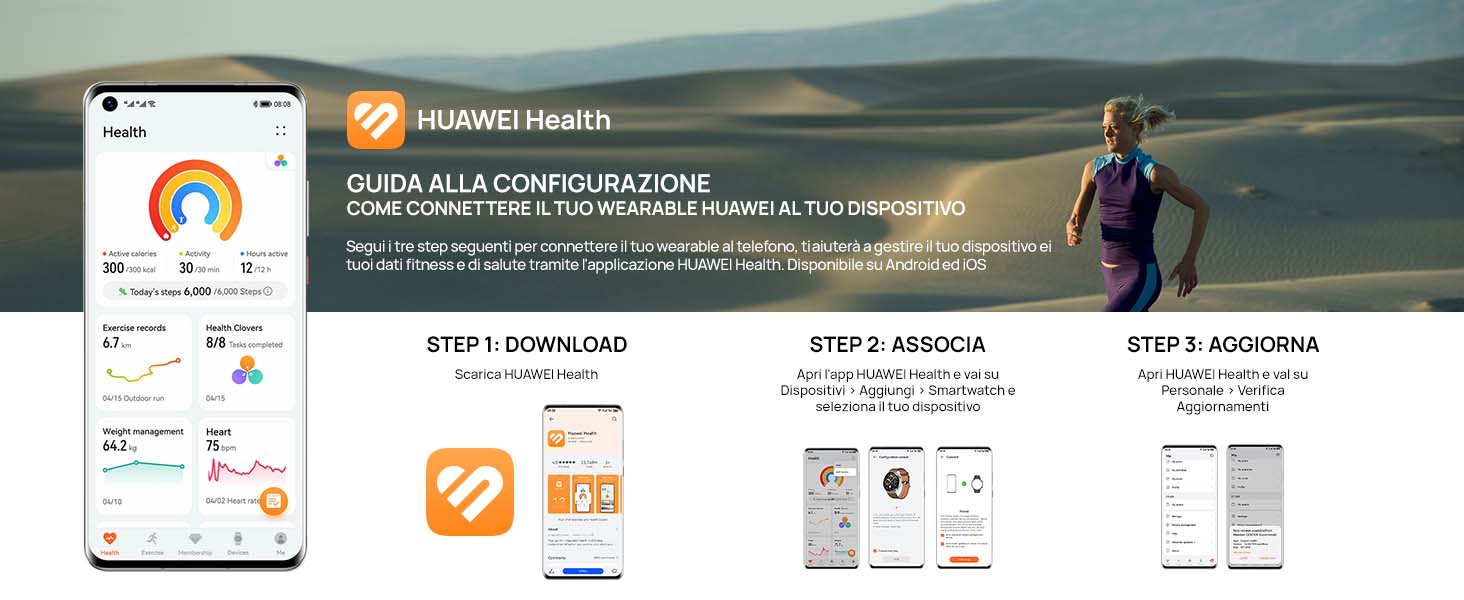
Image: Features of the HUAWEI Health+ app.
7.3 Падтрымка кліентаў
For detailed support, FAQs, and contact information, please visit the official HUAWEI support webсайт.