
Macally BTZKEYA
MACALLY BTZKEYA Bluetooth Wireless Keyboard for Mac (JIS Layout) - Rechargeable, Multi-Device Pairing Instruction Manual
Model: BTZKEYA
Уводзіны
Welcome to the Macally family. Thank you for purchasing the ACEBTKEY series keyboard. Our mission is to provide visually appealing, high-quality, and affordable peripherals and accessories to satisfy our customers. To achieve this, we create innovative and practical products, prioritizing ease of use above all else.
This manual provides comprehensive instructions for setting up, operating, and maintaining your new Macally BTZKEYA Bluetooth Wireless Keyboard. Please read it thoroughly to ensure optimal performance and longevity of your device.
Змест пакета
- Macally BTZKEYA Bluetooth Wireless Keyboard
- Кабель для зарадкі USB-C да USB-A
- Кіраўніцтва карыстальніка
Сістэмныя патрабаванні
- Bluetooth-enabled computer, laptop, smartphone, or tablet.
- Mac OS X or later.
- A USB-A port on your laptop or desktop PC for charging the keyboard.
- If your laptop or desktop PC only has USB-C ports, a USB-C to USB-A hub or adapter is required for charging.
Прадукт скончаныview
The Macally BTZKEYA keyboard is designed for efficiency and comfort, featuring a full-size layout with a numeric keypad and dedicated macOS shortcut keys. Its slim profile and scissor-switch keys provide a quiet and responsive typing experience.

Малюнак 1: The Macally BTZKEYA keyboard's slim profile and integrated kickstand. The keyboard is only 0.8 inches (approx. 2cm) thick.

Малюнак 2: The keyboard features 111 scissor-switch keys and 14 dedicated shortcut keys for macOS, enhancing productivity.

Малюнак 3: Scissor-switch keycaps provide a smooth, tactile, and quiet typing experience.

Малюнак 4: The keyboard supports multi-sync Bluetooth, allowing pairing with up to three devices like MacBook, iMac, iPad, and iPhone, with a wireless range of 30 feet.
Настройка
Зарадка клавіятуры
Before initial use, ensure the keyboard is fully charged. The built-in rechargeable battery provides extended usage.
- Connect the USB-A end of the included cable to a USB-A port on your computer, laptop, or a USB-compatible AC adapter.
- Connect the USB-C end to the USB-C charging port located on the side of the keyboard.
- Заўвага: This cable is for charging only. The keyboard will not function as a wired device when connected via this cable.
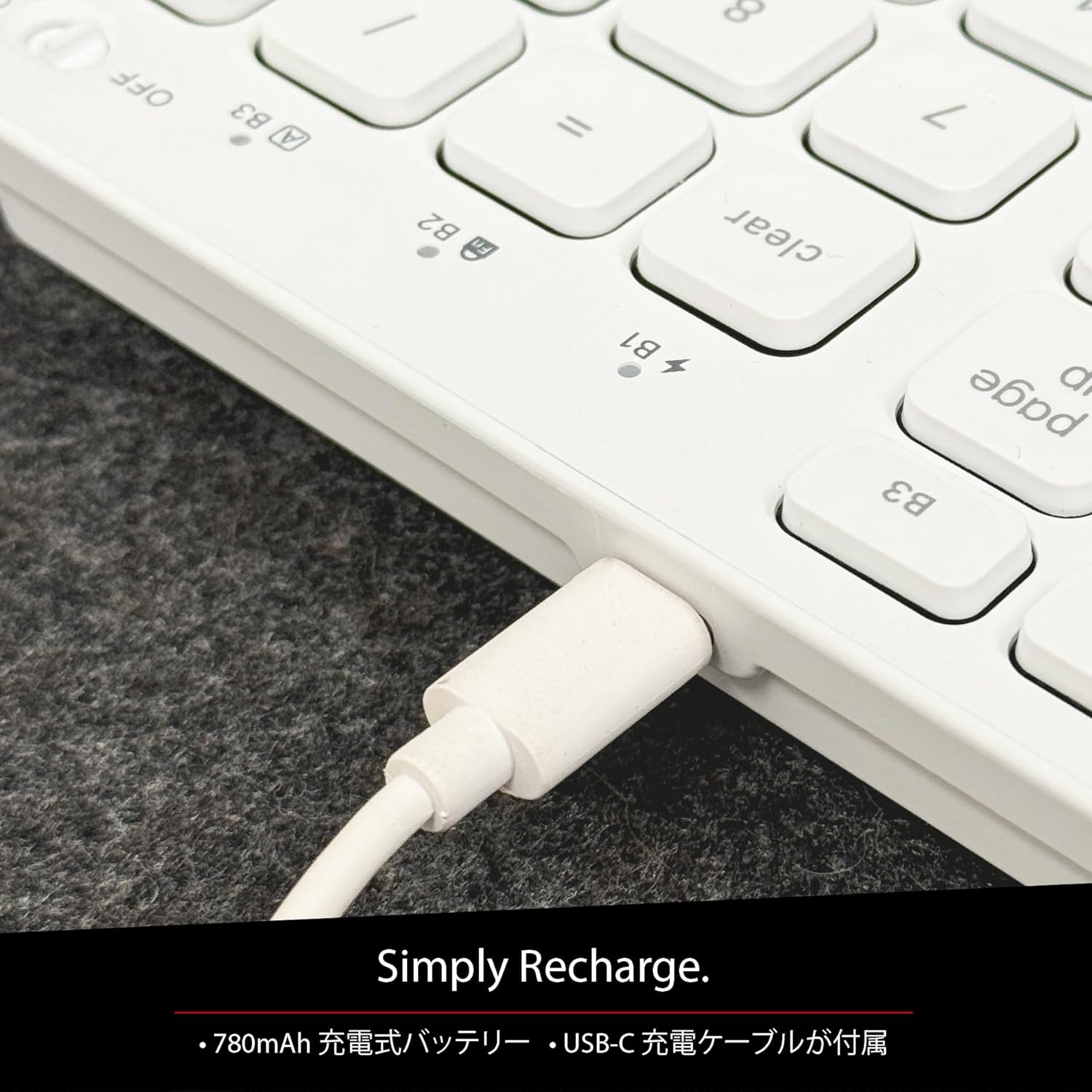
Малюнак 5: The USB-C charging port for easy recharging. The keyboard includes a 780mAh rechargeable battery.
Святлодыёдныя індыкатары зарадкі:
- Чырвоны святлодыёд: Ідзе зарадка.
- Зялёны святлодыёд: Цалкам зараджаны.
- All Bluetooth Channel LEDs flashing: Нізкі зарад батарэі.
Працэдура спалучэння Bluetooth
The keyboard can be paired with up to three Bluetooth-enabled devices. The number keys 1, 2, and 3 on the top row (not the numeric keypad) are labeled B1, B2, and B3, representing the Bluetooth channels.
Ensure the keyboard is powered on and sufficiently charged before starting the pairing process. The power switch is a slide button located on the side of the keyboard (Red for Off, Green for On).
Steps to Pair (using Bluetooth Channel 1 (B1) as an exampле):
- On the device you wish to connect (laptop, desktop, tablet, smartphone, etc.), open the Bluetooth settings screen.
- На клавіятуры націсніце і ўтрымлівайце fn клавішу, затым націсніце 1 key (B1) to select Bluetooth Channel 1.
- Next, press and hold the fn key and simultaneously press the P key. This will put the keyboard into pairing mode, and the B1 LED will flash rapidly.
- On your device's Bluetooth settings screen, click or tap the device name "ACEBTKEY" to initiate pairing.
- Once pairing is complete, the B1 LED on the keyboard will remain steadily lit in blue.
To connect to a second or third device, follow the same procedure using B2 (fn+2) or B3 (fn+3).
Keyboard Setup Assistant (For Mac Users)
If your Bluetooth keyboard is not immediately recognized by macOS, the Keyboard Setup Assistant will automatically launch, prompting you to specify the keyboard type. Follow the on-screen instructions.
- When prompted, press the Z ключ.
- Затым націсніце ? ключ.
- Confirm that "ANSI" is selected as the keyboard type and click "Done".
If keys do not respond or different characters are entered than printed, you may need to manually launch the Keyboard Setup Assistant:
- Open "System Settings" or "System Preferences".
- Select "Keyboard" and click "Change Keyboard Type".
- When the "Keyboard Setup Assistant" window appears, click "Continue" and follow the on-screen instructions.
Інструкцыя па эксплуатацыі
Switching Between Multiple Devices
After pairing all your devices with the keyboard, you can easily switch between them:
- Націсніце і ўтрымлівайце fn ключ.
- Пакуль трымае fn, press the desired Bluetooth channel key (B1, B2, або B3).
- Release both keys. The keyboard will switch to the selected device.
Shortcut and Function Keys
The F-row (function key row) at the top of the keyboard defaults to shortcut mode. These keys perform functions indicated by the small white icons or text printed on them (e.g., play, pause, cut, copy).
To use standard function keys (F1, F2, etc.), press the desired function key while holding down the fn ключ.
You can toggle between shortcut mode and standard F1-F12 function keys at any time by pressing fn + Esc. After switching, if you wish to use a shortcut function, press the desired shortcut key while holding down the fn ключ. Прэсінг fn + Esc again will return the keyboard to shortcut mode.
F-Key Functions:
| Функцыя | Mac OSX | вокны | iOS | Android |
|---|---|---|---|---|
| fn+esc (Toggle F-row mode) | ✓ | ✓ | ✓ | ✓ |
| Зніжэнне яркасці экрана | ✓ | ✓ | ||
| Павышэнне яркасці экрана | ✓ | ✓ | ||
| Выразаць | ✓ | ✓ | ✓ | ✓ |
| Копія | ✓ | ✓ | ✓ | ✓ |
| Уставіць | ✓ | ✓ | ✓ | ✓ |
| Папярэдні трэк | ✓ | ✓ | ✓ | ✓ |
| Прайграванне/Паўза | ✓ | ✓ | ✓ | ✓ |
| Наступны трэк | ✓ | ✓ | ✓ | ✓ |
| Адключыць гук | ✓ | ✓ | ✓ | ✓ |
| Памяншэнне гучнасці | ✓ | ✓ | ✓ | ✓ |
| Павялічыць гучнасць | ✓ | ✓ | ✓ | ✓ |
| Друк | ✓ | |||
| Mac: Eject Mac / Windows: Media Eject | ✓ | ✓ | ||
| Area Capture (Screenshot) | ✓ | |||
| Экранная клавіятура | ✓ | |||
| пошук | ✓ | ✓ | ✓ | ✓ |
| Кнопка "Дадому". | ✓ | ✓ | ||
| Меню | ✓ | |||
| Замак | ✓ | ✓ | ✓ | ✓ |
Важная заўвага: Standard function keys (F1-F12) may have special functions assigned by the connected operating system or currently running programs.
Рэжым энергазберажэння
The keyboard is designed with power-saving features. Based on an average of 3 hours of daily use, the built-in rechargeable battery can last up to 3 months on a single charge.
Тэхнічнае абслугоўванне
To ensure the longevity and optimal performance of your Macally BTZKEYA keyboard, please follow these maintenance guidelines:
- Keep the device away from liquids, moisture, and water.
- Use the device only within the specified temperature range of 0°C (32°F) to 40°C (104°F).
- Clean the keyboard regularly with a soft, dry cloth. Avoid using harsh chemicals or abrasive materials.
- Do not disassemble the device. Disassembly will void the warranty.
- When disposing of the product, do not treat it as general waste. Take it to your nearest recycling center for proper disposal.
Ліквідацыю непаладак
Праблемы спалучэння:
- If pairing fails, delete all existing pairing records for the keyboard on your device and attempt to reconnect.
- Ensure the keyboard is fully charged and powered on.
- Пераканайцеся, што Bluetooth вашай прылады ўключаны і даступны для пошуку.
Key Response Issues:
- If keys do not respond or different characters are entered than printed, manually launch the Keyboard Setup Assistant on your Mac (refer to the "Keyboard Setup Assistant" section under Setup).
- Ensure the keyboard is within the 30-foot wireless range of your device.
Агульная сумяшчальнасць:
- While designed for Mac, this keyboard is also compatible with Windows PCs. However, some functions may behave differently depending on the operating system or running programs.
Тэхнічныя характарыстыкі
| Асаблівасць | Дэталь |
|---|---|
| Марка | Макальна |
| Нумар мадэлі | BTZKEYA |
| Колькасць ключоў | 111 keys (Mac layout) |
| Тып ключа Пераключальнік | Нажніцы-выключальнік |
| Тэхналогія падлучэння | Bluetooth |
| Падтрымка некалькіх прылад | Да 3 прылад |
| Ёмістасць батарэі | 780 мАг (акумулятарная) |
| Порт для зарадкі | USB-C |
| Памеры прадукту | 42 х 14 х 2 см |
| Вага прадукту | 650 г |
| Рэкамендуемае выкарыстанне | Multimedia, Everyday Use, Personal, Education, Student, Business |
Інфармацыя аб гарантыі
Macally Peripherals warrants this product against defects in title, materials, and workmanship for a period of адзін год з даты пакупкі. If a defect is found in the product, Macally's sole obligation and your sole remedy will be to repair or replace the product.
This is a limited warranty applicable only to the product accompanied by this user guide. This warranty does not apply in the following cases:
- Abuse or misuse of the product.
- Exposure to abnormal electrical or environmental conditions.
- Use under conditions not considered normal use.
- Disassembly of the device.
Macally Peripherals' liability arising from this warranty and sale is limited to a refund of the purchase price. Macally is not responsible for the cost of procuring substitute products or services, lost profits, or any other consequential, incidental, direct, or indirect damages. These limitations apply even if the limited remedies fail of their essential purpose.
Тэхнічная падтрымка
For technical assistance, please contact Macally support during the following hours:
- Гадзіны працы: Monday to Friday, 9 AM to 5 PM (Pacific Standard Time)
- электронная пошта: techsupport@macally.com
When contacting support, please have your product model number (BTZKEYA) and purchase information ready.
Заява аб адпаведнасці FCC
Гэта прылада адпавядае частцы 15 правілаў FCC. Эксплуатацыя залежыць ад наступных дзвюх умоў: (1) гэта прылада не можа выклікаць шкодных перашкод і (2) гэта прылада павінна прымаць любыя перашкоды, у тым ліку перашкоды, якія могуць выклікаць непажаданую працу.
Змены або мадыфікацыі, якія не былі відавочна ўхвалены бокам, адказным за адпаведнасць патрабаванням, могуць пазбавіць карыстальніка права эксплуатаваць абсталяванне.
Гэта абсталяванне было праверана і прызнана адпаведным абмежаванням для лічбавых прылад класа B у адпаведнасці з часткай 15 Правілаў FCC. Гэтыя абмежаванні прызначаны для забеспячэння разумнай абароны ад шкодных перашкод пры ўсталёўцы ў жылых памяшканнях. Гэта абсталяванне генеруе, выкарыстоўвае і можа выпраменьваць радыёчастотную энергію і, калі не ўстаноўлена і не выкарыстоўваецца ў адпаведнасці з інструкцыямі, можа выклікаць шкодныя перашкоды радыёсувязі. Аднак няма ніякай гарантыі, што перашкоды не будуць узнікаць пры пэўным усталяванні. Калі гэтае абсталяванне стварае шкодныя перашкоды радыё- або тэлевізійнаму прыёму, што можна вызначыць, выключыўшы і ўключыўшы абсталяванне, карыстальніку рэкамендуецца паспрабаваць ліквідаваць перашкоды адным або некалькімі з наступных мер:
- Пераарыентуйце або перамесціце прыёмную антэну.
- Павялічце адлегласць паміж абсталяваннем і прымачом.
- Падключыце абсталяванне да іншай разеткі, чым тая, да якой падключаны прыёмнік.
- Звярніцеся па дапамогу да дылера або дасведчанага радыё/тэлетэхніка.
Гэта прылада была ацэнена на адпаведнасць агульным патрабаванням да ўздзеяння радыёчастот. Прылада можа выкарыстоўвацца ў партатыўных умовах ўздзеяння без абмежаванняў.
Відэа аб прадуктах
Macally BTZKEYA Bluetooth Keyboard Overview
Гэта відэа дае агульны аглядview of the Macally BTZKEYA Bluetooth keyboard, highlighting its features and design.
Macally Mac Bluetooth Keyboard - Premium Multi-Device
A detailed look at the Macally Bluetooth keyboard for Mac, emphasizing its premium build and multi-device capabilities.
Macally SLIMKEYPROA Keyboard Features
This video showcases the features of the Macally SLIMKEYPROA keyboard, which shares similar design and functionality with the BTZKEYA model.
Macally BLSlimkeyproA Keyboard Demonstration
A demonstration of the Macally BLSlimkeyproA keyboard, highlighting its compact design and key features.
Macally ACEBTKEYSGCB Keyboard Overview
Гэта відэа забяспечвае завяршэннеview of the Macally ACEBTKEYSGCB keyboard, showcasinяго дызайн і функцыянальнасць.
Macally SLIMKEYPRO Manual Guide
A visual guide to the Macally SLIMKEYPRO, offering insights into its usage and features.