
Уводзіны
This manual provides detailed instructions for the installation, operation, and maintenance of your Multi-Language DS-KV6113-WPE1 IP Doorbell. Please read this manual thoroughly before using the device to ensure proper functionality and safety.
Прадукт скончаныview
The DS-KV6113-WPE1 IP Doorbell is a multi-language, WiFi-enabled video intercom system designed for enhanced home security and communication. It features a waterproof design, IC card unlock capability, and supports direct calls to HIK-CONNECT without an indoor monitor.

Image: The DS-KV6113-WPE1 IP Doorbell unit shown with six yellow IC card key fobs. The doorbell unit is black and silver, enclosed in a clear protective rain cover.
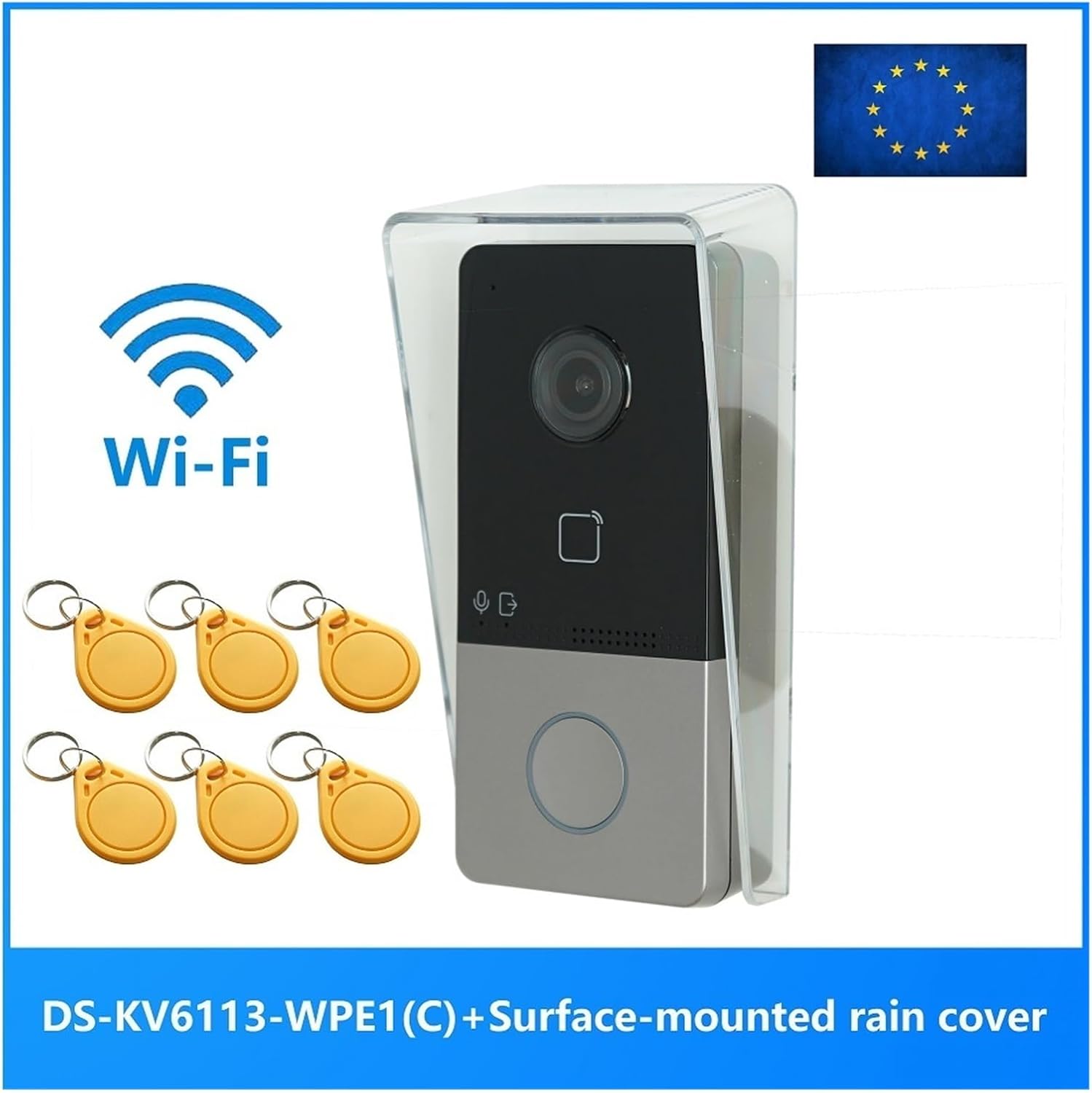
Image: The DS-KV6113-WPE1 IP Doorbell unit with a prominent Wi-Fi logo and the text "DS-KV6113-WPE1 (C) + Surface-mounted rain cover" indicating its features and included accessories. An EU flag is visible in the top right corner.
Змест пакета
Праверце наяўнасць усіх прадметаў у камплекце:
- DS-KV6113-WPE1 IP Doorbell Unit
- Surface-mounted rain cover
- IC Card Key Fobs (quantity may vary)
- Мантажныя шрубы і анкеры
- Кароткае кіраўніцтва па запуску (калі ёсць)
Тэхнічныя характарыстыкі
| Катэгорыя | Параметр | Каштоўнасць |
|---|---|---|
| Параметры сістэмы | Аперацыйная сістэма | Убудаваны Linux |
| ПЗУ | 32 Мб | |
| АЗП | 256 Мб | |
| працэсар | Embedded MCU Processor | |
| Параметры відэа | Resolution (Main Stream) | 1920 × 1080p, 720p |
| Resolution (Sub Stream) | 704 × 576 | |
| FOV | Па гарызанталі: 131°, па вертыкалі: 78° | |
| WDR | Сапраўдны WDR | |
| Дадатак Святло | IR supplement | |
| Кампрэсія відэа | H.264 | |
| Параметры гуку | Сціск аўдыё | G.711 U |
| Аўдыё ўваход | Убудаваны ўсенакіраваны мікрафон | |
| Аўдыёвыхад | Убудаваны гучнагаварыцель | |
| Якасць гуку | Падаўленне шуму і адмена рэха | |
| Ёмістасць | Ёмістасць карыстальніка | 2000 |
| Ёмістасць карты | 10000 | |
| Параметры сеткі | Пратакол сувязі | TCP/IP, RTSP |
| Правадная сетка | 10/100 Мбіт / с Ethernet | |
| Фізічныя характарыстыкі | Памеры (прыбл.) | 149.78 мм (У) x 79.56 мм (Ш) x 48.63 мм (Г) |
| Рэйтынг воданепранікальнасці | так |

Выява: Збоку view of the DS-KV6113-WPE1 IP Doorbell with its clear rain cover, showing approximate dimensions: 149.78mm in height and 79.56mm in width.

Выява: спераду view of the DS-KV6113-WPE1 IP Doorbell, highlighting the camera lens, IC card reader area, microphone, speaker, and call button.

Image: Angled side profile of the DS-KV6113-WPE1 IP Doorbell, showing the depth of the unit and the clear protective cover.
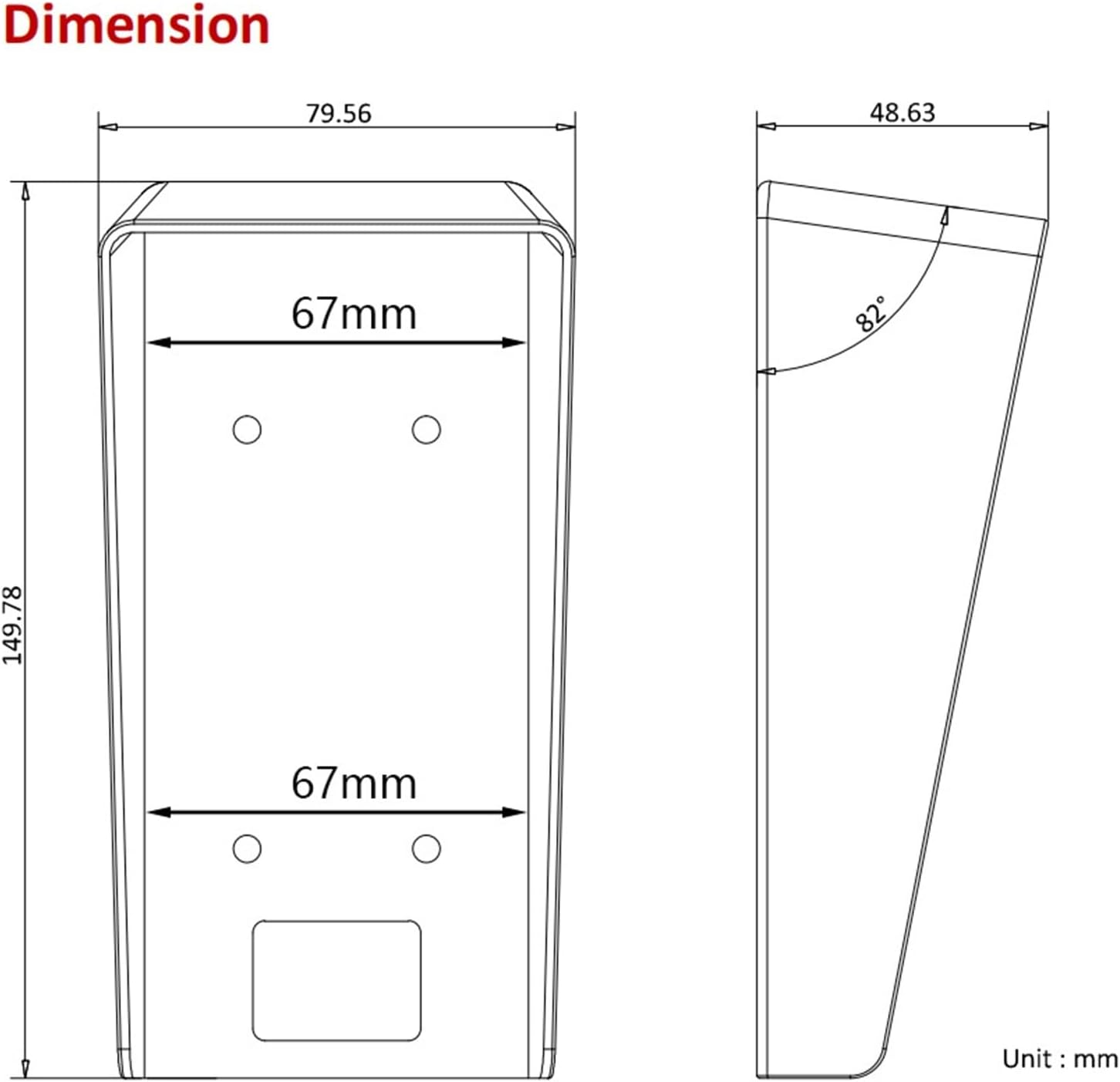
Image: Technical diagram showing the top and side dimensions of the DS-KV6113-WPE1 IP Doorbell unit, including measurements like 79.56mm width, 149.78mm height, and a 82° angle for the rain cover.

Выява: Задняя частка view of the DS-KV6113-WPE1 IP Doorbell, displaying the various ports (power, RS485, alarm in, lock, LAN) and overall dimensions of 138mm height, 65mm width, and 27mm depth for the main body.
Настройка і ўстаноўка
1. Выбар месца
Choose a suitable location for installation, typically near the main entrance. Ensure the area is protected from direct heavy rain and extreme temperatures, although the unit is waterproof.
2. Мантаж прылады
- Mark the drilling points on the wall using the mounting template (if provided) or by holding the rain cover in place.
- Прасвідруйце адтуліны і ўстаўце ў сцены анкеры.
- Secure the surface-mounted rain cover to the wall using the provided screws.
- Carefully insert the DS-KV6113-WPE1 doorbell unit into the rain cover, ensuring it clicks securely into place.
3. Падключэнне правадоў
Connect the necessary cables to the ports on the rear of the unit:
- Магутнасць: Connect to a suitable power supply. This unit supports PoE (Power over Ethernet) if connected to a compatible PoE switch.
- LAN: Connect an Ethernet cable for wired network connectivity.
- Блакаванне: Connect to an electronic door lock for remote unlock functionality.
- Уваход будзільніка: Connect to external alarm sensors if desired.
- RS485: For advanced communication with other devices (if applicable).
4. Network Configuration (WiFi)
For WiFi connectivity:
- Уключыце прыладу.
- Access the device's configuration interface via a connected PC or mobile app.
- Navigate to the network settings and select your WiFi network.
- Enter the WiFi password and save the settings.
Інструкцыя па эксплуатацыі
1. Здзяйсненне званка
To initiate a call, a visitor presses the call button on the doorbell unit. The call will be routed to your configured indoor monitor or the HIK-CONNECT mobile application.
2. Адказ на званок
Пры паступленні выкліку:
- On Indoor Monitor: Tap the answer button to establish two-way audio and video communication.
- On HIK-CONNECT App: Accept the incoming call notification to view жывая трансляцыя і зносіны з наведвальнікам.
3. Адмыканне дзвярэй
During an active call, you can unlock the connected door remotely:
- On Indoor Monitor/App: Locate and tap the unlock icon. Confirm the action if prompted.
4. IC Card Unlock
To unlock the door using an IC card:
- Ensure IC cards are registered with the doorbell system. Refer to the system's administration guide for card registration procedures.
- Present a registered IC card to the card reader area on the doorbell unit.
- The door will unlock momentarily upon successful card recognition.
5. Налады мовы
The device supports multiple languages. To change the language:
- Access the device's settings menu (via indoor monitor or app).
- Navigate to "System Settings" or "Language".
- Select your preferred language from the available options (English, French, Portuguese, Spanish, Russian, German, Italian, Polish, Arabic, Turkish, Vietnamese, Hungarian, Dutch, Romanian, Czech, Bulgarian, Ukrainian, Croatian, Serbian, Greek, Slovenian, Portuguese (Brazil), Estonian, Finnish, Hebrew, Lithuanian, Latvian, Mongolian, Norwegian, Slovak, Danish, Traditional Chinese, Uzbek, Kazakh).
Тэхнічнае абслугоўванне
- Уборка: Regularly wipe the camera lens and front panel with a soft, damp тканінай. Пазбягайце абразіўных ачышчальнікаў або растваральнікаў.
- Абнаўленні прашыўкі: Periodically check for official firmware updates to ensure optimal performance and security. Updates can typically be performed via the HIK-CONNECT app or web інтэрфейс.
- Ахова навакольнага асяроддзя: While waterproof, avoid prolonged exposure to extreme weather conditions or direct high-pressure water jets.
Ліквідацыю непаладак
Няма харчавання / Прылада не ўключаецца
- Праверце ўсе злучэнні харчавання.
- Ensure the power adapter or PoE switch is functioning correctly.
No Video / Poor Video Quality
- Verify network connectivity (wired or WiFi).
- Ачысціце аб'ектыў камеры.
- Check network bandwidth and signal strength for WiFi.
Няма гуку / нізкая якасць гуку
- Пераканайцеся, што мікрафон і дынамік нічым не перакрываюцца.
- Check audio settings in the device configuration.
- Праверце стабільнасць сеткі.
IC Card Not Unlocking Door
- Ensure the IC card is properly registered with the system.
- Verify the card is being presented correctly to the reader.
- Check the connection to the electronic door lock.
Немагчыма падключыцца да Wi-Fi
- Двойчы праверце пароль Wi-Fi.
- Ensure the doorbell is within range of your WiFi router.
- Restart the doorbell unit and your WiFi router.
Інфармацыя аб гарантыі
Гэты прадукт пастаўляецца з a Гарантыя 3 месяцаў з даты пакупкі. Гэтая гарантыя распаўсюджваецца на вытворчыя дэфекты і няспраўнасці пры нармальным выкарыстанні. Яна не распаўсюджваецца на пашкоджанні, выкліканыя няправільным выкарыстаннем, аварыямі, несанкцыянаванымі мадыфікацыямі або няправільнай устаноўкай.
For warranty claims, please contact your retailer or the manufacturer with your proof of purchase.
Падтрымка кліентаў
For further assistance or technical support, please refer to the official website of the manufacturer or contact their customer service department. Keep your product model number (DS-KV6113-WPE1) and purchase details ready when seeking support.