
Уводзіны
This manual provides detailed instructions for the Tatybo Wireless Gaming Headset (Model WT01). Designed for an immersive gaming experience, this headset features 7.1 surround sound, a 360° adjustable microphone, and versatile connectivity options including 2.4GHz USB, Type-C, Bluetooth 5.3, and a 3.5mm audio jack. It is compatible with a wide range of devices such as PS5, PS4, PC, Switch, laptops, Mac, and mobile phones.
Прадукт скончаныview
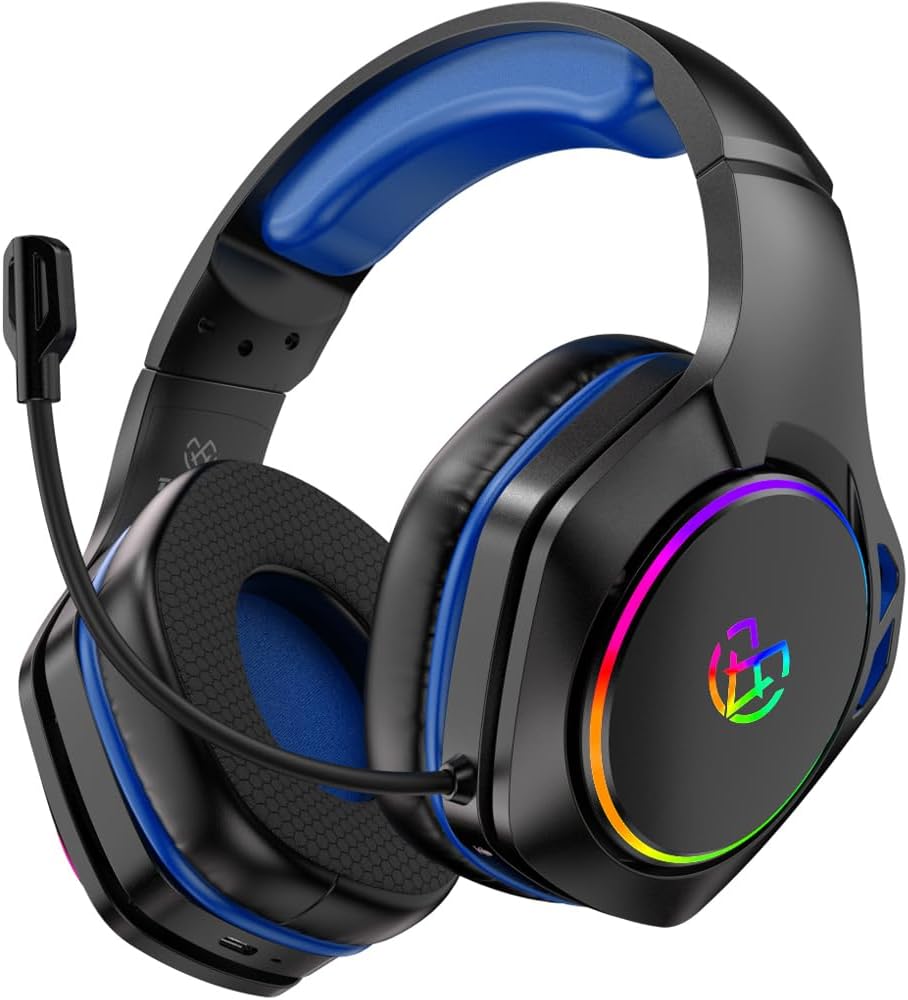
Image: The Tatybo Wireless Gaming Headset, featuring a blue headband and earcups, black exterior, an adjustable boom microphone, and colorful RGB lighting on the outer side of the earcups.
Змест пакета:
- Tatybo Wireless Gaming Headset (WT01)
- 2.4GHz USB/Type-C Wireless Dongle
- USB-кабель для зарадкі
- Аўдыёкабель 3.5 мм
- Кіраўніцтва карыстальніка (гэты дакумент)
Кампаненты гарнітуры:
- Рэгуляваная павязка на галаву: Для камфортнай пасадкі.
- Навушнікі: Over-ear design with breathable mesh cushions.
- Мікрафон: 360° adjustable, noise-canceling boom microphone.
- Кнопка харчавання: Located on one earcup.
- Рэгулятар гучнасці: Wheel or buttons for audio adjustment.
- Кнопка адключэння мікрафона: For quick muting.
- Порт для зарадкі: Порт USB-C для зарадкі.
- 3.5 мм аўдыяраз'ём: Для праваднога падключэння.
- Святлодыёдныя індыкатары: For power, charging, and connection status.
- RGB асвятленне: Customizable lighting on earcups.
Настройка
1. Зарадка гарнітуры
- Connect the provided USB charging cable to the headset's USB-C charging port.
- Падключыце другі канец кабеля да крыніцы харчавання USB (напрыклад, USB-порт кампутара, насценны адаптар).
- The LED indicator will show charging status. A full charge typically takes approximately 3 hours, providing over 40 hours of playtime.
2. Connecting via 2.4GHz Wireless (USB/Type-C Dongle)
This mode offers ultra-low latency for optimal gaming performance on compatible devices.
- Insert the 2.4GHz USB or Type-C wireless dongle into an available port on your device (PC, PS5, PS4, Nintendo Switch in docked mode).
- Уключыце гарнітуру, націснуўшы і ўтрымліваючы кнопку харчавання, пакуль не загарыцца святлодыёдны індыкатар.
- The headset should automatically pair with the dongle. The LED indicator will show a stable light once connected.
- On your device, ensure the Tatybo headset is selected as the default audio input and output device in the sound settings.
3. Connecting via Bluetooth 5.3
Ideal for mobile devices, laptops, Mac, and Nintendo Switch in handheld mode.
- Ensure the headset is powered off. Press and hold the Power button for approximately 5-7 seconds until the LED indicator flashes rapidly, indicating pairing mode.
- На сваёй прыладзе ўключыце Bluetooth і знайдзіце даступныя прылады.
- Select "Tatybo WT01" (or similar name) from the list of found devices to pair.
- Пасля падключэння святлодыёдны індыкатар на гарнітуры будзе гарэць пастаянна.
4. Connecting via 3.5mm Audio Jack (Wired Mode)
For universal compatibility with any device featuring a 3.5mm audio port, or when battery is depleted.
- Падключыце адзін канец аўдыёкабеля 3.5 мм да аўдыёраздыма 3.5 мм на гарнітуры.
- Connect the other end of the cable to the 3.5mm audio port on your device (e.g., controller, PC, mobile phone).
- The headset will function in passive wired mode. The microphone may or may not be active depending on the device's 3.5mm port configuration.
Інструкцыя па эксплуатацыі
Уключэнне/выключэнне харчавання
- Уключэнне: Націсніце і ўтрымлівайце кнопку харчавання на працягу 2-3 секунд.
- Выключэнне: Націсніце і ўтрымлівайце кнопку харчавання на працягу 3-5 секунд.
Рэгулятар гучнасці
Use the volume wheel or dedicated buttons on the earcup to adjust the audio output level.
Выкарыстанне мікрафона
- пазіцыянаванне: Adjust the flexible boom microphone to a comfortable position near your mouth for optimal voice pickup.
- Выключыць/уключыць гук: Press the dedicated microphone mute button on the earcup to toggle the microphone on or off.
Аб'ёмны гук 7.1
The headset features 7.1 surround sound for an immersive audio experience. This feature is typically active when connected via 2.4GHz wireless or USB, providing enhanced directional audio cues in compatible games.
Кіраванне святлодыёдным асвятленнем
The headset features RGB lighting on the earcups. To conserve battery life, you can typically turn off the LED lights by double-pressing the action button (often the power button or a dedicated LED control button).
Тэхнічнае абслугоўванне
- Уборка: Для чысткі гарнітуры выкарыстоўвайце мяккую сухую тканіну. Пазбягайце выкарыстання агрэсіўных хімічных рэчываў або абразіўных матэрыялаў. Акуратна працярыце амбушуры сухой тканінай.amp тканінай і дайце цалкам высахнуць на паветры.
- захоўванне: Захоўвайце гарнітуру ў прахалодным, сухім месцы, удалечыні ад прамых сонечных прамянёў і экстрэмальных тэмператур.
- Сыход за батарэяй: Каб падоўжыць тэрмін службы батарэі, пазбягайце частай поўнай разрадкі гарнітуры. Рэгулярна зараджайце яе, нават калі яна не выкарыстоўваецца працяглы час.
Ліквідацыю непаладак
- Няма гуку:
- Пераканайцеся, што гарнітура ўключана і зараджана.
- Праверце ўзровень гучнасці як на гарнітуры, так і на падлучанай прыладзе.
- Праверце, ці выбрана правільная прылада вываду гуку ў наладах гуку вашай прылады.
- If using 2.4GHz wireless, ensure the dongle is securely inserted and paired. Try re-pairing if necessary.
- If using Bluetooth, ensure the headset is paired and connected. Try unpairing and re-pairing.
- If using 3.5mm wired, ensure the cable is fully inserted into both the headset and the device.
- Мікрафон не працуе:
- Пераканайцеся, што мікрафон не адключаны (праверце кнопку адключэння гуку на гарнітуры).
- Verify the correct audio input device is selected in your device's sound settings.
- Check microphone privacy settings on your operating system.
- Ensure the microphone boom is properly positioned.
- Connection Issues (2.4GHz Wireless):
- Ensure the dongle is within range (typically up to 10 meters) and not obstructed by physical barriers or other wireless devices causing interference.
- Try plugging the dongle into a different USB/Type-C port.
- Reboot your device and the headset.
- Кароткі тэрмін службы батарэі:
- Перад выкарыстаннем пераканайцеся, што гарнітура цалкам зараджана.
- Turn off RGB lighting if not needed, as it consumes battery power.
- Reduce volume levels, as higher volumes can drain the battery faster.
Тэхнічныя характарыстыкі
| Асаблівасць | Дэталь |
|---|---|
| Назва мадэлі | WT01 |
| Марка | Татыбо |
| Тэхналогія падлучэння | Wireless (2.4GHz USB/Type-C, Bluetooth 5.3), Wired (3.5mm Audio Jack) |
| Сумяшчальныя прылады | Gaming Consoles (PS5, PS4, Switch), PCs, Laptops, Mac, Mobile Phones |
| Тып аўдыё драйвера | Дынамічны драйвер |
| Асаблівасці гуку | Аб'ёмны гук 7.1 |
| Мікрафон | 360° Adjustable, Noise-Canceling |
| Тэрмін службы батарэі | 40+ hours (after 3-hour charge) |
| Дыяпазон частот | 20 Гц - 20 000 Гц |
| Форма навушніка | Надвушныя |
| Вага прадмета | 1.19 фунта |
| Колер | Сіні |
Гарантыя і падтрымка
Tatybo products are designed for reliability and performance. For warranty information, technical support, or any inquiries regarding your WT01 Wireless Gaming Headset, please refer to the contact information provided on the product packaging or visit the official Tatybo webсайт. Захоўвайце пацвярджэнне пакупкі для прэтэнзій па гарантыі.