
Уводзіны
The Homey Pro mini is a powerful smart home hub designed to unify and manage all your smart devices from a single platform. It allows you to control and automate your devices, monitor real-time and historical energy usage, and receive sensor alerts. With advanced features like Homey Flow, Energy, Dashboards, and Insights, the Homey Pro mini provides comprehensive control and automation for your smart home ecosystem.

Figure 1: The Homey Pro mini device, showcasing its compact design and front LED indicator.
Асноўныя характарыстыкі
- Effortless & Local Smart Home Control: Automate and manage all your smart devices from one place. Monitor energy usage, receive real-time alerts, and enjoy local data processing for enhanced privacy and reliability, even when the internet is down.
- Automate Your Life with Homey Flow: Create personalized routines. Turn off all devices with one tap, play music when you get home, or build advanced workflows with the Homey desktop app for full customization.
- Works with 1000+ Brands: Seamlessly integrates with popular smart home brands like Sonos, Philips Hue, Ecobee, LG, Yale, Govee, TP-Link, and more. Access an expanding library of official and community-developed Homey Apps.
- Сумяшчальнасць некалькіх пратаколаў: Supports Zigbee, Matter, Thread, and Ethernet out of the box.
- No Subscription Required: Enjoy unlimited access to all Homey features, including cloud services like remote access and voice assistant integrations (Alexa, Google Assistant, Siri), without a monthly fee.
- Privacy First with Secure Backups: Back up your Homey locally or to the cloud to protect settings and automations, with easy restoration.

Figure 2: Homey's user-friendly interfaces across various devices, demonstrating control and automation capabilities.

Figure 3: Homey Pro mini's broad compatibility with over 1,000 smart home brands.

Figure 4: The Homey Energy feature, providing insights into energy consumption and potential savings.
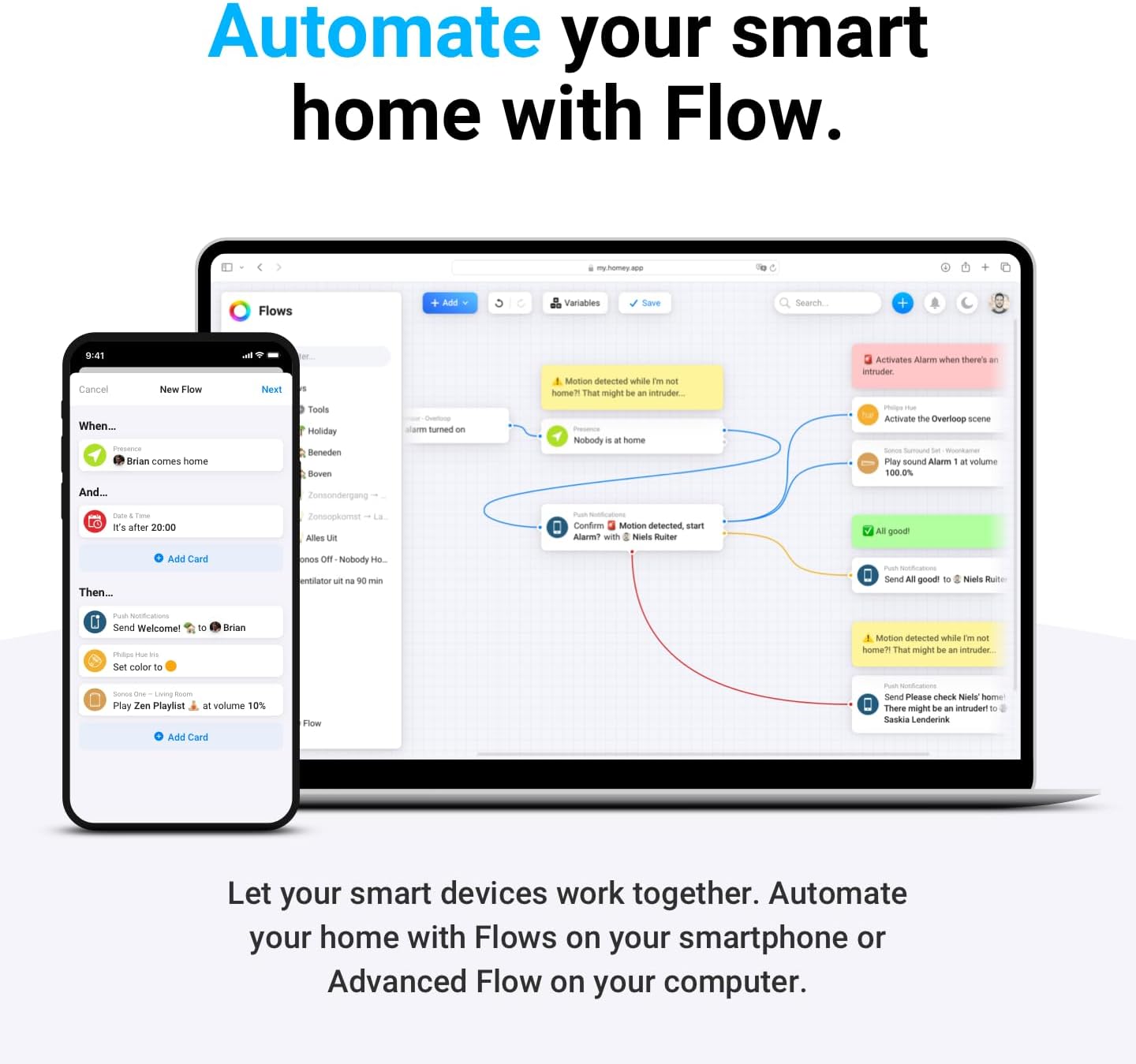
Figure 5: Automating smart home devices using Homey Flow on mobile and desktop applications.

Figure 6: Homey Pro mini's compatibility with popular voice assistants for hands-free control.
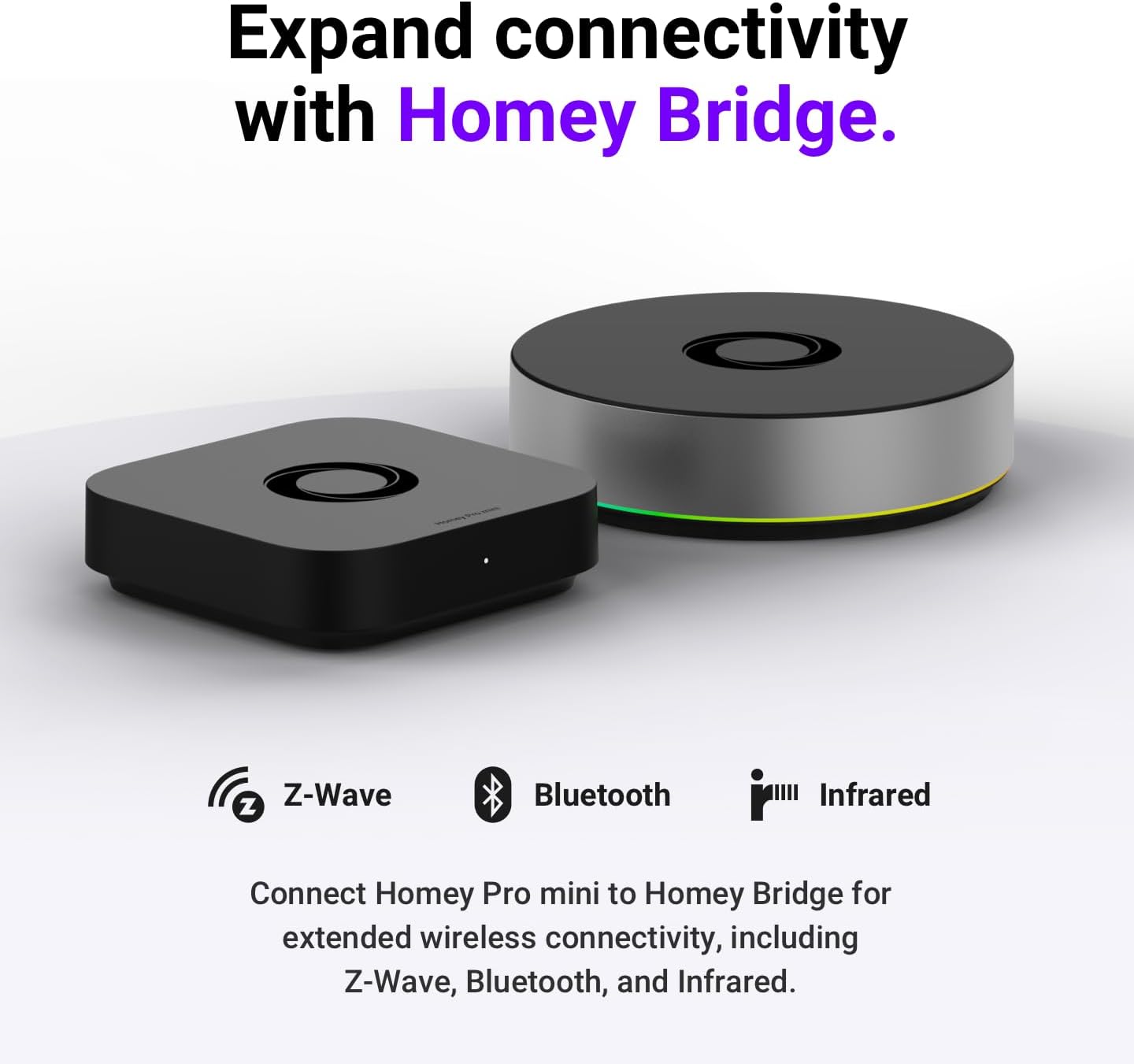
Figure 7: Expanding Homey Pro mini's connectivity with the Homey Bridge for Z-Wave, Bluetooth, and Infrared devices.
Кіраўніцтва па ўстаноўцы
Што ў скрынцы
Upon opening your Homey Pro mini package, please ensure all the following components are present:
- Homey Pro mini device
- Адаптар сілкавання
- Кабель USB-C да USB-C
- Ethernet Cable (Cat5e)
- Кіраўніцтва карыстальніка (гэты дакумент)
Пачатковая налада
- Падключэнне сілкавання: Connect the provided USB-C to USB-C cable to the Homey Pro mini and then connect it to the power adapter. Plug the power adapter into a wall outlet. The LED indicator on the Homey Pro mini will illuminate.
- Падключэнне да сеткі: Connect one end of the Ethernet Cable (Cat5e) to the Ethernet port on the Homey Pro mini and the other end to an available LAN port on your internet router or network switch.
- Download Homey App: Download the official Homey app from your smartphone's app store (available for iOS and Android).
- Стварэнне/уваход у сістэму: Open the Homey app and follow the on-screen instructions to create a new Homey account or log in with an existing one.
- Pairing Homey Pro mini: The app will guide you through the process of discovering and pairing with your new Homey Pro mini. Ensure your smartphone is connected to the same local network as your Homey Pro mini during this step.
- Першапачатковая канфігурацыя: Once paired, the app will prompt you to configure basic settings, such as your home's location and time zone.
- Усталяваць праграмы: From the Homey app, navigate to the "Apps" section to install apps for the smart devices and brands you wish to connect (e.g., Philips Hue, Sonos, etc.).
Інструкцыя па эксплуатацыі
Падключэнне разумных прылад
After installing the relevant apps for your smart devices, follow the in-app instructions to add and pair each device with your Homey Pro mini. Homey supports various protocols including Zigbee, Matter, and Thread directly. For Z-Wave, Bluetooth, and Infrared devices, a Homey Bridge (sold separately) is required.
Using Homey Flow for Automation
Homey Flow allows you to create powerful automations. Access the "Flows" section in the Homey app or desktop application. Flows are built using "When," "And," and "Then" cards:
- Калі: Triggers for the flow (e.g., "Motion detected," "Time is 7 PM," "Door opens").
- і: Conditions that must also be true for the flow to run (e.g., "It's dark outside," "Nobody is home").
- Затым: Actions Homey performs when the trigger and conditions are met (e.g., "Turn on lights," "Play music," "Send notification").
You can create simple one-tap scenes or complex multi-device automations.
Monitoring Energy with Homey Energy
The Homey Energy feature provides detailed insights into your home's energy consumption and generation. Access it via the "Energy" tab in the Homey app. You can view real-time data, historical trends, and identify opportunities to save energy by integrating energy-monitoring devices and creating energy-aware Flows.
Інтэграцыя галасавога кіравання
Homey Pro mini integrates with popular voice assistants like Amazon Alexa, Google Assistant, and Apple Siri. To enable voice control:
- Ensure your Homey Pro mini is connected to the internet.
- Open the Homey app and navigate to "Settings" > "Integrations."
- Select your preferred voice assistant and follow the instructions to link your Homey account.
- Once linked, you can use voice commands to control your devices and activate Homey Flows.
Тэхнічнае абслугоўванне
Абнаўлення праграмнага забеспячэння
Homey Pro mini receives regular software updates to improve performance, add new features, and enhance security. Ensure your device is connected to the internet to receive these updates automatically. You can check for updates manually in the Homey app under "Settings" > "System."
Уборка
To clean your Homey Pro mini, gently wipe the exterior with a soft, dry, lint-free cloth. Do not use liquid cleaners, aerosols, or abrasive materials, as these can damage the device.
Secure Backups
Regularly back up your Homey configuration to protect your settings and automations. Homey offers both local and cloud backup options. Access backup settings in the Homey app to schedule or perform manual backups. This ensures you can easily restore your smart home setup in case of an issue.
Ліквідацыю непаладак
| праблема | Магчымая прычына | Рашэнне |
|---|---|---|
| Homey Pro mini not powering on. | Адаптар сілкавання не падключаны або няспраўная разетка. | Пераканайцеся, што адаптар сілкавання надзейна падключаны да прылады і да спраўнай разеткі. Паспрабуйце іншую разетку. |
| Cannot connect to Homey Pro mini via app. | Network issue, incorrect Wi-Fi/Ethernet connection, or app glitch. |
|
| Smart device not responding. | Device not paired, out of range, or app not installed. |
|
| Flows are not executing. | Incorrect Flow logic, device offline, or conflicting automations. |
|
Тэхнічныя характарыстыкі
| Атрыбут | Дэталь |
|---|---|
| Нумар мадэлі | HOMEY-PRO-MINI-US-01 |
| Вытворца | Атом Б.В |
| Памеры (Д х Ш х У) | 3.9 х 3.9 х 1 цалі |
| Вага прадмета | 1.19 фунта |
| Колер | Чорны |
| Сувязь | Zigbee, Matter, Thread, Ethernet (Z-Wave, Bluetooth, Infrared via Homey Bridge) |
| Крыніца харчавання | Power Adapter (USB-C) |
| Уключаныя кампаненты | Homey Pro mini, Power Adapter, USB-C to USB-C cable, Ethernet Cable (Cat5e), User Manual |
| Патрабуюцца батарэі | няма |
Інфармацыя аб гарантыі
The Homey Pro mini comes with a standard manufacturer's warranty. For detailed information regarding the warranty period, coverage, and terms and conditions, please refer to the warranty card included in your product packaging or visit the official Homey webсайт. Калі ласка, захавайце пацвярджэнне пакупкі для любых гарантыйных прэтэнзій.
Падтрымка
For further assistance, technical support, or to explore additional features and integrations, please visit the official Homey support resources:
- Homey Official Webсайт: Visit the Homey Store on Amazon (for product information and links to official resources)
- Інтэрнэт-база ведаў: Access FAQs, setup guides, and troubleshooting articles.
- Форумы супольнасці: Connect with other Homey users and experts.
- Прамая падтрымка: Contact Homey customer service for personalized assistance.
Always refer to the latest information available on the official Homey website for the most up-to-date support and product details.