
1. Уводзіны
This manual provides essential information for the safe and efficient operation of your ApoloSign 32-inch FHD Smart Portable TV. Please read this manual thoroughly before using the device and retain it for future reference.
Асноўныя характарыстыкі:
- 32-inch 1080P FHD Touchscreen: Features a 1920x1080 resolution display with ten-point touch support.
- Android 15 OS & Google EDLA Certified: Provides access to the Google Play Store and popular streaming applications.
- 16(8+8)GB RAM & 128GB Storage: Ensures smooth operation and ampпрастора для праграм і медыя.
- Убудаваны акумулятар ёмістасцю 15000 мАг: Offers up to 8 hours of portable use.
- Full Swivel Rotation & Adjustable Height: Дазваляе гнутка viewing angles and easy movement.
- 8MP HD Camera & Voice Remote Control: Enhances functionality for video calls and hands-free operation.
- Wireless & Wired Casting: Supports screen projection from various devices (Android/iOS/Mac/Windows) via HDMI, USB 3.0, and USB 2.0 ports.
- Custom Widget Dashboard & AI Voice Assistant: Includes calendar widgets, digital screensavers, and Google Gemini integration.
2. Настройка
2.1 Распакоўка і кампаненты
Акуратна распакуйце ўсе прадметы з скрынкі. Пераканайцеся, што ўсе кампаненты ў наяўнасці:
- 1 x 32 Inch 1080P FHD Touchscreen Display
- 1 x 8MP HD Camera & Bluetooth Voice Remote
- 1 x Charging Base & Stand & Power Adapter
- 1 х камплект для ўстаноўкі
- 1 х Кіраўніцтва карыстальніка (гэты дакумент)
2.2 Зборка
Follow the instructions provided in the separate Installation Kit for assembling the stand and attaching the display. Ensure all connections are secure before proceeding.
2.3 Пачатковае ўключэнне і падключэнне да сеткі
- Падключыце адаптар сілкавання да зараднай базы і падключыце яго да электрычнай разеткі.
- Націсніце кнопку харчавання на прыладзе, каб уключыць яе.
- Follow the on-screen prompts to select your language and connect to a Wi-Fi network.
- Log in with your Google account to access Google services and the Play Store.
3. Інструкцыя па эксплуатацыі
3.1 Navigating the Android 15 OS
The ApoloSign Smart Portable TV runs on Android 15. Navigate using the touchscreen or the included voice remote control.
- Сэнсарны экран: Interact directly with the display by tapping, swiping, and pinching.
- Галасавое дыстанцыйнае кіраванне: Use the directional pad, selection buttons, and dedicated voice button for navigation and commands.
3.2 Кіраванне праграмамі
Access the Google Play Store to download and install your preferred applications, including streaming services like Netflix and YouTube.

Image: The ApoloSign TV showcasing its Android 15 operating system and access to the Google Play Store, with icons for various applications.
3.3 Voice Assistant (Google Gemini)
The device is preloaded with Google Gemini AI Voice Assistant. Press and hold the voice button on the remote control to activate it for instant commands, smart suggestions, and natural language interactions.
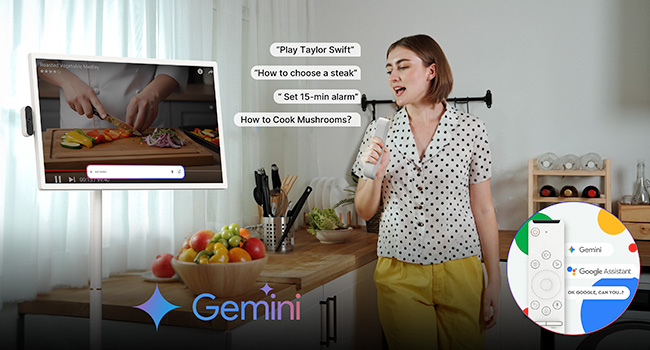
Image: A user interacting with the ApoloSign TV using voice commands, demonstrating the Google Gemini AI Voice Assistant feature in a kitchen environment.
3.4 Screen Casting and Connectivity
The ApoloSign TV supports both wireless and wired screen projection. It is compatible with Android, iOS, Mac, and Windows devices.
- Бесправадная трансляцыя: Use the built-in casting features to mirror content from your phone, tablet, or laptop.
- Правадное падключэнне: Utilize the HDMI, USB 3.0, and USB 2.0 ports for direct connections to external devices.

Image: A user playing a video game on the ApoloSign TV, demonstrating the wireless screen casting feature from a console.

Image: The ApoloSign TV displaying content from a laptop, illustrating its wireless screen casting capabilities for work or presentations.
3.5 Рэгуляваны Viewвуглавыя куты
The TV features full swivel rotation, height adjustment, tilt, and pivot capabilities for optimal viewing comfort in various settings.

Image: A visual representation of the ApoloSign TV's flexible angle adjustments, including rotation, tilt, lift, and pivot, for comfortable viewінж.
3.6 Custom Widget Dashboard & Digital Screensavers
Customize your home screen with widgets for weather, time, calendar, news, music, and to-do lists. Sync with Google/Outlook Calendar and Google Tasks. Utilize rich digital screensavers for aesthetic display when not actively in use.

Image: A user relaxing while the ApoloSign TV displays a custom widget dashboard with calendar, tasks, and other information.

Image: The ApoloSign TV screen showing various custom widgets, including Google Calendar, iCloud Calendar, and Google Tasks, for family organization.
3.7 Бацькоўскі кантроль
The device includes parental control features to manage content access and usage for children. Refer to the on-screen settings for configuration.
4. Інтэграцыя медыя
4.1 Выявы прадуктаў

Image: The ApoloSign 32-inch Smart Portable TV in a living room setting, demonstrating its full swivel rotation capability.
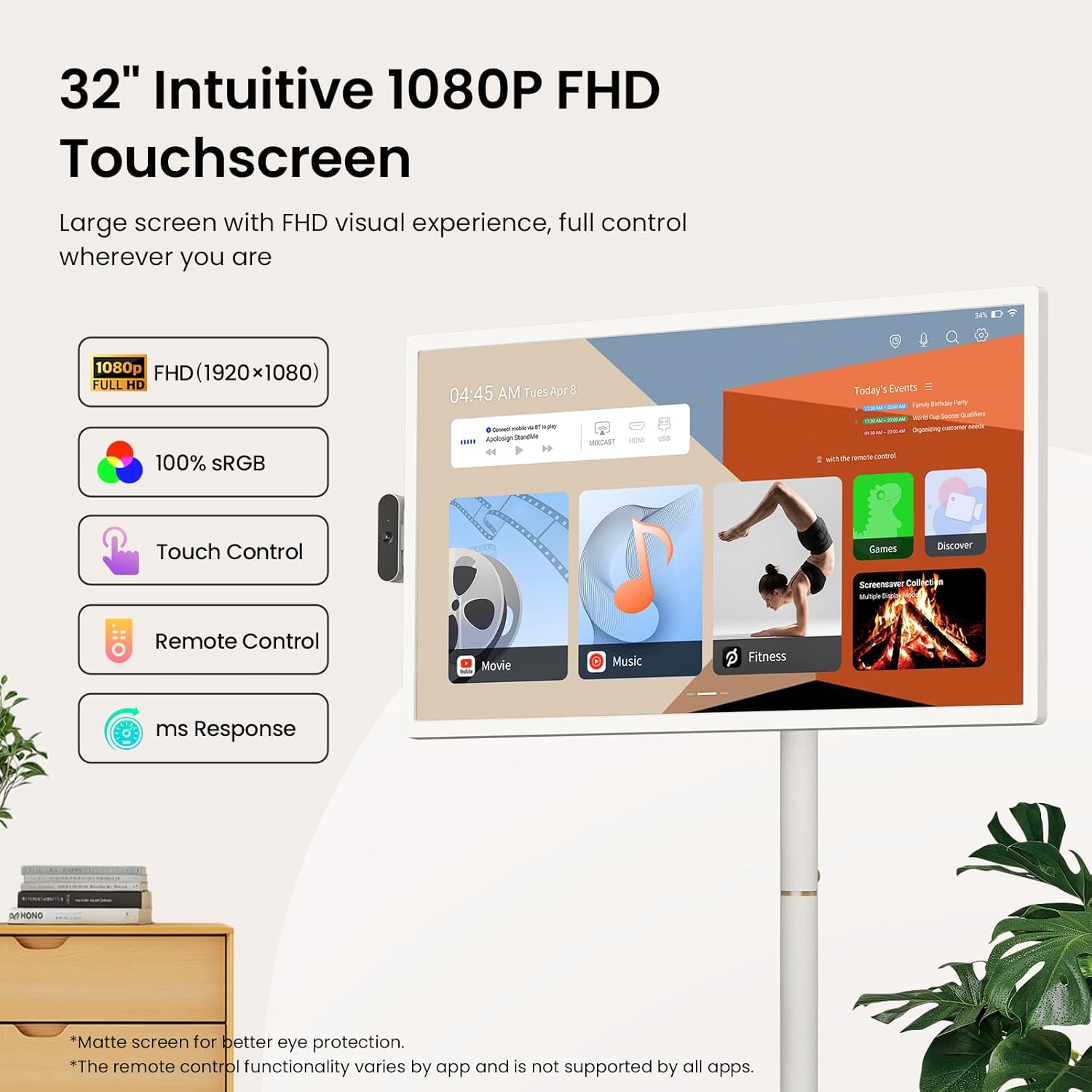
Image: A close-up of the ApoloSign 32-inch FHD Touchscreen, highlighting its 1080P resolution, 100% sRGB, touch control, remote control, and fast response time.

Image: A woman effortlessly moving the ApoloSign TV, emphasizing its wireless design with a built-in 15000mAh battery for up to 8 hours of use and quiet 360-degree rotating wheels.

Image: The ApoloSign TV presented as an all-in-one device, integrating functions of a monitor, digital calendar, Bluetooth speaker, television, and tablet.

Image: A collage showing the ApoloSign TV being used in various daily scenarios, including for makeup tutorials, cooking recipes, and yoga exercises, highlighting its versatility.
4.2 Афіцыйныя відэа пра прадукт
Video: ApoloSign 32-inch Smart Portable TV on full rolling stand. This video demonstrates the portability and full rolling stand functionality of the ApoloSign TV, showcasing its ease of movement and adjustable features.
Video: ApoloSign 32 inch Smart Portable TV, On-the-Go Entertainment. This video highlights the ApoloSign TV as a versatile entertainment solution for various locations, emphasizing its portability and smart features.
Video: Stream, Watch, Work, Enjoy - ApoloSign Portable TV Tablet. This video illustrates the multi-functional capabilities of the ApoloSign TV, suitable for streaming, watching, working, and general enjoyment.
5. Тэхнічнае абслугоўванне
5.1 Ачыстка дысплея
Каб ачысціць экран, акуратна працярыце яго мяккай тканінай без ворса. Для выдалення ўстойлівых плям злёгкуampПрацярыце тканіну вадой або растворам для чысткі экрана. Пазбягайце выкарыстання агрэсіўных хімічных рэчываў або абразіўных матэрыялаў.
5.2 Сыход за акумулятарам
The device features a built-in 15000mAh battery. For optimal battery life:
- Пазбягайце частай поўнай разрадкі акумулятара.
- Захоўвайце прыладу ў прахалодным, сухім месцы, калі яна не выкарыстоўваецца працяглы час.
- Charge the device using only the provided power adapter.
6. Выпраўленне непаладак
6.1 Агульныя праблемы і рашэнні
| выпуск | Магчымае рашэнне |
|---|---|
| Прылада не ўключаецца | Ensure the power adapter is securely connected and the device is charged. |
| Немагчыма падключыцца да Wi-Fi | Check your Wi-Fi router and network settings. Restart the device and try again. |
| Сэнсарны экран не рэагуе | Restart the device. Ensure the screen is clean and free of obstructions. |
| Пульт дыстанцыйнага кіравання не працуе | Check battery levels in the remote. Ensure there are no obstructions between the remote and the TV. Re-pair the remote if necessary. |
| Screen casting issues | Ensure both devices are on the same Wi-Fi network. Check compatibility and casting settings on both devices. |
6.2 Дадатковая дапамога
If you encounter issues not covered in this section, please refer to the support information in Section 8.
7. Тэхнічныя характарыстыкі
| Асаблівасць | Дэталь |
|---|---|
| Памеры прадукту | 16.14" Г x 28.87" Ш x 60.26" У |
| Вага прадмета | 48.2 фунта |
| Нумар мадэлі тавару | SW3299T |
| Батарэі | 1 акумулятар 12 В (у камплекце) |
| Памер экрана | 32 цалі |
| Тэхналогія адлюстравання | ВК |
| дазвол | 1080P FHD (1920x1080) |
| Частата абнаўлення | 60 Гц |
| Суадносіны бакоў | 16:9 |
| Тэхналогія падлучэння | Bluetooth 5.3, HDMI, IEEE 802.11b/g/n/a/ac/ax (Wi-Fi 6), USB 2.0 Host, USB 3.0 Host |
| Асаблівасці | 1080P FHD Touch Screen, Android 15 OS & Google Play Store Support, Bluetooth Speaker Mode, 128GB Storage, Parental Controls, Detachable Camera, Voice-activated Remote Control, Multi-angle Swivel, Height Adjustment, Movable Bracket, Wireless Screen Casting, Multiple Interfaces |
8. Гарантыя і падтрымка
8.1 Падтрымка кліентаў
ApoloSign is committed to providing continuous technical support and 24/7 customer service. For any setup questions, feature guidance, or usage issues, please reach out to ApoloSign customer service. Responses are typically provided within 24 hours with tailored solutions.
8.2 Інфармацыя аб гарантыі
This product includes a lifetime warranty. Please refer to the official ApoloSign website or contact customer service for detailed warranty terms and conditions.