
1. Уводзіны
This instruction manual provides essential information for the safe and efficient use of your ApoloSign 32-inch UHD 4K Smart Portable TV Gen2. Please read this manual thoroughly before operating the device and retain it for future reference. This portable smart TV combines a high-resolution display with smart features, offering versatile entertainment and productivity options throughout your home.

Image: The ApoloSign 32-inch Portable TV Gen2 positioned in a modern living room, showcasing its sleek design and portability.
2. Інфармацыя па бяспецы
Агульныя меры бяспекі
- Не падвяргайце прыладу ўздзеянню дажджу або вільгаці, каб пазбегнуць пажару або паражэння электрычным токам.
- Забяспечце належную вентыляцыю. Не блакуйце вентыляцыйныя адтуліны.
- Выкарыстоўвайце толькі адаптар сілкавання, які пастаўляецца з прыладай.
- Avoid placing the device on unstable surfaces.
- Не спрабуйце разбіраць або рамантаваць прыладу самастойна. Звяртайцеся да кваліфікаванага персаналу па любыя паслугі па абслугоўванні.
Бяспека акумулятара
- The device contains a built-in 15000mAh lithium-ion battery. Do not expose it to excessive heat, direct sunlight, or fire.
- Перад першым выкарыстаннем цалкам зарадзіце акумулятар.
- If the battery shows signs of swelling, leakage, or damage, discontinue use immediately and contact support.
- Утылізуйце батарэі ў адпаведнасці з мясцовымі правіламі.
3. Змесціва ўпакоўкі
Праверце наяўнасць усіх прадметаў у камплекце:
- ApoloSign 32-inch UHD 4K Smart Portable TV Gen2 Display
- Rolling Stand Base
- Stand Pole (multiple sections)
- Адаптар сілкавання
- Галасавы пульт дыстанцыйнага кіравання
- 8MP Camera Module
- Assembly Screws and Tools
- Кіраўніцтва карыстальніка (гэты дакумент)

Image: The voice remote control, a key accessory for navigating the ApoloSign TV.

Image: The detachable 8MP camera module, designed for video calls and other interactive features.
4. Прадукт скончыўсяview
The ApoloSign 32-inch UHD 4K Smart Portable TV Gen2 is a versatile device designed for flexible use across various environments. Its main components include:
- 32-inch UHD 4K Touchscreen: A large, high-resolution display with touch functionality for intuitive interaction.
- Пракатны стэнд: A sturdy base with smooth wheels for easy movement between rooms.
- Adjustable Screen Mount: Allows for height adjustment, left/right swivel, and tilt for optimal viewвуглы здымкі як у партрэтнай, так і ў альбомнай арыентацыі.
- Інтэграваная 8-мегапіксельная камера: For video conferencing and other camera-enabled applications.
- Галасавое дыстанцыйнае кіраванне: Enables hands-free operation and navigation.
- Убудаваны акумулятар ёмістасцю 15000 мАг: Provides up to 8 hours of portable use.
- Падлучэння Парты: Includes HDMI, USB 2.0, USB 3.0, Bluetooth 5.3, and Wi-Fi for various connections.
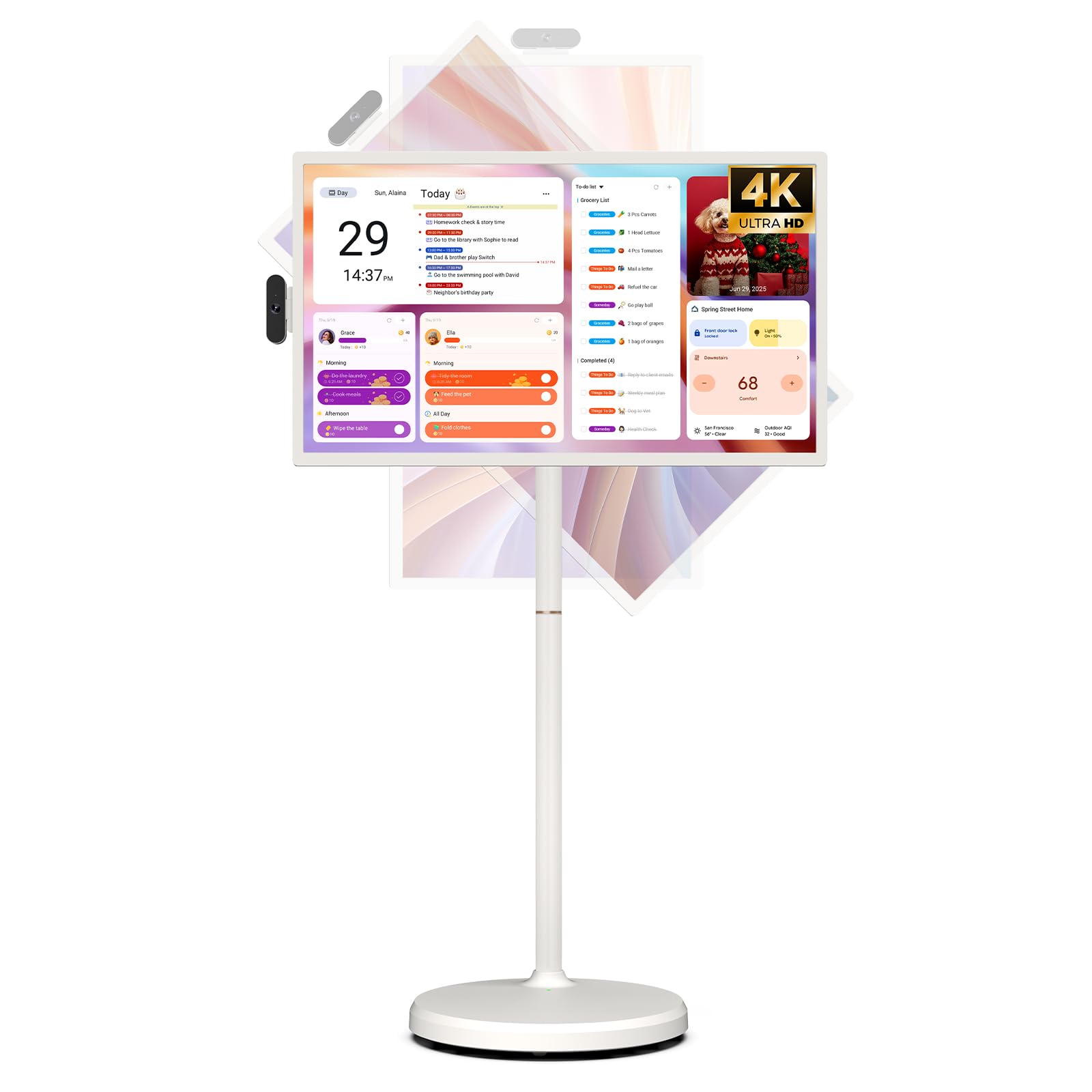
Image: The ApoloSign 32-inch UHD 4K Smart Portable TV Gen2, highlighting its large screen and mobile stand.
5. Настройка
зборка
- Распакуйце ўсе кампаненты з скрынкі.
- Attach the stand pole sections to the rolling base using the provided screws.
- Carefully mount the TV display onto the top of the assembled stand pole, ensuring it clicks securely into place.
- Connect the internal power cable from the stand to the display.
- Attach the 8MP camera module to the designated slot on top of the display.
Першапачатковае ўключэнне і падключэнне да сеткі
- Connect the power adapter to the TV and a power outlet. The device will begin charging.
- Press the power button located on the back of the display to turn on the TV.
- Выконвайце падказкі на экране, каб выбраць мову і рэгіён.
- Connect to your Wi-Fi network by selecting it from the list and entering the password.
- Sign in with your Google account to access the Google Play Store and other services.
Спалучэнне з дыстанцыйным кіраваннем
- Insert batteries into the voice remote control.
- On the TV screen, navigate to Settings > Remotes & Accessories > Add Accessory.
- Press and hold the specified pairing buttons on the remote (refer to remote's mini-guide) until the indicator light blinks.
- Select the remote control from the list on the TV screen to complete pairing.
6. Інструкцыя па эксплуатацыі
Базавая навігацыя
- Сэнсарны экран: Tap, swipe, and pinch to navigate menus, open apps, and interact with content.
- Галасавы пульт: Use the directional pad and selection buttons for menu navigation. Press the voice button to activate voice commands for searching or launching apps.
Screen Rotation and Adjustment
The screen can be rotated 90 degrees between landscape and portrait modes. It also allows for height adjustment, left/right swivel, and tilting to achieve the desired viewкут нахілу.

Image: Illustrations demonstrating the various ways the ApoloSign TV screen can be adjusted: height, tilt, and rotation.
Apps and Google Play Store
Running on a customized Android 15 OS and Google certified, you can download and install any app available on the Google Play Store. Access streaming services, social media, productivity tools, and games.

Image: The ApoloSign TV screen showing the Android 15 interface with icons for popular apps like Netflix, YouTube, Spotify, and TikTok.
Wireless and Wired Casting
Share content from your mobile phone, tablet, or laptop to the TV screen.
- Бесправадная трансляцыя: Use the built-in MixCast feature or other compatible casting protocols. Ensure your device and the TV are on the same Wi-Fi network.
- Wired Casting: Connect external devices like gaming consoles or laptops via the HDMI port. The TV supports 4K HDMI output.
Video: A demonstration of how to screen mirror a mobile phone, tablet, or laptop to the ApoloSign Smart Portable TV.
Calendar Widget and Screensavers
The interactive desktop calendar widget syncs with Google Calendar, Outlook, and Google Tasks to help manage your schedule. Utilize dynamic screensavers to transform the TV into a digital clock, photo frame, or market billboard.

Image: The ApoloSign TV screen showcasing its digital calendar feature, displaying daily schedules and events.

Image: The ApoloSign TV screen demonstrating different digital screensaver options, including a photo display and a music player interface.
Выкарыстанне камеры
The integrated 8MP camera is ideal for video calls and conferences. Ensure the camera is correctly installed and facing the desired direction.
7. Тэхнічнае абслугоўванне
Уборка
- Перад чысткай заўсёды адключайце прыладу ад сеткі.
- Выкарыстоўвайце мяккую безворсовую тканіну, злёгку dampПрамыйце дысплей вадой або ачышчальнікам для экранаў. Пазбягайце выкарыстання агрэсіўных хімічных рэчываў.
- Wipe the body of the TV and stand with a dry, soft cloth.
Сыход за батарэяй
- Для аптымальнага тэрміну службы батарэі пазбягайце частай поўнай разрадкі батарэі.
- Захоўвайце прыладу ў прахалодным, сухім месцы, калі яна не выкарыстоўваецца працяглы час.
- Перыядычна зараджайце акумулятар, калі ён захоўваўся працяглы час, каб пазбегнуць глыбокага разраду.
Абнаўлення праграмнага забеспячэння
Regularly check for and install software updates to ensure optimal performance and access to the latest features. Updates can usually be found in the device's settings menu.
8. Выпраўленне непаладак
- Device not powering on or shutting off abruptly:
Ensure the power adapter is securely connected and the battery is charged. If the issue persists, perform a soft reset by holding the power button for 10-15 seconds. If problems continue, contact customer support. - Remote control not responding or selective functionality:
Check the remote's batteries and replace if necessary. Ensure the remote is paired correctly (refer to Section 5). If the remote is still unresponsive, try re-pairing it. - Праблемы з падключэннем да Wi-Fi:
Verify that your Wi-Fi router is working correctly. Restart the TV and your router. Ensure the TV is within range of your Wi-Fi signal. - Люстраное адлюстраванне экрана не працуе:
Confirm that both the TV and the source device (phone, tablet, laptop) are connected to the same Wi-Fi network. Ensure the casting feature is activated on both devices. - Poor picture or sound quality:
For streaming content, check your internet connection speed. For wired connections (HDMI), ensure cables are securely connected and undamaged. Adjust display settings (resolution, brightness) as needed.
9. Тэхнічныя характарыстыкі
| Асаблівасць | Дэталь |
|---|---|
| Назва мадэлі | SW3299T-4K |
| Памер экрана | 32 цалі |
| дазвол | 4K UHD 2160p (3840x2160 Pixels) |
| Тэхналогія адлюстравання | ВК |
| Частата абнаўлення | 60 Гц |
| Аперацыйная сістэма | Android 15 |
| АЗП | 16GB (8+8GB) |
| Унутраная памяць | 256 ГБ |
| Ёмістасць батарэі | 15000mAh (up to 8 hours runtime) |
| Камера | 8 МП |
| Сувязь | Bluetooth 5.3, Wi-Fi |
| Парты | 1x HDMI, 1x USB 2.0, 1x USB 3.0 |
| Апісанне дынаміка | 2.1-канальныя калонкі |
| Метад кантролю | Touch, Voice Remote |
| Памеры прадукту | 16.14" Г x 28.87" Ш x 60.26" У |
10. Гарантыя і падтрымка
Гарантыя вытворцы
This ApoloSign product is covered by a 1 гады гарантыі ад вытворцы з даты пакупкі. Гэтая гарантыя распаўсюджваецца на дэфекты матэрыялаў і вырабу пры нармальным выкарыстанні. Калі ласка, захавайце пацвярджэнне пакупкі для прэтэнзій па гарантыі.
Падтрымка кліентаў
For technical assistance, troubleshooting, or warranty inquiries, please contact ApoloSign Official customer support. They offer 24/7 fast support to address any issues you may encounter.
Для атрымання дадатковай інфармацыі наведайце ApoloSign Store on Amazon.