
Уводзіны
This manual provides essential information for the setup, operation, maintenance, and troubleshooting of your Protectli Vault Pro VP2430-4 Port Micro Appliance/Mini PC. Please read these instructions carefully before using the device to ensure proper functionality and longevity.
Настройка
Follow these steps to set up your Protectli Vault Pro VP2430-4.
1. Распакоўка і праверка кампанентаў
Carefully unpack all components from the box. Verify that all items are present:
- Protectli Vault Pro VP2430-4 unit
- Адаптар харчавання і кабель
- Mounting bracket and screws (if included)
- USB Type-C console cable
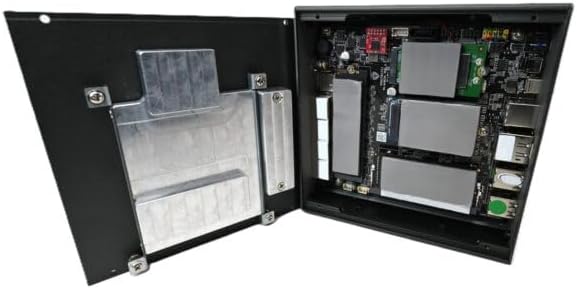
Image: Included accessories, including the power adapter, mounting bracket, screws, and USB console cable.
2. Фізічныя злучэнні
Connect the necessary cables to the device ports. Refer to the image below for port identification.

Image: Rear panel of the Protectli Vault Pro VP2430-4, displaying various ports including USB, HDMI, DisplayPort, and USB-C console port.
- Магутнасць: Connect the power adapter to the DC 12V input port and then to a power outlet.
- Сетка: Connect Ethernet cables to the 2.5G NIC ports (labeled 1-4) as required for your network configuration.
- Дысплей: If a display is needed for initial setup or monitoring, connect a monitor to the HDMI or DisplayPort output.
- USB прылады: Connect any necessary USB peripherals (keyboard, mouse) to the USB 2.0 or USB 3.2 Type C ports.
- Кансоль: For serial console access, connect the provided USB Type-C console cable to the console port and your computer.
3. Першы запуск
After all connections are made, press the power button located on the front panel. The device will power on. Since no operating system is pre-installed, you will need to install your preferred firewall or operating system software.
Інструкцыя па эксплуатацыі
The Protectli Vault Pro VP2430-4 is designed as a micro appliance for network security and mini PC applications. It does not come with a pre-installed operating system, allowing for maximum flexibility.
Сумяшчальнасць праграмнага забеспячэння
This hardware is tested for compatibility with various open-source firewall software solutions, including OPNsense, pfSense, and VyOS. It also supports other popular open-source software solutions. The device ships with AMI BIOS.
Тыповыя сцэнарыі выкарыстання
- Firewall/Router: Utilize the multiple 2.5G NICs to create a robust and secure network gateway.
- Міні-ПК: Install a lightweight operating system for various computing tasks.
- Віртуалізацыя: Deploy hypervisors for running virtual machines.
Тэхнічнае абслугоўванне
Рэгулярнае тэхнічнае абслугоўванне забяспечвае аптымальную прадукцыйнасць і даўгавечнасць вашай прылады.
Уборка
To clean the exterior of the device, use a soft, dry cloth. Avoid using liquid cleaners or solvents, as these can damage the finish or internal components. Ensure the device is powered off and unplugged before cleaning.
Абнаўленне прашыўкі
Periodically check the Protectli website for BIOS/firmware updates. Updating the firmware can improve stability, performance, and security. Follow the instructions provided with the firmware update package carefully.
Hardware Upgrades (RAM/Storage)
The Protectli Vault Pro VP2430-4 supports upgrades for RAM and M.2 SATA SSD storage. To perform an upgrade:
- Выключыце прыладу і адключыце ўсе кабелі.
- Carefully remove the screws securing the bottom cover.
- Gently lift the cover to expose the internal components.

Выява: Унутраная view of the Protectli Vault Pro VP2430-4, showing the motherboard, RAM slots, and M.2 SSD slots.
Locate the SODIMM DDR5 RAM slots and M.2 SATA SSD slot. Install or replace components according to their respective instructions. Ensure components are seated correctly before reattaching the cover and screws.
Ліквідацыю непаладак
У гэтым раздзеле разглядаюцца распаўсюджаныя праблемы, з якімі вы можаце сутыкнуцца.
Няма сілы
- Пераканайцеся, што адаптар сілкавання надзейна падключаны да прылады і да спраўнай разеткі.
- Праверце працаздольнасць разеткі, падключыўшы да яе іншую прыладу.
- Праверце адаптар сілкавання на наяўнасць бачных пашкоджанняў.
Няма вываду дысплея
- Confirm the monitor is powered on and correctly connected to the device's HDMI or DisplayPort.
- Паспрабуйце іншы кабель дысплея або манітор.
- Пераканайцеся, што на маніторы выбрана правільная крыніца ўваходнага сігналу.
Праблемы з падключэннем да сеткі
- Check that Ethernet cables are securely connected to both the device and your network equipment.
- Verify the status indicator lights on the Ethernet ports.
- Ensure your installed operating system or firewall software is correctly configured for network interfaces.
Тэхнічныя характарыстыкі
| мадэль | ВП2430 |
| працэсар | Intel N150 Quad Core (up to 3.6GHz, 6MB Cache) |
| АЗП | 32 ГБ аператыўнай памяці SO-DIMM DDR5 |
| Захоўванне | 1000GB NVMe SSD, 32GB eMMC on-board |
| Сеткавыя інтэрфейсы | 4x Intel I226-V 2.5G NICs |
| Парты USB | 2x USB 3.2 Type C with DisplayPort, 4x USB 2.0 Type A, 1x USB Type C Console |
| Відэавыхад | 1x HDMI, 1x DisplayPort (via USB-C) |
| Графічны супрацэсар | Intel UHD Graphics 630 |
| Апаратная платформа | PC |
| Памеры (ДхШхВ) | 5.67 х 5.63 х 2.17 цалі |
| Вага | 4.1 фунта |
| Крыніца харчавання | DC |
| Батарэі | Патрабуецца 1 батарэя CR2 (у камплекце) |
Гарантыя і падтрымка
Інфармацыя аб гарантыі
Your Protectli Vault Pro VP2430-4 comes with a 30-day money-back guarantee. For specific warranty terms and conditions, please refer to the official Protectli webсайт або звярніцеся ў службу падтрымкі кліентаў.
Падтрымка кліентаў
Protectli offers US-based customer support to assist you with any questions or issues. Our dedicated team is available to provide technical assistance and guidance.
Каб атрымаць падтрымку, наведайце Protectli Store or refer to the contact information provided with your product documentation.