
Element Element 2023
Інструкцыя па эксплуатацыі тэлевізара Element 43" без рамак 4K UHD HDR XUMO
Model: Element 2023
1. Уводзіны
This manual provides essential information for setting up, operating, and maintaining your Element 43-inch Frameless 4K UHD HDR XUMO TV. Please read it thoroughly before using your television to ensure proper functionality and safety.
The Element XUMO TV offers a breathtaking viewing experience with its 4K Ultra HD resolution, delivering clear and detailed images. Enhanced color and contrast are provided by Dolby Vision and HDR technology, ensuring an immersive experience even in dark scenes. Dolby Audio contributes to superior sound quality for movies and games. A 120Hz effective refresh rate ensures smooth motion during fast-paced content.

Выява 1.1: Спераду view of the Element 43" XUMO TV.
2. Што ў скрынцы
Калі ласка, праверце змесціва вашай упакоўкі, каб пераканацца ў наяўнасці ўсіх прадметаў:
- 1 Element Xumo TV 43"
- 1 Xumo TV remote control (batteries included)
- 1 Кароткае кіраўніцтва
- 1 TV stand + hardware
3. Настройка
3.1 Распакаванне
- Carefully remove the TV from its packaging. It is recommended to have two people for this step due to the size and weight of the television.
- Пакладзеце тэлевізар экранам уніз на мяккую, роўную паверхню, каб пазбегнуць драпін.
- Зніміце ўсе ахоўныя плёнкі і ўпаковачныя матэрыялы.
3.2 Прымацаванне падстаўкі
Каб прымацаваць падстаўку для тэлевізара:
- Вызначце левую і правую ножкі стойкі.
- Сумясціце кожную ножку падстаўкі з адпаведнымі адтулінамі для шруб у ніжняй частцы тэлевізара.
- Secure the stand legs using the provided hardware (screws). Do not overtighten.
- Асцярожна падніміце тэлевізар у вертыкальнае становішча на ўстойлівай, роўнай паверхні.
3.3 Падключэнне перыферыйных прылад
Connect your external devices (e.g., cable box, gaming console, Blu-ray player) to the appropriate ports on the back of the TV. Refer to the Quick Start Guide for port locations.
3.4 Першапачатковае ўключэнне
- Падключыце шнур харчавання да тэлевізара, а затым да разеткі.
- Націсніце кнопку харчавання на пульце дыстанцыйнага кіравання або на самым тэлевізары.
- Выконвайце інструкцыі на экране, каб завяршыць пачатковую наладу, у тым ліку падключэнне да сеткі і пошук каналаў.
4. Інструкцыя па эксплуатацыі
4.1 Функцыі дыстанцыйнага кіравання
The included XUMO TV remote control allows you to navigate the TV's features. It includes an advanced voice remote function for easy content search.
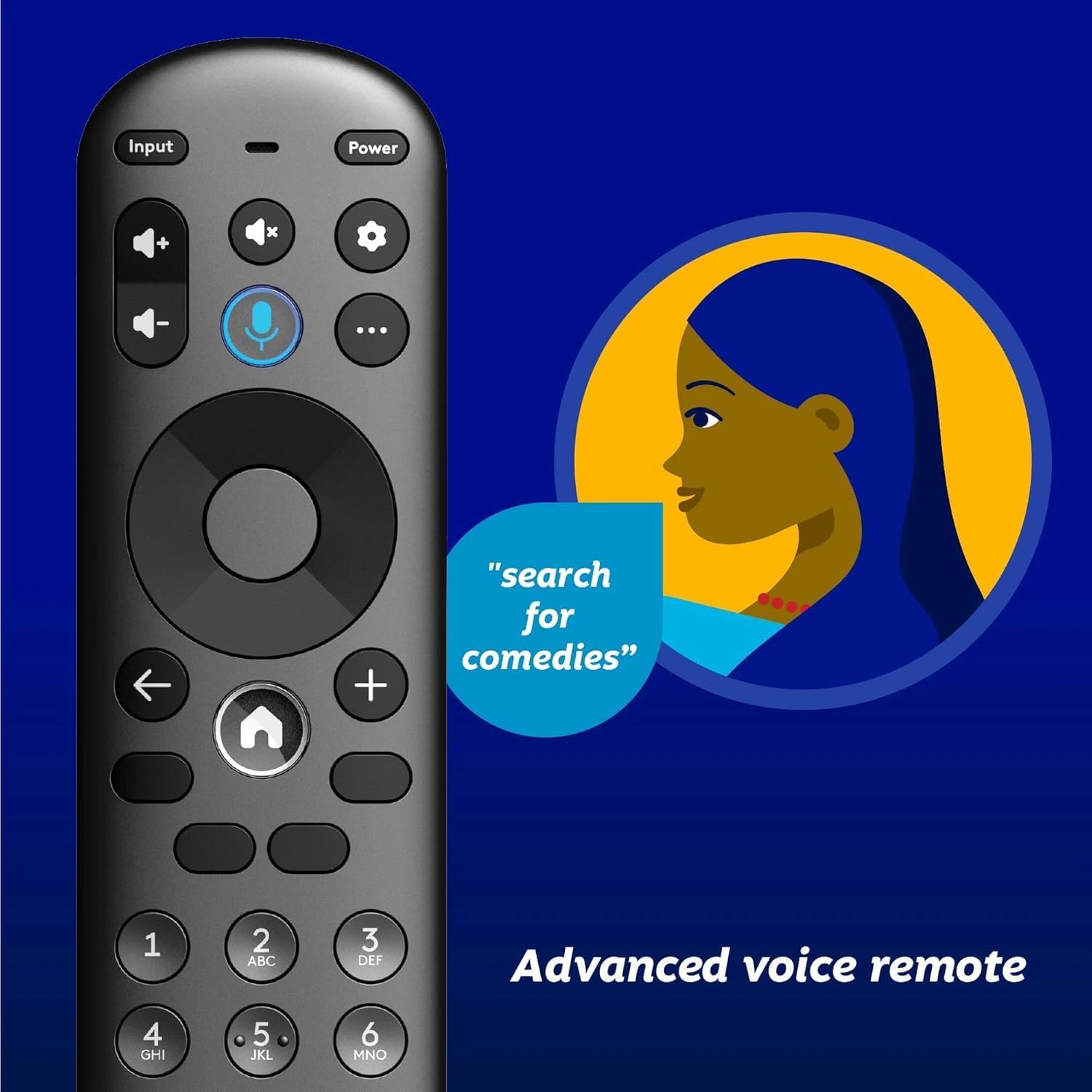
Image 4.1: Element XUMO TV advanced voice remote control.
- Магутнасць: Уключае або выключае тэлевізар.
- Увод: Выбірае крыніцу ўваходнага сігналу (HDMI, AV і г.д.).
- Гукавая кнопка: Activates voice commands for searching content or controlling the TV.
- Навігацыйная панэль: Выкарыстоўваецца для перамяшчэння па меню і выбару опцый.
- Кнопка дадому: Returns to the XUMO TV home screen.
- Гучнасць +/-: Рэгулюе ўзровень гучнасці.
- Канал +/-: Змяняе тэлеканалы.
4.2 Smart TV Features (XUMO)
Your Element TV features a built-in XUMO TV experience, providing access to over 250 pre-loaded apps and streaming services.

Image 4.2: XUMO TV smart interface with streaming applications.
- Праграмы для струменевай перадачы: Access thousands of movies, TV shows, and music from platforms like Netflix, YouTube, Disney+, Prime Video, Peacock, and more.
- Каналы ў прамым эфіры: Explore over 750 free live channels, including news, sports, and kids' programming, from Xumo Play, Tubi, Pluto TV, and others.
- Персаналізаваны кантэнт: The XUMO interface is designed to help you stream easily, bringing together content in one simple view.
4.3 Падключэнне
- Wi-Fi: Падключыцеся да хатняй бесправадной сеткі для доступу ў Інтэрнэт і струменевай перадачы.
- Bluetooth: Easily pair your TV with compatible Bluetooth devices such as speakers, headphones, or game controllers.
- Apple AirPlay і Home: Mirror your smartphone, iPad, or Mac screen to the TV, stream media, and control your TV directly from Apple devices.
5. Тэхнічнае абслугоўванне
5.1 Ачыстка экрана
- Выключыце тэлевізар і адключыце яго ад электрычнай разеткі.
- Акуратна працярыце экран мяккай, сухой тканінай без ворса.
- Для ўстойлівых плям злёгку пачысціцеampпрацярыце тканіну вадой або спецыяльным сродкам для чысткі экранаў (не распыляйце непасрэдна на экран).
- Пазбягайце выкарыстання агрэсіўных хімікатаў, абразіўных сродкаў або ачышчальнікаў на аснове спірту.
5.2 Агульны догляд
- Трымайце тэлевізар далей ад прамых сонечных прамянёў, крыніц цяпла і празмернай колькасці пылу.
- Забяспечце належную вентыляцыю вакол тэлевізара, каб прадухіліць перагрэў.
- Не стаўце цяжкія прадметы на тэлевізар.
6. Выпраўленне непаладак
Калі ў вас узніклі праблемы з тэлевізарам, звярніцеся да наступных распаўсюджаных праблем і іх рашэнняў:
- Няма харчавання:
- Пераканайцеся, што шнур харчавання надзейна падключаны як да тэлевізара, так і да спраўнай электрычнай разеткі.
- Праверце працаздольнасць разеткі, падключыўшы да яе іншую прыладу.
- Паспрабуйце націснуць кнопку харчавання на самым тэлевізары, а не толькі на пульце дыстанцыйнага кіравання.
- No Picture, But Has Sound:
- Праверце, ці выбрана правільная крыніца ўваходнага сігналу (напрыклад, HDMI 1, AV).
- Праверце ўсе кабельныя злучэнні паміж тэлевізарам і знешнімі прыладамі.
- Перазагрузіце тэлевізар і ўсе падлучаныя прылады.
- No Sound, But Has Picture:
- Праверце ўзровень гучнасці і пераканайцеся, што гук тэлевізара не выключаны.
- Калі выкарыстоўваюцца знешнія дынамікі, пераканайцеся, што яны правільна падключаны і ўключаны.
- Праверце налады аўдыёвыхаду ў меню тэлевізара.
- Пульт дыстанцыйнага кіравання не працуе:
- Замяніце батарэйкі ў пульце дыстанцыйнага кіравання.
- Пераканайцеся, што паміж пультам дыстанцыйнага кіравання і ІЧ-датчыкам тэлевізара няма перашкод.
- Re-pair the remote if it's a Bluetooth remote (refer to the Quick Start Guide for pairing instructions).
- Праблемы з падключэннем да сеткі:
- Перазагрузіце Wi-Fi-роўтар і мадэм.
- Check the Wi-Fi settings on the TV to ensure it's connected to the correct network.
- If possible, try connecting the TV to the internet via an Ethernet cable.
7. Тэхнічныя характарыстыкі
Key technical specifications for the Element 43" Frameless 4K UHD HDR XUMO TV:
| Асаблівасць | Апісанне |
|---|---|
| Фірмовае найменне | элемент |
| Назва мадэлі | Элемент 2023 |
| Памер экрана | 43 цалі (110 см) |
| Тэхналогія адлюстравання | святлодыёд |
| дазвол | 4K Ultra HD |
| Асаблівасці | 4K High Definition, HDR (High Dynamic Range), Vibrant Colors, 60 Hz, Dolby Vision, HDR10+ |
| Эфектыўная частата абнаўлення | 120 Гц |
| Аўдыётэхналогія | Dolby Audio |
| Падтрымліваюцца інтэрнэт-сэрвісы | Netflix, Prime Video, Max, Disney Plus, YouTube TV, Paramount+, Apple TV+, Crunchyroll, Xumo Play, Tubi, Pluto TV |
| Тэхналогія падлучэння | Wired, Wireless (Wi-Fi, Bluetooth, Apple AirPlay) |
| Суадносіны бакоў | 16:9 |
| Вага прадмета | 22 фунта |
| Памеры прадукту | 3.3 х 37 х 225 цалі |
7.1 Функцыі якасці выявы

Image 7.1: Dolby Vision technology enhances highlights and darks for superior contrast.

Image 7.2: 120Hz Effective Refresh Rate for smooth motion.

Image 7.3: 4K resolution delivers vivid colors and remarkable detail.
8. Гарантыя і падтрымка
This product is an Amazon Renewed item. Amazon Renewed products are backed by the Amazon Renewed Guarantee. This means your purchase is eligible for a replacement or refund within 90 days of receipt if it does not work as expected.
For specific warranty details or support inquiries, please refer to the documentation provided with your Amazon Renewed purchase or visit the Amazon Renewed support page.
Ask a question about this manual
Ask about setup, troubleshooting, compatibility, parts, safety, or missing instructions. Manuals+ will review the question and use this page’s manual context to help answer it.