
Infinity DM 56
Кіраўніцтва карыстальніка смарт-гадзінніка Infinity DM56 Sport
Мадэль: DM 56
1. Уводзіны
Thank you for choosing the Infiniity DM56 Sport Smartwatch. This device is designed to enhance your active lifestyle with advanced fitness tracking, health monitoring, and smart connectivity features. Equipped with a vibrant 1.43-inch AMOLED display, built-in GPS, and comprehensive health sensors, the DM56 is your reliable companion for both daily wear and intense workouts.
This manual provides detailed instructions on how to set up, operate, maintain, and troubleshoot your smartwatch to ensure optimal performance and longevity.

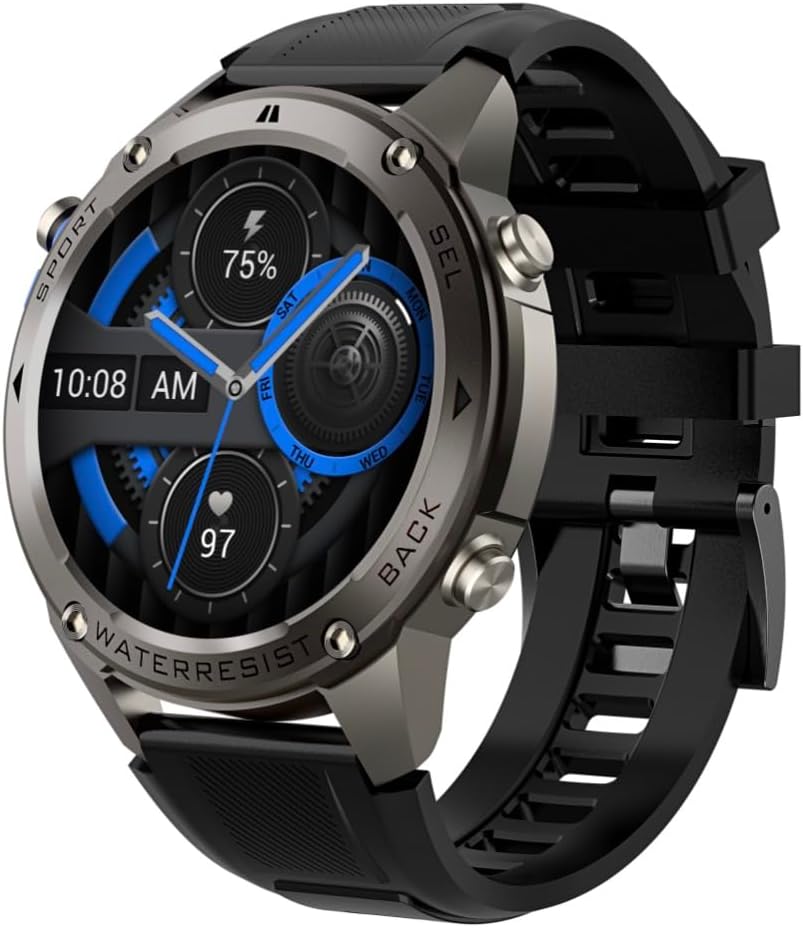
Выява 1.1: Спераду view of the Infiniity DM56 Sport Smartwatch, showcasing its round AMOLED display and rugged design.
2. Што ў скрынцы
Upon opening your Infiniity DM56 Sport Smartwatch package, please ensure all the following items are present:
- Infiniity DM56 Sport Smartwatch
- Зарадны кабель
- Кіраўніцтва карыстальніка (гэты дакумент)
3. Настройка
3.1 Зарадка разумнага гадзінніка
Before first use, fully charge your DM56 smartwatch. A full charge typically takes approximately 2 hours.
- Connect the magnetic charging cable to the charging contacts on the back of the smartwatch. Ensure the pins align correctly.
- Падключыце USB-кабель да стандартнага USB-адаптара сілкавання (рэкамендуецца 5 В/1 А) або да USB-порта кампутара.
- The watch display will show a charging indicator. Once fully charged, the indicator will change or disappear.
3.2 Спалучэнне са смартфонам
To unlock the full potential of your DM56 smartwatch, you need to pair it with your smartphone via Bluetooth using the dedicated companion application. The DM56 is compatible with Android 5.0+ and iOS 11 and above.
- Спампаваць прыкладанне: Пошук the official Infiniity companion app (refer to the packaging or quick start guide for the exact app name) on the Google Play Store (for Android) or Apple App Store (for iOS) and install it.
- Уключыць Bluetooth: Пераканайцеся, што Bluetooth уключаны на вашым смартфоне.
- Адкрыйце прыкладанне: Launch the companion app on your smartphone and follow the on-screen instructions to create an account or log in.
- Дадаць прыладу: Within the app, navigate to the 'Add Device' or 'Pair Device' section. The app will search for available smartwatches.
- Select DM56: Select 'DM56' from the list of found devices. A pairing request may appear on both your phone and the watch. Confirm the pairing on both devices.
- Поўная ўстаноўка: Once paired, the app will guide you through initial settings, such as profile information, notification permissions, and data synchronization.
4. Кіраванне разумным гадзіннікам
4.1 Асноўная навігацыя
The DM56 features a responsive touchscreen and physical buttons for intuitive control.
- Сэнсарны экран: Правядзіце пальцам уверх, уніз, улева або ўправа, каб перамяшчацца па меню і апавяшчэннях. Націсніце, каб выбраць элементы.
- Фізічныя кнопкі: The watch has multiple buttons, typically labeled 'SPORT', 'SEL', 'BACK', and a dedicated 'GPS' button. Their functions may vary depending on the current screen or mode.
Малюнак 4.1: Збоку view of the Infiniity DM56 Sport Smartwatch, highlighting the physical control buttons.
4.2 Функцыі дысплея
The 1.43-inch AMOLED display offers vibrant colors and deep blacks with a resolution of 466x466 pixels.
- Заўсёды ўключаны дысплей: The DM56 supports Always-On Display functionality, allowing you to see the time and essential information at a glance without needing to raise your wrist or press a button. This feature can be configured in the watch settings.

Image 4.2: The Infiniity DM56 Sport Smartwatch display, showcasing a typical watch face with various data points.
4.3 Built-in GPS & Compass
The DM56 features dual-frequency GPS (L1+L5) and supports multiple satellite systems (GPS, GLONASS, BDS, Galileo, NAVIC, QZSS) for precise outdoor tracking. A built-in compass further aids navigation.
- GPS адсочванне: When starting an outdoor activity (e.g., running, cycling), the watch will automatically attempt to acquire a GPS signal. Ensure you are in an open area for faster signal acquisition. Your route, distance, and pace will be recorded.
- компас: Access the compass feature from the watch's menu to get real-time directional information.

Image 4.3: The Infiniity DM56 Sport Smartwatch from an angle, highlighting the dedicated GPS button on the side.

Малюнак 4.4: Крупны план view of the GPS button on the Infiniity DM56 Sport Smartwatch, indicating its function.
4.4 All-Day Health Monitoring
The DM56 is equipped with the VC30F sensor for continuous health monitoring.
- Маніторынг сардэчнага рытму: Track your heart rate in real-time throughout the day. View ваш бягучы пульс на цыферблаце гадзінніка або ў спецыяльным дадатку для адсочвання пульса.
- Маніторынг кіслароду ў крыві (SpO2): Вымерайце ўзровень насычэння крыві кіслародам.
- Адсочванне сну: The watch automatically monitors your sleep patterns, including deep sleep, light sleep, and awake times. View падрабязны аналіз сну ў суправаджальным дадатку.
- Адсочванне стрэсу: Сачыце за ўзроўнем стрэсу на працягу дня.
- Шагомер: Counts your daily steps, distance, and estimated calories burned.
Note: The Infiniity DM56 Smartwatch is NOT A MEDICAL DEVICE. All health monitoring data is for reference only and should not be used for medical diagnosis or treatment.
4.5 спартыўных рэжымаў
The DM56 offers over 170 customizable sports modes, with 14 built-in modes such as outdoor running, cycling, and swimming. You can add up to 10 additional modes manually via the companion app.
- Пачатак дзейнасці: Navigate to the 'Workout' or 'Sports' menu on the watch, select your desired activity, and tap to start.
- Падчас дзейнасці: The watch will display real-time metrics such as duration, distance, heart rate, and calories burned.
- Ending Activity: Swipe or press the designated button to pause or end the activity. Your workout data will be saved and synchronized with the app.
4.6 Smart Notifications & Calls
Once paired with your smartphone, the DM56 can receive notifications and handle calls directly on your wrist.
- Апавяшчэнні: Receive alerts for incoming calls, SMS messages, and app notifications (e.g., social media, email). Configure which app notifications you want to receive in the companion app.
- Make/Answer Call: The DM56 allows you to make and answer calls directly from the watch, utilizing its built-in microphone and speaker. Ensure the watch is connected to your phone via Bluetooth.
5. Тэхнічнае абслугоўванне
5.1 Рэйтынг воданепранікальнасці
The DM56 has a 5ATM waterproof rating, meaning it can withstand water pressures equivalent to a depth of 50 meters. This makes it suitable for swimming, showering, and other water-based activities. However, it is not recommended for diving or high-pressure water activities.
- Avoid exposing the watch to hot water, steam, or strong detergents.
- Пасля кантакту з салёнай вадой прамыйце гадзіннік прэснай вадой і старанна высушыце.
5.2 Чыстка і догляд
Каб захаваць знешні выгляд і функцыянальнасць вашага разумнага гадзінніка:
- Рэгулярна чысціце корпус гадзінніка і раменьчык мяккай губкайamp тканіна.
- Перад зарадкай пераканайцеся, што кантакты зарадкі на задняй панэлі гадзінніка чыстыя і сухія.
- Пазбягайце выкарыстання абразіўных ачышчальнікаў або растваральнікаў.
5.3 Аптымізацыя тэрміну службы батарэі
The DM56 is powered by a 500mAh high-voltage battery, offering extended usage. To maximize battery life:
- Adjust screen brightness to a lower level.
- Абмяжуйце выкарыстанне пастаянна ўключанага дысплея, калі гэта не неабходна.
- Адключыце непатрэбныя апавяшчэнні.
- Адключыце бесперапынны маніторынг пульса, калі ён не патрэбны 24/7.
6. Выпраўленне непаладак
If you encounter issues with your Infiniity DM56 smartwatch, try the following common solutions:
- Гадзіннік не ўключаецца: Пераканайцеся, што гадзіннік цалкам зараджаны. Падключыце яго да зараднай прылады і пачакайце некалькі хвілін, перш чым спрабаваць зноў уключыць.
- Немагчыма спалучыць з тэлефонам:
- Пераканайцеся, што Bluetooth уключаны на вашым тэлефоне і гадзінніку.
- Пераканайцеся, што гадзіннік знаходзіцца ў зоне дзеяння Bluetooth вашага тэлефона.
- Перазагрузіце і гадзіннік, і тэлефон.
- Ачысціце кэш Bluetooth на тэлефоне (Android) або забудзьце прыладу і зноў падключыце яе.
- Пераканайцеся, што суправаджальнае прыкладанне абноўлена да апошняй версіі.
- Недакладныя дадзеныя пра здароўе:
- Пераканайцеся, што гадзіннік шчыльна прылягае да запясця, не занадта туга і не занадта свабодна.
- Ачысціце датчык на задняй панэлі гадзінніка.
- Note that environmental factors and individual physiology can affect readings. Remember, it is not a medical device.
- Апавяшчэнні не атрыманы:
- Праверце налады апавяшчэнняў у спадарожнай праграме.
- Ensure the app has necessary permissions on your phone (e.g., notification access).
- Verify that the watch is connected to your phone.
- Кароткі тэрмін службы батарэі: Глядзіце раздзел 5.3 для атрымання парад па аптымізацыі батарэі.
Калі пасля выканання гэтых крокаў праблема не знікне, звярніцеся ў службу падтрымкі кліентаў для атрымання дадатковай дапамогі.
7. Тэхнічныя характарыстыкі
| Асаблівасць | Спецыфікацыя |
|---|---|
| Нумар мадэлі | DM 56 |
| Дысплей | 1.43-inch AMOLED, 466x466 pixels |
| Датчыкі | Heart Rate (VC30F), Accelerometer (STK8321), Magnetometer (Compass), Barometer+Altitude (SPL07-03) |
| Сувязь | Bluetooth 5.3 |
| Ёмістасць батарэі | 500 мАг |
| Воданепранікальны ўзровень | 5АТМ |
| Сумяшчальнасць | Android 5.0+ and iOS 11 and above |
| Вага прадмета | 3 унцыі |
| Памеры ўпакоўкі | 4.25 х 4.25 х 2.8 цалі |
| Аперацыйная сістэма | Android Wear 2.7 (Note: This refers to the underlying OS, not necessarily full Android Wear functionality) |
| GPS | Built-in GPS (L1+L5 dual-frequency) |
| Форма | Круглая |
| Тып батарэі | Nonstandard Battery, Lithium Ion |
8. Гарантыя і падтрымка
The Infiniity DM56 Sport Smartwatch comes with a standard manufacturer's warranty. Please refer to the warranty card included in your product packaging for specific terms and conditions, including warranty duration and coverage details.
For technical support, troubleshooting assistance beyond what is covered in this manual, or warranty claims, please contact Infiniity customer service through the contact information provided on the product packaging or the official Infiniity webсайт.
Калі ласка, захавайце пацвярджэнне пакупкі для гарантыйных мэт.
Ask a question about this manual
Ask about setup, troubleshooting, compatibility, parts, safety, or missing instructions. Manuals+ will review the question and use this page’s manual context to help answer it.