
THOMSON B210
THOMSON B210 Bluetooth Soundbar User Manual
Мадэль: B210
1. Інфармацыя па бяспецы
Калі ласка, уважліва прачытайце ўсе інструкцыі па тэхніцы бяспекі перад выкарыстаннем гэтага прадукта. Захоўвайце гэтую інструкцыю для далейшага выкарыстання.
- Не падвяргайце саўндбар уздзеянню дажджу, вільгаці або экстрэмальных тэмператур.
- Не закрывайце вентыляцыйныя адтуліны.
- Выкарыстоўвайце толькі насадкі/аксэсуары, указаныя вытворцам.
- Адключайце саўндбар ад сеткі падчас навальніцы або калі ён не выкарыстоўваецца працяглы час.
- Звяртайцеся да кваліфікаванага абслугоўваючага персаналу.
2. Змесціва ўпакоўкі
Праверце наяўнасць усіх прадметаў у камплекце:
- THOMSON B210 Bluetooth Soundbar
- Пульт дыстанцыйнага кіравання
- Адаптар сілкавання
- Кіраўніцтва карыстальніка
- Audio Cables (e.g., Optical, AUX - specific cables may vary)
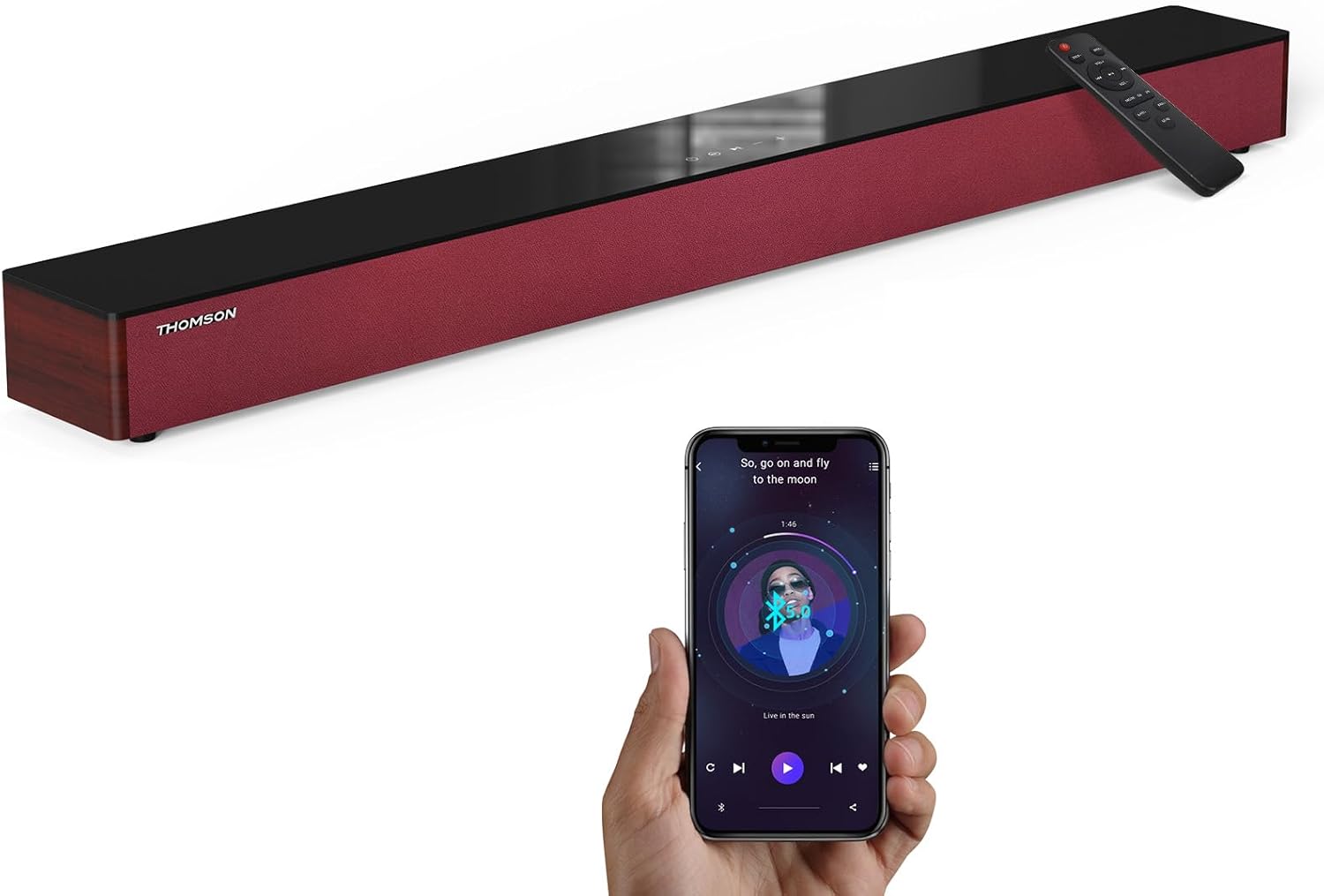
Image: The THOMSON B210 Soundbar, its remote control, and a smartphone demonstrating Bluetooth connectivity.
3. Прадукт скончыўсяview
3.1 Пярэдняя і верхняя панэль
The soundbar features intuitive controls on its top panel for easy access.
3.2 Злучэнні задняй панэлі
The rear panel provides various input ports for connecting to different audio sources.

Выява: Падрабязная view of the soundbar's rear connection ports, including AUX IN, COAXIAL, OPTICAL, HDMI ARC, USB, and DC IN.
3.3 Пульт дыстанцыйнага кіравання
The included remote control allows for convenient operation of all soundbar functions.

Image: A hand operating the soundbar with its remote control, demonstrating wireless command over the device.
4. Настройка
4.1 Размяшчэнне
Place the soundbar on a stable, flat surface directly in front of your television for optimal sound dispersion. Ensure there is adequate space around the soundbar for ventilation.
4.2 Падключэнне харчавання
- Падключыце адаптар сілкавання да порта DC IN на задняй панэлі саўндбара.
- Падключыце іншы канец адаптара сілкавання да насценнай разеткі.
5. Інструкцыя па эксплуатацыі
5.1 Уключэнне/выключэнне сілкавання
Press the Power button on the soundbar's top panel or the remote control to turn the unit on or off.
5.2 Рэгулятар гучнасці
Выкарыстоўвайце кнопкі павелічэння гучнасці (+) і памяншэння гучнасці (-) на саўндбары або пульце дыстанцыйнага кіравання, каб адрэгуляваць узровень гуку.
5.3 Выбар уводу
Press the 'MODE' button on the soundbar or remote control to cycle through available input sources: ARC, Optical, AUX, USB, and Bluetooth.
5.4 Рэжымы эквалайзера
The soundbar offers three distinct equalizer modes to optimize audio for different content types:
- Рэжым музыкі: Паляпшае музычную выразнасць і басы.
- Рэжым фільма: Provides a more immersive cinematic experience.
- Рэжым навін: Optimizes dialogue for clear speech.
Press the corresponding EQ button on the remote control to select your desired mode.

Image: Visual representation of the soundbar's optimized audio modes for Music, Movie, and News content.
6. Сувязі
The THOMSON B210 Soundbar supports multiple connection types for versatility.

Image: The soundbar demonstrating its compatibility with multiple devices such as projectors, PCs, game consoles, and smartphones.
6.1 Падключэнне HDMI ARC
For the best audio quality and control, connect your TV to the soundbar using an HDMI cable via the ARC port.
- Connect one end of an HDMI cable to the HDMI ARC port on your TV.
- Connect the other end to the HDMI ARC port on the soundbar.
- Select 'ARC' as the input source on the soundbar.
6.2 Аптычнае падключэнне
Выкарыстоўвайце аптычны кабель для атрымання высакаякаснага лічбавага аўдыёзлучэння.
- Connect one end of an optical cable to the Optical OUT port on your TV or audio device.
- Connect the other end to the OPTICAL port on the soundbar.
- Select 'Optical' as the input source on the soundbar.
6.3 Злучэнне AUX
For analog audio devices, use an AUX cable.
- Connect one end of a 3.5mm audio cable to the headphone jack or AUX OUT port on your device.
- Падключыце другі канец да порта AUX IN на саўндбары.
- Select 'AUX' as the input source on the soundbar.
6.4 USB-злучэнне
Прайграванне аўдыё files непасрэдна з USB-назапашвальніка.
- Устаўце USB-назапашвальнік у USB-порт на гукавой панэлі.
- Select 'USB' as the input source on the soundbar.
- Саўндбар аўтаматычна пачне прайграваць сумяшчальнае аўдыё files.
6.5 Спалучэнне па Bluetooth
Connect your smartphone, tablet, or other Bluetooth-enabled device wirelessly.
- Turn on the soundbar and select 'Bluetooth' mode using the 'MODE' button. The Bluetooth indicator will flash.
- Уключыце Bluetooth на прыладзе і знайдзіце даступныя прылады.
- Select 'THOMSON B210' from the list.
- Пасля спалучэння індыкатар Bluetooth перастане міргаць і будзе гарэць пастаянна.

Image: A family enjoying entertainment with the soundbar, illustrating seamless Bluetooth connectivity from a smartphone.
7. Тэхнічнае абслугоўванне
Каб забяспечыць даўгавечнасць і аптымальную працу вашай гукавой панэлі, выконвайце наступныя рэкамендацыі па тэхнічным абслугоўванні:
- Уборка: Выкарыстоўвайце мяккую сухую тканіну для чысткі паверхні гукавой панэлі. Не выкарыстоўвайце вадкія ачышчальнікі або абразіўныя матэрыялы.
- захоўванне: Калі вы захоўваеце саўндбар працяглы час, адключыце яго ад электрычнай разеткі і захоўвайце ў прахалодным, сухім месцы.
- Вентыляцыя: Пераканайцеся, што вентыляцыйныя адтуліны не заблакіраваны, каб пазбегнуць перагрэву.
8. Выпраўленне непаладак
If you encounter issues with your THOMSON B210 Soundbar, refer to the following common problems and solutions:
| праблема | Магчымая прычына | Рашэнне |
|---|---|---|
| Няма ўлады | Кабель харчавання не падключаны; разетка неактыўная | Пераканайцеся, што кабель харчавання надзейна падключаны; паспрабуйце іншую разетку |
| Няма гуку | Няправільная крыніца ўваходнага сігналу; Занадта нізкая гучнасць; Уключаны гук; Праблема з падключэннем кабеля | Select correct input source; Increase volume; Deactivate mute; Check audio cable connections |
| Збой спалучэння Bluetooth | Soundbar not in pairing mode; Device Bluetooth off; Device too far | Ensure soundbar is in Bluetooth mode (flashing indicator); Enable Bluetooth on device; Move device closer to soundbar |
| Пульт дыстанцыйнага кіравання не працуе | Батарэі разраджаныя; перашкода паміж пультам дыстанцыйнага кіравання і саўндбарам | Заменіце батарэйкі ў пульце дыстанцыйнага кіравання; выдаліце ўсе перашкоды; пераканайцеся, што пульт накіраваны на датчык саўндбару |
9. Тэхнічныя характарыстыкі
Detailed technical specifications for the THOMSON B210 Soundbar:
- мадэль: B210
- Марка: ТОМСАН
- Памеры прадукту: 36.5" Г х 4.7" Ш х 2.9" В (92.7 см х 11.8 см х 7.3 см)
- Вага прадмета: 11 фунты (прыблізна 5 кг)
- Максімальная выхадная магутнасць дынаміка: 50 ват
- Тып мацавання: Настольнае мацаванне
- Версія Bluetooth: 5.3
- Каэфіцыент сігнал-шум: 70 дБ
- Дакладчыкі: 4 Full Range Speakers, 2 Woofers (Advanced Bass Diaphragms)
- Уваходныя злучэнні: ARC (HDMI), Optical, AUX, USB, Bluetooth

Image: Physical dimensions of the soundbar, showing length, width, and height in centimeters, along with a view of the rear ports.

Image: Internal component diagram of the soundbar, detailing its 4 high-performance drivers and 2 advanced bass diaphragms for enhanced audio.
10. Гарантыя і падтрымка
THOMSON products are manufactured to high-quality standards. For warranty information and technical support, please refer to the warranty card included with your product or visit the official THOMSON support webсайт.
For further assistance, please contact THOMSON customer service.
Ask a question about this manual
Ask about setup, troubleshooting, compatibility, parts, safety, or missing instructions. Manuals+ will review the question and use this page’s manual context to help answer it.