
1. Уводзіны
Дзякуй за пакупкуasing the JVC XS-N1154B Bluetooth Speaker. This manual provides essential information for the safe and efficient operation of your device. Please read it thoroughly before use and retain it for future reference.
2. Інфармацыя па бяспецы
- Не падвяргайце дынамік уздзеянню экстрэмальных тэмператур, прамых сонечных прамянёў або высокай вільготнасці.
- Пазбягайце падзення дынаміка і не падвяргайце яго моцным ударам.
- Не спрабуйце разбіраць або мадыфікаваць дынамік. Гэта прывядзе да анулявання гарантыі.
- Нягледзячы на воданепранікальнасць, трымайце дынамік далей ад вады і вадкасцей, каб пазбегнуць пашкоджання ўнутраных кампанентаў.
- Выкарыстоўвайце толькі пазначаны кабель для зарадкі і адаптар сілкавання.
- Працірайце дынамік мяккай сухой тканінай. Не выкарыстоўвайце абразіўныя ачышчальнікі або растваральнікі.
3. Змесціва ўпакоўкі
Пераканайцеся, што ўсе прадметы прысутнічаюць у пасылцы:
- JVC XS-N1154B Bluetooth Speaker
- Зарадны кабель
- Кіраўніцтва карыстальніка
- Пульт дыстанцыйнага кіравання (калі ёсць)
4. Прадукт скончыўсяview
Азнаёмцеся з кампанентамі і элементамі кіравання дынамікам.
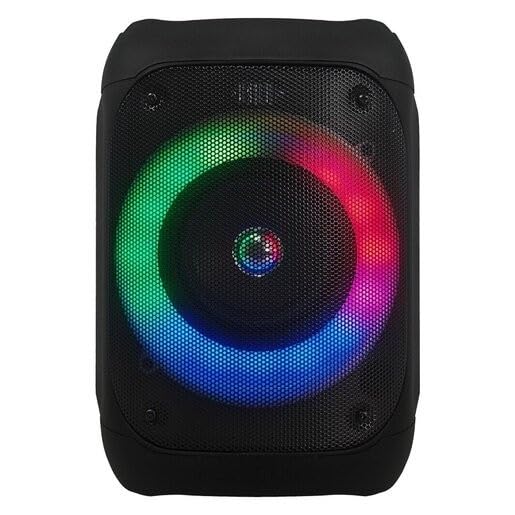
Малюнак 1: Фронт view of the JVC XS-N1154B Bluetooth Speaker, showcasing the speaker grille and integrated music-activated LED lights.
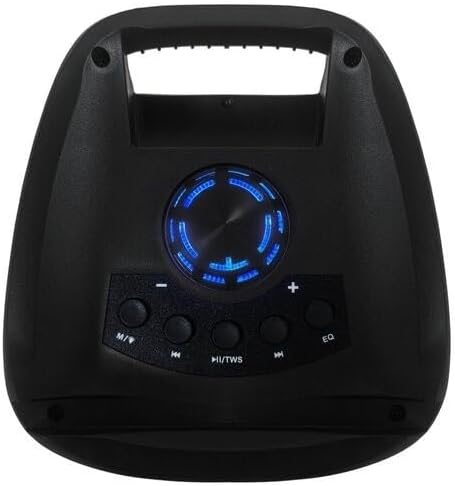
Малюнак 2: Топ view of the JVC XS-N1154B Bluetooth Speaker, displaying the control panel with various buttons and the volume knob.
Функцыі панэлі кіравання:
- Кнопка харчавання: Уключае або выключае дынамік.
- Кнопка рэжыму (M): Switches between Bluetooth, USB, SD Card, and FM Radio modes.
- Play/Pause (►||) / TWS Button: Plays or pauses audio. Long press for TWS (True Wireless Stereo) pairing.
- Previous Track (◀◀) Button: Skips to the previous track or tunes down in FM mode.
- Next Track (►►) Button: Skips to the next track or tunes up in FM mode.
- Кнопка эквалайзера: Пераключэнне паміж прадусталяванымі наладамі эквалайзера.
- Рэгулятар гучнасці: Rotates to adjust the volume level.
5. Настройка
5.1 Зарадка дынаміка
- Падключыце зарадны кабель да зараднага порта дынаміка.
- Падключыце другі канец кабеля да адпаведнага адаптара харчавання USB (не ўваходзіць у камплект) або да порта USB з харчаваннем.
- Індыкатар зарадкі будзе гарэць, звычайна чырвоным, падчас зарадкі.
- Once fully charged, the indicator light may change color (e.g., turn off or turn blue/green). Disconnect the speaker from the power source.
5.2 Уключэнне/выключэнне
- Каб уключыць: Press and hold the Power button until the speaker powers on and you hear an audible prompt.
- Каб выключыць: Press and hold the Power button again until the speaker powers off.
6. Інструкцыя па эксплуатацыі
6.1 Спалучэнне па Bluetooth
- Ensure the speaker is powered on and in Bluetooth mode. If not, press the Mode (M) button to switch to Bluetooth mode. The speaker will indicate it is ready for pairing (e.g., a blinking LED or audible prompt).
- На мабільнай прыладзе (смартфоне, планшэце, ноўтбуку) уключыце Bluetooth і знайдзіце даступныя прылады.
- Select "JVC XS-N1154B" from the list of devices.
- Пасля спалучэння дынамік падасць гукавое пацверджанне, а індыкатар Bluetooth пачне гарэць пастаянна.
- Цяпер вы можаце прайграваць аўдыё з прылады праз дынамік.
6.2 Прайграванне з USB/SD-карты
- Insert a USB flash drive or an SD card (with supported audio files) into the corresponding port on the speaker.
- The speaker will automatically switch to USB or SD card mode and begin playing audio. If not, press the Mode (M) button to select the correct input.
- Use the Previous Track (◀◀), Next Track (►►), and Play/Pause (►||) buttons to control playback.
Праца з радыё 6.3 FM
- Націсніце кнопку Mode (M), каб пераключыцца ў рэжым FM-радыё.
- To auto-scan and save available stations, press and hold the Play/Pause (►||) button. The speaker will scan and store stations automatically.
- Use the Previous Track (◀◀) and Next Track (►►) buttons to navigate between saved FM stations.
6.4 святлодыёдных рэжымаў святла
The speaker features music-activated LED lights. These lights typically synchronize with the audio playback. There may be an additional button or a combination of buttons to cycle through different light modes or to turn them off. Refer to the remote control section for specific controls if available.
6.5 Рэгулятар гучнасці
Rotate the Volume Knob on the top panel clockwise to increase volume and counter-clockwise to decrease volume.
6.6 Выкарыстанне дыстанцыйнага кіравання
If your package includes a remote control, it provides convenient access to various functions:
- Магутнасць: Уключэнне/Выключэнне
- рэжым: Switch input sources (Bluetooth, USB, SD, FM)
- Гучнасць +/-: Адрэгулюйце гучнасць
- Прайграванне/Паўза: Кіраванне прайграваннем
- Папярэдні/Наступны: Skip tracks/stations
- EQ: Change equalizer presets
- святлодыёд: Control LED light modes (if applicable)
7. Тэхнічнае абслугоўванне
7.1 Ачыстка
Wipe the speaker's exterior with a soft, dry, lint-free cloth. Do not use liquid cleaners, sprays, or solvents, as these may damage the finish or internal components. Ensure all ports are dry before use, especially given its waterproof nature.
7.2 Захоўванне
When not in use for extended periods, store the speaker in a cool, dry place, away from direct sunlight and extreme temperatures. It is recommended to charge the battery periodically to maintain its lifespan.
8. Выпраўленне непаладак
| праблема | Магчымая прычына | Рашэнне |
|---|---|---|
| Дынамік не ўключаецца. | Акумулятар разраджаны. | Цалкам зарадзіце дынамік. |
| Няма гуку. | Volume is too low or muted. Device not paired correctly. | Increase volume. Re-pair Bluetooth device. Check audio source. |
| Збой спалучэння Bluetooth. | Дынамік не ў рэжыме спалучэння. Прылада знаходзіцца занадта далёка. Перашкоды. | Пераканайцеся, што дынамік знаходзіцца ў рэжыме спалучэння Bluetooth. Перамясціце прыладу бліжэй. Выключыце іншыя прылады Bluetooth. |
| USB/SD card not playing. | Няправільна file фармат. Карта/дыск няправільна ўстаўлены. | Забяспечце аўдыё files are in a supported format. Reinsert the USB drive/SD card. Press Mode button to select correct input. |
| Прыём FM-радыё дрэнны. | Слабы сігнал. | Перанясіце дынамік у месца з лепшым прыёмам. |
9. Тэхнічныя характарыстыкі
- мадэль: XS-N1154B
- Марка: JVC
- Падключэнне: Bluetooth, USB, SD-карта
- радыё: Лічбавае FM-радыё
- Выходная магутнасць: 4 ват
- Рэжым вываду гуку: Стэрэа
- Метад кантролю: Дыстанцыйнае
- матэрыял: Пластыкавыя
- Воданепранікальны: так
- Крыніца харчавання: Харчаванне ад батарэі
- Памеры: Approximately 18.6D x 18.9W x 25.5H cm
- Вага: Прыкладна 1.2 кг
- Сумяшчальныя прылады: Ноўтбук, смартфон
10. Гарантыя і падтрымка
10.1 Інфармацыя аб гарантыі
This JVC XS-N1154B Bluetooth Speaker comes with a 1 год гарантыі з даты пакупкі. Гэтая гарантыя распаўсюджваецца на вытворчыя дэфекты і дэфекты вырабу пры нармальным выкарыстанні. Яна не распаўсюджваецца на пашкоджанні, выкліканыя няправільным выкарыстаннем, аварыямі, несанкцыянаванымі мадыфікацыямі або звычайным зносам.
10.2 Падтрымка кліентаў
For technical assistance, warranty claims, or further inquiries, please contact JVC customer support through their official website or the retailer where the product was purchased. Please have your product model number (XS-N1154B) and proof of purchase ready when contacting support.