
1. Уводзіны
Thank you for choosing the Crelander HY310PRO Mini Projector. This portable smart projector is designed to deliver a high-quality viewing experience with native 1080P support, auto-focus, and advanced connectivity options like Wi-Fi and Bluetooth. This manual provides essential information for setting up, operating, and maintaining your projector to ensure optimal performance and longevity.

Image 1.1: The Crelander HY310PRO Mini Projector and its remote control, showcasinяго кампактны дызайн і карыстальніцкі інтэрфейс.

Выява 1.2: Канецview of key features including 0.8:1 ultra short throw, auto focus, dual band Wi-Fi 6 & BT5.4, native 1080P, 260 ANSI lumens, and 180° free projection.
2. Змесціва ўпакоўкі
Please check the package carefully to ensure all items are present and in good condition. If any items are missing or damaged, please contact customer support.

Image 2.1: Illustration of the items included in the product package: the projector unit, remote control, user manual, and power cord with adapter.
- Crelander HY310PRO Mini Projector
- Пульт дыстанцыйнага кіравання (батарэі не ўваходзяць у камплект)
- Сеткавы шнур і адаптар
- Кіраўніцтва карыстальніка (гэты дакумент)
Заўвага: For transport safety reasons, batteries are not included in the remote control package. Please insert two AAA batteries (not supplied) before use.
3. Настройка
- Падключэнне сілкавання: Падключыце адаптар сілкавання да ўваходнага порта сілкавання праектара, а затым уключыце яго ў разетку.
- Размяшчэнне: Place the projector on a stable, flat surface. Ensure there are no obstructions in front of the lens. The projector supports 180° free projection, allowing it to project onto walls, ceilings, or floors.
- Першапачатковае ўключэнне: Націсніце кнопку харчавання на праектары або пульце дыстанцыйнага кіравання, каб уключыць прыладу.
- Настройка пульта дыстанцыйнага кіравання: Insert two AAA batteries into the remote control. The remote combines traditional remote functions with a mouse pointer for easier navigation.
4. Інструкцыя па эксплуатацыі
4.1. Auto Focus and Keystone Correction
The HY310PRO projector features automatic focus and keystone correction to ensure a clear and properly shaped image without manual adjustments.
- аўтафокус: The projector automatically adjusts the lens to achieve a sharp image. You do not need to manually adjust the focus.
- Auto Horizontal Keystone Correction: The projector automatically corrects horizontal image distortion.
- Чатырохкропкавая карэкцыя: For more precise adjustments, the projector offers four-point correction to fine-tune the image shape.
- Electronic Upper and Lower Trapezoid Correction: This feature allows for electronic adjustment of vertical image distortion.

Image 4.1: Visual representation of the auto horizontal keystone correction and four-point correction capabilities, demonstrating how the projector adjusts the image to a perfect rectangle.

Image 4.2: Diagram illustrating the electronic upper and lower trapezoid correction feature, which helps in rectifying vertical image distortions.
4.2. Сувязь
The projector supports both Wi-Fi and Bluetooth for versatile connectivity.
- Wi-Fi: Connect to your home network to access built-in streaming applications and online content. Navigate to the settings menu to configure Wi-Fi.
- Bluetooth: Pair with external Bluetooth speakers or headphones for enhanced audio. Access Bluetooth settings through the main menu.
4.3. Projection and Screen Size
The HY310PRO offers flexible projection options for various environments.
- Каэфіцыент праекцыі: Features a 0.8:1 ultra short throw ratio.
- Памер праекцыі: Supports screen sizes from 40 to 260 inches.
- Адлегласць праекцыі: Optimal projection distances range from 2 feet to 8.2 feet.
- 180° Free Projection: The projector's design allows for projection at various angles, including ceilings and floors, providing flexibility in placement.

Image 4.3: Chart illustrating the relationship between projection distance and screen size, showing examples for 40, 85, and 130-inch screens.

Image 4.4: Visual demonstration of the projector's 180-degree free projection feature, allowing it to project images onto various surfaces and angles.

Image 4.5: The projector positioned to project images onto a wall and a ceiling, highlighting its versatility in different room setups.
4.4. Built-in Applications
The projector comes with multiple built-in applications, providing seamless access to a wide range of video content. Ensure your software is up-to-date for the best experience.
- Абнаўленні праграмнага забеспячэння: Калі ваш viewing software is outdated, visit the product's inbuilt software store to upgrade to the latest firmware.
5. Тэхнічнае абслугоўванне
- Ачыстка аб'ектыва: Use a soft, lint-free cloth specifically designed for optical lenses. Do not use abrasive cleaners or harsh chemicals.
- Ачыстка вонкавага выгляду: Працірайце знешнія паверхні праектара мяккай сухой тканінай. Пазбягайце выкарыстання вадкіх ачышчальнікаў непасрэдна на прыладзе.
- Вентыляцыя: Ensure the projector's ventilation ports are clear of dust and obstructions to prevent overheating.
- захоўванне: Калі праектар не выкарыстоўваецца працяглы час, захоўвайце яго ў прахалодным, сухім месцы, удалечыні ад прамых сонечных прамянёў і экстрэмальных тэмператур.
6. Выпраўленне непаладак
| праблема | Магчымая прычына | Рашэнне |
|---|---|---|
| Няма праецыравання выявы | Power not connected, projector off, input source not selected. | Праверце падключэнне да сілкавання, уключыце праектар, абярыце правільную крыніцу ўваходнага сігналу. |
| Відарыс размыты | Auto-focus issue, projector too close/far from screen. | Ensure projector is on a stable surface. If issue persists, restart the projector. |
| Выява скажоная (трапецыяпадобная) | Праектар не перпендыкулярны экрану. | The projector has auto keystone correction. If manual adjustment is needed, check settings for four-point or electronic trapezoid correction. |
| Няма гуку | Volume too low, external audio device not connected, Bluetooth not paired. | Increase volume, check audio cable connections, ensure Bluetooth device is paired and connected. |
| Пульт дыстанцыйнага кіравання не працуе | Батарэйкі разраджаныя або няправільна ўстаўленыя. | Replace batteries (AAA), ensure correct polarity. |
| Немагчыма падключыцца да Wi-Fi | Incorrect password, router issue, out of range. | Verify Wi-Fi password, restart router, move projector closer to router. |
If you encounter issues not listed here or if the problem persists, please contact our Customer Support Centre for assistance.
7. Тэхнічныя характарыстыкі
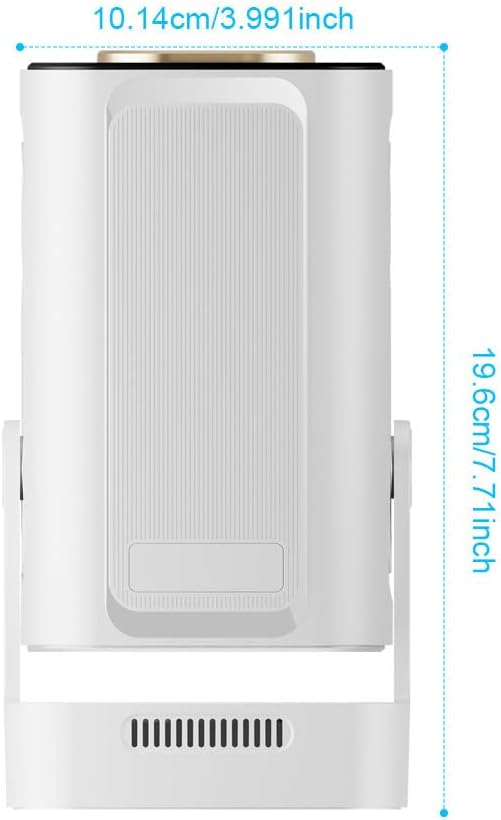
Image 7.1: Diagram showing the physical dimensions of the Crelander HY310PRO Mini Projector: approximately 10.14 cm (3.991 inches) in width and 19.6 cm (7.71 inches) in height.
| Асаблівасць | Дэталь |
|---|---|
| Марка | Crelander |
| мадэль | HY310PRO |
| Рэкамендуемае выкарыстанне | Хатні кінатэатр |
| Асаблівасць | Аўтафокус |
| Тэхналогія падлучэння | Bluetooth, Wi-Fi (Dual Band Wi-Fi 6 & BT5.4) |
| Дазвол дысплея | Native 1920 x 1080 (1080P) |
| Яркасць | 260 прасветаў ANSI |
| Каэфіцыент кантраснасці | 10,000:1 |
| Каэфіцыент праекцыі | 0.8:1 Ultra Short Throw |
| Памер праекцыі | Ад 40 да 260 цаляў |
| Адлегласць праекцыі | Ад 2 футаў да 8.2 футаў |
| Аўдыё | Upgraded 5W Speakers |
| Карэкцыя Keystone | Auto Horizontal, Four-Point, Electronic Upper/Lower Trapezoid |
| Кут праекцыі | 180° Free Projection |
8. Гарантыя і падтрымка
For any questions, technical assistance, or warranty inquiries, please do not hesitate to contact our Customer Support Centre. Refer to your purchase documentation for specific warranty terms and contact details.
We recommend checking the version of your viewing software regularly. If the version is outdated, please visit the product's inbuilt software store to upgrade to the latest firmware for the best viewвопыту.