
Уводзіны
Дзякуй, што выбралі Blackview W50PRO Smartwatch. This manual provides essential information for setting up, operating, and maintaining your device. Please read it carefully to ensure optimal performance and a safe user experience. Keep this manual for future reference.
Змест пакета
Праверце, ці ёсць усе прадметы ў вашай упакоўцы:
- Чорныview W50PRO Smartwatch
- Сіліконавы раменьчык
- Replacement Nylon Braided Strap
- Магнітны зарадны кабель
- Кіраўніцтва карыстальніка (гэты дакумент)

Image: Package contents and product dimensions.
Прадукт скончаныview
Чорныview W50PRO Smartwatch features a 1.45-inch HD touchscreen display, function buttons, a powerful flashlight, and a comfortable silicone strap. Its robust design is suitable for various activities.

Выява: чорныview W50PRO Smartwatch with its key features labeled.
Настройка
1. Зарадка прылады
Перад першым выкарыстаннем цалкам зарадзіце свой разумны гадзіннік. Падключыце магнітны зарадны кабель да зарадных кропак на задняй панэлі гадзінніка, а USB-кабель — да адаптара харчавання (не ўваходзіць у камплект) або USB-порта кампутара. На гадзінніку з'явіцца індыкатар зарадкі.
- Поўная зарадка звычайна займае каля 3 гадзін.
- The 960mAh battery provides up to 30 days of typical use and 100 days of standby time.

Image: Battery capacity and charging information.
2. Усталёўка прыкладання
Спампаваць і ўсталяваць "Да Фіт" application on your smartphone. You can find it in the App Store (iOS) or Google Play Store (Android).
3. Device Pairing and Bluetooth Calls
To connect your smartwatch and enable Bluetooth calling:
- Download the Da Fit app from your phone's app store.
- Уключыце Bluetooth на вашым смартфоне.
- Open the Da Fit app and add your device.
- Confirm the pairing request on your phone and watch.
- Grant necessary notification permissions within the Da Fit app for calls and messages.
- Once paired, you can make and receive calls directly from your watch.

Image: Connection and calling setup guide.
Інструкцыя па эксплуатацыі
1. Базавая навігацыя
- Сэнсарны экран: Правядзіце пальцам улева/управа, уверх/уніз, каб перамяшчацца па меню і атрымліваць доступ да функцый. Націсніце, каб выбраць.
- Функцыянальныя кнопкі: Use the physical buttons on the side of the watch for quick access to specific functions or to return to the home screen.
2. Flashlight and Compass
The W50PRO includes a built-in flashlight and compass for outdoor activities.
- Ліхтарык: Activate the flashlight feature from the watch's menu. It offers fixed and intermittent modes for various situations.
- компас: Access the compass feature from the watch's menu for accurate directional guidance.
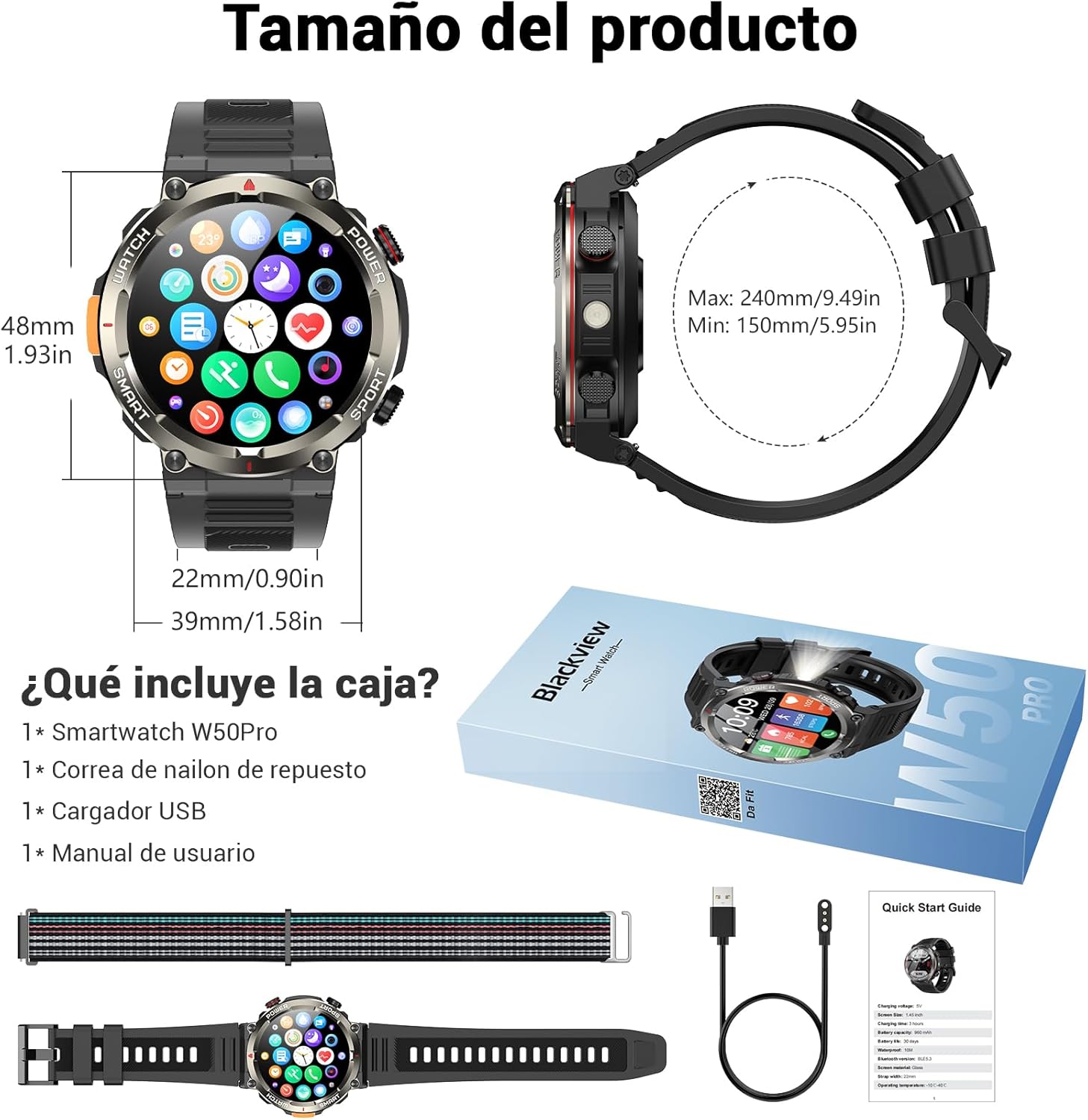
Image: Compass feature for outdoor navigation.

Image: Powerful LED flashlight in action.
3. Званкі і апавяшчэнні праз Bluetooth
Once paired with your smartphone, the W50PRO allows you to manage calls and notifications directly from your wrist.
- Здзяйсненне/прыём званкоў: Use the integrated speaker and microphone to make or answer calls.
- Апавяшчэнні: Receive real-time alerts for text messages, emails, and social media apps.
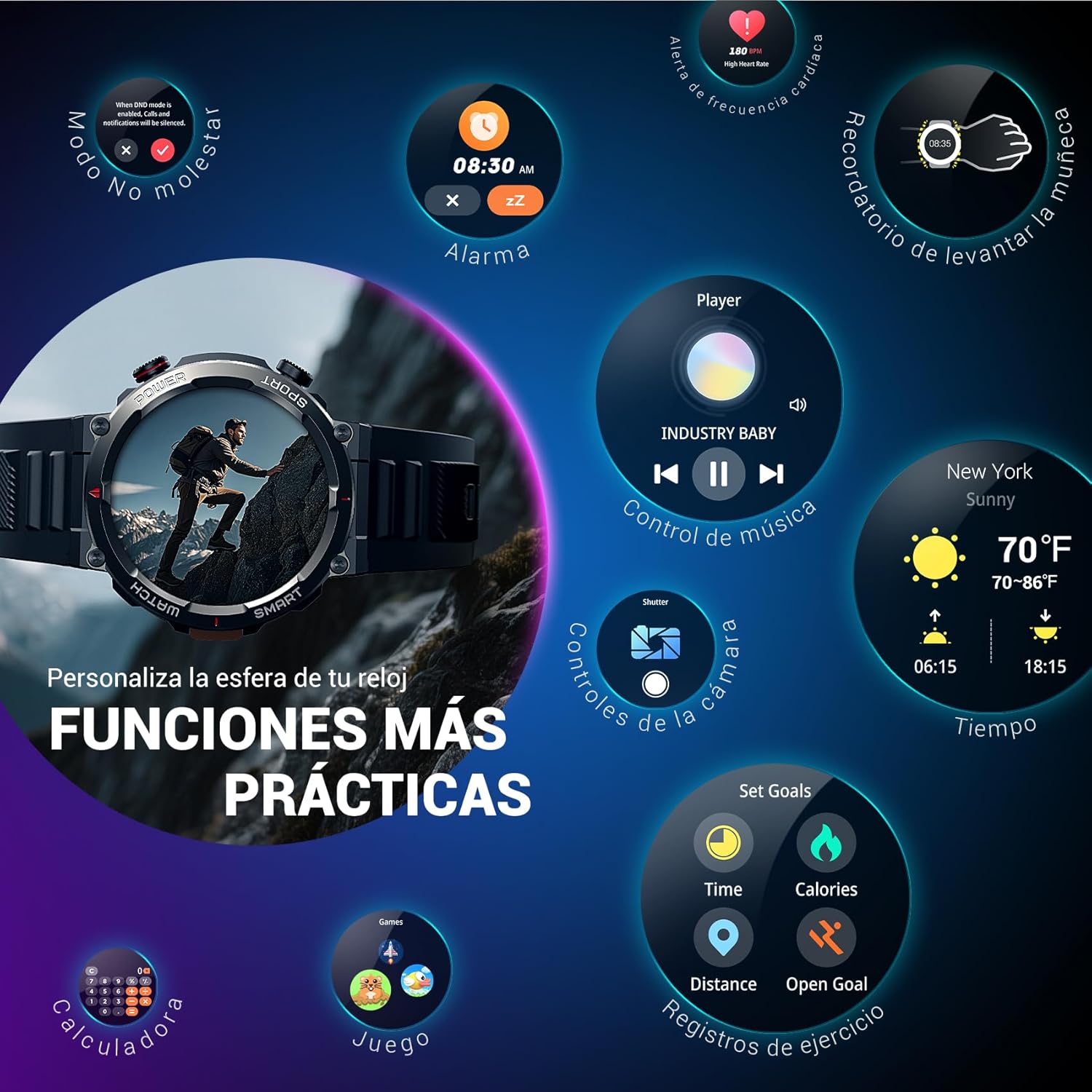
Image: Bluetooth calling and notification features.
4. Маніторынг здароўя
The smartwatch is equipped with high-precision sensors to monitor various health indicators:
- Частата сардэчных скарачэнняў: Маніторынг пульса ў рэжыме рэальнага часу.
- Кісларод крыві (SpO2): Сачыце за ўзроўнем кіслароду ў крыві.
- Манітор сну: Адсочвае якасць і заканамернасці сну.
- Узровень стрэсу: Дае ўяўленне аб вашым узроўні стрэсу.
All health data synchronizes with the Da Fit app for detailed analysis and trend tracking.

Image: Real-time health monitoring features.
5. Спартыўныя рэжымы
The W50PRO offers over 100 integrated sports modes, including running, cycling, climbing, rope skipping, football, and basketball. It accurately records exercise time, distance, steps, calorie consumption, and heart rate changes, providing clear and intuitive performance data. Detailed data can be viewу дадатку Da Fit.

Выява: Зверхуview of 100+ sports modes.
6. Налада цыферблатаў гадзінніка
The Da Fit app provides a wide selection of watch faces to suit various styles. You can also upload personal photos as wallpaper and adjust text color and widget layout to create a unique watch interface.

Image: Customizable watch faces.
7. Іншыя практычныя функцыі
Чорныview W50PRO includes additional features for daily convenience:
- Прагноз надвор'я
- Кіраванне музыкай
- Пульт дыстанцыйнага кіравання камерай
- Сігналізацыя
- Сядзячы напамін
- Напамін пра пітную ваду
- Секундамер
- Таймер зваротнага адліку
- Знайдзіце тэлефон
- Калькулятар
- гульні
- Рэгуляванне яркасці

Image: Multiple smart functions available on the smartwatch.
Тэхнічнае абслугоўванне
1. Уборка
Regularly clean your smartwatch and strap to prevent skin irritation and maintain device functionality. Use a soft, damp тканіна для працірання экрана і casing. For the strap, follow the manufacturer's cleaning recommendations based on the material (silicone or nylon).
2. Воданепранікальнасць
Чорныview W50PRO Smartwatch features an IP68 water resistance rating. This means it is protected against dust ingress and can withstand immersion in water up to 1.5 meters for up to 30 minutes. It is suitable for daily use, such as hand washing or light rain. Avoid using it in hot water, saunas, or during diving, as steam and high pressure can compromise the seals.

Image: Durability features including IP68 water resistance.
3. Сыход за батарэяй
Каб падоўжыць тэрмін службы батарэі:
- Пазбягайце экстрэмальных тэмператур.
- Не дапускайце частай поўнай разрадкі акумулятара.
- Charge the device using the provided magnetic charging cable.
Ліквідацыю непаладак
Калі ў вас узніклі праблемы з вашым Blackview W50PRO Smartwatch, try the following:
- Прылада не ўключаецца: Пераканайцеся, што гадзіннік цалкам зараджаны.
- Немагчыма спалучыць з тэлефонам: Check if Bluetooth is enabled on both devices. Restart both the watch and phone. Ensure the Da Fit app has necessary permissions.
- Недакладныя дадзеныя пра здароўе: Ensure the watch is worn snugly on your wrist. Clean the sensors regularly.
- Апавяшчэнні не атрыманы: Verify that notification permissions are granted in the Da Fit app and your phone's settings. Ensure the app is running in the background.
- Кароткі тэрмін службы батарэі: Reduce screen brightness, disable unnecessary features, and limit frequent heart rate monitoring.
For persistent issues, refer to the Da Fit app's help section or contact customer support.
Тэхнічныя характарыстыкі
| Асаблівасць | Спецыфікацыя |
|---|---|
| Марка | Чорныview |
| мадэль | W50PRO |
| Памер дысплея | 1.45 цаляў |
| Тып дысплея | ВК |
| дазвол | 360 х 360 пікселяў |
| Ёмістасць батарэі | 960 мАг |
| Тыповы тэрмін службы батарэі | Да 30 дзён |
| Час чакання | Да 100 дзён |
| Час зарадкі | Прыбл. 3 гадзіны |
| Сувязь | Bluetooth |
| Увод чалавечага інтэрфейсу | Buttons, Microphone |
| Воданепранікальнасць | IP68 |
| Сумяшчальныя мадэлі тэлефонаў | iOS і Android |
| Памеры прадукту | 8.8 х 2.2 х 18.1 см |
| Вага прадукту | 136 г |
Гарантыя і падтрымка
For warranty information and technical support, please refer to the documentation included with your purchase or visit the official Blackview webсайт. Захоўвайце пацвярджэнне пакупкі для прэтэнзій па гарантыі.