
1. Уводзіны
Thank you for choosing the Bcofo Wireless Mobile Game Controller. This versatile gamepad is designed to enhance your gaming experience across multiple platforms, including iOS, Android, Nintendo Switch, and PC. Featuring advanced Hall Effect triggers, programmable buttons, vibrant RGB lighting, and a robust battery, this controller provides precise control and immersive feedback for all your favorite games.
2. Асноўныя магчымасці
- Мультыплатформенная сумяшчальнасць: Easily switch between iOS, Android, Switch, and PC modes. Supports iPhone, iPad, Mac, Apple Arcade MFi Games, Android mobile smart phones, Android HID Games, tablets, Switch/Lite/OLED, and laptops via Bluetooth. Wired connection is available for PC (Windows 7/8/10/11/Steam Deck).
- Трыгеры эфекту Хола: Experience smoother and more accurate gameplay with advanced Hall Effect sensors, providing a competitive edge in fast-paced action games.
- 2 Programmable Buttons (N1/N2): Customize complex skill operations by programming up to 30-second combinations using the 21 available buttons (A/B/X/Y, etc.).
- Cool RGB Lighting: Personalize your gaming setup with 8 lights and 1 colorful gradient. Choose from 4 lighting modes (color, wave, breathing, static) and 9 different RGB colors. Toggle RGB lights on/off by pressing and holding the 'RGB' button.
- Six Gyro Sensor & Dual Vibration: The 6-Axis motion control allows rapid movement detection for quick responses. Dual vibration provides realistic feedback for impacts, explosions, and collisions.
- 3 Turbo Speeds: Enhance your action and arcade game experience with adjustable turbo speeds of 5, 12, or 20 shots per second.
- Працяглая батарэя: The built-in 1200mAh high-performance battery provides up to 15 hours of playtime on a 2-3 hour charge. The controller can be used while charging.
- Integrated Phone Clip: Securely attach your smartphone to the controller for mobile gaming. The clip is designed for easy attachment and removal.
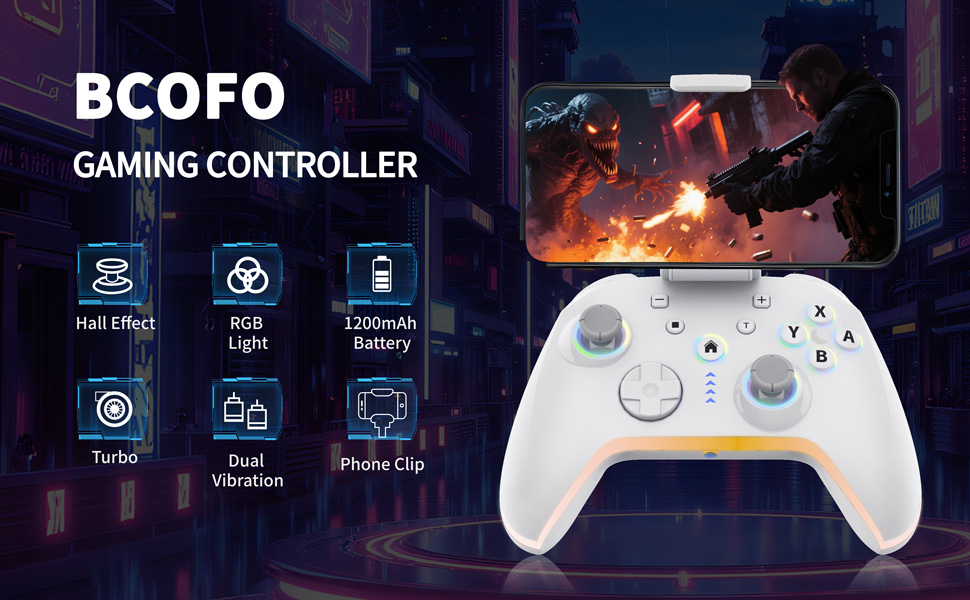
Image: The Bcofo Mobile Gaming Controller showcasing its RGB lighting effects.
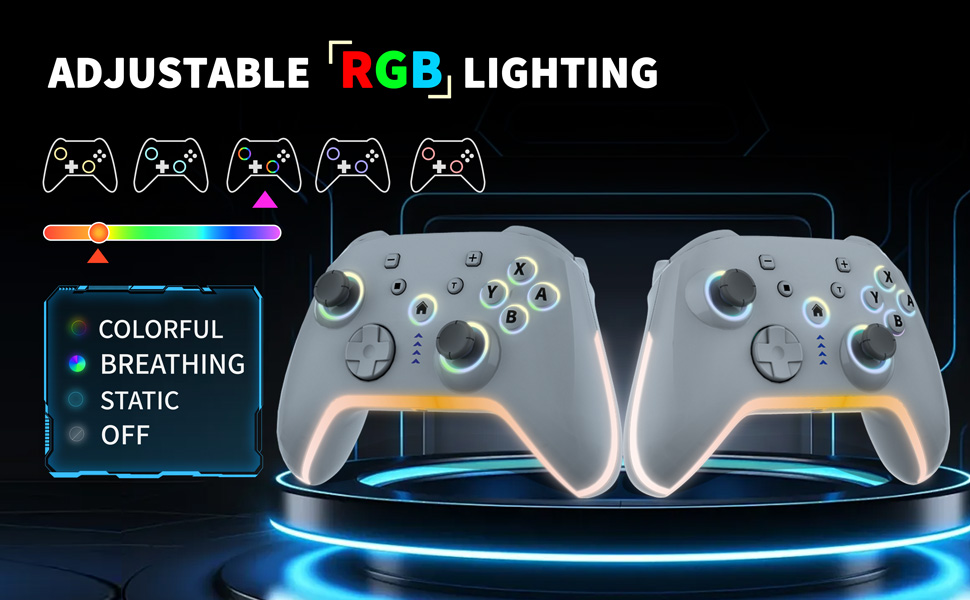
Image: The Bcofo controller with a smartphone attached via the integrated phone clip, demonstrating mobile gaming.
3. Змесціва ўпакоўкі
Калі ласка, пераканайцеся, што ўсе прадметы прысутнічаюць у вашай упакоўцы:
- Bcofo Wireless Mobile Game Controller
- Здымны заціск для тэлефона
- USB-кабель для зарадкі
- Кіраўніцтва карыстальніка
4. Налада і падключэнне
The controller features a mode switch button on the back to select the appropriate platform. After selecting the mode, press and hold the 'HOME' button to initiate pairing.
4.1. Attaching the Phone Clip
The phone clip can be easily inserted into the slot on the top of the controller. It extends and retracts freely to accommodate various phone sizes and can be disassembled effortlessly when not in use. Ensure the clip is securely attached before placing your phone.
Video: Demonstration of attaching and detaching the phone clip, and its secure hold during gameplay. This video also shows the control buttons demo and mode switching.
4.2. Connecting to iOS Devices (iPhone/iPad/Mac)
- On the back of the controller, slide the mode switch to the 'iOS' position.
- Short press the 'HOME' button for a few seconds until the LED lights flash quickly, indicating pairing mode.
- На прыладзе iOS перайдзіце па спасылцы Налады > Bluetooth.
- Select the Bluetooth name: "Xbox Wireless Controller" да пары.
- Once connected, the LED lights will stop flashing and remain solid.
Video: Step-by-step guide on how to connect the Bcofo controller to an iOS device.
4.3. Connecting to Android Devices
- On the back of the controller, slide the mode switch to the 'Android' position.
- Short press the 'HOME' button for a few seconds until the LED lights flash quickly, indicating pairing mode.
- На прыладзе Android перайдзіце па спасылцы Налады > Bluetooth.
- Select the Bluetooth name: "6147 Gamepad" да пары.
- Once connected, the LED lights will stop flashing and remain solid.
Video: Step-by-step guide on how to connect the Bcofo controller to an Android device.
4.4. Падключэнне да Nintendo Switch
- On the back of the controller, slide the mode switch to the 'NS' (Nintendo Switch) position.
- On your Nintendo Switch, go to Налады сістэмы > Кантролеры і датчыкі > Змяніць захоп/парадак.
- Press and hold the 'HOME' button on the controller until the LED lights flash quickly.
- The Switch will detect the controller and pair automatically.
4.5. Connecting to PC (Wired)
- On the back of the controller, slide the mode switch to the 'PC' position.
- Падключыце кантролер да кампутара з дапамогай USB-кабеля, які ўваходзіць у камплект.
- The PC should automatically recognize the controller. No additional drivers are typically required for Windows 7/8/10/11 or Steam Deck.
5. Інструкцыя па эксплуатацыі
5.1. Programmable Back Buttons (N1/N2)
The controller features two programmable back buttons, N1 and N2, allowing you to map complex button sequences or single button presses for quick execution.
- Press the 'SET' button on the back of the controller. The indicator light will start flashing.
- Press either N1 or N2.
- Press the button(s) or sequence of buttons you wish to program (up to 30 seconds).
- Press the 'SET' button again to save the programming. The indicator light will turn off.
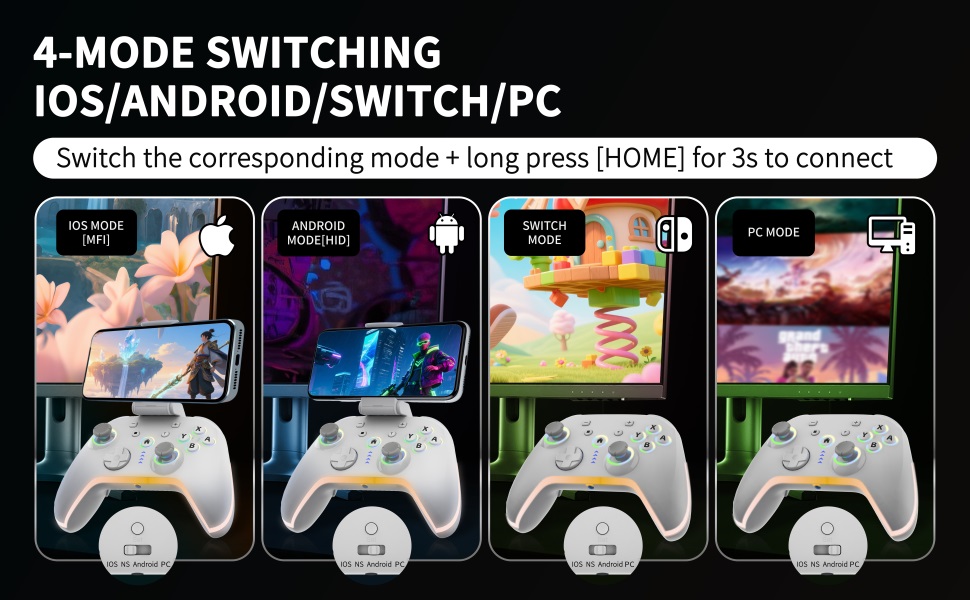
Image: Close-up of the controller's back, showing the N1 and N2 programmable buttons and the mode switch.
5.2. Кіраванне RGB-святлодыёдным асвятленнем
The controller is equipped with customizable RGB LED lighting.
- To cycle through 9 different RGB colors, press the 'RGB' button on the back of the gamepad.
- To switch between 4 lighting modes (color, wave, breathing, static), press the 'RGB' button repeatedly.
- To turn the RGB lights on or off, press and hold the 'RGB' button for a few seconds.
5.3. Turbo Speed Adjustment
Activate turbo function for rapid button presses in action and arcade games.
- Press and hold the 'Turbo' button (T).
- While holding 'Turbo', press the button you wish to apply turbo to (e.g., A, B, X, Y).
- To adjust turbo speed (5/12/20 shots per second), press and hold 'Turbo' and move the right joystick up or down.
- To clear turbo for a specific button, press and hold 'Turbo' and press the assigned button again.
- To clear all turbo settings, press and hold 'Turbo' and press the 'HOME' button.
6. Тэхнічнае абслугоўванне
- Падтрымлівайце чысціню кантролера, праціраючы яго мяккай сухой тканінай. Пазбягайце выкарыстання агрэсіўных хімічных рэчываў або абразіўных матэрыялаў.
- Захоўвайце кантролер у прахалодным, сухім месцы, удалечыні ад прамых сонечных прамянёў і экстрэмальных тэмператур.
- Пазбягайце падзення кантролера або моцных удараў.
- Charge the controller regularly to maintain battery health, even if not in frequent use.
7. Выпраўленне непаладак
7.1. Кантролер не падключаецца
- Ensure the correct mode (iOS/Android/NS/PC) is selected using the switch on the back of the controller.
- Make sure the controller is charged. Connect it to a power source using the USB cable.
- Verify Bluetooth is enabled on your device and that the controller is in pairing mode (LEDs flashing quickly).
- Забудзьце прыладу ў наладах Bluetooth вашай прылады і паспрабуйце падключыць яе зноў.
- For PC wired connection, ensure the USB cable is securely connected and try a different USB port.
7.2. Кнопкі або джойсцікі не рэагуюць
- Check if the controller is properly connected to your device.
- Перазагрузіце кантролер і гульнявую прыладу.
- Ensure the game you are playing supports external controllers.
- Perform a factory reset by pressing the 'Reset' button on the back of the controller (a small pin might be needed).
7.3. RGB Lights Not Working
- Press the 'RGB' button to cycle through modes and colors.
- Press and hold the 'RGB' button to ensure the lights are not turned off.
- Ensure the controller has sufficient battery charge.
8. Тэхнічныя характарыстыкі
| Нумар мадэлі | 6147 |
| Сувязь | Бесправадное (Bluetooth), правадное (USB) |
| Сумяшчальнасць | iOS, Android, Nintendo Switch, PC (Windows 7/8/10/11, Steam Deck) |
| Ёмістасць батарэі | 1200 мАг |
| Час зарадкі | 2-3 гадзін |
| Час прайгравання | Да 15 гадзін |
| Вага | 11.3 унцый (прыблізна 320 г) |
| Памеры | 6.38 х 4.57 х 2.83 цалі (прыблізна 16.2 х 11.6 х 7.2 см) |
9. Гарантыя і падтрымка
For any questions or issues regarding your Bcofo Wireless Mobile Game Controller, please refer to the seller's return policy or contact customer support through your purchase platform. Keep your proof of purchase for warranty claims, if applicable.