
Bluedee BD-SK800
Кіраўніцтва карыстальніка камп'ютэрных калонак Bluedee
Model: BD-SK800
Brand: Bluedee
Уводзіны
Thank you for choosing Bluedee Computer Speakers. These speakers are designed to provide clear, balanced audio for your desktop PC, laptop, or projector. Featuring 10W high-power drivers, they deliver crisp vocals and rich sound, enhancing your gaming, movie-watching, and music listening experiences. With a simple plug-and-play USB/Type-C connection and dynamic RGB lighting, these speakers offer both convenience and aesthetic appeal.
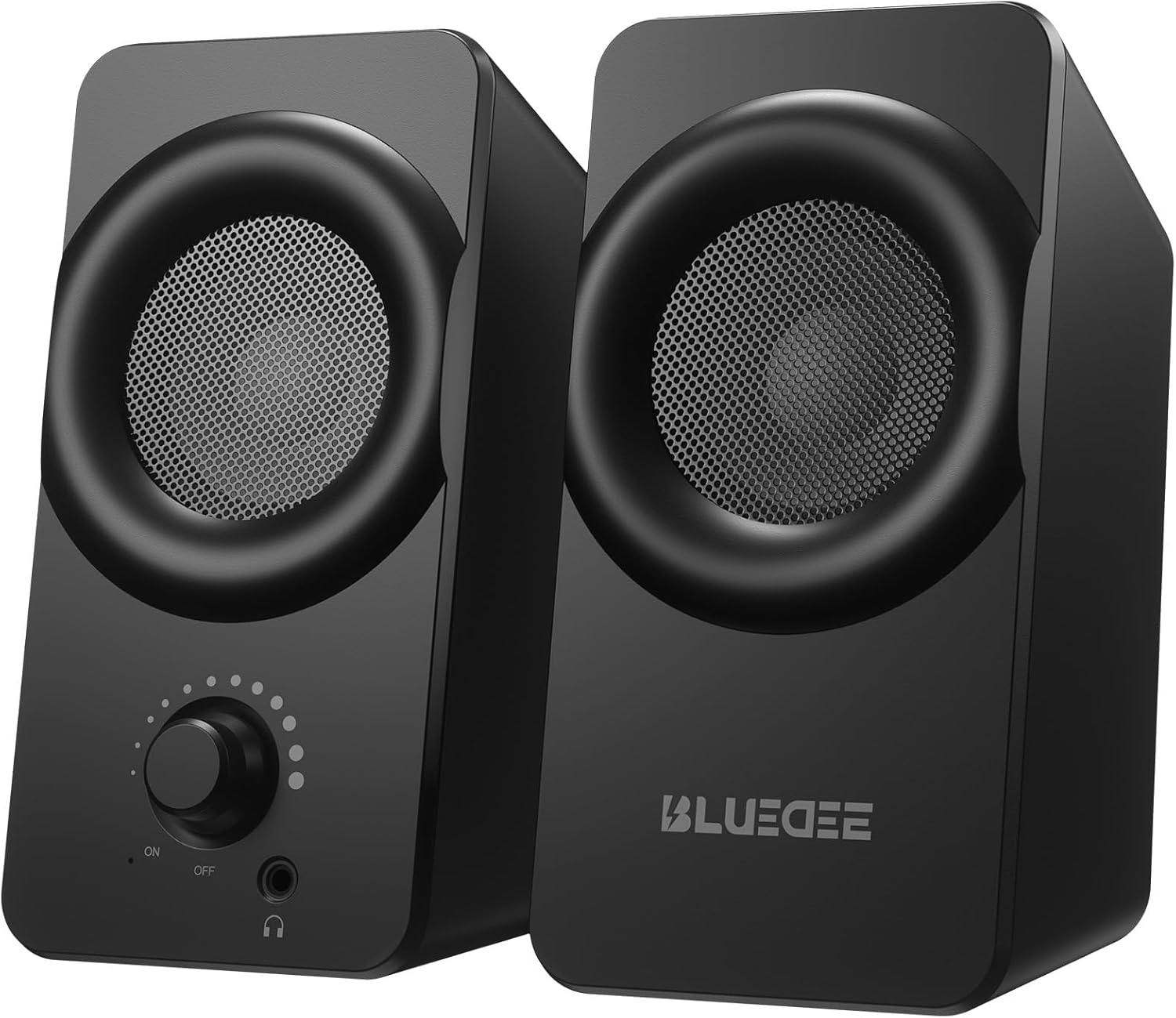
Выява: спераду view of the two Bluedee computer speakers, showcasing their compact black design with circular speaker grilles and a volume knob on the right speaker.
Што ў скрынцы
Upon opening your Bluedee Computer Speakers package, you will find the following items:
- Two (2) Bluedee Computer Speakers
- Integrated USB/Type-C Cable (Undetachable)
- Кіраўніцтва карыстальніка (гэты дакумент)
Video: An unboxing and setup guide for the Bluedee computer speakers, demonstrating what's included in the package and how to connect the speakers.
Настройка
Setting up your Bluedee Computer Speakers is quick and straightforward, thanks to their plug-and-play design.
- Размяшчэнне: Position the two speakers on your desk or desired surface. Ensure they are stable and the non-slip pads on the bottom are making full contact to minimize vibrations.
- Connect to Power/Audio: The speakers are powered and receive audio via a single USB/Type-C cable.
- If your device has a USB-C port, connect the Type-C end of the cable directly.
- If your device has a standard USB-A port, use the included USB-A adapter to connect the cable.
- Уключэнне: Rotate the volume knob on the front of the right speaker clockwise until you hear a click to turn the speakers ON.

Image: A close-up of the USB/Type-C cable connecting to a laptop, illustrating the versatile connectivity options for the speakers.
For a visual guide on connecting your speakers, please refer to the "What's in the Box & How to Use" video in the previous section, specifically from the 0:18 mark.
Інструкцыя па эксплуатацыі
Your Bluedee speakers are designed for intuitive control.
- Рэгулятар гучнасці: The large knob on the front of the right speaker controls both power and volume.
- Павярніце па гадзіннікавай стрэлцы, каб павялічыць гучнасць.
- Павярніце супраць гадзіннікавай стрэлкі, каб паменшыць гучнасць.
- Rotate fully counter-clockwise until it clicks to turn the speakers OFF.
- RGB асвятленне: The speakers feature dynamic RGB lights that can be controlled with a touch-sensitive symbol on top of the right speaker.
- Tap the light symbol once to turn the RGB lights ON or OFF.
- The lights will pulse with your music or game audio, creating an immersive atmosphere.
- Раз'ём для навушнікаў: A 3.5mm headphone jack is located on the front of the right speaker.
- Plug in your headphones for a private listening experience.
- Connecting headphones will automatically mute the speakers.

Выява: Падрабязны view of the right speaker's controls, highlighting the volume knob, headphone jack, and the touch-sensitive RGB light control symbol.
For a demonstration of the controls, including power, volume, and RGB light operation, please refer to the "What's in the Box & How to Use" video from the 0:29 mark.
Тэхнічнае абслугоўванне
To ensure the longevity and optimal performance of your Bluedee Computer Speakers, follow these simple maintenance guidelines:
- Уборка: Use a soft, dry cloth to wipe down the speaker surfaces. Avoid using abrasive cleaners, solvents, or strong chemicals, as these can damage the finish.
- Выдаленне пылу: Gently brush away any dust from the speaker grilles using a soft brush or a can of compressed air.
- захоўванне: Калі дынамікі не выкарыстоўваюцца працяглы час, захоўвайце іх у прахалодным, сухім месцы, удалечыні ад прамых сонечных прамянёў і экстрэмальных тэмператур.
- Пазбягайце вадкасці: Do not expose the speakers to water or other liquids. They are not waterproof.
Ліквідацыю непаладак
If you encounter any issues with your Bluedee Computer Speakers, please refer to the following troubleshooting steps:
| праблема | Магчымая прычына | Рашэнне |
|---|---|---|
| З дынамікаў няма гуку |
|
|
| Гук скажоны або невыразны |
|
|
| RGB-ліхтары не працуюць |
|
|
If the problem persists after trying these steps, please contact Bluedee Customer Support for further assistance.
Тэхнічныя характарыстыкі
Detailed specifications for your Bluedee Computer Speakers:
| Асаблівасць | Дэталь |
|---|---|
| Назва мадэлі | BD-SK800 |
| Тып дынаміка | Камп'ютарная акустыка |
| Тэхналогія падлучэння | USB (includes Type-C adapter) |
| Максімальная выхадная магутнасць дынаміка | 10 ват |
| Памеры прадукту (Д х Ш х У) | 3.74" Г x 3.15" Ш x 6.11" У |
| Вага прадмета | 1.6 фунта |
| Матэрыял | Метал, пластык |
| Метад кантролю | Touch (for RGB lights) |
| Тып кантролера | Knob (for volume/power) |
| Рэжым выхаду гуку | Стэрэа |
| Крыніца харчавання | Электрычны шнур (праз USB) |
| UPC | 732133620731 |

Image: The two speakers shown with their dimensions (length, width, height) overlaid, emphasizing their compact size.
Гарантыя і падтрымка
Bluedee stands behind the quality of its products. Your Bluedee Computer Speakers are backed by an 18-месячны гарантыя якасці.
If you encounter any issues or have questions regarding your product, please do not hesitate to contact Bluedee Customer Support. We are committed to resolving any concerns within 24 hours.
For support, please reach out to the seller, HanMeng Direct, through the platform where you made your purchase.
Additional protection plans may be available for purchase separately. Please refer to your purchase details for more information on extended warranty options.