
1. Уводзіны
This manual provides detailed instructions for the safe and effective operation of your TOOLTOP ET120M 120MHz Handheld Digital Oscilloscope. Please read this manual thoroughly before using the device to ensure proper functionality and to prevent damage.
2. Інфармацыя па бяспецы
Always observe the following safety precautions when using the ET120M oscilloscope:
- Не выкарыстоўвайце прыладу ў вільготных або damp умовы.
- Ensure the device is powered off before connecting or disconnecting probes.
- Выкарыстоўвайце толькі прадастаўленыя аксэсуары або зацверджаныя запасныя часткі.
- Не спрабуйце адкрываць або мадыфікаваць прыладу; звяртайцеся па абслугоўванне да кваліфікаванага персаналу.
- Трымайце прыладу далей ад моцных электрамагнітных палёў.
3. Змесціва ўпакоўкі
Праверце, ці ёсць у вашай упакоўцы ўсе пералічаныя ніжэй прадметы:
- TOOLTOP ET120M Handheld Digital Oscilloscope
- 100MHz Oscilloscope Probe
- USB-кабель для зарадкі
- Кіраўніцтва карыстальніка
- Суконная сумка

Малюнак 3.1: Змест пакета
4. Прадукт скончыўсяview
4.1. Характарыстыкі прылады
The TOOLTOP ET120M is a compact and portable handheld digital oscilloscope designed for various electrical testing and repair applications. Key features include:
- 120MHz analog bandwidth and 500MS/s real-time sampстаўка лінга.
- 2.4-inch 320x240 clear color LCD screen.
- Integrated square wave signal output (1kHz, 10KHz, 100KHz, 1MHz).
- 12 types of automatic parameter measurements (Vpp, Vrms, Vavg, Vp, Vmax, Vmin, F, T, T+, T-, Du+, Du-).
- Three scan modes: Auto, Normal, and Single.
- Ability to store 2500 DSO waveforms with thumbnail browsing.
- Built-in rechargeable lithium battery for up to 6 hours of continuous use.
- Durable design with a silicone protective cover.

Малюнак 4.1: Асноўныя характарыстыкіview
4.2. Ідэнтыфікацыя кампанентаў
Familiarize yourself with the main components and controls of the ET120M oscilloscope:

Малюнак 4.2: Спераду View of ET120M Oscilloscope
- Экран дысплея: 2.4-inch LCD for waveform display and menu navigation.
- Input BNC Connector: For connecting the oscilloscope probe.
- Кнопкі кіравання: Including MENU, F1, F2, SAVE, AC/DC, 1X/10X, 50%, TRIG, EDGE, STOP, AUTO, and directional/OK buttons for navigation and settings adjustment.
- Порт USB: Для зарадкі прылады.
5. Настройка
5.1. Пачатковая зарадка
Before first use, fully charge the built-in lithium battery using the provided USB charging cable and a standard USB power adapter (not included). The charging indicator will show the charging status.
5.2. Падключэнне зонда
Connect the oscilloscope probe to the BNC input connector on the top of the device. Ensure the connection is secure. Set the probe attenuation switch (if applicable) to the desired setting (e.g., 1X or 10X) and match this setting on the oscilloscope via the 1X/10X button.
6. Інструкцыя па эксплуатацыі
6.1. Уключэнне/выключэнне харчавання
Press and hold the power button (usually located on the side or top) to turn the device on or off.
6.2. Basic Waveform Acquisition
After powering on, connect the probe to the circuit under test. The oscilloscope will display the waveform. Use the directional buttons to navigate menus and adjust settings.
6.3. Waveform Acquisition Modes
The ET120M supports three scan modes:
- Аўто: Automatically adjusts time base and vertical amplitude for a stable waveform display. Press the АЎТА button for one-key waveform adaptation.
- Нармальны: Displays a waveform only when a trigger condition is met.
- адзіночны: Captures and displays a single waveform when a trigger condition is met, then stops.

Figure 6.1: Auto Waveform Adaptation
6.4. Parameter Measurement
The device can automatically measure 12 different waveform parameters. Access these measurements through the menu system. Parameters include Peak-to-Peak Voltage (Vpp), Root Mean Square Voltage (Vrms), Average Voltage (Vavg), Peak Voltage (Vp), Maximum Voltage (Vmax), Minimum Voltage (Vmin), Frequency (F), Period (T), Positive Pulse Width (T+), Negative Pulse Width (T-), Positive Duty Cycle (Du+), and Negative Duty Cycle (Du-).
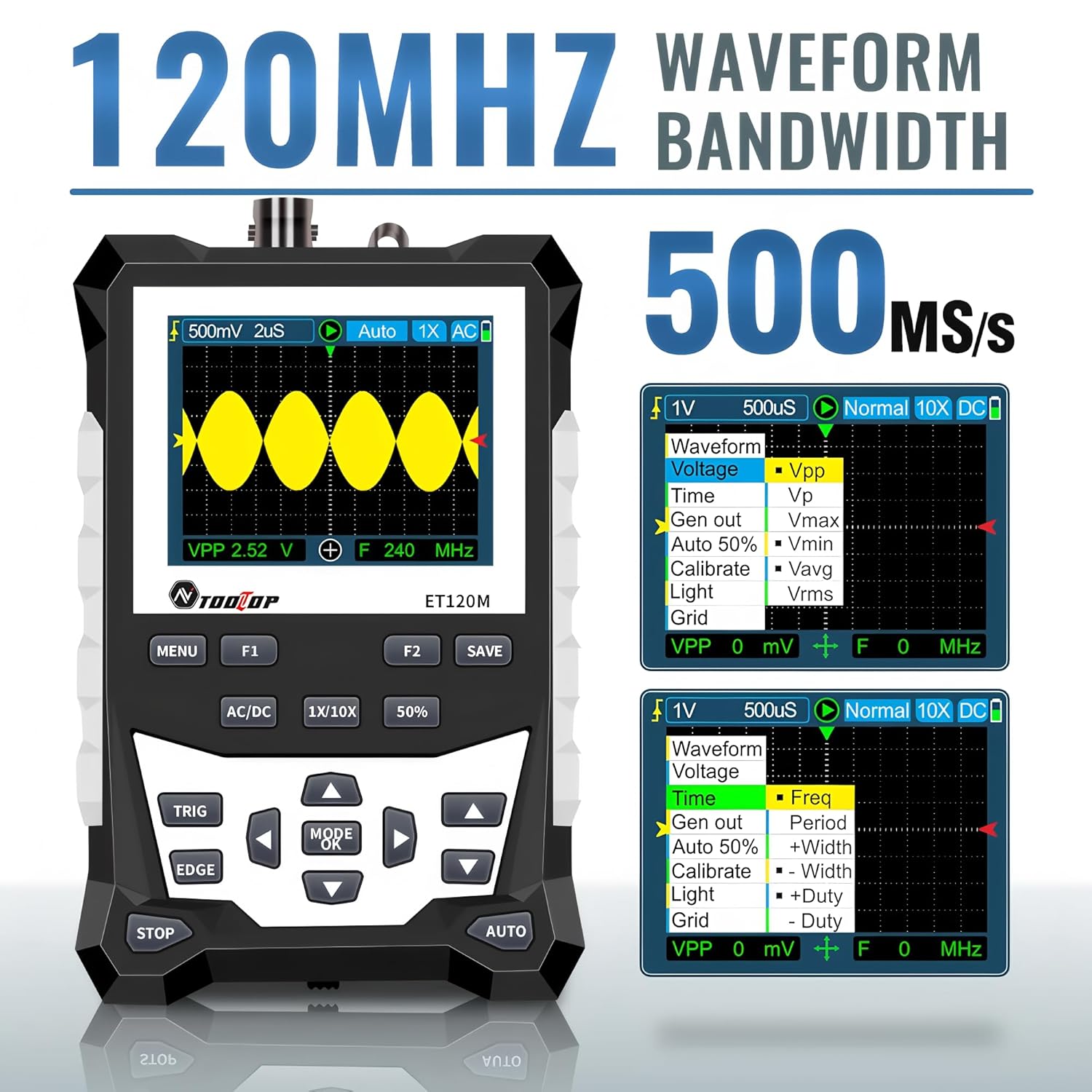
Figure 6.2: Automatic Measurement Functions
6.5. Square Wave Signal Output
The ET120M can generate square wave signals at specific frequencies. Navigate to the signal output function in the menu to select between 1kHz, 10KHz, 100KHz, and 1MHz output frequencies. This feature is useful for testing circuits.

Figure 6.3: Square Wave Signal Output Function
6.6. Waveform Storage and Recall
The device can store up to 2500 DSO waveforms. Use the ЗАХАВАЦЬ button to store the current waveform. Stored waveforms can be browsed via thumbnails for easy recall and analysis.

Figure 6.4: Waveform Storage and Browsing
6.7. Adjusting Waveform Parameters
You can manually adjust various waveform display parameters to fine-tune your measurements:
- База часу: Adjusts the horizontal scale (time per division).
- Amplitude (Vertical Sensitivity): Adjusts the vertical scale (volts per division).
- Нахіл трыгера: Sets the trigger to rising or falling edge.
- Узровень запуску: Задае аб'ёмtage level at which the waveform is triggered.

Figure 6.5: Adjusting Waveform Display Parameters
7. Тэхнічнае абслугоўванне
7.1. Уборка
Для чысткі прылады выкарыстоўвайце мяккую сухую тканіну. Для ўстойлівага бруду злёгкуamp можна выкарыстоўваць тканіну з мяккім мыйным сродкам, сачыце за тым, каб вадкасць не патрапіла ўнутр прылады. Не выкарыстоўвайце абразіўныя ачышчальнікі або растваральнікі.
7.2. Захоўванне
When not in use for extended periods, store the oscilloscope in a cool, dry place, away from direct sunlight and extreme temperatures. It is recommended to store it in the provided cloth bag to protect it from dust and scratches.
7.3. Сыход за батарэяй
Каб падоўжыць тэрмін службы акумулятара, пазбягайце частай поўнай разрадкі акумулятара. Пры працяглым захоўванні зараджайце акумулятар прыкладна да 50% кожныя некалькі месяцаў.
8. Выпраўленне непаладак
If you encounter issues with your ET120M oscilloscope, refer to the following common problems and solutions:
- Прылада не ўключаецца: Ensure the battery is charged. Connect the USB charging cable and try again.
- Хвалі не адлюстроўваюцца: Check probe connection. Ensure the probe is properly connected to the circuit under test. Adjust vertical sensitivity and time base settings. Try the AUTO function.
- Нестабільная форма хвалі: Adjust the trigger level and trigger slope. Ensure the trigger mode is appropriate for the signal.
- Няправільныя вымярэнні: Verify probe attenuation setting (1X/10X) matches the device setting. Perform a probe compensation if necessary (refer to advanced operation in a full manual).
For persistent issues, contact TOOLTOP customer support.
9. Тэхнічныя характарыстыкі
9.1. Агульныя характарыстыкі
| Дысплей | 320x240 LCD screen |
| Плошча адлюстравання | 50 мм х 40 мм |
| Падсвятленне | White, brightness adjustable |
| Імпеданс | x1: 1MΩ / x10: 10MΩ |
| акумулятар | 18650 lithium battery (built-in) |
| Аўтаматычнае адключэнне | Без аперацыі на працягу 15 хвілін |
| Захоўванне сігналаў | 2500 DSO waveforms |
| Памер | 124 мм х 80 мм х 35 мм |
| Умовы эксплуатацыі | 0°C ~ +40°C; <75%RH |
| Умовы захоўвання | -10°C ~ +60°C; <90%RH |
9.2. Oscilloscope Specifications
| Аналагавая прапускная здольнасць | 120 МГц |
| Maximum Real-time Sampлінг -стаўка | 500MSps |
| Вертыкальнае дазвол | 8 біт |
| Вертыкальная дакладнасць | ±(5% + 0.2падзел) |
| Auto Zero Reference | Падчас вымярэння пастаяннага току |
| Узровень трыгера | ±3.8div (0.1div per step) |
| Пазіцыя трыгера | ±6div (0.1div per step) |
| Cursor Function | ΔV, Δt, 1/Δt |
| Нелінейнасць | ±1 bits |
| Метад злучэння | DC/AC |
| Division Vertical | ±3.8 Horizontal: 12 |
| Дыяпазон часовай базы | 6 нс/падзел ~ 50 с/падзел |
| Дакладнасць базы часу | ±(0.01%+0.1падзел) |
| рэжым сканавання | Auto/Single/Normal |
| Спускавы склон | Рост / Спад |
| Працягласць запісу | 12раздзяленне |
| Аўтаканфігурацыя | Automatically set time base and vertical ampлітуда |
| Automatic Measurement Functions | Vpp, Vrms, Vavg, Vp, Vmax, Vmin, F, T, T+, T-, Du+, Du- |
| Vertical Sensitivity Range | x1: 50mV/div ~ 10V/div; x10: 500mV/div ~ 100V/div |
10. Гарантыя і падтрымка
For warranty information or technical support, please refer to the documentation provided with your purchase or contact TOOLTOP customer service directly. Keep your purchase receipt as proof of purchase.