
Уводзіны
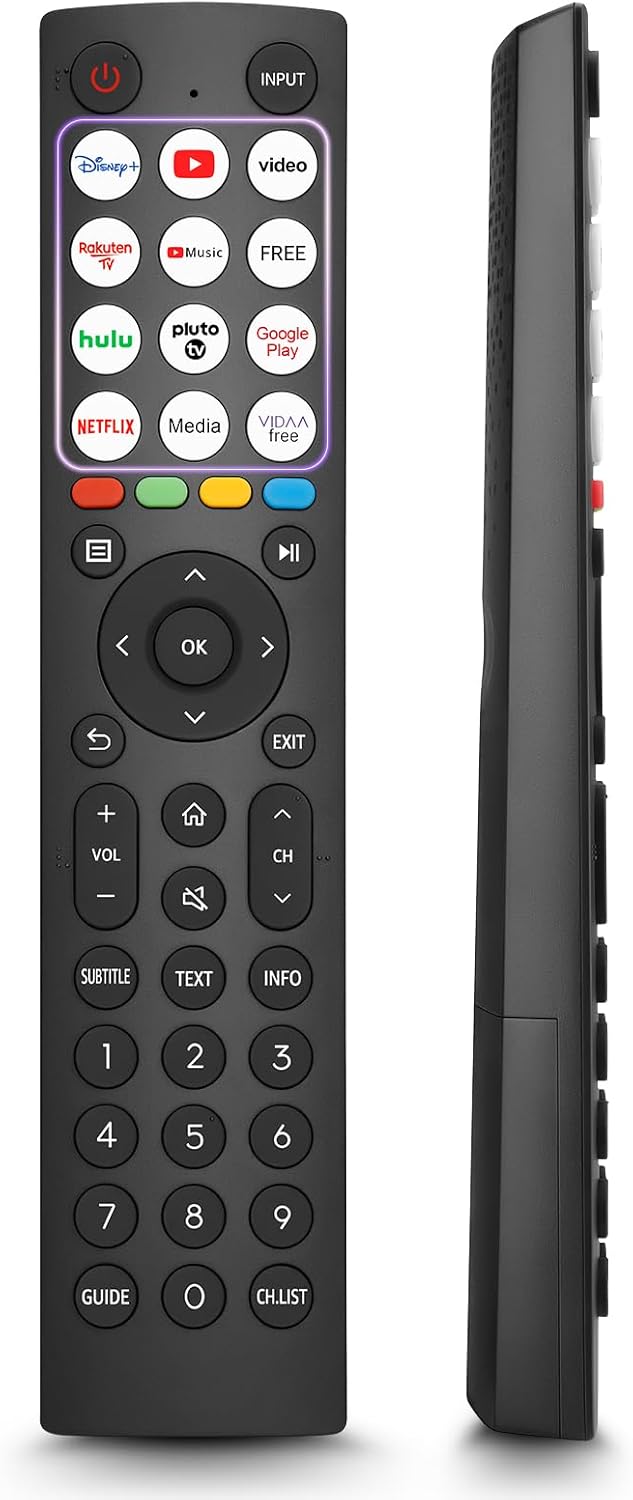
This manual provides comprehensive instructions for the OMAIC EN2Q36H replacement remote control, designed for Hisense Smart TVs. It covers essential information regarding setup, operation, and maintenance to ensure optimal performance and user experience. This remote offers a direct replacement solution without the need for complex programming.
Настройка
The OMAIC EN2Q36H remote control is designed for immediate use with compatible Hisense Smart TVs. No programming or pairing is required.
Ўстаноўка акумулятара
- Знайдзіце батарэйны адсек на задняй частцы пульта дыстанцыйнага кіравання.
- Зрушыце вечка батарэйнага адсека ўніз або ў кірунку, паказаным стрэлкай, каб адкрыць яго.
- Устаўце дзве шчолачныя батарэйкі тыпу AAA (не ўключаны ў камплект), пераканаўшыся, што станоўчая (+) і адмоўная (-) клемы правільна сумяшчаюцца з пазнакамі ўнутры адсека.
- Устаўце вечка батарэйнага блока на месца, зрушыўшы яе назад да шчоўкнення.
Once batteries are installed, the remote is ready to operate your Hisense Smart TV.

Інструкцыя па эксплуатацыі
This remote control utilizes infrared (IR) technology for communication with your Hisense Smart TV. Ensure a clear line of sight between the remote and the TV's IR receiver for optimal performance.
Асноўныя характарыстыкі
- 12 Shortcut Buttons: Quickly access popular streaming services and applications with dedicated buttons.
- Strong IR Signal: Provides a longer transmission distance and quick response without noticeable delay.
- Трывалая канструкцыя: Made from high-quality ABS and silicone materials for extended lifespan.

Функцыі кнопак
Familiarize yourself with the functions of each button on your OMAIC EN2Q36H remote control:
| Кнопка | Функцыя |
|---|---|
| УЛАДА | Switches the TV on or into standby mode. |
| УВОД | Выбірае крыніцы ўваходнага сігналу (HDMI, AV і г.д.). |
| APP Buttons | Quick access buttons for specific applications (e.g., Disney+, Netflix, YouTube). |
| МЕНЮ | Displays the Quick Setup menu. |
| Кантроль СМІ | Buttons for Play, Pause, Stop, Fast Forward, Rewind. |
| Навігацыя (уверх/уніз/налева/направа) | Navigates on-screen menus and adjusts system settings. |
| OK | Confirms selection in on-screen menus. |
| НАЗАД | Вяртаецца да папярэдняга меню. |
| ВЫХАД | Выхад з бягучага меню. |
| ГУЧНАСЦЬ +/- | Рэгулюе ўзровень гучнасці. |
| ДОМ | Enters the Home screen. |
| МУК | Адключае або аднаўляе гук тэлевізара. |
| CH ^/v | Switches channels. |
| субтытры | Activates or deactivates subtitle mode. |
| ТЭКСТ | Turns teletext function on and off. |
| ІНФА | Паказвае інфармацыю пра бягучую праграму. |
| NUMBER Buttons (0-9) | Direct channel selection or number input. |
| КІРАЎНІЦТВА | Displays the Electronic Programme Guide (DTV input). |
| Ч.СПІС | Displays the Channel List on the screen. |

Compatible Hisense TV Models
The OMAIC EN2Q36H replacement remote control is compatible with the following Hisense VIDAA 4K HDTV Smart TV series:
- 32A4K, 40A4K, 43A4K
- 32A5KQ, 40A5KQ
- 43A6K, 50A6K, 55A6K, 58A6K, 65A6K, 70A6K, 75A6K, 85A6K
- 55U6KQ, 65U6KQ
- 43A7KQ, 50A7KQ, 55A7KQ, 65A7KQ, 75A7KQ
- 43E7KQ, 50E7KQ, 55E7KQ, 65E7KQ, 75E7KQ
Тэхнічнае абслугоўванне
Каб забяспечыць даўгавечнасць і належную працу пульта дыстанцыйнага кіравання, выконвайце наступныя рэкамендацыі па тэхнічным абслугоўванні:
- Уборка: Use a soft, dry cloth to clean the remote. Avoid using liquid cleaners or abrasive materials, as they may damage the surface or internal components.
- Замена батарэі: Замяняйце батарэйкі, калі пульт дыстанцыйнага кіравання становіцца павольным або перастае працаваць. Заўсёды замяняйце абедзве батарэйкі адначасова на новыя аднолькавага тыпу (шчолачныя AAA).
- захоўванне: Захоўвайце пульт у прахалодным, сухім месцы, удалечыні ад прамых сонечных прамянёў, экстрэмальных тэмператур і высокай вільготнасці.
- Пазбягайце кропель: Абараняйце пульт ад фізічных удараў, бо падзенні могуць пашкодзіць унутраныя схемы.
Ліквідацыю непаладак
If you encounter issues with your remote control, refer to the following troubleshooting steps:
| праблема | Магчымая прычына | Рашэнне |
|---|---|---|
| Пульт дыстанцыйнага кіравання не адказвае | Разраджаныя або няправільна ўстаўленыя батарэйкі. | Замяніце батарэйкі новымі шчолачнымі батарэйкамі тыпу AAA, сачыце за правільнай палярнасцю. |
| Пульт дыстанцыйнага кіравання не адказвае | Перашкода паміж пультам і тэлевізарам. | Ensure a clear line of sight to the TV's IR receiver. Remove any objects blocking the path. |
| Пульт дыстанцыйнага кіравання не адказвае | Пульт знаходзіцца занадта далёка ад тэлевізара. | Move closer to the TV. The remote has an extended range, but extreme distances may affect performance. |
| Кнопкі ліпнуць або не рэагуюць | Бруд або смецце пад гузікамі. | Акуратна працярыце паверхню вакол кнопак мяккай сухой тканінай. Пазбягайце вадкасцей. |
| Specific functions not working | TV model incompatibility (rare). | Verify your Hisense TV model is listed in the 'Compatible Hisense TV Models' section. |
Тэхнічныя характарыстыкі
| Асаблівасць | Дэталь |
|---|---|
| Назва мадэлі | EN2Q36H |
| Марка | АМАЙК |
| Сумяшчальныя прылады | Hisense Smart TVs |
| Тэхналогія падлучэння | Інфрачырвоны (ВК) |
| Колькасць кнопак | 48 |
| Тып кіравання | Кіраванне кнопкамі |
| Асаблівасці | Universal, Comfortable |
| Колер | Чорны |
| Апісанне батарэі | AAA (шчолачныя) |
| Supported Devices (Max) | 1 |
| Памеры прадукту (прыблізна) | 34.7 х 24.7 х 2.2 см |
| Вага прадукту (прыбл.) | 80 грамаў |

Гарантыя і падтрымка
OMAIC is committed to the quality and compatibility of its replacement remote controls. We provide professional after-sales support to ensure customer satisfaction.
If you have any questions or concerns regarding your OMAIC EN2Q36H remote control or your order, please contact us directly. Our support team aims to respond to inquiries within 12 working hours.