
1. Прадукт скончыўсяview
The JUSTONE A1 is an 11.3-inch portable touch screen designed to bring wireless CarPlay and Android Auto functionality to your vehicle. It features an in-Cell fully laminated display, 1920x720 resolution, and supports up to 60 frames per second for a smooth user experience. Control is available via the capacitive touchscreen or a wireless button knob. It also includes a BT Display Only Mode for audio streaming and offers multiple mounting options.
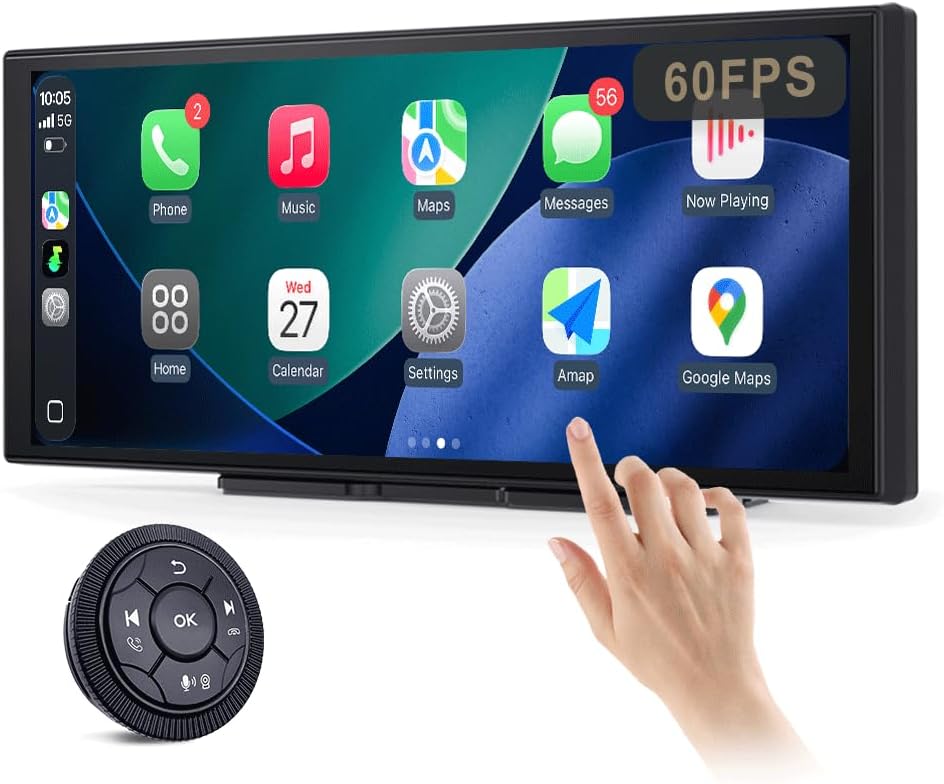
Figure 1: JUSTONE A1 Portable Touch Screen with CarPlay interface and wireless control knob.
2. Змесціва ўпакоўкі
Праверце, ці ўсе пералічаныя ніжэй прадметы ўваходзяць у камплект. Калі якія-небудзь прадметы адсутнічаюць або пашкоджаныя, звярніцеся ў службу падтрымкі кліентаў.

Figure 2: Included accessories for the JUSTONE A1.
- Screen Host
- 4 Clip Bracket
- Двухбаковы скотч
- Кранштэйн для прысоскі
- Control Button (Wireless Knob)
- Аўтамабільны адаптар сілкавання
- Ball Shaped Bracket Converter
- TYPE-C Power Cable
- Аўдыёкабель AUX
- Base for Suction Cup
- Camera Input Cable (Camera optional)
- Кіраўніцтва карыстальніка
3. Настройка
3.1 Варыянты мантажу
The JUSTONE A1 offers two primary mounting methods to suit various vehicle dashboards. Ensure the screen is securely mounted and does not obstruct your view дарогі.

Малюнак 3: Выпamples of suction cup and dashboard mounting.
- 4-Clip Vertical Base: Use this bracket to rest the bottom of the screen directly on your dashboard. Secure it with the provided double-sided tape for stability.
- 17mm Ball-Joint Extendable Arm Mount (Suction Cup Bracket): This option allows for more flexible positioning, typically on the windshield or a smooth dashboard surface. Ensure the suction cup is firmly attached.
Заўвага: Always ensure the chosen mounting location complies with local traffic laws regarding windshield obstructions.
3.2 Падключэнне харчавання
- Connect the TYPE-C Power Cable to the screen host.
- Plug the Car Power Adapter into your vehicle's 12V power outlet (cigarette lighter socket).
- The screen will power on automatically when the vehicle's ignition is turned on.
3.3 Initial Wireless Connection (CarPlay/Android Auto)
- Пераканайцеся, што Bluetooth і Wi-Fi уключаны на вашым смартфоне.
- On the JUSTONE A1 screen, select either 'CarPlay' or 'Android Auto' from the main menu.
- Follow the on-screen instructions to pair your phone via Bluetooth.
- Once Bluetooth is paired, the system will automatically establish a Wi-Fi connection for wireless CarPlay or Android Auto.
- The device is designed to auto-connect to your paired phone when you start your car after the initial setup.
4. Інструкцыя па эксплуатацыі
4.1 Функцыі дысплея

Figure 4: Display features including 11.3-inch size and in-cell full lamination.
- 11.3" In-Cell Full-Laminated Display: Provides a premium look and feel, appearing darker when off compared to standard lamination. The actual panel size is approximately 10.5" x 4.13".
- 1920x720 Resolution: Delivers clear and sharp visuals.
- 60 Гц частата абнаўлення: Ensures smoother performance, especially for CarPlay.
4.2 Метады кантролю
The device offers two ways to interact with its interface:

Figure 5: Touchscreen and wireless knob control options.
- Ёмістны сэнсарны экран: Directly interact with the display by touching icons and swiping.
- Wireless Button Knob: For safer operation while driving, especially if the screen is difficult to reach. This knob allows navigation, volume control, and other functions without direct screen interaction.
4.3 Функцыі падключэння

Figure 6: Supported phone connectivity options.
- Бесправадны CarPlay: Access navigation, music, messages, and more from your iPhone.
- Бесправадная сувязь Android Auto: Access navigation, music, and communication features from your Android phone.
- AirPlay: Mirror content from your Apple devices.
- MiraCast: Mirror content from compatible Android devices.
4.4 Рэжымы аўдыёвыхаду
The JUSTONE A1 supports multiple ways to output audio to your vehicle's sound system:
- BT Display Only Mode: When your phone is connected to the JUSTONE A1, audio streams directly from your phone to your vehicle's built-in Bluetooth audio system. This requires your vehicle to have its own Bluetooth audio input.
- AUX выхад: Connect the provided AUX Audio Cable from the JUSTONE A1 to your vehicle's AUX input port.
- FM-перадатчык: The device can transmit audio via an FM frequency. Tune your car radio to the same frequency set on the JUSTONE A1.
4.5 Automatic Day/Night Mode

Figure 7: Automatic brightness adjustment for day and night conditions.
The built-in light sensor automatically detects ambient light conditions and switches between dark and light themes, adjusting screen brightness for optimal visibility and glare resistance during both day and night driving.
5. Тэхнічнае абслугоўванне
- Уборка: Для чысткі экрана выкарыстоўвайце мяккую тканіну без ворса. Для выдалення ўстойлівых плям злёгку працярыцеampПрацярыце тканіну вадой або сродкам для ачысткі экрана. Пазбягайце агрэсіўных хімічных рэчываў або абразіўных матэрыялаў.
- тэмпература: Пазбягайце працяглага ўздзеяння экстрэмальных тэмператур, як высокіх, так і нізкіх.
- захоўванне: Калі прылада захоўваецца працяглы час, адключыце яе ад сеткі і захоўвайце ў прахалодным, сухім месцы.
- Кабелі: Regularly check power and audio cables for any signs of wear or damage. Replace if necessary.
6. Выпраўленне непаладак
- Прылада не ўключаецца:
- Ensure the car power adapter is securely plugged into the vehicle's 12V outlet and the TYPE-C cable is firmly connected to the screen.
- Праверце, ці падаецца напружанне на разетку 12 В аўтамабіля (напрыклад, пратэставаўшы яе з дапамогай іншай прылады).
- Wireless CarPlay/Android Auto fails to connect:
- Verify Bluetooth and Wi-Fi are enabled on your smartphone.
- Ensure your phone is not connected to another CarPlay/Android Auto device.
- Паспрабуйце забыць прыладу ў наладах Bluetooth тэлефона і зноў падключыць яе.
- Restart both your phone and the JUSTONE A1 device.
- Няма аўдыявыхаду:
- If using BT Display Only Mode, ensure your phone is connected to your car's native Bluetooth audio system.
- If using AUX, check that the AUX cable is properly connected to both the JUSTONE A1 and your car's AUX input, and your car's audio source is set to AUX.
- If using FM transmitter, ensure the frequency on the JUSTONE A1 matches your car radio's frequency and there is no strong interference on that frequency.
- Check the volume levels on both the JUSTONE A1 and your car's audio system.
- Экран не рэагуе або завісае:
- Disconnect the power cable from the JUSTONE A1 for 10 seconds, then reconnect it to perform a restart.
- Wireless control knob is not working:
- Ensure the knob's battery is not depleted. Replace if necessary.
- Re-pair the knob with the main unit if it has become disconnected.
7. Тэхнічныя характарыстыкі
| Асаблівасць | Спецыфікацыя |
|---|---|
| Назва мадэлі | A1 |
| Марка | JUSTONE |
| Памер дысплея | 11.3 Inches (10.5" x 4.13" actual panel) |
| Тып дысплея | In-Cell Full-Laminated Touch Screen |
| дазвол | 1920x720 |
| Частата абнаўлення | Up to 60Hz (for CarPlay) |
| Тэхналогія падлучэння | Bluetooth, Wi-Fi (for Wireless CarPlay/Android Auto) |
| Рэжым выхаду гуку | BT Display Only, AUX, FM Transmitter |
| Інтэрфейс кіравання | Touchscreen, Wireless Button Knob |
| Тып мацавання | Panel Mount (4-clip vertical base), Dashboard Mount (17mm ball-joint extendable arm) |
| Асаблівасць | Portable, Auto Day/Night Mode (Light Sensor) |
| Вага прадмета | 14.8 унцыі (420 грама) |
| Памеры ўпакоўкі | 12.01 х 5.51 х 3.98 цалі |
8. Гарантыя і падтрымка
8.1 Інфармацыя аб гарантыі
The JUSTONE A1 portable touch screen comes with a аднагадовая гарантыя вытворцы from the date of purchase. This warranty covers defects in materials and workmanship under normal use. It does not cover damage caused by misuse, accidents, unauthorized modifications, or improper installation.
Калі ласка, захавайце доказы пакупкі для прэтэнзій па гарантыі.
8.2 Падтрымка кліентаў
For technical assistance, troubleshooting, or warranty inquiries, please contact JUSTONE customer support through the retailer's platform where the product was purchased or visit the official JUSTONE webсайт для кантактнай інфармацыі.
When contacting support, please have your product model (A1) and purchase details ready.