
1. Уводзіны
The ALIGATOR AZA930B is a mobile phone designed with ease of use in mind, particularly for seniors. It features a large keypad, a clear 2.8-inch color display, and essential safety functions such as an SOS button and SOS locator. This manual provides detailed instructions on how to set up, operate, maintain, and troubleshoot your device to ensure optimal performance and safety.
2. Інфармацыя па бяспецы
Please read this section carefully before using your phone to ensure safe and proper operation.
- Бяспека акумулятара: Use only ALIGATOR approved batteries and chargers. Do not short-circuit, puncture, or expose the battery to extreme temperatures. Dispose of batteries properly.
- Зарадка: The phone does not include a charger. Use a compatible USB-C charger (recommended model ALIGATOR CHA0047) with a power output of 2.5-3W. Avoid charging in damp умовы.
- Абарона слыху: Пазбягайце працяглага праслухоўвання на высокім узроўні гучнасці, каб пазбегнуць пашкоджання слыху.
- Бяспека кіравання: Always prioritize driving safety. Use hands-free accessories and obey all local laws and regulations regarding mobile phone use while driving.
- Медыцынскія прылады: Maintain a safe distance between the phone and medical devices such as pacemakers. Consult your physician and the medical device manufacturer for specific guidelines.
- Воданепранікальнасць: Гэты тэлефон не воданепранікальны. Пазбягайце кантакту з вадкасцямі.
3. Змесціва ўпакоўкі
Праверце, ці ёсць усе прадметы ў камплекце з вашым прадуктам:
- ALIGATOR AZA930B Mobile Phone
- Док-станцыя для зарадкі
- Кіраўніцтва карыстальніка (гэты дакумент)
- Заўвага: зарадная прылада не ўваходзіць у камплект і павінна быць набыта асобна.
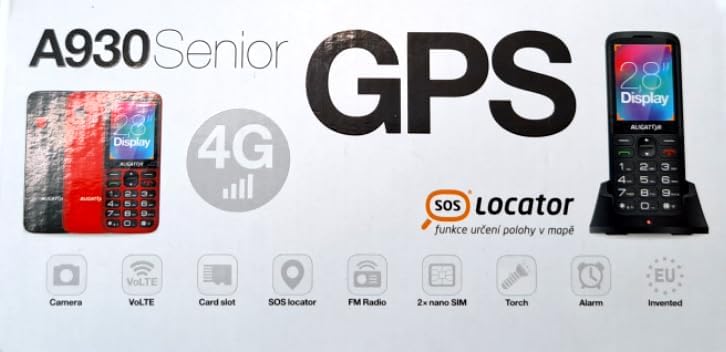
Figure 3.1: Product packaging illustrating the phone, charging dock, and various features such as 4G connectivity, GPS, SOS Locator, camera, VoLTE, card slot, FM radio, torch, and alarm. The box also indicates the 2.8-inch display.
4. Настройка
4.1. Устаўка SIM-карт
The ALIGATOR AZA930B supports Dual SIM (2 x Nano SIM) functionality. To insert SIM cards:
- Выключыце тэлефон.
- Зніміце заднюю крышку і акумулятар.
- Locate the SIM card slots. Insert your Nano SIM cards into the designated slots, ensuring the gold contacts face down and the cut corner aligns correctly.
- Замяніце батарэю і заднюю крышку.
4.2. Устаўка карты Micro SD
The phone supports a Micro SD memory card up to 256 GB for additional storage.
- Follow steps 1 and 2 from "4.1. Inserting SIM Cards".
- Locate the Micro SD card slot. Insert the Micro SD card with the gold contacts facing down until it clicks into place.
- Замяніце батарэю і заднюю крышку.
4.3. Пачатковая зарадка
Before first use, fully charge the phone's 1700 mAh Li-ion battery.
- Connect the USB-C cable (not included) to the phone's USB-C port or place the phone in the charging dock.
- Connect the other end of the cable to a compatible charger (e.g., ALIGATOR CHA0047, 2.5-3W) or a powered USB port.
- The charging indicator will illuminate. A full charge may take several hours.

Figure 4.1: The ALIGATOR AZA930B phone placed in its dedicated charging dock. The phone's screen shows the current time and network signal indicators.

Figure 4.2: Detail from the product box, explicitly showing an icon indicating that a charger is not included and specifying a recommended charger power of 2.5-3W.
5. Інструкцыя па эксплуатацыі
5.1. Уключэнне/выключэнне харчавання
- Каб уключыць: Націсніце і ўтрымлівайце кнопку харчавання/завяршэння выкліку (чырвоную кнопку), пакуль не загарыцца экран.
- Каб выключыць: Націсніце і ўтрымлівайце кнопку харчавання/завяршэння выкліку, пакуль не з'явяцца параметры выключэння харчавання, затым выберыце «Выключыць харчаванне».
5.2. Асноўныя функцыі выклікаў
- Здзяйсненне званка: Enter the phone number using the large keypad and press the Call button (green button).
- Адказ на званок: When the phone rings, press the Call button (green button).
- Завяршэнне выкліку: Націсніце кнопку харчавання/завяршэння выкліку (чырвоную кнопку).
- Гучная сувязь: During a call, activate hands-free mode via the on-screen option or a dedicated button if available.
5.3. SOS Button and SOS Locator
The SOS button is a critical safety feature, allowing quick contact in emergencies.
- Кнопка SOS: Located on the back of the phone (often red). Press and hold this button to activate the emergency sequence.
- SOS Presets: You can set up to 5 preset emergency contacts. When the SOS button is pressed, the phone will automatically call these numbers in sequence and send an emergency SMS.
- SOS Locator: This function sends the phone's location via SMS to the emergency contacts after the SOS button is pressed. The recipient can then view the location on a map via a web link provided in the SMS. This feature utilizes both GSM and GPS for location accuracy.

Малюнак 5.1: Задняя частка view of the ALIGATOR AZA930B, showing the prominent red SOS button and the speaker grille for clear audio.

Малюнак 5.2: Задняя частка пад вуглом view of the ALIGATOR AZA930B, demonstrating the activated flashlight feature.
5.4. "Zachranka" Rescue Application
The "Zachranka" application is a mobile emergency call application pre-installed on the device.
- It provides quick contact with emergency medical services or mountain rescue.
- The application is valid in Austria, Hungary, the Czech Republic, and in the territories of the Slovak mountains.
- For more information, refer to the "Zachranka" app's official resources.

Малюнак 5.3: Пярэдняя і задняя часткі views of the ALIGATOR AZA930B, accompanied by the "Zachranka" rescue application logo, indicating its integration with the device.
5.5. Іншыя асаблівасці
- Тэлефонная кніга: Store up to 500 contacts.
- Абмен паведамленнямі: Send and receive SMS messages (memory for 100 SMS). Supports sending photos via MMS.
- Мультымедыя:
- FM-радыё: Слухайце FM-радыёстанцыі.
- Медыяплэер: Прайграванне аўдыё і відэа files stored on the phone or Micro SD card.
- Дыктафон: Запісвайце галасавыя нататкі.
- Ліхтарык: Уключыце ўбудаваны ліхтарык для падсветкі.
- інструменты: Includes Alarm, Calculator, and SIM toolkit support.
- Bluetooth: Connect to Bluetooth headsets or other devices.
- Вібрацыйная сігналізацыя: Set the phone to vibrate for incoming calls or notifications.
- Мелодыі: Choose from 10+1 pre-installed melodies.
- Аўтаматычная карэкціроўка часу: The phone can automatically adjust its time.

Малюнак 5.4: Спераду view of the ALIGATOR AZA930B, highlighting its user-friendly large keypad and vibrant color display.
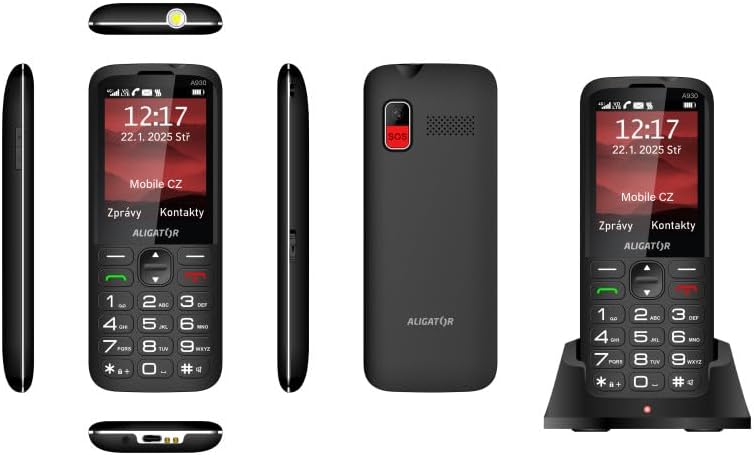
Малюнак 5.5: Комплексны views of the ALIGATOR AZA930B, illustrating its design from the top, sides, front, back, and when seated in its charging dock.
6. Тэхнічнае абслугоўванне
- Уборка: Выкарыстоўвайце мяккую сухую тканіну для чысткі паверхні тэлефона. Пазбягайце выкарыстання агрэсіўных хімічных рэчываў або абразіўных матэрыялаў.
- Сыход за батарэяй: To prolong battery life, avoid fully discharging the battery frequently. Store the phone in a cool, dry place if not used for extended periods.
- захоўванне: Keep the phone away from extreme temperatures, direct sunlight, and dusty environments.
7. Выпраўленне непаладак
| праблема | Магчымая прычына | Рашэнне |
|---|---|---|
| Тэлефон не ўключаецца. | Батарэя разраджана або няправільна ўстаўлена. | Зарадзіце акумулятар. Пераканайцеся, што акумулятар правільна ўстаўлены. |
| Няма сігналу сеткі. | SIM card not inserted correctly or out of network coverage. | Reinsert SIM card. Move to an area with better network coverage. |
| Нельга рабіць або прымаць званкі. | No credit, SIM card issue, or network problem. | Check your account balance. Verify SIM card insertion. Contact your network provider. |
| Не працуе кнопка SOS. | SOS numbers not set up or incorrect. | Ensure SOS numbers are correctly configured in settings. Check network signal. |
| Акумулятар хутка разраджаецца. | High usage, background apps, or aging battery. | Зменшце яркасць экрана. Закрыйце непатрэбныя праграмы. Падумайце аб замене батарэі, калі яна старая. |
8. Тэхнічныя характарыстыкі
| Асаблівасць | Дэталь |
|---|---|
| Нумар мадэлі | AZA930B |
| Дысплей | 2.8-цалевы каляровы TFT-дысплей |
| Слоты для SIM-карт | Dual SIM (2 x Nano SIM) |
| Падтрымка карты памяці | Micro SD да 256 ГБ |
| акумулятар | 1700 мАг літый-іённы |
| Час размовы | Да 480 хвілін |
| Час чакання | Да 10 дзён |
| Камера | 1.9 МП |
| Сувязь | 4G/LTE/VoLTE, Bluetooth |
| Порт для зарадкі | USB-C |
| Раз'ём для навушнікаў | 3.5 мм |
| Памеры | 14.3 х 5.8 х 1.36 см |
| Вага | 95 г |
| Аперацыйная сістэма | Symbian 9.1 |
| Колер | Чорны |
Заўвага: тэхнічныя характарыстыкі могуць быць зменены без папярэдняга паведамлення.
9. Гарантыя і падтрымка
ALIGATOR products are designed and manufactured to the highest quality standards. For detailed warranty information, including terms, conditions, and duration, please refer to the warranty card included with your product or visit the official ALIGATOR webсайт.
For technical support, service, or inquiries regarding your ALIGATOR AZA930B mobile phone, please contact ALIGATOR customer service or visit their official support channels. Keep your purchase receipt and product serial number (IMEI) handy when seeking support.
- IMEI 1: 357140835088496
- IMEI 2: 357140835088504
- Barcode/UPC: 8596426108267