
SVITOO SVITOO Tab 10 GMS Certified 1027C
SVITOO Kids Tablet 10 Inch User Manual
Model: SVITOO Tab 10 GMS Certified 1027C
Уводзіны
This manual provides essential instructions for setting up, operating, and maintaining your SVITOO Kids Tablet 10 Inch. Designed for young users, this Android 15 tablet features parental controls, a durable shockproof case, and a vibrant 10-inch HD IPS display. Please read this guide thoroughly to ensure proper use and to maximize your tablet's functionality.
Што ў скрынцы
- SVITOO Kids Tablet 10 Inch
- Protective Cover (Pre-installed)
- Зарадны кабель USB-C
- Кіраўніцтва карыстальніка
- Падарункавая скрынка
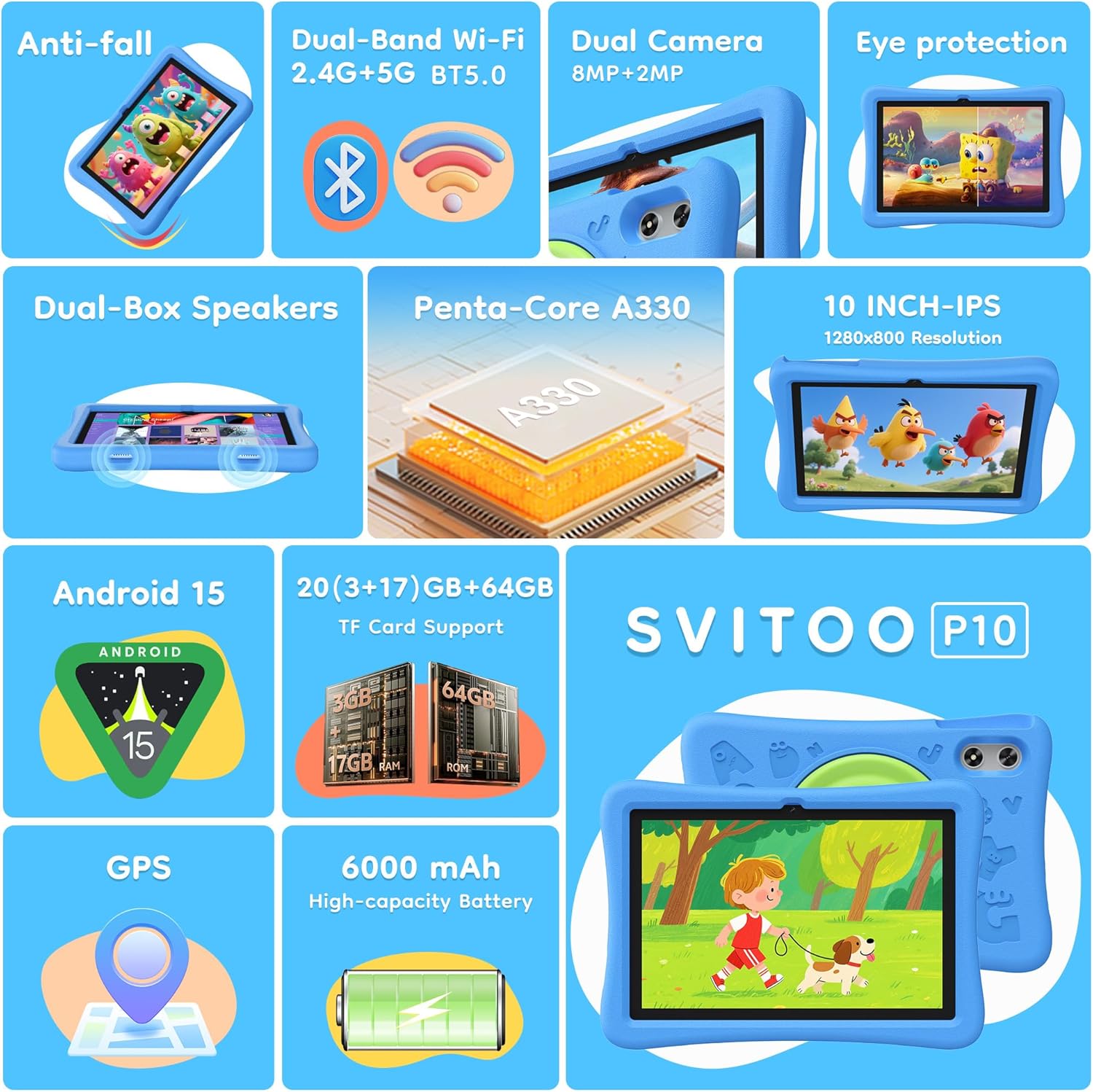
Image: The SVITOO Kids Tablet 10 Inch, shown in its blue protective case, highlighting its robust design suitable for children.
Прадукт скончаныview
Асноўныя характарыстыкі
- Аперацыйная сістэма: Android 15 with GMS Certification for full Google Play access.
- Дысплей: 10-inch HD IPS (1280 x 800 pixels) touchscreen with eye protection mode.
- Працэсар: Unisoc T7200 8-core CPU for smooth performance.
- Памяць і захоўванне: 20GB RAM (3GB physical + 17GB virtual) and 64GB internal storage, expandable up to 1TB via microSD card (sold separately).
- Камеры: 8MP Rear Camera and 2MP Front Camera.
- Падключэнне: Dual-Band Wi-Fi (2.4/5 GHz) and Bluetooth 5.0.
- акумулятар: 6000mAh high-capacity battery for extended usage.
- Аўдыё: Dual-box speakers and a 3.5mm headphone jack.
- Трываласць: Kid-friendly EVA shockproof case with a 360° rotating handle and 180° rotating stand.
- Бацькоўскі кантроль: Advanced settings for screen time limits, content filtering, and app management.
Кампаненты планшэта
Азнаёмцеся з фізічнымі кампанентамі вашага планшэта:

Выява: Падрабязны view of the tablet's side and rear, indicating the USB Type-C port, headphone jack, power ON/OFF button, volume controls, speakers, rear camera, and front camera.
- Порт USB Type-C: Для зарадкі і перадачы дадзеных.
- Раз'ём для навушнікаў (3.5 мм): Для падключэння правадных навушнікаў.
- Кнопка ўключэння/выключэння харчавання: To turn the tablet on/off or put it to sleep.
- Кнопкі гучнасці: Каб рэгуляваць гучнасць гуку.
- Дакладчыкі: Dual-box speakers for audio output.
- Пярэдняя камера: Для відэазванкоў і сэлфі.
- Задняя камера: Для здымкі фота і відэа.
- Слот для карты MicroSD: Located under a protective flap, for storage expansion.

Image: The tablet's protective case featuring a versatile 360-degree rotating handle that also functions as a 180-degree rotating stand, allowing for various viewныя вуглы.
Кіраўніцтва па ўстаноўцы
- Зарадзіць планшэт: Before first use, fully charge the tablet using the provided USB-C cable and a compatible power adapter.
- Уключэнне: Press and hold the Power ON/OFF button until the screen lights up.
- Першапачатковая ўстаноўка: Выконвайце падказкі на экране, каб выбраць мову, падключыцца да сеткі Wi-Fi і наладзіць свой уліковы запіс Google.
- Google Kids Space / Parental Controls: During setup, you will have the option to configure Google Kids Space or other parental control settings. It is highly recommended to set these up immediately to ensure a safe environment for your child.
- Усталяваць праграмы: Once setup is complete, you can download age-appropriate apps and games from the Google Play Store.
Інструкцыя па эксплуатацыі
Базавая навігацыя
- Галоўны экран: Swipe left or right to access different app pages.
- Скрыня праграм: Правядзіце пальцам уверх ад ніжняга краю экрана, каб view усе ўсталяваныя прыкладання.
- Апавяшчэнні і хуткія налады: Swipe down from the top of the screen to access notifications and quick settings like Wi-Fi, Bluetooth, and screen brightness.
- Назад, Галоўная, Нядаўнія праграмы: Use the navigation buttons at the bottom of the screen to go back, return to the home screen, or view нядаўна адкрытыя праграмы.
Зарадка планшэта
Connect the USB-C charging cable to the tablet's USB-C port and the other end to a power adapter. The battery icon on the screen will indicate charging status. A full charge provides approximately 12 hours of mixed use.

Image: The tablet connected to a charger, displaying a battery icon with 99% charge, illustrating the charging process and battery life features like Night Mode and Energy Saving.
Рэжым аховы вачэй
To reduce eye strain, especially during prolonged use, activate the Eye Protection Mode (often called Night Mode or Reading Mode) from the quick settings panel or display settings. This mode adjusts screen colors to warmer tones.
Бацькоўскі кантроль
The SVITOO Kids Tablet features robust parental controls to help manage your child's digital experience. These controls are integrated with Android 15 and Google Family Link.

Image: A family using the tablet, with an overlay showing various parental control options such as setting screen time limits, blocking harmful apps/websites, approving app downloads, and tracking child's location.
Configuring Parental Controls:
- Налады доступу: Перайсці да Налады > Лічбавае дабрабыт і бацькоўскі кантроль or search for "Family Link" in your app drawer.
- Set Screen Time Limits: Define daily limits for tablet usage to encourage balanced screen time.
- Фільтраванне кантэнту: Блакіраваць доступ да непажаданых webсайты і праграмы.
- App Approvals: Require parental approval for new app downloads or in-app purchases.
- Адсочванне месцазнаходжання: Monitor your child's device location (if enabled and configured).
For detailed instructions on Google Family Link, please refer to Google's official support documentation.
Тэхнічнае абслугоўванне
- Уборка: Для чысткі экрана і корпуса планшэта выкарыстоўвайце мяккую тканіну без ворса. Пазбягайце выкарыстання абразіўных ачышчальнікаў або растваральнікаў.
- Сыход за батарэяй: Каб падоўжыць тэрмін службы батарэі, пазбягайце частай поўнай разрадкі планшэта. Рэгулярна зараджайце яго і не падвяргайце ўздзеянню экстрэмальных тэмператур.
- Абнаўленні праграмнага забеспячэння: Keep the tablet's operating system and apps updated to ensure optimal performance and security.
- захоўванне: Store the tablet in a cool, dry place away from direct sunlight when not in use.
- Ахоўны футляр: The included EVA shockproof case provides protection against drops and bumps. Ensure it is properly fitted at all times.
Ліквідацыю непаладак
| праблема | Рашэнне |
|---|---|
| Планшэт не ўключаецца. | Ensure the tablet is fully charged. Connect it to a charger for at least 30 minutes, then try powering it on again. |
| Экран не рэагуе. | Perform a force restart by holding the Power ON/OFF button for 10-15 seconds. If the issue persists, contact support. |
| Праблемы з падключэннем да Wi-Fi. | Check if other devices can connect to the Wi-Fi network. Restart your router and the tablet. Forget the network and reconnect. |
| Праграмы завісаюць або працуюць павольна. | Close background apps. Clear app cache (Settings > Apps > [App Name] > Storage > Clear Cache). Ensure sufficient storage space is available. Restart the tablet. |
| Акумулятар хутка разраджаецца. | Зменшце яркасць экрана. Зачыніце невыкарыстоўваныя праграмы. Адключайце Wi-Fi/Bluetooth, калі яны не выкарыстоўваюцца. Праверце выкарыстанне батарэі ў наладах, каб вызначыць праграмы, якія спажываюць шмат энергіі. |
Тэхнічныя характарыстыкі
| Асаблівасць | Дэталь |
|---|---|
| Назва мадэлі | SVITOO Tab 10 GMS Certified 1027C |
| Аперацыйная сістэма | Android 15 |
| Памер экрана | 10 цалі |
| Дазвол экрана | 1280 x 800 пікселяў (HD IPS) |
| Працэсар | 1.8 GHz (Unisoc T7200 8-core CPU) |
| АЗП | 20 ГБ (3 ГБ фізічнай + 17 ГБ віртуальнай) |
| Унутраная памяць | 64 ГБ |
| Сховішча з магчымасцю пашырэння | Up to 1TB via MicroSD (sold separately) |
| Графічны супрацэсар | Mali-G57 processor Imagination Tech |
| Бесправадны тып | 802.11a/b/g/n/ac (Dual-Band 2.4/5 GHz) |
| Bluetooth | Bluetooth 5.0 |
| Ёмістасць батарэі | 6000 мАг |
| Сярэдні тэрмін службы батарэі | 12 гадзін |
| Пярэдняя камера | 2 мегапікселяў |
| Задняя камера | 8 мегапікселяў |
| Вага прадмета | 2.44 фунта |
| Памеры прадукту | 9.7 х 6.4 х 0.4 цалі |
Гарантыя і падтрымка
Your SVITOO Kids Tablet comes with a 1-Year Manufacturer Protection. This warranty covers manufacturing defects under normal use. It does not cover damage caused by misuse, accidents, natural disasters, or unauthorized modifications.
For technical support, warranty claims, or any questions regarding your product, please contact SVITOO customer service through your Amazon order page. Look for the "Contact Us" option next to your order details.
Калі ласка, захавайце пацвярджэнне пакупкі для гарантыйных мэт.