AULA WIN60 HE PRO 60% Mechanical Gaming Keyboard User Manual
Model: WIN60 HE PRO | Brand: AULA
1. Уводзіны
This manual provides detailed instructions for the AULA WIN60 HE PRO 60% Mechanical Gaming Keyboard. Designed for high-performance gaming, this keyboard features Hall Effect magnetic switches, rapid trigger mode, an 8000Hz polling rate, and customizable RGB lighting. Please read this manual thoroughly to ensure proper setup, operation, and maintenance of your keyboard.
Figure 1: AULA WIN60 HE PRO 60% Mechanical Gaming Keyboard with highlighted features.
2. Настройка
2.1 Распакаванне
Асцярожна выміце ўсе кампаненты з упакоўкі. Пераканайцеся, што ў наяўнасці наступныя прадметы:
AULA WIN60 HE PRO Keyboard
USB-кабель C
Здымальнік клавішнай шапкі
Extra Switches (if included)
Video 1: Unboxing the AULA WIN60 HE Gaming Keyboard, showing the contents including the keyboard, USB-C cable, and switch puller.
2.2 Падключэнне клавіятуры
Знайдзіце порт USB-C на задняй панэлі клавіятуры.
Connect the provided USB-C cable to the keyboard.
Падключыце іншы канец кабеля USB-C да вольнага порта USB на вашым кампутары.
The keyboard will automatically be recognized by your operating system (Windows PC/Laptop compatible).
Note: This keyboard is not compatible with PlayStation 5/4 (PS5/PS4) and OBOX.
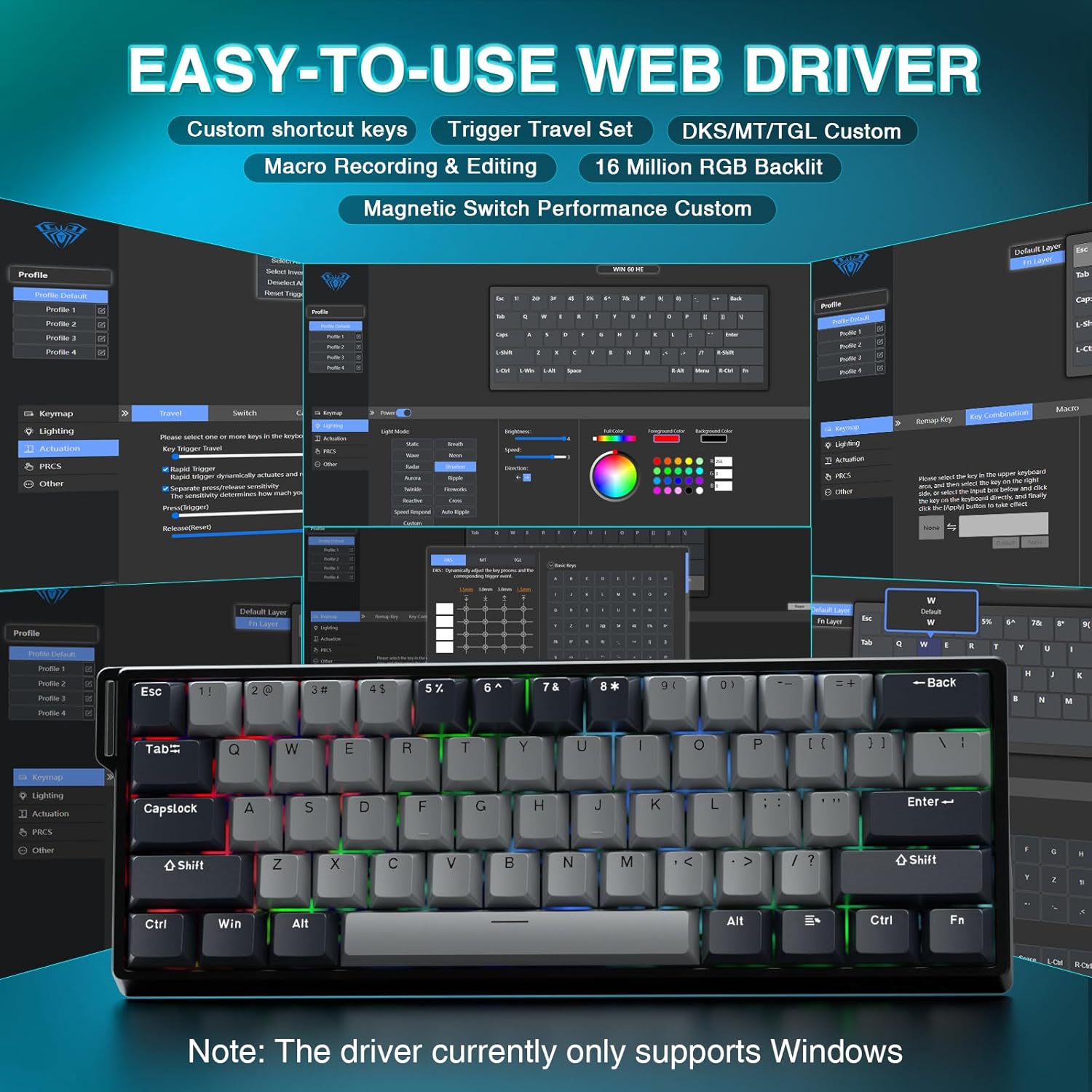
2.3 Driver Installation (Web-Based)
The AULA WIN60 HE PRO utilizes a web-based driver for customization, eliminating the need for software downloads.
Пераканайцеся, што ваш кампутар падлучаны да інтэрнэту.
Адкрыйце абранае web браўзер.
Navigate to the official AULA web driver portal (refer to the product packaging or manufacturer's webсайт для дакладнага URL).
The web interface will allow you to customize settings directly.
Figure 2: Easy-to-use web driver interface for customization.
Заўвага: The web driver currently only supports Windows operating systems.
3. Аперацыя
3.1 Hall Effect Magnetic Switches & Rapid Trigger
The AULA WIN60 HE PRO features advanced Hall Effect magnetic switches, which detect key presses using magnetic fields rather than physical contact. This design provides:
Рэгуляваны прывад: Customize the actuation point of each key to your preference for faster response or more deliberate presses.
Рэжым хуткага запуску: Allows keys to activate and deactivate based on movement rather than a fixed actuation point, enabling ultra-fast repeated inputs and precise control, especially beneficial for FPS games. The ultra-low RT step distance is 0.02mm.
Трываласць: Absence of physical contact reduces wear and tear.
Figure 3: Rapid Trigger technology for enhanced gaming performance.
Video 2: Demonstrating the hot-swappable magnetic switches, including Gray Wood Magnetic Switch and Wing Chun Magnetic Switch variants.
3.2 8000Hz Polling Rate
The keyboard features an 8000Hz polling rate, meaning it reports key presses to your computer 8000 times per second. This results in:
Ultra-Fast Response Times: Minimizes input lag for immediate in-game actions.
Кантроль дакладнасці: Ensures every keystroke is registered accurately and without delay.
Figure 4: 8000Hz Hyper-Polling Technology for minimal latency.
3.3 Дынамічнае RGB-падсвятленне
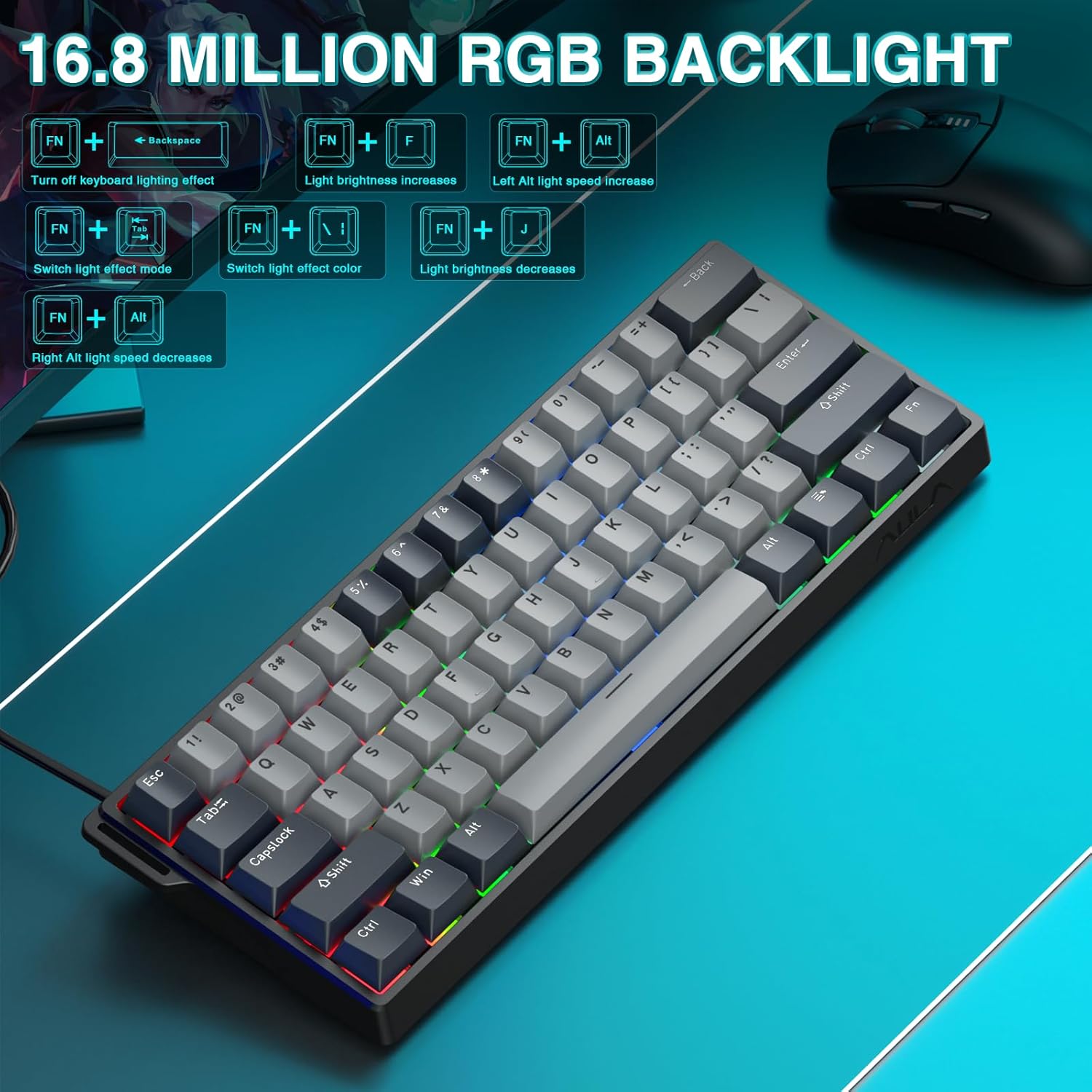
The keyboard offers 16.8 million customizable RGB color options and various lighting effects. Use the following key combinations for quick adjustments:
RGB Lighting Control Hotkeys
Камбінацыя клавіш
Функцыя
FN + Backspace
Turn off keyboard lighting effect
FN + [
Яркасць святла павялічваецца
FN + ]
Яркасць святла памяншаецца
FN + {
Left Alt light speed increase
FN + }
Right Alt light speed decrease
FN + \
Пераключэнне рэжыму светлавога эфекту
FN + Альт
Пераключыць колер светлавога эфекту
Figure 5: RGB Backlight controls and effects.
3.4 Customization with Web Кіроўца
The web-based driver provides extensive customization options:
Пераназначэнне клавіш: Assign any function to any key.
Стварэнне макрасаў: Запісвайце і прысвойвайце складаныя паслядоўнасці каманд адной клавішы.
Настройка асвятлення RGB: Fine-tune lighting effects, colors, and patterns beyond the basic hotkeys.
Рэгуляванне кропкі спрацоўвання: Precisely set the actuation distance for each magnetic switch.
Доступ да web driver as described in Section 2.3.
4. Тэхнічнае абслугоўванне
4.1 Чыстка клавіятуры
Каб падтрымліваць аптымальную прадукцыйнасць і знешні выгляд:
Адключыце клавіятуру ад кампутара перад чысткай.
Выкарыстоўвайце мяккую безворсовую тканіну, злёгку dampпрамыйце вадой або мяккім ачышчальным растворам, каб праціраць клавішы і корпус.
Для выдалення пылу і смецця паміж клавішамі выкарыстоўвайце сціснутае паветра.
Пазбягайце рэзкіх хімікатаў або абразіўных матэрыялаў.
4.2 Перамыкачы з магчымасцю гарачай замены
The AULA WIN60 HE PRO features hot-swappable magnetic switches, allowing for easy replacement or customization without soldering.
Выкарыстоўвайце прадугледжаны здымнік для клавіш, каб акуратна зняць каўпачок.
Use a switch puller (not explicitly mentioned as included, but implied by "hot-swappable" and video) to carefully remove the switch.
Align the new switch with the socket and press firmly until it clicks into place.
Заменіце каўпачок клавішы.
Caution: Apply gentle force to avoid damaging the switch sockets.
5. Выпраўленне непаладак
5.1 Клавіятура не рэагуе
Пераканайцеся, што кабель USB-C надзейна падключаны як да клавіятуры, так і да кампутара.
Паспрабуйце падключыць клавіятуру да іншага USB-порта на вашым кампутары.
Праверце клавіятуру на іншым кампутары, каб выключыць праблемы, характэрныя для сістэмы.
Перазагрузіце кампутар.
5.2 RGB-падсветка не працуе
Check if the lighting is turned off using the FN + Backspace гарачая клавіша.
Адрэгулюйце яркасць з дапамогай FN + [ or FN + ].
Забяспечце web driver settings haven't disabled lighting.
5.3 Keys Sticking or Not Registering
Clean around the affected keycap to remove any debris.
If a specific switch is faulty, consider replacing it using the hot-swappable feature (refer to Section 4.2).
Check the actuation point settings in the web driver; it might be set too high or too low for your preference.
6. Тэхнічныя характарыстыкі
Асаблівасць
Дэталь
мадэль
WIN60 HE PRO
Тып клавіятуры
60% Mechanical Gaming Keyboard
Тып перамыкача
Hall Effect Magnetic Switch, Hot-Swappable
Сувязь
Правадны USB-C
Стаўка апытання
8000 Гц
Асаблівасці
Rapid Trigger Mode, Adjustable Actuation, RGB Backlit, Programmable Keys, Hotkeys and Media Keys, Portable
Сумяшчальныя прылады
Laptop, PC Windows (Not compatible with PS5/PS4, OBOX)
Памеры прадукту
11 х 5 х 1.1 цалі (27.94 х 12.7 х 2.79 см)
Вага прадмета
2.18 фунта (0.99 кг)
Вытворца
АЎЛА
Figure 6: Detailed comparison of AULA WIN60 HE series magnetic switches.
7. Гарантыя і падтрымка
For warranty information, technical support, or service inquiries, please refer to the warranty card included with your product or visit the official AULA/CORBOBO webсайт. Вы таксама можаце звязацца з прадаўцом непасрэдна праз платформу пакупак для атрымання дапамогі.
Ask about setup, troubleshooting, compatibility, parts, safety, or missing instructions. Manuals+ will review the question and use this page’s manual context to help answer it.