
AIPER W2SE
Aiper HydroComm Pure Communication Module User Manual
Model: W2SE
1. Уводзіны
The Aiper HydroComm Pure Communication Module is designed to enhance the functionality of your Aiper Scuba X Series robotic pool cleaner. This module facilitates real-time underwater communication, allowing you to remotely switch cleaning modes and initiate one-tap surface retrieval directly from your mobile device.
This manual provides essential information for the proper setup, operation, and maintenance of your HydroComm Pure module, ensuring optimal performance and longevity.
2. Прадукт скончыўсяview
The HydroComm Pure module acts as an underwater communication station, bridging the gap between your Aiper app and your Scuba X Series robotic pool cleaner. It is a floating device equipped with communication capabilities.
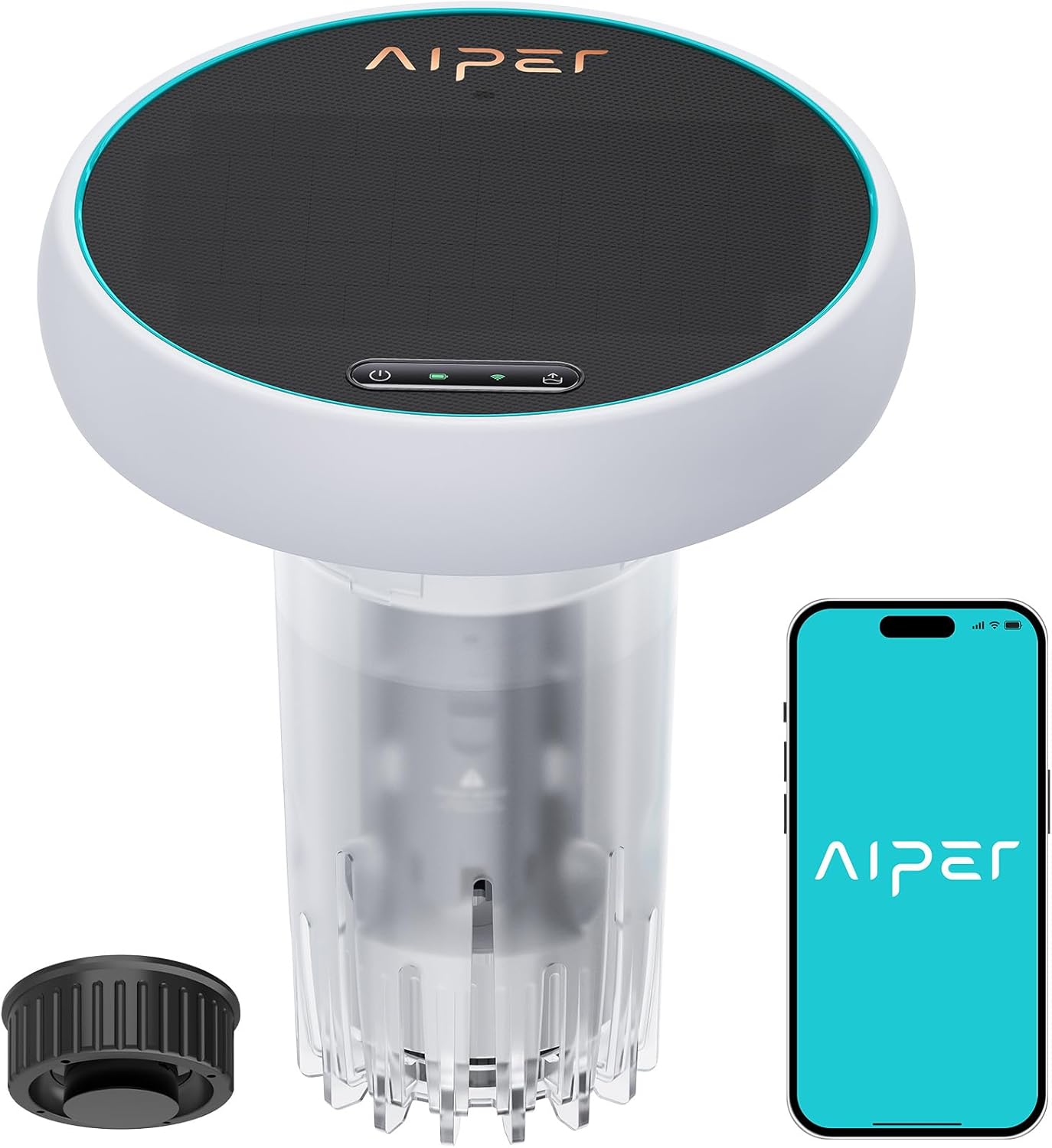
Figure 2.1: Aiper HydroComm Pure Communication Module and companion app interface.
Асноўныя характарыстыкі:
- Real-Time Underwater Communication: Enables seamless communication with Aiper Scuba X Series pool cleaners.
- Switch Cleaning Modes: Allows real-time adjustment of cleaning modes while the robot is operating underwater.
- One-Tap Surface Retrieval: Instantly brings the robotic cleaner back to the surface with a single command from the app.
- Кіраванне праграмамі: Integrates with the Aiper app for remote control and monitoring.
- Solar-Assisted Charging: Features a solar panel to help maintain battery charge.

Figure 2.2: HydroComm Series comparison, highlighting the Pure module's underwater communication feature.

Figure 2.3: Compatibility of HydroComm Pure with Aiper Scuba X1, Scuba X1 Pro, and Scuba X1 Pro Max models.
3. Настройка
- Charge the Module: Ensure the HydroComm Pure module is sufficiently charged before first use. While it features solar charging, an initial charge via the included adapter is recommended.
- Download the Aiper App: Download and install the official Aiper app on your smartphone or tablet. The app is available on both iOS and Android platforms.
- Спалучэнне з праграмай: Follow the in-app instructions to pair the HydroComm Pure module with your Aiper account and your Scuba X Series robotic pool cleaner. Ensure Bluetooth and Wi-Fi are enabled on your device.
- Размяшчэнне ў басейне: Once paired, turn on the HydroComm Pure module and gently place it into the pool. It is designed to float on the surface, acting as a communication hub.
- Activate Pool Cleaner: Start your Aiper Scuba X Series robotic pool cleaner as per its own instruction manual.
4. Інструкцыя па эксплуатацыі
The HydroComm Pure module provides enhanced control over your Aiper Scuba X Series robotic pool cleaner through the Aiper app.
4.1 Switching Cleaning Modes Underwater
- Ensure the HydroComm Pure module is floating in the pool and connected to your Aiper app.
- Open the Aiper app and select your connected Scuba X Series pool cleaner.
- Navigate to the cleaning mode selection interface within the app.
- Choose your desired cleaning mode (e.g., Floor, Wall, Smart) from the available options. The command will be transmitted to the underwater robot via the HydroComm Pure module.
- Confirm the mode change in the app.

Figure 4.1: App interface demonstrating the ability to switch cleaning modes while the robot is underwater.
4.2 One-Tap Surface Retrieval
- Ensure the HydroComm Pure module is floating in the pool and connected to your Aiper app.
- Open the Aiper app and select your connected Scuba X Series pool cleaner.
- Locate the "Surface Retrieval" or similar one-tap retrieval option within the app interface.
- Tap the button to initiate the retrieval process. The robotic cleaner will receive the command and begin moving towards the surface or a designated wall for easy retrieval.
- Wait for the robot to reach the surface before attempting to remove it from the pool.

Figure 4.2: App interface demonstrating the one-tap surface retrieval function.
4.3 Маніторынг
The Aiper app also allows you to monitor the battery charge level of your robotic pool cleaner and the HydroComm Pure module, providing real-time status updates.
5. Тэхнічнае абслугоўванне
- Уборка: After each use, retrieve the HydroComm Pure module from the pool. Turn it off and rinse it thoroughly with fresh water to remove any pool chemicals or debris.
- захоўванне: Store the module in a cool, dry place away from direct sunlight when not in use for extended periods.
- Сыход за сонечнымі панэлямі: Перыядычна працірайце паверхню сонечнай панэлі мяккай анучайamp cloth to ensure it remains clean and can efficiently absorb sunlight for charging.
- акумулятар: The module's battery is designed to be maintained by the solar panel during sunny conditions. For optimal battery life, avoid prolonged storage with a completely depleted battery.
6. Выпраўленне непаладак
| праблема | Магчымая прычына | Рашэнне |
|---|---|---|
| Module not connecting to app/robot |
|
|
| Solar charging ineffective |
|
|
| Commands not reaching robot |
|
|
7. Тэхнічныя характарыстыкі
| Асаблівасць | Дэталь |
|---|---|
| Нумар мадэлі | W2SE |
| Марка | АЙПЕР |
| Крыніца харчавання | На сонечных батарэях |
| Метад кантролю | дадатак |
| Асаблівасць | One-tap Retrieval Underwater, Switch Cleaning Modes Underwater, Underwater Comm |
| Памеры прадукту | 9.2 см Д х 10.2 см Ш х 9.2 см В |
| Вага прадмета | 7.43 фунта (3.38 кілаграма) |
| Тып батарэі | Патрабуецца 1 літый-іённы акумулятар (у камплекце) |
| Змест энергіі літыевай батарэі | 37.44 Вт гадзін |
| Матэрыял | Пластыкавыя |
| Колер | Белы |
8. Гарантыя і падтрымка
8.1 Інфармацыя аб гарантыі
The Aiper HydroComm Pure Communication Module comes with a двухгадовая гарантыя з даты пакупкі. Гэтая гарантыя распаўсюджваецца на вытворчыя дэфекты і няспраўнасці пры нармальным выкарыстанні. Калі ласка, захавайце пацвярджэнне пакупкі для прэтэнзій па гарантыі.
For detailed warranty terms and conditions, please refer to the official Aiper webсайт або звярніцеся ў службу падтрымкі кліентаў.
8.2 Падтрымка кліентаў
If you encounter any issues or have questions regarding your Aiper HydroComm Pure Communication Module, please visit the official Aiper support website or contact their customer service team. Contact information can typically be found on the product packaging or the Aiper official webсайт.
Aiper Official Webсайт: www.aiper.com
Ask a question about this manual
Ask about setup, troubleshooting, compatibility, parts, safety, or missing instructions. Manuals+ will review the question and use this page’s manual context to help answer it.