
1. Уводзіны
This manual provides essential instructions for the safe and effective use of your Hello Kitty Kuromi Wireless Bluetooth Earbuds. Please read this manual thoroughly before using the product and retain it for future reference.
2. Змесціва ўпакоўкі
Праверце наяўнасць усіх прадметаў у камплекце:
- Hello Kitty Kuromi Wireless Bluetooth Earbuds (2)
- Rotating Charging Case
- Кабель USB
- Кіраўніцтва карыстальніка (гэты дакумент)
3. Прадукт скончыўсяview
3.1 Кампаненты
The Hello Kitty Kuromi Wireless Bluetooth Earbuds system consists of two earbuds and a rotating charging case. The charging case features a unique flip-face design, allowing you to change Kuromi's expression.
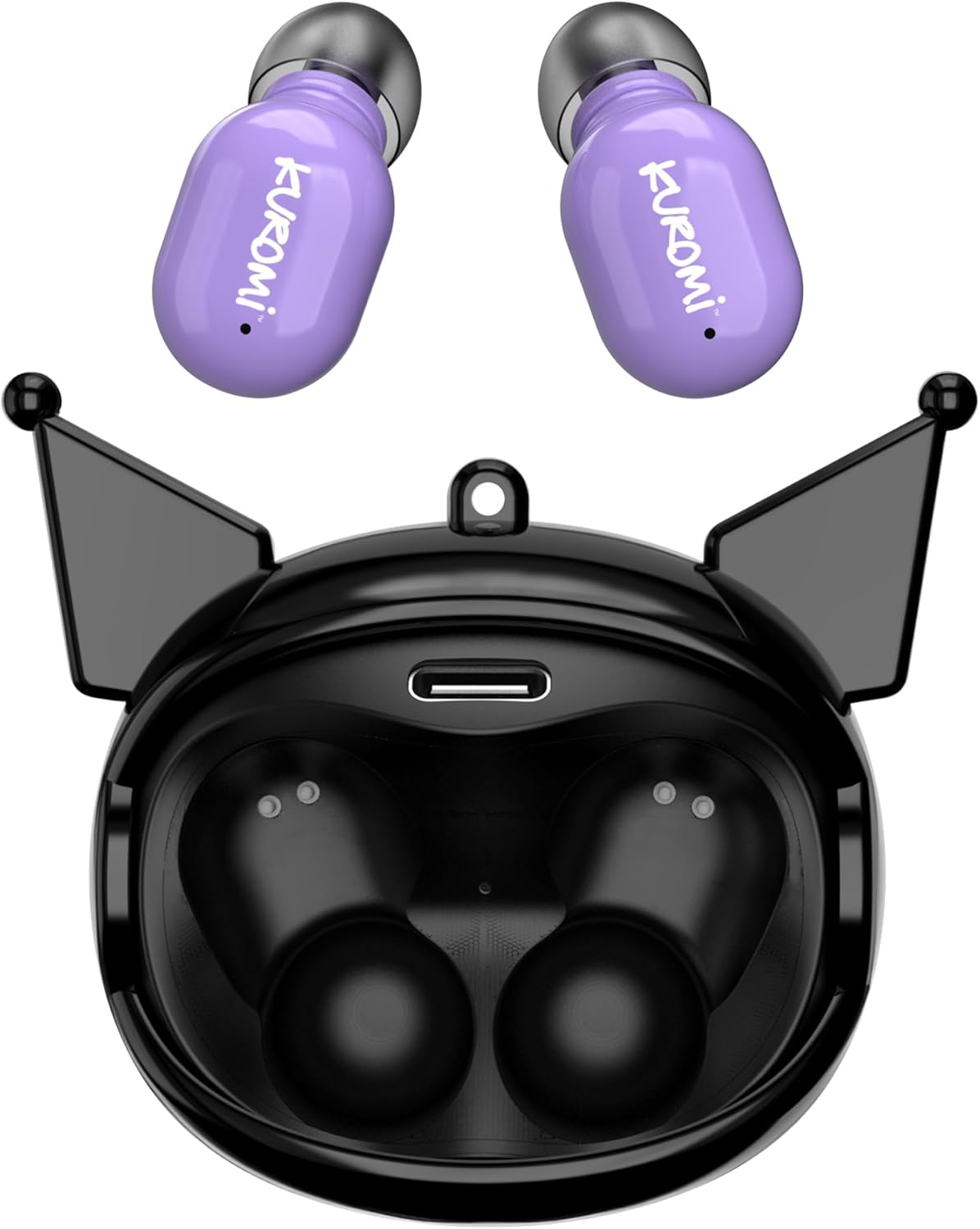
This image displays the two purple Kuromi wireless earbuds positioned above their open black charging case. The charging case features the Kuromi character design with pointed ears and an open compartment for the earbuds, revealing the charging contacts and a USB-C port.

The closed black charging case is shown, featuring Kuromi's default facial expression with a pink skull on her forehead and a neutral mouth.

The closed black charging case displays Kuromi's winking facial expression, with one eye closed and a small pink heart near her mouth.

The closed black charging case features Kuromi's heart-eyes facial expression, with two pink hearts replacing her eyes and an open-mouthed smile.
3.2 Элементы кіравання
The earbuds feature touch controls for various functions. Specific touch gestures may vary; refer to the 'Operating Instructions' section for details.
4. Настройка
4.1 Першапачатковая зарадка
Перад першым выкарыстаннем цалкам зарадзіце навушнікі і зарадны футляр.
- Connect the provided USB cable to the charging port on the case and to a compatible USB power source.
- Змесціце абодва навушнікі ў зарадны футляр. Пераканайцеся, што яны правільна ўсталяваныя.
- The charging indicator lights (if present) will illuminate to show charging status. A full charge typically takes approximately 1 hour.
4.2 Спалучэнне па Bluetooth
Каб падключыць навушнікі да прылады:
- Пераканайцеся, што навушнікі зараджаныя і вынятыя з зараднага футляра. Яны павінны аўтаматычна перайсці ў рэжым спалучэння.
- На вашай прыладзе (смартфоне, планшэце і г.д.) уключыце Bluetooth.
- Пошук даступныя прылады Bluetooth.
- Select "HKTWSRKU" or a similar name from the list of devices.
- Пасля падключэння навушнікі пакажуць паспяховае спалучэнне (напрыклад, галасавой падказкай або зменай святлодыёднага індыкатара).
- Навушнікі аўтаматычна падключацца да апошняй спалучанай прылады пасля вымання з кейса, калі на прыладзе ўключаны Bluetooth.
5. Інструкцыя па эксплуатацыі
5.1 Уключэнне/выключэнне сілкавання
- Уключэнне: Дастаньце навушнікі з зараднага футляра. Яны ўключацца аўтаматычна.
- Выключэнне: Place the earbuds back into the charging case. They will power off and begin charging automatically.
5.2 Прайграванне музыкі
Use the touch controls on the earbuds:
- Прайграванне/Паўза: Націсніце адзін раз на любую навушніцу.
- Наступны трэк: Двойчы націсніце правы навушнік.
- Папярэдні трэк: Двойчы націсніце на левы навушнік.
- Рэгулятар гучнасці: Гучнасць звычайна рэгулюецца з дапамогай падлучанай прылады.
5.3 Кіраванне выклікамі
The built-in microphone allows for hands-free calling:
- Адказаць на званок: Tap once on either earbud when a call comes in.
- Завяршыць выклік: Tap once on either earbud during a call.
- Адхіліць выклік: Націсніце і ўтрымлівайце любы з навушнікаў прыблізна 2 секунды.
5.4 Flip-Face Feature
The charging case features a rotating mechanism to change Kuromi's facial expression. Gently rotate the front panel of the case to cycle through the available expressions.
6. Зарадка
6.1 Зарадка навушнікаў
Place the earbuds into the charging case. They will automatically begin to charge from the case's internal battery.
6.2 Зарадка корпуса
When the charging case battery is low, connect it to a power source using the provided USB cable. The case's indicator lights will show charging status. A full charge for the case typically takes about 1 hour.
7. Тэхнічнае абслугоўванне і догляд
- Уборка: Выкарыстоўвайце мяккую сухую тканіну для чысткі навушнікаў і зараднага футляра. Не выкарыстоўвайце агрэсіўныя хімічныя рэчывы або абразіўныя матэрыялы.
- захоўванне: Захоўвайце навушнікі ў зарадным чахле, калі яны не выкарыстоўваюцца, каб абараніць іх і падтрымліваць зараджанымі. Пазбягайце экстрэмальных тэмператур.
- Ўздзеянне вады: These earbuds are not waterproof. Avoid exposure to water or excessive moisture.
- Уплыў: Handle the earbuds and case with care to prevent damage from drops or impacts.
8. Выпраўленне непаладак
Калі ў вас узнікнуць праблемы, звярніцеся да наступнай табліцы:
| праблема | Магчымае рашэнне |
|---|---|
| Навушнікі не спалучаюцца | Пераканайцеся, што навушнікі зараджаныя. Выключыце і ўключыце Bluetooth на прыладзе. Забудзьце прыладу ў наладах Bluetooth і зноў падключыце яе. |
| Няма гуку з навушнікаў | Check device volume. Ensure earbuds are connected. Try playing different audio. |
| Навушнікі не зараджаюцца | Ensure earbuds are correctly seated in the case. Check if the charging cable is securely connected to the case and power source. |
| Не працуе мікрафон | Ensure earbuds are properly connected. Check microphone permissions on your device. |
9. Тэхнічныя характарыстыкі
Key technical details for the Hello Kitty Kuromi Wireless Bluetooth Earbuds:
| Асаблівасць | Дэталь |
|---|---|
| Назва мадэлі | Wireless Earbuds (HKTWSRKU) |
| Тэхналогія падлучэння | Bluetooth 5.3 |
| Тэрмін службы батарэі (час прайгравання) | Да 4 гадзін на адной зарадцы |
| Час зарадкі | Прыкладна 1 гадзіна |
| Метад кантролю | Дакранацца |
| Размяшчэнне вушэй | У вуха |
| Асаблівасць | Rotating Charging Case with Flip-Face Feature |
| Уключаныя кампаненты | Rotating Charging Case, USB Cable, User Manual |
| Вытворца | Паўднёвы Тэлекам |
| Вага прадмета | 3.52 унцыі |
10. Інфармацыя аб гарантыі
For warranty details, please refer to the documentation included with your purchase or contact the retailer where the product was acquired. Warranty terms and conditions may vary by region and retailer.
11. Падтрымка
If you require further assistance or have questions not covered in this manual, please contact the manufacturer or your retailer's customer support. Keep your purchase receipt and product model number (HKTWSRKU) available when seeking support.