
Montech HS02 PRO Glass Black with Fans
MONTECH HS02 PRO ATX Mid-Tower PC Case User Manual
Model: HS02 PRO Glass Black with Fans (HS02PB)
Марка: Montech
1. Інфармацыя па бяспецы
Please read and understand all safety instructions before installing or using the MONTECH HS02 PRO PC Case. Failure to follow these instructions may result in damage to the product, personal injury, or voiding of the warranty.
- Электрабяспека: Ensure all power components are properly grounded and connected. Disconnect power before performing any installation or maintenance.
- Апрацоўка: The case contains tempered glass panels. Handle with care to prevent breakage. Avoid dropping or subjecting the case to strong impacts.
- Вентыляцыя: Ensure adequate airflow around the case to prevent overheating. Do not block ventilation openings.
- Асяроддзе: Operate the case in a dry, stable environment. Avoid extreme temperatures, humidity, and direct sunlight.
- Дзеці і хатнія жывёлы: Keep the product and its components out of reach of children and pets. Small parts can be a choking hazard.
2. Змесціва ўпакоўкі
Verify that all items listed below are present in your package. If any items are missing or damaged, please contact Montech customer support.
- MONTECH HS02 PRO ATX Mid-Tower PC Case
- Скрынка з аксэсуарамі (шрубы, хамуты, распоркі і г.д.)
- Кіраўніцтва карыстальніка (гэты дакумент)
- Pre-installed GF120 V2 ARGB Fans (5x)
3. Прадукт скончыўсяview
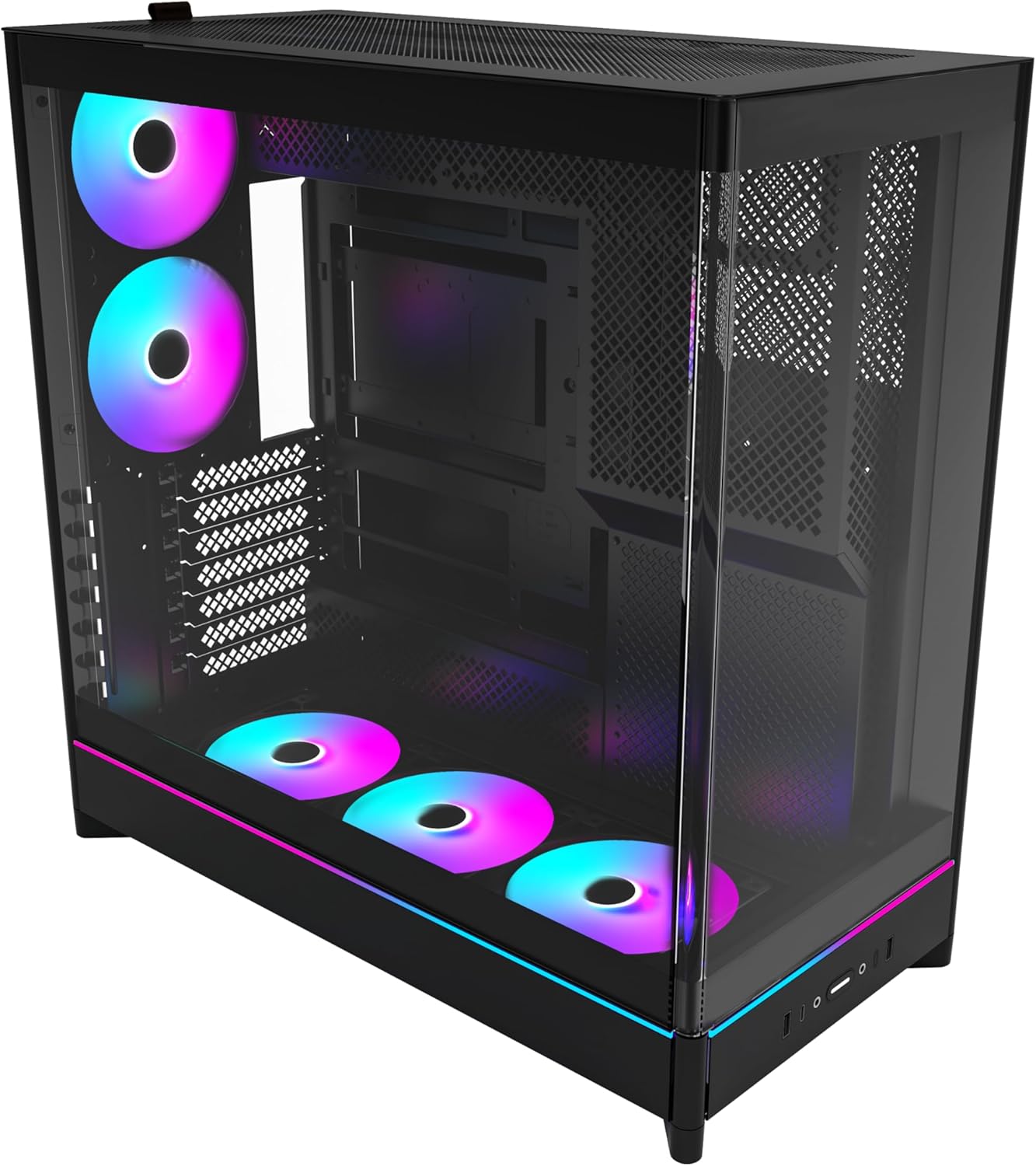
The MONTECH HS02 PRO is a high-airflow ATX mid-tower PC case designed for optimal thermal performance and aesthetic appeal. It features a unique reversible layout and a sturdy curved tempered glass front panel.
Асноўныя характарыстыкі:
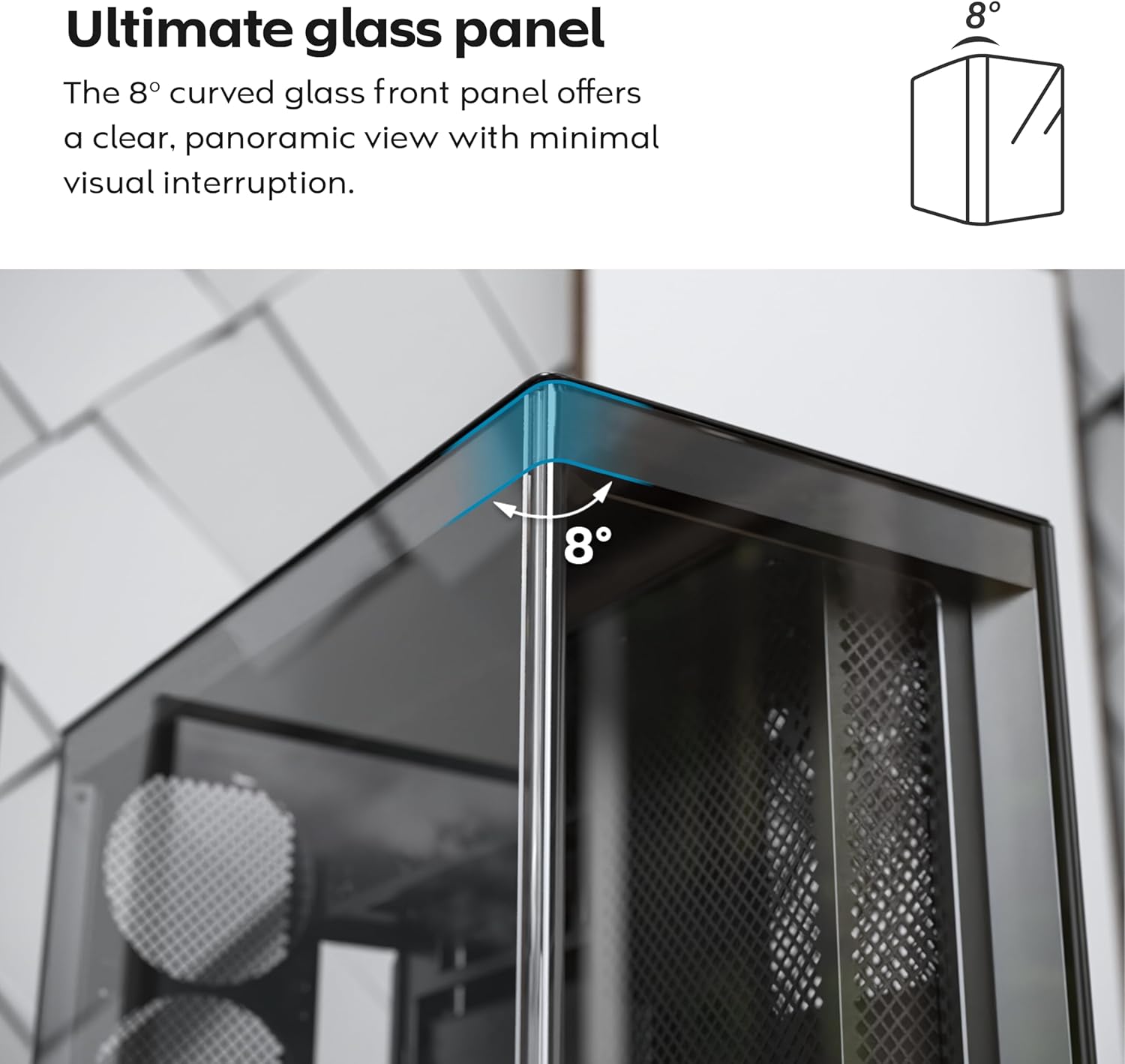
- 8-Degree Curved Glass Panel: The front tempered glass panel features a subtle 8-degree curved edge, offering a distinctive and refined view of the interior with minimal visual distortion.
- Зваротны дызайн: A top-down reversible layout allows the entire setup to be positioned on either the left or right side, showcasing your build from your preferred angle.
- Vertical Ventilation: Bottom air intake and top exhaust create a natural chimney effect for efficient heat dissipation.
- Vertical GPU Ready: Rotatable PCIe slots enable an instant vertical GPU setup without requiring an extra holder or stand.
- Sink-In Design: A recessed bottom fan and motherboard layout maintain a clean, unobstructed side view.
- Pre-installed ARGB PWM Fans: Comes with 5 pre-installed GF120 V2 ARGB fans, fully syncable with motherboard lighting control.
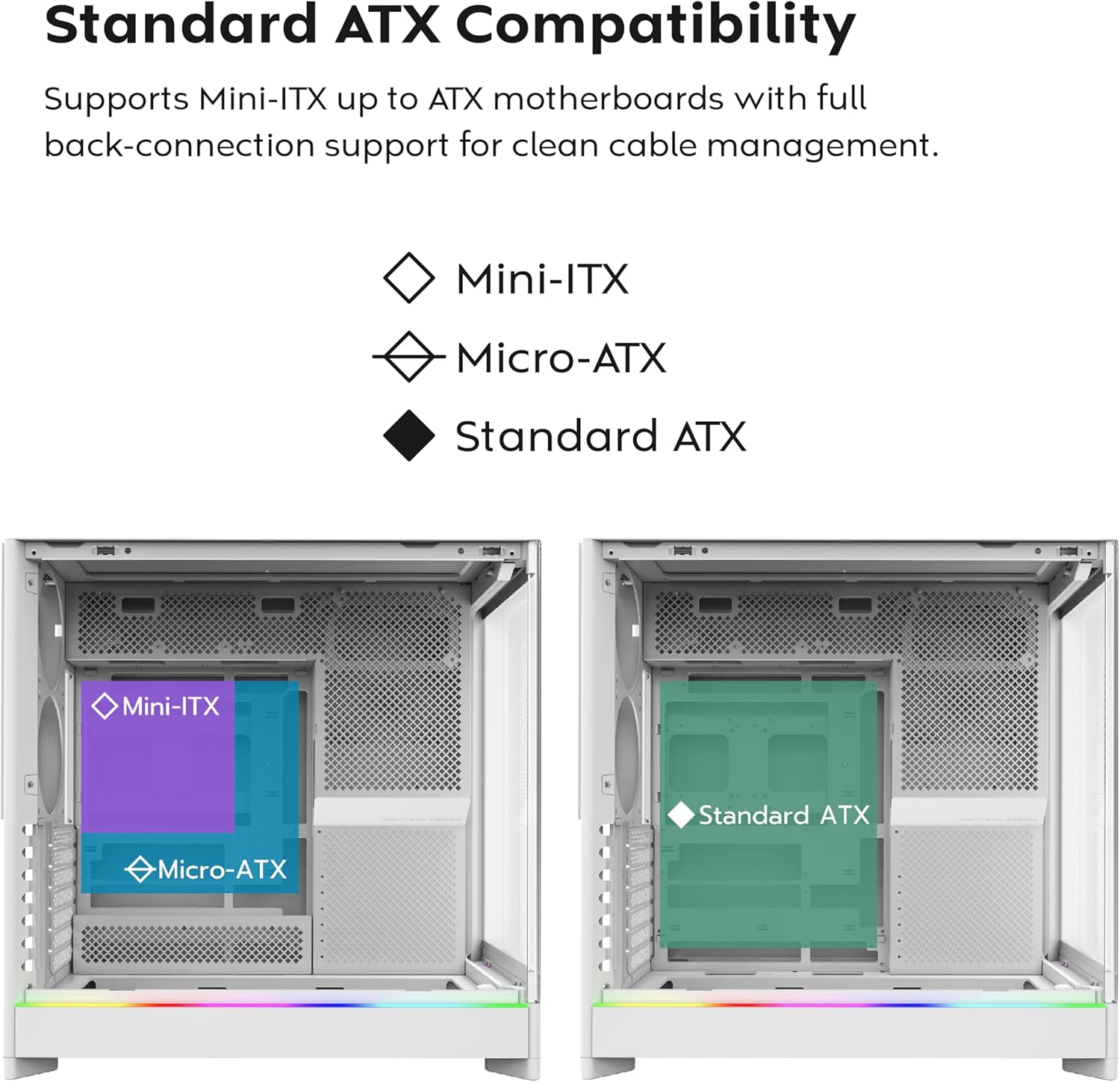
- Back-Connect Motherboard Ready: Supports standard and back-connect motherboards, including MSI Project Zero, ASUS BTF, and more.
- Ample Ёмістасць захоўвання: Supports multiple storage drives (HDD/SSD) for flexible and expandable storage options.
Ідэнтыфікацыя кампанента:





4. Настройка і ўстаноўка
This section provides general guidelines for setting up your MONTECH HS02 PRO PC case. For detailed component-specific instructions, refer to your motherboard, GPU, and PSU manuals.
4.1 Падрыхтоўка справы
- Распакаванне: Асцярожна выміце чахол з упакоўкі. Праверце яго на наяўнасць пашкоджанняў пры дастаўцы.
- Зняцце панэлі: Gently remove the tempered glass side panel and the rear metal side panel. The tempered glass panel is secured with toolless latches.
- Скрынка для аксесуараў: Знайдзіце скрынку з аксэсуарамі ўнутры корпуса, у якой знаходзяцца ўсе неабходныя шрубы і мацавальныя элементы.
4.2 Устаноўка мацярынскай платы
- Standoffs: Ensure the correct standoffs are installed for your motherboard form factor (Mini-ITX, Micro-ATX, or ATX). Adjust if necessary.
- Шчыт уводу/вываду: Install your motherboard's I/O shield into the rear opening of the case.
- Мантаж: Carefully align your motherboard with the standoffs and gently lower it into place. Secure it with the provided screws.
- Back-Connect Motherboards: If using a back-connect motherboard, ensure proper alignment with the designated cutouts for cable routing.
4.3 Устаноўка блока сілкавання (БП).
- Мантаж: The PSU mounts at the bottom of the case. Slide the PSU into its designated bay from the rear.
- Бяспека: Замацуеце блок харчавання шрубамі з задняй часткі корпуса.
- Кабель: Route necessary power cables through the cable management cutouts to the motherboard and other components.
4.4 Storage Drive Installation (HDD/SSD)
- Завалы: Utilize the designated drive bays for 3.5" HDDs and 2.5" SSDs.
- Мантаж: Secure drives using the provided screws or toolless mechanisms where applicable.
4.5 Усталёўка відэакарты (GPU)
- Слоты PCIe: Remove the necessary PCIe slot covers.
- Гарызантальная ўстаноўка: Insert the GPU into the primary PCIe slot on your motherboard and secure it with screws.
- Vertical Installation (Optional): The rotatable PCIe slots allow for vertical GPU mounting. Rotate the bracket and install your GPU vertically. A PCIe riser cable (not included) is required for vertical mounting.
4.6 Cooling System Installation (Fans/Radiators)
- Папярэдне ўсталяваныя вентылятары: The case comes with 5 pre-installed ARGB PWM fans. Connect their power and ARGB cables to your motherboard or a fan controller.
- Additional Fans/Radiators: The case supports additional fans and radiators at the top, rear, and bottom. Refer to the specifications for supported sizes.
- AIO Cooler: Install your All-in-One (AIO) liquid cooler radiator and fans according to the cooler's instructions, utilizing the available mounting points.
4.7 Арганізацыя кабеляў
Выкарыстоўвайце ample space behind the motherboard tray and the cable management cutouts to route and secure cables. This improves airflow and aesthetics.
5. Інструкцыя па эксплуатацыі
Once all components are installed and secured, you can power on your system.
5.1 Уключэнне
- Падключэнне перыферыйных прылад: Connect your monitor, keyboard, mouse, and other peripherals to your system.
- Сілавы кабель: Connect the PSU power cable to a wall outlet and flip the PSU's power switch to the 'ON' position.
- Кнопка харчавання: Press the power button on the front I/O panel of the case.
5.2 Front I/O Panel Functions
- Порты USB 3.0: Для падлучэння прылад, сумяшчальных з USB 3.0.
- Порт USB Type-C: Для падлучэння прылад, сумяшчальных з USB Type-C.
- Аўдыёраз'ём: Для навушнікаў або калонак.
- Раз'ём для мікрафона: Для падлучэння мікрафона.
- Кнопка харчавання: Каб уключыць або выключыць сістэму.
- Святлодыёдная кнопка: To cycle through the 29 ARGB lighting modes for the pre-installed fans and integrated light strip.
6. Тэхнічнае абслугоўванне
Рэгулярнае тэхнічнае абслугоўванне дапамагае забяспечыць аптымальную прадукцыйнасць і даўгавечнасць кампанентаў вашага ПК.
- Ачыстка ад пылу: Periodically clean dust filters (top, bottom, front) to maintain optimal airflow. Use compressed air to remove dust from internal components.
- Ачыстка шкляных панэляў: Для чысткі загартаваных шкляных панэляў выкарыстоўвайце мяккую тканіну без ворса і неабразіўны сродак для чысткі шкла. Пазбягайце выкарыстання агрэсіўных хімічных рэчываў.
- Кабельнае кіраванне: Перыядычна правярайце пракладку кабеляў, каб пераканацца, што яны не перашкаджаюць патоку паветра або лапаткам вентылятара.
- Агляд вентылятара: Ensure all fans are spinning freely and quietly. Clean fan blades if dust buildup is significant.
7. Выпраўленне непаладак
This section addresses common issues you might encounter. For more complex problems, consult Montech customer support or a qualified technician.
Агульныя праблемы і рашэнні:
| праблема | Магчымая прычына | Рашэнне |
|---|---|---|
| Сістэма не ўключаецца. | PSU switch off, power cables loose, faulty PSU/motherboard. | Ensure PSU switch is ON. Check all power connections (24-pin, CPU, GPU). Test PSU if possible. |
| Fans are not spinning or RGB is not working. | Fan cables disconnected, ARGB cables disconnected, faulty fan/controller. | Verify fan power and ARGB headers are securely connected to motherboard/controller. Use the LED button to cycle modes. |
| Слабая цыркуляцыя паветра або высокая тэмпература. | Dust buildup, obstructed vents, incorrect fan orientation. | Clean dust filters and internal components. Ensure fans are oriented correctly for intake/exhaust. Check for cable obstructions. |
| Front I/O ports not functioning. | Front panel connectors loose or incorrectly connected to motherboard. | Refer to your motherboard manual to ensure all front panel headers (USB, audio) are correctly connected. |
8. Тэхнічныя характарыстыкі
Detailed technical specifications for the MONTECH HS02 PRO ATX Mid-Tower PC Case.
| Асаблівасць | Спецыфікацыя |
|---|---|
| Назва мадэлі | HS02 PRO Glass Black with Fans |
| Нумар мадэлі | HS02PB |
| Тып корпуса | Сярэдняя вежа |
| Сумяшчальнасць матчыных поплаткаў | ATX, Micro-ATX, Mini-ITX (with back-connect support) |
| Памеры (ДхШхВ) | 32 х 52.4 х 58.8 цалі (прыблізна 81.3 х 133.1 х 149.4 см) |
| Вага прадмета | 24.2 фунта (прыблізна 10.98 кг) |
| Пярэдняя панэль | Curved Tempered Glass (8-degree) |
| Папярэдне ўсталяваныя вентылятары | 5x GF120 V2 ARGB PWM Fans |
| Спосаб астуджэння | Air (Vertical Ventilation / Chimney Effect) |
| Тып мацавання блока харчавання | Ніжняе мацаванне |
| Пярэднія парты I / O | 2x USB 3.0, 1x USB Type-C, Audio, Mic, Power Button, LED Button |
| Афармленне GPU | Up to 420mm (supports vertical GPU with rotatable PCIe slots) |
| Адсекі для захоўвання | Multiple HDD/SSD support |
| Колер | Чорны |
9. Гарантыя і падтрымка
For warranty information and technical support, please refer to the official Montech webсайт або звярніцеся непасрэдна ў службу падтрымкі кліентаў. Захоўвайце пацвярджэнне пакупкі для прэтэнзій па гарантыі.
- Montech Official Webсайт: www.montechpc.com
- Абслугоўванне кліентаў: Звярніцеся да website for contact details, including email and phone support.