
1. Уводзіны
This manual provides detailed instructions for the installation, operation, and maintenance of your JOYING Double Din Car Stereo. This advanced head unit features a 10.1-inch Android 13 system with 8GB RAM and 128GB storage, offering a comprehensive in-car entertainment and navigation experience. Key functionalities include CarPlay, Android Auto, Mirror Link, AM/FM radio, and Bluetooth connectivity.
Please read this manual thoroughly before using the product to ensure proper operation and to maximize your enjoyment of its features. Keep this manual for future reference.
2. Змесціва ўпакоўкі
Праверце, ці ўсе пералічаныя ніжэй прадметы ўваходзяць у камплект. Калі якія-небудзь прадметы адсутнічаюць або пашкоджаныя, звярніцеся ў службу падтрымкі кліентаў.
- 10.1" Radio Unit (1)
- Double Din Cage (1)
- Left & Right Bracket (1 set)
- Reinforced Shims (1 set)
- Кіраўніцтва па ўстаноўцы (1)
- WiFi Antenna (1)
- GPS Antenna (1)
- 4G Antenna (2)
- External Microphone (1)
- USB-кабель (2)
- AR Cable (1)
- Screen Ribbon Cable (1)
- ISO Cable (1)
- Кіраўніцтва карыстальніка (1)

Малюнак 2.1: Rear panel connections and included accessories for the JOYING Double Din Car Stereo. This image displays the various ports on the back of the head unit, including USB, HDMI, optical, coaxial, and antenna inputs, alongside a clear layout of all components provided in the box, such as mounting brackets, cables, and antennas.
3. Асаблівасці прадукту
3.1. Manual Rotation Display

Малюнак 3.1: The 10.1-inch display of the JOYING car stereo can be manually rotated 90 degrees, allowing for both landscape and portrait viewing modes to suit user preference or application requirements.
The display can be manually rotated 90 degrees to switch between landscape and portrait orientations, providing flexibility for navigation, media consumption, and other applications.
3.2. High-Quality Audio Output

Малюнак 3.2: This image highlights the advanced audio capabilities of the head unit, featuring a TDA7851 DSP chip, a 48-band graphic equalizer for precise sound tuning, and a powerful 4x50W maximum output. It also shows support for external amplifiers via fiber optical and SPDIF coaxial digital outputs, along with 4 audio outputs, 1 SUB output, and a center channel output.
Equipped with a TDA7851 DSP chip and a 48-band graphic equalizer, this unit delivers high-fidelity audio. It provides 4x50W maximum output power and supports external amplifiers via Optical Fiber and Coaxial Digital Output for superior sound quality.
3.3. Split-Screen Multitasking

Малюнак 3.3: The split-screen multitasking feature allows users to run two applications simultaneously, such as watching a video on YouTube while navigating with a map application. The image provides a step-by-step guide on how to activate split-screen mode using the recent apps icon.
The split-screen function allows you to run two applications simultaneously, such as navigation and media playback, enhancing convenience and usability.
3.4. Выхад HDMI
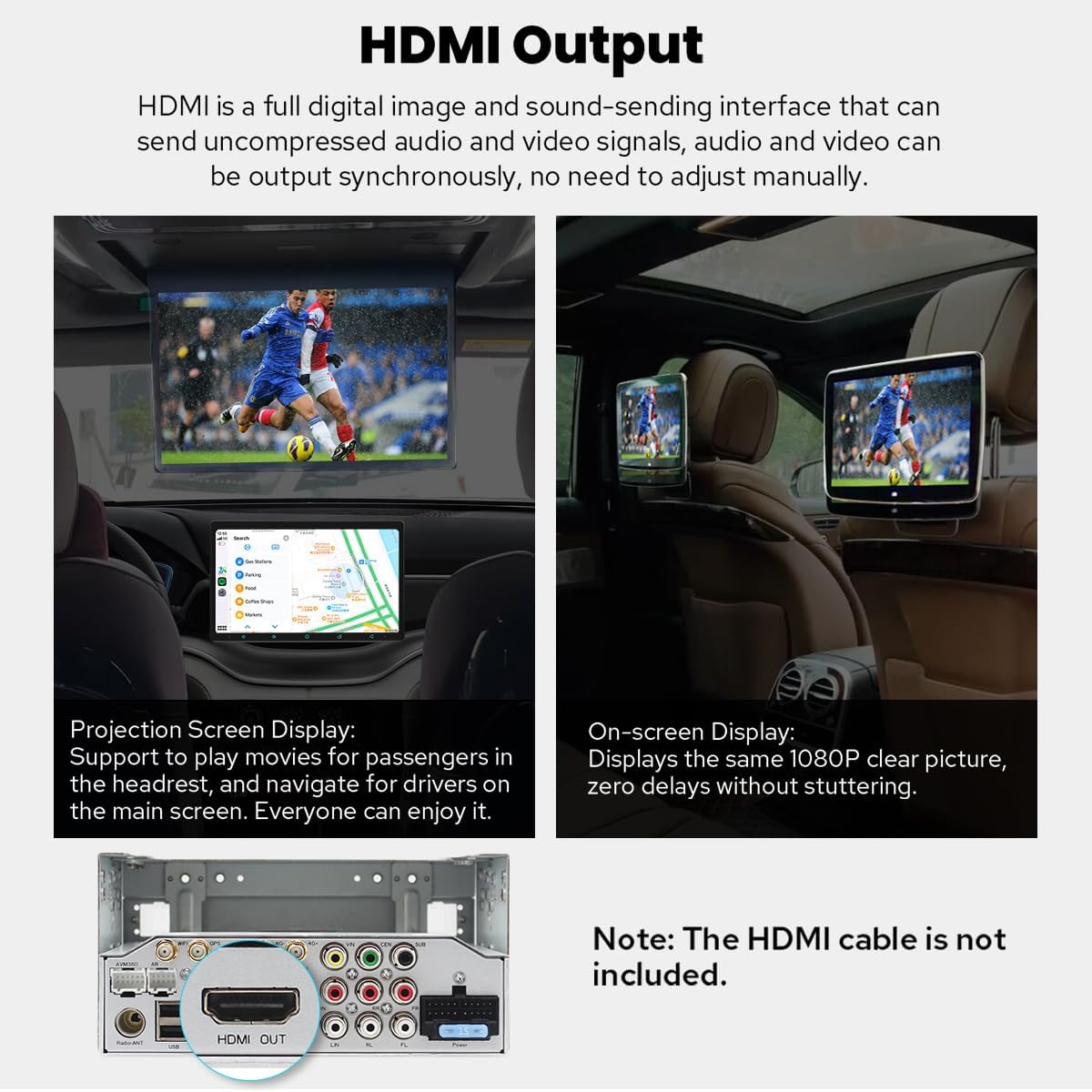
Малюнак 3.4: The HDMI output port enables the main screen content to be projected onto external displays, such as headrest monitors, providing entertainment for rear-seat passengers. The output delivers a 1080P clear picture without stuttering. Note: HDMI cable is not included.
The HDMI output allows for uncompressed audio and video signals to be sent to external displays, such as rear-seat monitors, providing synchronized content for passengers. The HDMI cable is not included.
3.5. Built-in CarPlay & Android Auto

Малюнак 3.5: This image displays the seamless integration of Apple CarPlay and Android Auto, allowing users to connect their smartphones via USB or Bluetooth to access navigation, make calls, and play music directly on the car stereo's larger screen.
Connect your mobile phone via USB cable or Bluetooth to utilize CarPlay and Android Auto, sharing your phone's apps for navigation, calls, and music on the larger screen.
3.6. Enhanced Cooling System

Малюнак 3.6: The upgraded cooling system features a dual heat sink design and an active cooling fan to ensure superior heat dissipation, improved temperature control, and enhanced performance stability. The system can automatically activate the fan when CPU temperature or radio volume exceeds a set warning value.
The unit features a dual heat sink design and an active cooling fan for superior heat dissipation, improved temperature control, and enhanced performance stability. The fan automatically activates if the CPU temperature or radio's volume exceeds a set warning value.
3.7. Upgraded WiFi Signal

Малюнак 3.7: An independent WiFi antenna is included to ensure stable signal quality and provide fast, smooth internet access. The image shows the antenna and its connection port on the rear of the head unit, supporting 802.11a/b/g/n/AC standards across 2.4GHz/5GHz spectral bands.
An independent WiFi antenna ensures stable signal quality and provides fast, smooth internet access, supporting 802.11a/b/g/n/AC standards across 2.4GHz/5GHz bands.
3.8. Other Notable Features
- Хуткая загрузка: Starts up in 2 seconds after the first boot (initial boot takes 30-40 seconds).
- Built-in 4G Module: Insert a SIM card for internet access (does not support phone calls or SMS).
- GPS-навігацыя: Precise positioning with included GPS antenna, supports offline maps and synchronization with phone map data via CarPlay/Android Auto.
- AM/FM-радыё: Standard radio functionality.
- Выклік па гучнай сувязі: Bluetooth connectivity for safe calling.
- Карцінка ў карцінцы (PiP): Allows a small video window to overlay other applications.
- 3 порта USB: Multiple connectivity options for external devices.
- Слот для карты Micro SD: For additional storage.
- Персаналізаваныя налады: Customizable car boot logo, wallpapers, changeable button colors, and adjustable screen brightness.
4. Настройка і ўстаноўка
Installation of the JOYING Double Din Car Stereo requires technical knowledge and may involve modifying your vehicle's dashboard. It is highly recommended to have the unit installed by a professional car audio technician.
4.1. Меркаванні перад устаноўкай
- Сумяшчальнасць з аўтамабілем: Ensure your vehicle has a double din slot (178 x 102mm inner size).
- Праводка: You may need a special ISO harness, amplifier adapter, or CANbus decoder depending on your car's make and model.
- Factory Components: This unit does not support factory car GPS antenna, back-up rear camera, Bluetooth, USB, or microphone.
- Аксэсуары: Only JOYING accessories are supported. DVR, OBDII scanner, reverse camera, TPMS, and steering wheel controller are not included and must be ordered separately if desired.
4.2. Basic Installation Steps (Refer to the included Installation Manual for detailed instructions)
- Адключыце акумулятар: Заўсёды адключайце адмоўны вывад акумулятара аўтамабіля перад пачаткам любых электрамантажных работ.
- Зняць старую галоўку блока: Carefully remove your existing car stereo and dashboard trim.
- Падключэнне правадоў: Connect the ISO cable, GPS antenna, WiFi antenna, 4G antennas, and external microphone to the corresponding ports on the JOYING unit. Ensure all connections are secure.
- Мантаж: Install the double din cage and brackets. Secure the JOYING unit into the dashboard opening.
- Праверка функцыянальнасці: Before fully reassembling the dashboard, reconnect the battery and test the unit's basic functions (power, audio, touch screen, radio).
- Фінальная зборка: Once confirmed working, reassemble the dashboard trim.
5. Інструкцыя па эксплуатацыі
5.1. Уключэнне/выключэнне харчавання і асноўныя элементы кіравання
- Уключэнне: The unit will automatically power on when the car ignition is turned on. The first boot takes 30-40 seconds; subsequent boots are typically within 2 seconds.
- Выключэнне: The unit will power off with the car ignition. A long press on the power button (if available) may put it into standby or fully shut down.
- Рэгулятар гучнасці: Адрэгулюйце гучнасць з дапамогай элементаў кіравання на экране або элементаў кіравання на рулі (калі яны падключаны і настроены).
5.2. Навігацыя
The unit comes with pre-installed navigation capabilities. You can use online maps (e.g., Google Maps) with an internet connection (via WiFi or 4G SIM) or download offline maps for use without internet. CarPlay and Android Auto also allow you to synchronize your phone's navigation apps.
5.3. CarPlay і Android Auto
To use CarPlay or Android Auto, connect your compatible smartphone via a USB cable to one of the unit's USB ports or wirelessly via Bluetooth (for supported devices). Follow the on-screen prompts to establish the connection. This allows access to phone features like navigation, music, and messaging directly from the head unit.
5.4. Налады гуку
Access the audio settings menu to customize your sound experience. The 48-band graphic equalizer allows for precise frequency adjustments. The built-in DSP (Digital Signal Processor) provides advanced sound optimization options. If an external amplifier is connected via optical or coaxial output, ensure the settings are configured correctly for optimal sound.
5.5. Функцыя падзелу экрана
To activate split-screen multitasking:
- Tap the recent apps icon (usually a square or three vertical lines).
- Find the app you want to run in split-screen, then tap the split-screen icon (often two rectangles) next to its title.
- Select the second app from the recent apps list to fill the other half of the screen.
5.6. Connectivity (4G & WiFi)
- 4G: Insert a compatible SIM card into the designated slot for mobile data access. Note that this module is for data only and does not support voice calls or SMS.
- WiFi: Connect to available WiFi networks via the settings menu. The independent WiFi antenna ensures a stable connection for online services.
5.7. Персаналізацыя
Navigate to the settings menu to customize various aspects of the unit:
- Car Boot Logo: Select a custom logo to display when the unit starts up.
- Шпалеры: Choose from pre-installed wallpapers or upload your own.
- Колер кнопкі: Adjust the color of the physical or on-screen buttons.
- Яркасць экрана: Manually adjust the display brightness for optimal viewўмовы.
6. Тэхнічнае абслугоўванне
To ensure the longevity and optimal performance of your JOYING Car Stereo, follow these maintenance guidelines:
- Ачыстка экрана: Выкарыстоўвайце мяккую тканіну без ворса, каб акуратна працерці экран. Для выдалення ўстойлівых плям злёгку працярыцеampПрацярыце тканіну вадой або сродкам для ачысткі экрана. Пазбягайце агрэсіўных хімічных рэчываў або абразіўных матэрыялаў.
- Абнаўленні праграмнага забеспячэння: Periodically check for software updates from the JOYING official website or through the unit's system settings. Keeping the software updated ensures the best performance and access to new features.
- Умовы навакольнага асяроддзя: Пазбягайце працяглага ўздзеяння экстрэмальных тэмператур, прамых сонечных прамянёў або празмернай вільготнасці на прыладу.
- Праверкі злучэння: Occasionally check all cable connections at the rear of the unit to ensure they are secure and free from corrosion.
7. Выпраўленне непаладак
If you encounter issues with your JOYING Car Stereo, refer to the following common problems and solutions:
| праблема | Магчымая прычына | Рашэнне |
|---|---|---|
| Прылада не ўключаецца | Няспраўнае падключэнне да электрасеткі, перагарэлы засцерагальнік, праблема з акумулятарам аўтамабіля. | Праверце сілавыя кабелі і злучэнні. Праверце засцерагальнікі аўтамабіля. Пераканайцеся, што акумулятар аўтамабіля зараджаны. |
| Няма выхаду гуку | Volume too low, mute activated, speaker wires disconnected, incorrect audio settings. | Increase volume. Check if mute is active. Verify speaker wire connections. Adjust audio output settings. |
| Сігнал GPS страчаны або недакладны | GPS antenna not properly connected or obstructed, unit in an area with poor satellite reception. | Пераканайцеся, што антэна GPS надзейна падключана і мае выразны сігнал view неба. Перайдзіце на адкрытую прастору. |
| Bluetooth не падключаецца | Bluetooth off on unit or phone, device not in pairing mode, interference. | Пераканайцеся, што Bluetooth уключаны на абедзвюх прыладах. Перавядзіце тэлефон у рэжым спалучэння. Выдаліце папярэднія спалучэнні і паспрабуйце зноў. |
| Сэнсарны экран не рэагуе | Software glitch, screen calibration issue, physical damage. | Restart the unit. Perform a factory reset (data will be lost). If issue persists, contact support. |
| CarPlay/Android Auto не запускаецца | Incorrect USB cable, phone not compatible, software issue. | Use a high-quality USB data cable. Ensure your phone's OS is updated. Check phone settings for CarPlay/Android Auto permissions. |
If the problem persists after attempting these solutions, please contact JOYING customer support for further assistance.
8. Тэхнічныя характарыстыкі
Detailed technical specifications for the JOYING Double Din Car Stereo (Model: JY-UTS10N8-MR):
| Асаблівасць | Дэталь |
|---|---|
| Нумар мадэлі | JY-UTS10N8-MR |
| Аперацыйная сістэма | Android 13 |
| Памер дысплея | 10.1 Inches (Manual Rotation) |
| АЗП | 8 ГБ |
| Унутраная памяць | 128 ГБ |
| Рэжым выхаду гуку | Стэрэа |
| Канфігурацыя канала аб'ёмнага гуку | 5.1 |
| Максімальная выхадная магутнасць | 4 х 50 Вт |
| Чып DSP | TDA7851 |
| Эквалайзер | 48-дыяпазонны графічны эквалайзер |
| Тэхналогія падлучэння | Bluetooth, Ethernet, HDMI, USB, Wi-Fi, 4G |
| Стандарт WiFi | 802.11a/b/g/n/AC (2.4GHz/5GHz) |
| 4G Module Support | FDD-LTE: B2/B4/B5/B7/B12/B13/B14/B17/B25/B26/B38/B66/B71; TDD-LTE: B41 |
| Тып раздыма | Coaxial, Optical, USB, HDMI |
| Усяго партоў HDMI | 1 (выхад) |
| Парты USB | 3 |
| Сумяшчальныя прылады | Amplifier, Camera, Smartphone, Speaker |
| Падтрымка кадавання відэа | H264/H265/MP4/AVI/MKV/FLV |
| Вага прадмета | 2.65 фунта |
| Памеры прадукту | 5.91 х 7.99 х 4.72 цалі |
9. Дадатковыя аксэсуары
Enhance your JOYING Car Stereo experience with these optional accessories (not included in the package):

Малюнак 9.1: This image displays various optional accessories that can be purchased separately to expand the functionality of the JOYING car stereo. These include an OBD2 scanner for vehicle diagnostics, an AR Front Camera for recording the road, and an AR Rear Camera for assistance with reversing.
- OBD2 Scanner: Connects via Bluetooth to retrieve real-time data and trouble codes from your vehicle computer.
- AR Front Camera: Records the front road automatically while driving.
- AR Rear Camera: Switches to the reverse display automatically when reversing the car.
10. Інфармацыя аб гарантыі
The JOYING Double Din Car Stereo (Model: JY-UTS10N8-MR) comes with a Гарантыя 2 год from the date of purchase. This warranty covers manufacturing defects and malfunctions under normal use. It does not cover damage caused by improper installation, misuse, accidents, unauthorized repairs, or normal wear and tear.
Please retain your proof of purchase for warranty claims. For detailed warranty terms and conditions, refer to the warranty card included in your package or contact JOYING customer support.
11. Падтрымка
For technical assistance, troubleshooting, or warranty inquiries, please contact JOYING customer support through the following channels:
- Інтэрнэт-падтрымка: Visit the official JOYING webсайт з часта задаванымі пытаннямі, артыкуламі падтрымкі і кантактнымі формамі.
- Падтрымка па электроннай пошце: Звярніцеся да ўпакоўкі прадукту або да афіцыйнай webсайт для адраса электроннай пошты службы падтрымкі кліентаў.
- Крама Amazon: Вы таксама можаце наведаць в JOYING Store on Amazon каб атрымаць інфармацыю пра прадукт і варыянты сувязі з прадаўцом.
When contacting support, please have your product model number (JY-UTS10N8-MR) and proof of purchase readily available.