
Уводзіны
Thank you for choosing the Kiwi KAP 6730 Air Purifier. This manual provides essential information for the safe and efficient use of your device. Please read it thoroughly before operation and retain it for future reference.
The Kiwi KAP 6730 is designed to improve indoor air quality using advanced filtration technology, including a medical-grade H13 HEPA filter, to capture various airborne particles and odors.
Важныя інструкцыі па бяспецы
Заўсёды выконвайце асноўныя меры бяспекі пры выкарыстанні электрапрыбораў, каб знізіць рызыку пажару, паражэння электрычным токам і траўмаў.
- Прачытайце ўсе інструкцыі перад выкарыстаннем прыбора.
- Пераканайцеся, што крыніца харчавання адпавядае аб'ёмуtage паказана на этыкетцы прыбора.
- Не выкарыстоўвайце прыбор з пашкоджаным шнуром або вілкай.
- Трымайце шнур сілкавання далей ад нагрэтых паверхняў.
- Не апускайце прыбор, шнур або вілку ў ваду ці іншыя вадкасці.
- Адключыце ачышчальнік паветра ад сеткі перад чысткай або любым тэхнічным абслугоўваннем.
- Не закрывайце ўваходныя і выпускныя адтуліны для паветра.
- Гэты прыбор прызначаны толькі для выкарыстання ў памяшканні.
- Захоўваць у месцах, недаступных дзецям.
Прадукт скончаныview
The Kiwi KAP 6730 Air Purifier features a compact design with an intuitive control panel and multi-stagэлектронная сістэма фільтрацыі.

выява: Топ view of the Kiwi KAP 6730 Air Purifier, highlighting the circular control panel with various function icons including power, fan speed, timer, and Wi-Fi connectivity. The top grille for air output is also visible.

выява: An exploded diagram of the Kiwi KAP 6730 Air Purifier, illustrating its internal components. The image shows the outer casing, the fan assembly, and the cylindrical multi-layer filter system, with arrows indicating airflow and the capture of dust and pet hair by different filter stagэс.
Асноўныя характарыстыкі:
- Medical-grade H13 HEPA filter for effective air purification.
- Мульты-сtagэлектронная сістэма фільтрацыі.
- Intuitive control panel.
- Кампактная і лёгкая канструкцыя.
- Smart connectivity (Wi-Fi enabled).
Настройка
Распакаванне
- Асцярожна дастаньце ачышчальнік паветра з упакоўкі.
- Remove all packaging materials, including any protective films or bags.
- Праверце на наяўнасць пашкоджанняў падчас транспарціроўкі. У выпадку пашкоджанняў не выкарыстоўвайце прыладу і звярніцеся ў службу падтрымкі кліентаў.
Filter Installation (if not pre-installed)
The air purifier comes with a multi-layer filter. Ensure it is properly installed before first use.
- Перавярніце ачышчальнік паветра дагары нагамі.
- Павярніце ніжнюю крышку супраць гадзіннікавай стрэлкі, каб разблакіраваць і зняць яе.
- Зніміце пластыкавую ўпакоўку з фільтра.
- Insert the filter into the air purifier, ensuring it sits securely.
- Replace the base cover and twist clockwise to lock it into place.
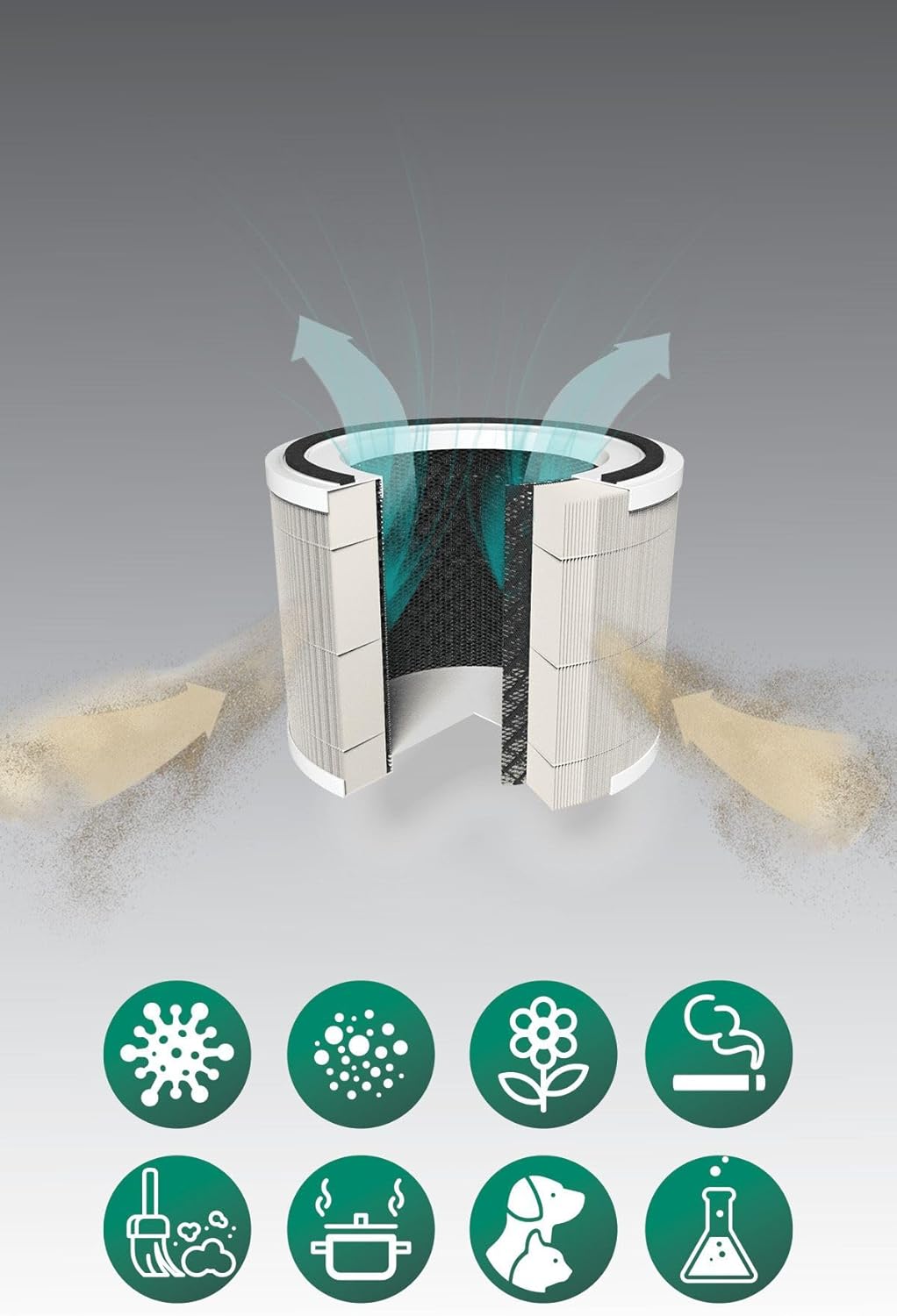
выява: A cutaway diagram illustrating the multi-layer filter system of the Kiwi KAP 6730 Air Purifier. Arrows show air entering and exiting the filter. Below the filter, icons represent various airborne pollutants that the system is designed to filter, including bacteria, dust, pollen, smoke, pet dander, cooking odors, and chemical fumes.
Размяшчэнне
- Пастаўце ачышчальнік паветра на цвёрдую роўную паверхню.
- Ensure there is at least 15-30 cm (6-12 inches) of space around all sides for optimal airflow.
- Avoid placing near heat sources, direct sunlight, or in damp асяроддзях.
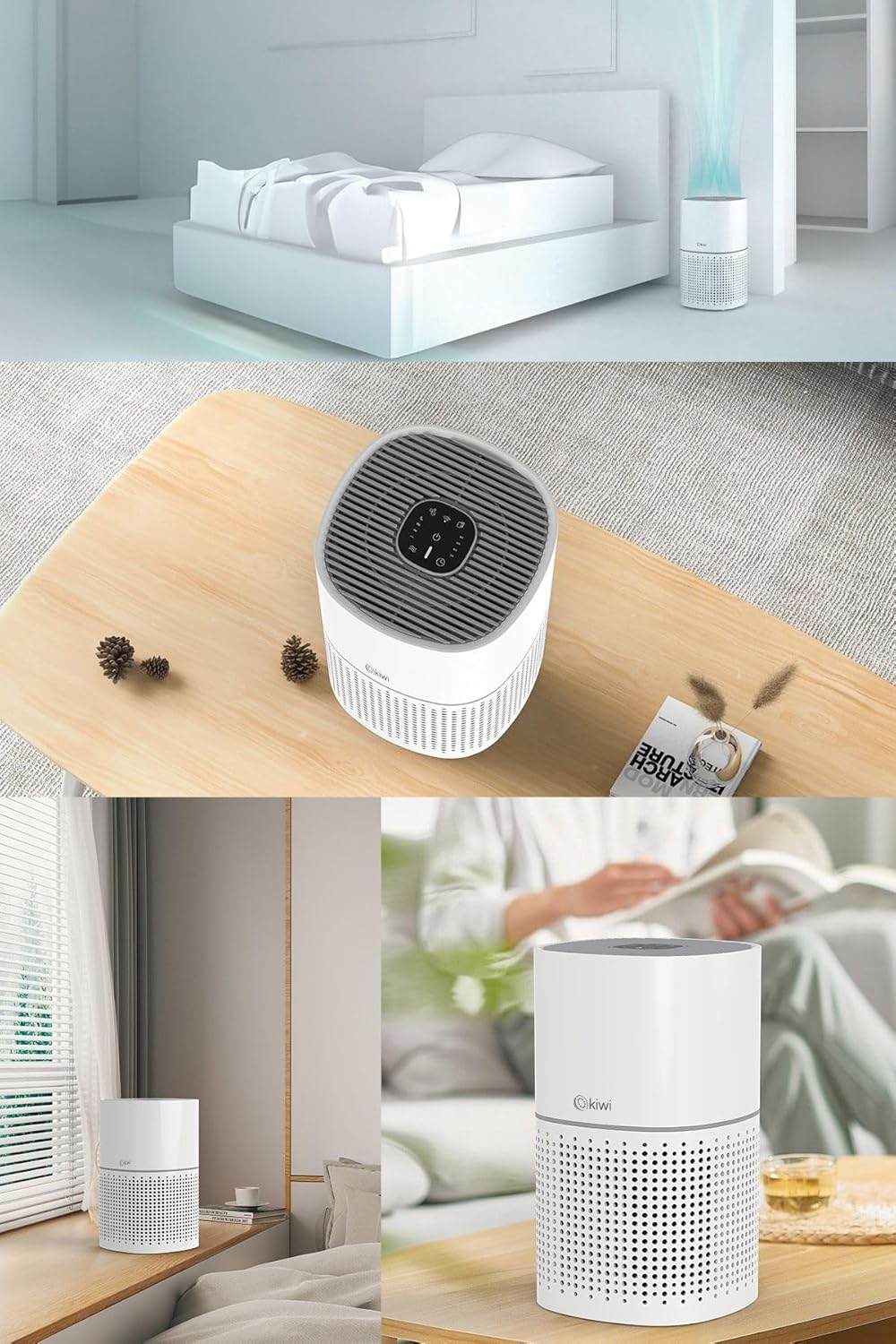
выява: A collage of images showing the Kiwi KAP 6730 Air Purifier in different home environments. It is depicted on a bedside table in a bedroom, on a wooden table in a living area, and on a windowsill, demonstrating its compact size and versatility for placement.
Падключэнне сілкавання
Падключыце шнур сілкавання да адпаведнай электрычнай разеткі.
Аперацыя
Функцыі панэлі кіравання
The control panel is located on the top of the air purifier.
выява: Падрабязны view of the circular control panel on the top of the Kiwi KAP 6730 Air Purifier. Icons for power, fan speed, timer settings (1H, 2H, 4H, 8H), sleep mode, and Wi-Fi connectivity are clearly visible, along with an indicator light.
- Кнопка харчавання (⏻): Press to turn the air purifier ON or OFF.
- Кнопка хуткасці вентылятара (💨): Press to cycle through different fan speeds (e.g., Low, Medium, High, Auto).
- Кнопка таймера (⏱): Set the operating time (e.g., 1 hour, 2 hours, 4 hours, 8 hours). The unit will automatically turn off after the set time.
- Кнопка рэжыму сну (🌙): Activates sleep mode, reducing fan speed and dimming indicator lights for quiet operation.
- Wi-Fi Button (📶): Press and hold to activate Wi-Fi pairing mode for smart control via a mobile application.
- Індыкатар скіду фільтра: Illuminates when the filter needs replacement. Press and hold after filter replacement to reset.
Smart Control (App)
The Kiwi KAP 6730 can be controlled via a dedicated mobile application. Follow the app's instructions for pairing and remote control.

выява: The Kiwi KAP 6730 Air Purifier positioned in a room, with a hand holding a smartphone in the foreground. The smartphone screen displays a mobile application interface, indicating that the air purifier can be controlled remotely via a smart app, showing air quality readings and control options.
Тэхнічнае абслугоўванне
Рэгулярнае абслугоўванне забяспечвае аптымальную прадукцыйнасць і падаўжае тэрмін службы вашага ачышчальніка паветра.
Ачыстка экстэр'ера
- Перад чысткай заўсёды адключайце ачышчальнік паветра ад сеткі.
- Працярыце вонкавыя паверхні мяккай, damp тканіна.
- Не выкарыстоўвайце абразіўныя ачышчальнікі, воск або растваральнікі.
- Сачыце за тым, каб вада не трапляла ўнутр прылады.
Замена фільтра
The filter life depends on air quality and usage. The filter replacement indicator will illuminate when a new filter is needed (typically every 6-12 months).
- Адключыце ачышчальнік паветра ад сеткі.
- Перавярніце ачышчальнік паветра дагары нагамі.
- Павярніце ніжнюю крышку супраць гадзіннікавай стрэлкі, каб разблакіраваць і зняць яе.
- Выміце стары фільтр і ўтылізуйце яго належным чынам.
- Unpack the new filter and insert it into the air purifier.
- Replace the base cover and twist clockwise to lock it into place.
- Plug in the air purifier. Press and hold the Filter Reset button (often the Wi-Fi or a dedicated filter icon) for 3-5 seconds until the indicator light turns off.
Заўвага: Only use genuine Kiwi replacement filters to ensure proper performance and maintain warranty validity.
Ліквідацыю непаладак
| праблема | Магчымая прычына | Рашэнне |
|---|---|---|
| Ачышчальнік паветра не ўключаецца. | Не падключаны да сеткі; няспраўнасць разеткі; не націснутая кнопка харчавання. | Ensure the power cord is securely plugged in. Try a different outlet. Press the power button firmly. |
| Зніжэнне патоку паветра або эфектыўнасці ачысткі. | Blocked air inlets/outlets; Dirty filter; Filter packaging not removed. | Check for obstructions and clear them. Replace the filter if the indicator is on or if it appears dirty. Ensure all filter packaging is removed. |
| Незвычайны шум. | Filter not installed correctly; Foreign object inside; Unit not on a level surface. | Check filter installation. Unplug and inspect for foreign objects. Place on a stable, level surface. |
| Filter replacement indicator remains on after changing filter. | Скід фільтра не выкананы. | Press and hold the Filter Reset button for 3-5 seconds until the light turns off. |
| Немагчыма падключыцца да Wi-Fi/праграмы. | Incorrect Wi-Fi password; Router too far; App not updated; Wi-Fi pairing mode not activated. | Ensure correct password. Move unit closer to router. Update app. Press and hold Wi-Fi button to activate pairing mode. Consult app instructions. |
Тэхнічныя характарыстыкі
| Асаблівасць | Дэталь |
|---|---|
| мадэль | КАП-6730 |
| Марка | КІВІ |
| Колер | Белы |
| Тып фільтрацыі | H13 HEPA Filter (Medical Grade) |
| Крыніца харчавання | Правадная электрычная |
| Вага прадукту | 2 кілаграм |
| Сувязь | Wi-Fi (Smart App Control) |
| Памеры (прыбл.) | Кампактны дызайн |
Гарантыя і падтрымка
For warranty information and customer support, please refer to the warranty card included with your product or visit the official KIWI webсайт.
You can also contact customer service for assistance with troubleshooting or replacement parts.
KIWI Official Webсайт: www.kiwi.com.tr (Заўвага: Гэта запаўняльнік URL, калі ласка, звярніцеся да дакументацыі да прадукту для атрымання адпаведнай падтрымкі webсайт.)