
DigiLand DigiLand-S10
Кіраўніцтва карыстальніка DigiLand Android Tablet S10
Model: DigiLand-S10
1. Уводзіны
This manual provides essential information for the proper use and maintenance of your DigiLand Android Tablet S10. Please read it thoroughly before operating the device to ensure optimal performance and longevity. The DigiLand S10 is a 10.1-inch Android 14 tablet designed for versatile use, featuring an Octa-Core processor, ample memory, and a high-definition display.
2. Інфармацыя па бяспецы
- Не падвяргайце планшэт уздзеянню экстрэмальных тэмператур, прамых сонечных прамянёў або высокай вільготнасці.
- Пазбягайце падзення планшэта і моцных удараў.
- Use only the original charger and accessories provided with the tablet.
- Не спрабуйце разбіраць або рамантаваць планшэт самастойна. Звярніцеся да кваліфікаванага абслугоўваючага персаналу.
- Трымайце таблетку далей ад вады і іншых вадкасцей.
- Утылізуйце планшэт і яго акумулятар адказна ў адпаведнасці з мясцовымі правіламі.
3. Змесціва ўпакоўкі
Пасля адкрыцця ўпакоўкі пераканайцеся, што ўсе пералічаныя ніжэй прадметы наяўныя і знаходзяцца ў добрым стане:
- DigiLand Android Tablet S10 (Blue)
- Зарадны кабель USB Type-C
- Адаптар сілкавання
- Кароткае кіраўніцтва

Figure 3.1: Items included in the DigiLand Tablet S10 package. This image displays the tablet itself, its packaging box, a USB Type-C charging cable, a power adapter, and a quick start guide, ensuring users can confirm all components are present.
4. Прадукт скончыўсяview
The DigiLand S10 tablet features a sleek design with essential ports and controls for user convenience.
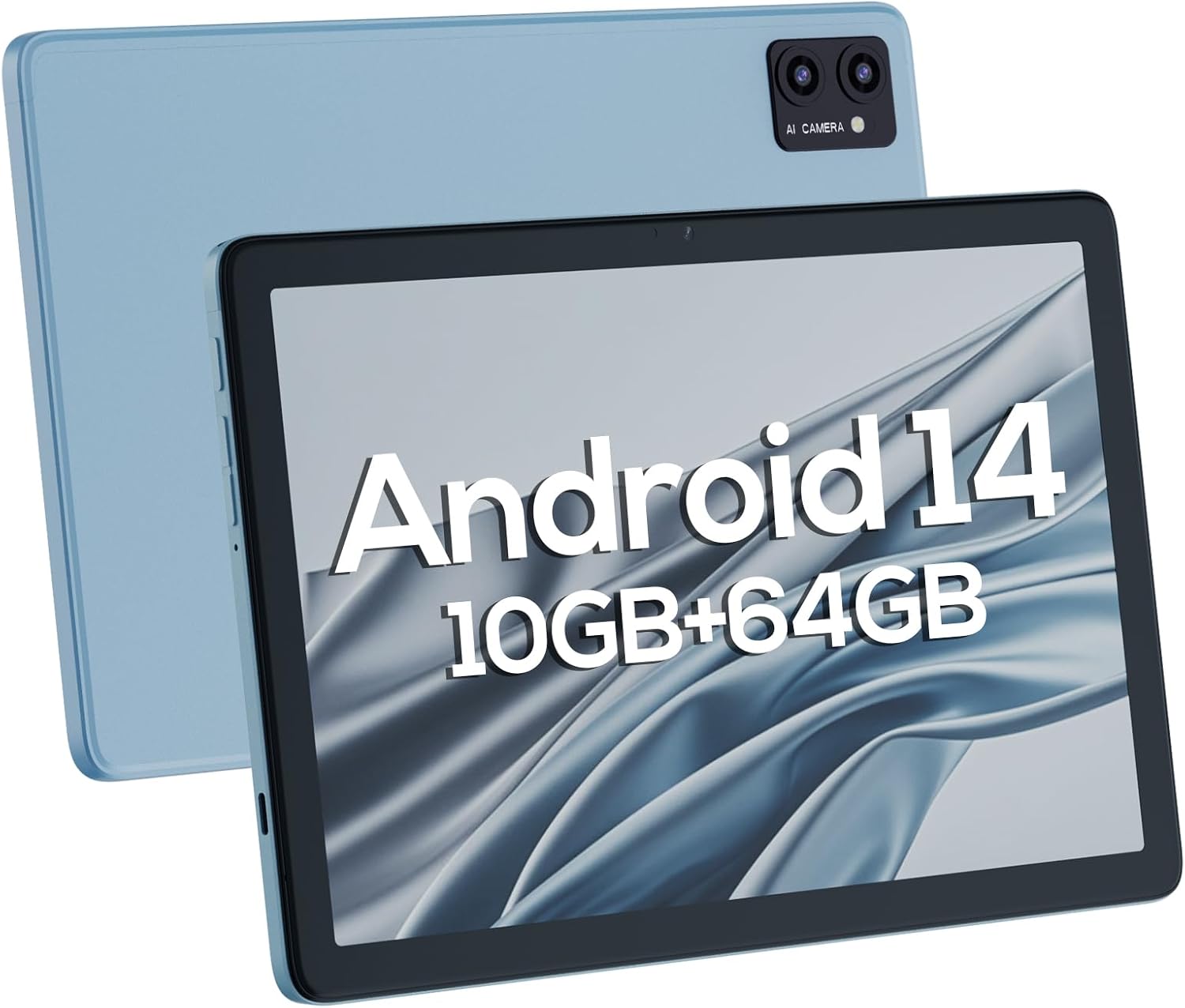
Малюнак 4.1: Пярэдняя і задняя часткі views of the DigiLand Android Tablet S10. The image highlights the tablet's 10.1-inch display on the front and the dual camera module on the blue-colored back panel.
Ключавыя кампаненты:
- 10.1-цалевы IPS HD-дысплей: Provides vibrant visuals with 800x1280 resolution.
- Пярэдняя камера (5 Мп): Размешчаны на пярэдняй панэлі, падыходзіць для відэазванкоў і сэлфі.
- Задняя камера (8 МП): Located on the back, for capturing photos and videos.
- Кнопка харчавання: Used to turn the tablet on/off or put it to sleep/wake.
- Кнопкі гучнасці: Адрэгулюйце гучнасць гуку.
- Порт USB Type-C: Для зарадкі і перадачы дадзеных.
- Гняздо для навушнікаў 3.5 мм: Для падключэння правадных навушнікаў.
- Слот для карты MicroSD: Для пашырэння сховішча да 256 ГБ.
- Падвойныя дынамікі: Забяспечыць выхад гуку.
5. Настройка
5.1 Першапачатковая зарадка
Before first use, fully charge your tablet. Connect the USB Type-C cable to the tablet's charging port and the power adapter to a wall outlet. The battery indicator on the screen will show charging status. A full charge typically takes several hours.
5.2 Уключэнне/выключэнне
- Каб уключыць: Press and hold the Power button until the DigiLand logo appears.
- Каб выключыць: Націсніце і ўтрымлівайце кнопку харчавання, пакуль не з'явіцца меню выключэння харчавання. Выберыце «Выключыць харчаванне» і пацвердзіце.
- Каб заснуць/прачнуцца: Каротка націсніце кнопку харчавання.
5.3 Майстар пачатковай налады
Upon first power-on, the Android 14 setup wizard will guide you through basic configurations:
- Выберыце сваю мову.
- Падключыцеся да сеткі Wi-Fi.
- Увайдзіце ў свой уліковы запіс Google або стварыце новы.
- Review і прыняць умовы.
- Наладзьце блакаванне экрана (PIN-код, узор або пароль).
- Configure other settings as prompted.
5.4 Пашырэнне сховішча
The tablet supports MicroSD cards up to 256GB for additional storage. Locate the MicroSD card slot (often near the headphone jack or power button, as shown in Figure 4.1) and insert the card gently until it clicks into place. You may need to format the card via the tablet's settings for optimal use.
6. Кіраванне планшэтам
6.1 Асноўная навігацыя
- Галоўны экран: Галоўны экран, дзе вы можаце атрымаць доступ да праграм і віджэтаў.
- Скрыня праграм: Правядзіце пальцам уверх ад галоўнага экрана да view усе ўсталяваныя прыкладання.
- Панэль апавяшчэнняў: Правядзіце пальцам уніз ад верхняй часткі экрана, каб атрымаць доступ да апавяшчэнняў і хуткіх налад.
- Апошнія праграмы: Tap the square navigation button (or swipe up and hold from the bottom if using gestures) to see recently opened applications.
6.2 Падключэнне да Wi-Fi і Bluetooth
- Wi-Fi: Перайсці да Налады > Сетка і інтэрнэт > Wi-FiУключыце Wi-Fi і абярыце патрэбную сетку. Пры неабходнасці ўвядзіце пароль.
- Bluetooth: Перайсці да Налады > Падключаныя прылады > Параметры злучэння > BluetoothУключыце Bluetooth і падключыце даступныя прылады.
6.3 Выкарыстанне камер
Планшэт абсталяваны франтальнай камерай на 5 Мп і задняй камерай на 8 Мп.
- Адкрыйце праграму Камера.
- Націсніце на значок пераключальніка камеры, каб пераключацца паміж пярэдняй і задняй камерамі.
- Націсніце кнопку спуску засаўкі, каб зрабіць фотаздымак або пачаць/спыніць відэазапіс.

Figure 6.1: Visual representation of the tablet's camera capabilities, showing sample images captured by both the 5MP front and 8MP rear cameras.
6.4 Кіраванне батарэяй
Акумулятар ёмістасцю 6000 мАг забяспечвае працяглы час працы. Каб аптымізаваць тэрмін службы батарэі:
- Паменшыць яркасць экрана.
- Выключайце Wi-Fi і Bluetooth, калі яны не выкарыстоўваюцца.
- Зачыніце невыкарыстоўваныя праграмы, якія працуюць у фонавым рэжыме.
- Уключыце рэжым эканоміі батарэі ў наладах.

Figure 6.2: Battery performance details for the DigiLand Tablet S10. This graphic illustrates the 6000mAh battery capacity and provides estimated usage durations for various activities like video playback (9 hours), music (14 hours), and browsing (15 hours).
7. Тэхнічнае абслугоўванне
- Уборка: Для чысткі экрана і корпуса выкарыстоўвайце мяккую тканіну без ворса. Пазбягайце выкарыстання абразіўных ачышчальнікаў.
- Абнаўленні праграмнага забеспячэння: Рэгулярна правярайце наяўнасць абнаўленняў сістэмы і ўсталёўвайце іх, каб забяспечыць аптымальную прадукцыйнасць і бяспеку. Перайдзіце па спасылцы Налады > Сістэма > Абнаўленне сістэмы.
- Кіраванне сховішчам: Перыядычна чысціце кэш, выдаляйце непатрэбнае fileі выдаліце невыкарыстоўваныя праграмы, каб вызваліць месца для захоўвання.
- Рэзервовыя даныя: Regularly back up important data to a cloud service or external storage device to prevent data loss.
8. Выпраўленне непаладак
| праблема | Магчымае рашэнне |
|---|---|
| Планшэт не ўключаецца | Пераканайцеся, што акумулятар зараджаны. Націсніце і ўтрымлівайце кнопку харчавання 10-15 секунд, каб прымусова перазагрузіць прыладу. |
| Павольнае выкананне | Close unused apps, clear cache, restart the tablet. Consider a factory reset if issues persist (backup data first). |
| Праблемы з падключэннем да Wi-Fi | Restart the tablet and router. Forget the network and reconnect. Ensure Wi-Fi is enabled. |
| Праграмы выходзяць з ладу | Clear app cache/data (Settings > Apps), update the app, or reinstall it. |
| Экран не рэагуе | Force restart the tablet. If issue persists, contact support. |
9. Тэхнічныя характарыстыкі
Below are the detailed technical specifications for the DigiLand Android Tablet S10:
| Асаблівасць | Дэталь |
|---|---|
| Марка | ДыгітЛэнд |
| Назва мадэлі | DigiLand-S10 |
| Аперацыйная сістэма | Android 14 |
| Памер экрана | 10.1 цалі |
| Дазвол экрана | 800 x 1280 (IPS HD Display) |
| Працэсар | A523, Octa core, Cortex A55@1.8 GHz, 22nm |
| АЗП | 10GB (4+6GB) |
| Унутраная памяць | 64 ГБ |
| Сховішча з магчымасцю пашырэння | Up to 256GB via TF card (MicroSD) |
| Пярэдняя камера | 5 МП |
| Задняя камера | 8 МП |
| Ёмістасць батарэі | 6000 мАг |
| Сувязь | Wi-Fi (2.4G+5G), Bluetooth 5.0, USB Type-C, 3.5mm Headphone Jack |
| Памеры (ДхШхВ) | 7 х 4 х 0.5 цалі |
| Вага прадмета | 2.42 фунта (прыблізна 510 г) |
| Колер | Сіні |

Малюнак 9.1: Закончанаview of the DigiLand Tablet S10's core specifications. This graphic highlights features such as Android 14, MTK Helio A523 Octa-Core Processor, 10GB RAM, 64GB ROM (expandable to 256GB), 10.1-inch HD display, 6000mAh battery, 5MP front camera, 8MP rear camera, 510g weight, and 8.8mm thickness.
10. Гарантыя і падтрымка
10.1 Інфармацыя аб гарантыі
DigiLand products typically come with a limited manufacturer's warranty. Please refer to the warranty card included in your product packaging or visit the official DigiLand website for detailed terms and conditions regarding warranty coverage, duration, and limitations. Keep your proof of purchase for warranty claims.
10.2 Падтрымка кліентаў
For technical assistance, troubleshooting, or any inquiries regarding your DigiLand Android Tablet S10, please contact DigiLand customer support. Contact information can usually be found in the Quick Start Guide or on the official DigiLand website. When contacting support, please have your product model (DigiLand-S10) and purchase details ready.
Thank you for choosing DigiLand. We hope you enjoy your new tablet!
Ask a question about this manual
Ask about setup, troubleshooting, compatibility, parts, safety, or missing instructions. Manuals+ will review the question and use this page’s manual context to help answer it.