
Уводзіны
Дзякуй за пакупкуasing the WISCENT WTB-733 Retro Cassette Player Recorder. This device combines classic audio playback with modern features, including AM/FM/SW radio, Bluetooth connectivity, USB/Micro SD playback, and voice recording. Please read this manual thoroughly before use to ensure proper operation and to maximize your listening experience.
Інфармацыя па бяспецы
- Не падвяргайце прыладу ўздзеянню дажджу або вільгаці, каб пазбегнуць пажару або паражэння электрычным токам.
- Пазбягайце размяшчэння прылады побач з крыніцамі цяпла, такімі як радыятары, абагравальнікі, пліты або іншыя прыборы, якія выпрацоўваюць цяпло.
- Выкарыстоўвайце толькі насадкі/аксэсуары, указаныя вытворцам.
- Адключайце прыладу ад сеткі падчас навальніцы або калі яна не выкарыстоўваецца на працягу доўгага часу.
- Не адчыняйце casing. Па ўсіх пытаннях тэхнічнага абслугоўвання звяртайцеся да кваліфікаванага персаналу.
- Захоўваць у месцах, недаступных дзецям.
Прадукт скончаныview
The WISCENT WTB-733 is a versatile audio system designed for both retro and modern listening. Key features include:
- Касетны прайгравальнік/магнітафон: Прайграванне і запіс аўдыёкасет.
- AM/FM/SW Radio: Multi-band radio tuner for various broadcasts.
- Злучэнне Bluetooth: Бесправадная трансляцыя аўдыё з сумяшчальных прылад.
- USB/Micro SD (TF) Playback: Прайграванне MP3/WMA fileз знешняга назапашвальніка.
- Убудаваны мікрафон: Для запісу голасу.
- RGB Colorful Lights: Dynamic lighting effects on speakers.
- Раз'ём для навушнікаў: Для прыватнага праслухоўвання.
- Падвойныя параметры харчавання: AC or battery powered.

Малюнак 1: Спераду view of the WISCENT WTB-733 with key features highlighted.
Настройка
Харчаванне прылады
The WTB-733 can be powered by AC electricity or batteries.
- Магутнасць пераменнага току: Connect the included AC power cord to the AC IN port on the back of the unit and then to a standard 120V AC, 60Hz wall outlet. The AC cord is typically stored in the battery compartment.
- Магутнасць батарэі: For portable use, insert 6 UM-1 type batteries (not included) into the battery compartment located on the back of the unit. Ensure correct polarity. Alternatively, 2 rechargeable batteries (not included) can be used.
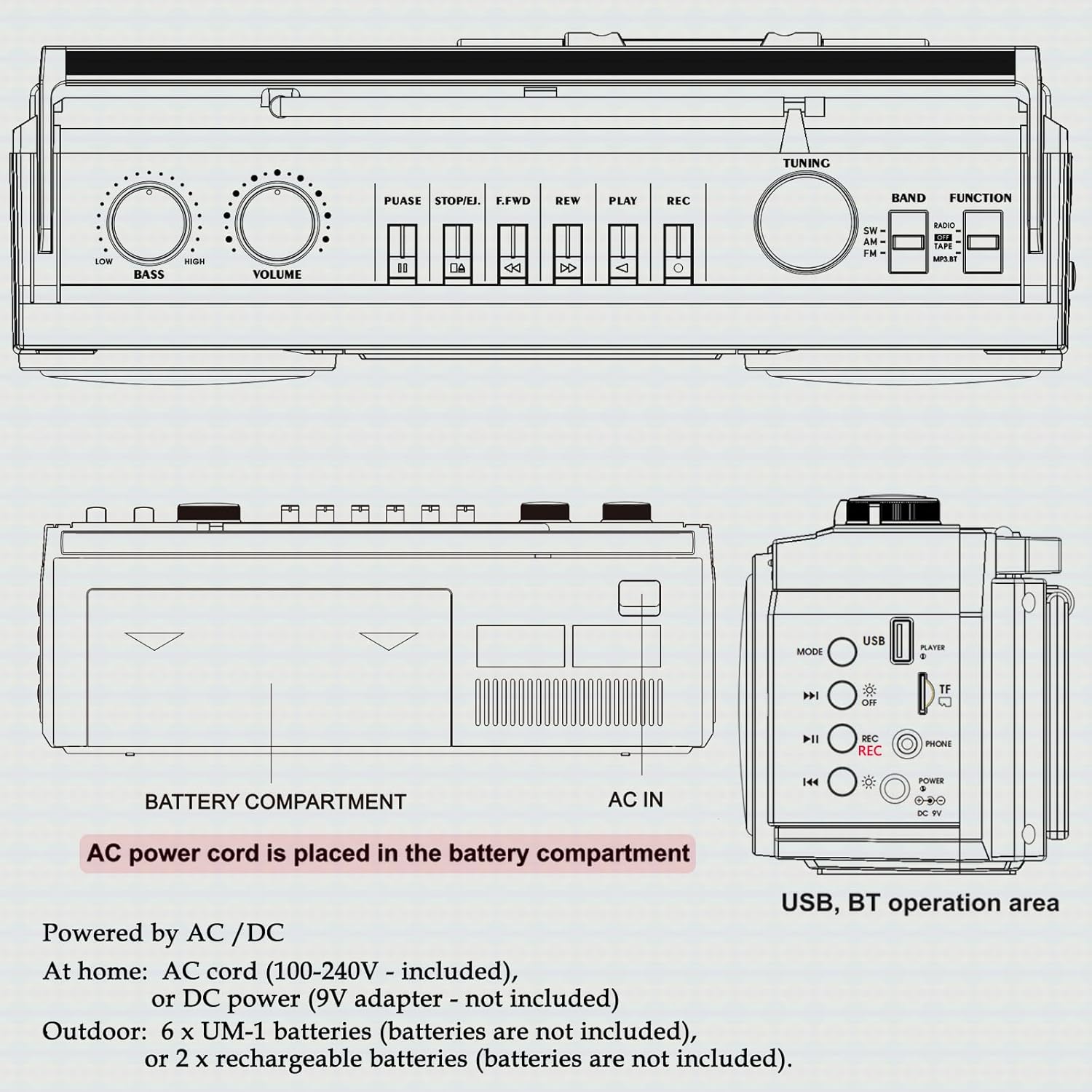
Малюнак 2: Задняя частка view showing battery compartment and AC IN port.
Налада антэны
For optimal radio reception, extend the telescopic antenna fully. Adjust its position and angle to improve signal clarity.
Інструкцыя па эксплуатацыі
Агульны кантроль

Малюнак 3: Элементы кіравання на верхняй панэлі.
- Выключальнік сілкавання: Уключае/выключае прыладу.
- Ручка гучнасці: Рэгулюе агульны ўзровень гуку.
- Ручка BASS: Рэгулюе ўзровень баса.
- ФУНКЦЫЙНЫ СЕЛЕКТАР: Switches between RADIO, TAPE, USB/TF, and BT (Bluetooth) modes.
- Выбар дыяпазону: In Radio mode, selects between FM, AM, and SW bands.
- Ручка TUNING: Tunes to desired radio stations.
Праца з радыё (AM/FM/SW)
- Усталюйце ФУНКЦЫЯ селектар да РАДЫЁ.
- Select the desired band (FM, AM, or SW) using the ГУРТ селектар.
- Для лепшага прыёму выцягніце тэлескапічную антэну.
- Павярнуць ЦЮНІНГ knob to find your desired station.
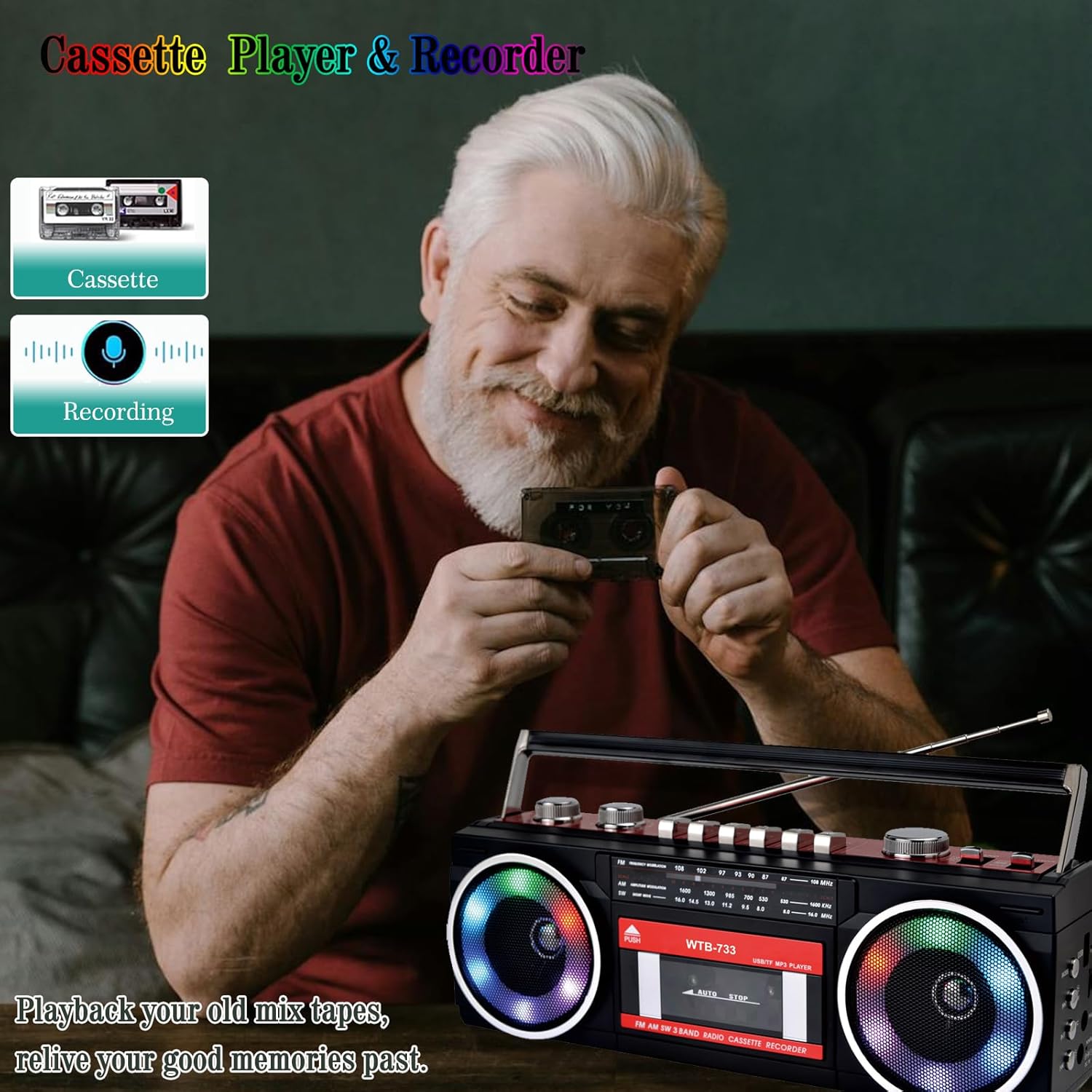
Figure 4: Radio tuning dial.
Касетны прайгравальнік і магнітафон

Figure 5: Cassette player controls.
- Усталюйце ФУНКЦЫЯ селектар да ЛІГА.
- Націсніце PUSH/EJECT кнопку, каб адкрыць дзверцы касеты.
- Insert a cassette tape with the open edge facing upwards. Close the cassette door.
- Прайграванне: Націсніце ГУЛЬНЯ кнопку, каб пачаць прайграванне.
- Запіс: Націсніце ЗАПІС button to begin recording. Ensure a blank tape is inserted. The built-in microphone will record ambient sound.
- Перамотка наперад/назад: Выкарыстоўвайце F.FWD і REW кнопкі.
- Паўза: Націсніце Паўза button to temporarily stop playback/recording. Press again to resume.
- Спыніць/выняць: Націсніце СТОП/ВЫХОД button to stop playback/recording and eject the tape.
Злучэнне Bluetooth
- Усталюйце ФУНКЦЫЯ селектар да BT. The unit will enter pairing mode, indicated by a flashing light or audio prompt.
- На прыладзе з падтрымкай Bluetooth (напрыклад, смартфоне, планшэце) уключыце Bluetooth і знайдзіце даступныя прылады.
- Select "WTB-733" from the list of devices to pair.
- Пасля спалучэння вы можаце перадаваць аўдыё з прылады на бумбокс.
- Заўвага: This unit supports Bluetooth reception only and does not transmit Bluetooth signals to headphones or other speakers.

Figure 6: Bluetooth streaming from a mobile device.
USB/Micro SD (TF) Playback
- Усталюйце ФУНКЦЫЯ селектар да USB/TF.
- Insert a USB drive or Micro SD (TF) card into the corresponding slot on the side of the unit.
- The unit will automatically detect and begin playing MP3/WMA files з прылады захоўвання дадзеных.
- Use the playback control buttons (Play/Pause, Next, Previous) to navigate tracks.
Рознакаляровыя агні RGB
The speakers are equipped with RGB LED lighting that creates a dynamic visual effect.
- The lights are automatically turned off in Radio mode.
- In other modes (BT, Tape, USB/TF), the lights are on by default.
- To manually control the lights, press the 'OFF' button (often labeled with a lightbulb icon) twice continuously to toggle them on or off.

Figure 7: RGB colorful lights in operation.
Раз'ём для навушнікаў
Connect standard 3.5mm headphones (not included) to the headphone jack on the side of the unit for private listening. Audio will be muted from the main speakers when headphones are connected.
Тэхнічнае абслугоўванне
- Уборка: Для чысткі вонкавых паверхняў прылады выкарыстоўвайце мяккую сухую тканіну. Не выкарыстоўвайце абразіўныя ачышчальнікі або растваральнікі.
- Сыход за касетнай дэкай: Перыядычна чысціце галоўкі стужкі і прыціскныя ролікі ватным тампонам, злёгку працёртымampпрацякаюць ізапрапілавым спіртам, каб забяспечыць аптымальную якасць гуку і прадухіліць пашкоджанне стужкі.
- захоўванне: Калі прылада не выкарыстоўваецца працяглы час, выміце батарэйкі і захоўвайце яе ў прахалодным, сухім месцы, удалечыні ад прамых сонечных прамянёў.
Ліквідацыю непаладак
| праблема | Магчымая прычына | Рашэнне |
|---|---|---|
| Няма ўлады | Шнур пераменнага току не падключаны; батарэйкі разраджаныя або няправільна ўстаўленыя. | Check AC connection; Replace or correctly insert batteries. |
| Няма гуку | Занадта нізкі гук; падключаны навушнікі; няправільны рэжым працы. | Increase volume; Disconnect headphones; Select correct function mode. |
| Дрэнны прыём радыё | Антэна не выцягнута; слабы сігнал. | Выцягніце і адрэгулюйце антэну; паспрабуйце перанесці прыладу ў іншае месца. |
| Касета не прайграваецца/не запісваецца | Tape damaged; Incorrect buttons pressed; Tape heads dirty. | Check tape condition; Ensure correct play/record buttons are pressed; Clean tape heads. |
| Bluetooth не падключаецца | Unit not in BT mode; Device not in pairing mode; "WTB-733" not selected. | Switch to BT mode; Ensure device Bluetooth is on and searching; Select "WTB-733" to pair. |
| RGB-ліхтары не працуюць | In Radio mode; Lights turned off manually. | Lights are off in Radio mode by design; Press the 'OFF' button twice to toggle them on in other modes. |
Тэхнічныя характарыстыкі
- Нумар мадэлі: ВТБ-733
- Памеры прадукту: 13 х 4.92 х 3.93 цалі
- Вага прадмета: 3.63 фунта
- Дыяпазоны радыё: AM/FM/SW
- Падключэнне: Bluetooth, USB, Micro SD (TF)
- Тып дынаміка: Стэрэа
- крыніца харчавання: AC 120V, 60Hz or 6 x UM-1 batteries (not included)
- USB/TF Support: Да 64 ГБ (фармат FAT32)
Гарантыя і падтрымка
WISCENT products are designed for reliability and performance. For warranty information or technical support, please refer to the documentation included with your purchase or contact WISCENT customer service through their official channels. Keep your purchase receipt as proof of purchase for warranty claims.