
1. Уводзіны
Thank you for choosing the FLEXISPOT H5 Laptop Support Table. This manual provides essential information for the safe assembly, operation, and maintenance of your new adjustable mobile desk. Please read these instructions carefully before use and retain them for future reference.
The FLEXISPOT H5 is designed for versatile use, offering manual height adjustment and a tilting tabletop to enhance comfort while working, reading, or dining from your sofa, bed, or armchair.
2. Інфармацыя па бяспецы
ПАПЯРЭДЖАННЕ:
- Не перавышайце максімальную грузападымальнасць 7 кг (15.4 фунтаў)Перагрузка можа прывесці да нестабільнасці і пашкоджанняў.
- Avoid placing heavy or unstable objects near the edge of the tabletop to prevent them from falling.
- Перад выкарыстаннем пераканайцеся, што ўсе шрубы і крапежныя элементы надзейна зацягнуты. Перыядычна правярайце наяўнасць няшчыльных злучэнняў.
- Keep hands and fingers clear of moving parts during height adjustment and tabletop tilting to prevent pinching.
- Do not allow children to play with or climb on the table.
- Use the table on a flat, stable surface to prevent tipping.
3. Змесціва ўпакоўкі
Перад пачаткам зборкі пераканайцеся, што ўсе кампаненты ёсць у наяўнасці і не пашкоджаны. Калі якія-небудзь дэталі адсутнічаюць або пашкоджаныя, звярніцеся ў службу падтрымкі кліентаў.
- Tabletop (Maple + White Frame)
- Асноўная апорная калона
- Base Feet (2 pieces)
- Safety Bar for Tilting Tabletop
- Зборныя элементы (шрубы, гаечны ключ і г.д.)
- Кіраўніцтва па эксплуатацыі
4. Налада і зборка
The FLEXISPOT H5 table is designed for quick and easy assembly. A screwdriver is recommended, and all necessary tools are included.
- Attach the Base Feet: Securely attach the two base feet to the bottom of the main support column using the provided screws. Ensure they are oriented correctly for stability.
- Connect the Tabletop: Attach the tabletop to the top of the main support column. Align the pre-drilled holes and fasten with the appropriate screws.
- Install the Safety Bar: If desired, install the removable safety bar along the bottom edge of the tabletop. This prevents items from sliding off when the tabletop is tilted.
- Канчатковая праверка: Once assembled, gently shake the table to ensure all connections are secure and the table is stable.

Image: FLEXISPOT H5 table showing its dimensions (60 cm x 40 cm) and maximum load capacity (7 kg).
5. Інструкцыя па эксплуатацыі
5.1. Рэгуляванне вышыні
The table's height can be manually adjusted between 65 cm and 105 cm to suit various sitting or standing positions.
- Каб падняць: Pull the adjustment lever (handle) upwards. The tabletop will rise. Release the lever at the desired height.
- Каб панізіць: Pull the adjustment lever (handle) upwards and gently push the tabletop downwards. Release the lever at the desired height.

Image: Demonstrating the height adjustment feature, allowing use while sitting or standing. The table can be adjusted between 65 cm and 105 cm.
5.2. Tabletop Tilting
The tabletop can be tilted to provide an ergonomic angle for reading, writing, or using a laptop.
- Каб нахіліць: Locate the tilting mechanism (often a lever or knob) beneath the tabletop. Engage the mechanism and adjust the tabletop to your preferred angle.
- Для абароны: Release the tilting mechanism to lock the tabletop in place.
- Using the Safety Bar: If you plan to tilt the tabletop, ensure the removable safety bar is installed to prevent items from sliding off.

Image: The tilting tabletop feature, demonstrating how to adjust the angle for ergonomic use. An inset shows the simple lever for angle adjustment.
5.3. Мабільнасць
The C-shaped design and hidden casters allow for easy movement and placement of the table, making it suitable for various locations like beside a sofa, bed, or as a mobile workstation.
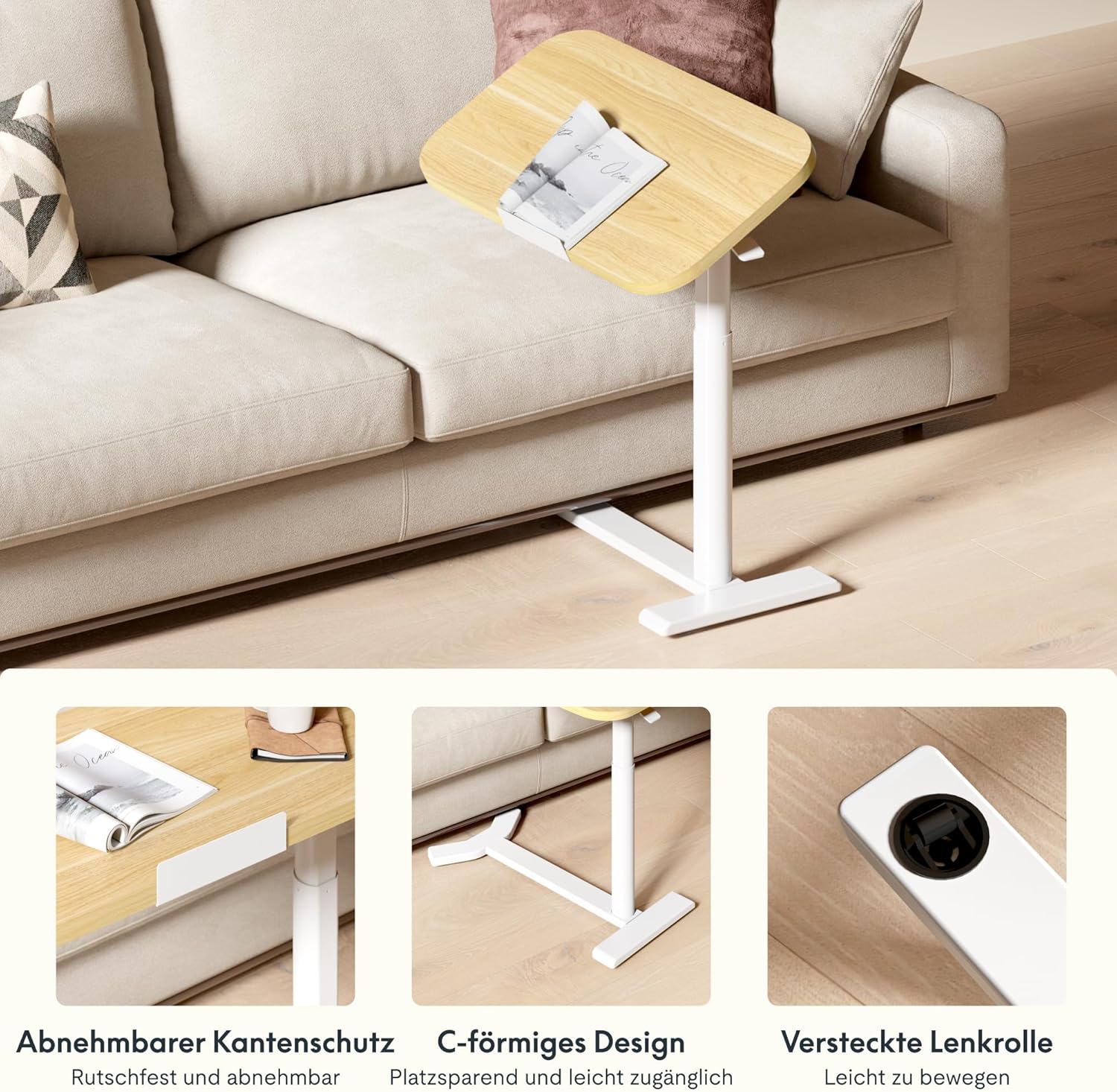
Image: Key design features including removable edge protection, the C-shaped base for easy access, and hidden casters for effortless movement.
6. Тэхнічнае абслугоўванне
- Уборка: Працярыце стол і раму мяккай губкайamp cloth. Avoid abrasive cleaners or harsh chemicals that could damage the finish. The water-repellent surface allows for easy cleaning.
- Інспекцыі: Перыядычна правярайце ўсе шрубы і злучэнні, каб пераканацца, што яны зацягнуты. Пры неабходнасці падцягвайце.
- Грузападымальнасць: Always adhere to the maximum load capacity of 7 kg to prevent structural damage.
- захоўванне: When not in use, store the table in a dry environment away from extreme temperatures or direct sunlight.

Image: The tabletop features rounded corners for safety and a water-repellent surface for easy cleaning.
7. Выпраўленне непаладак
| праблема | Магчымая прычына | Рашэнне |
|---|---|---|
| Стол хістаецца або стаіць нестабільна. | Loose assembly screws; uneven floor surface. | Check and tighten all assembly screws. Move the table to a flat, even surface. |
| Height adjustment is difficult or stuck. | Mechanism obstruction; excessive weight on tabletop. | Ensure no objects are obstructing the lifting mechanism. Reduce weight on the tabletop. If issues persist, contact support. |
| Tabletop does not tilt smoothly. | Tilting mechanism obstruction or damage. | Check for any debris or obstruction in the tilting mechanism. Do not force the tilt. Contact support if damaged. |
| Items slide off tilted tabletop. | Safety bar not installed or improperly installed. | Ensure the removable safety bar is correctly installed along the bottom edge of the tabletop when tilting. |
8. Тэхнічныя характарыстыкі
| Нумар мадэлі: | H5-6040 |
| Марка: | ФЛЕКСІСПОТ |
| Памеры (Д х Ш х У): | 60 х 40 х 65-105 см (23.6 х 15.7 х 25.6-41.3 цалі) |
| Дыяпазон рэгулявання вышыні: | 65 cm - 105 cm (25.6 inches - 41.3 inches) |
| Tabletop Dimensions: | 60 см x 40 см (23.6 цалі x 15.7 цаляў) |
| Таўшчыня стальніцы: | 16 мм (0.63 цаляў) |
| Вага: | 9 кг (19.8 фунтаў) |
| Максімальная грузападымальнасць: | 7 кг (15.4 фунтаў) |
| матэрыялы: | Engineered Wood (Tabletop), Wood (Frame), Metal (Base) |
| колер: | Maple + White Frame |
| Патрабуецца зборка: | Так (інструменты ў камплекце) |
| GTIN/UPC: | 840460424028 |
9. Інфармацыя аб гарантыі
FLEXISPOT products typically come with a limited warranty covering manufacturing defects. Please refer to the warranty card included with your product or visit the official FLEXISPOT webпадрабязныя гарантыйныя ўмовы для вашага рэгіёна глядзіце на сайце.
Захоўвайце чэк аб куплі ў якасці пацверджання пакупкі ў выпадку любых гарантыйных прэтэнзій.
10. Падтрымка кліентаў
If you have any questions, require assistance with assembly, or encounter any issues with your FLEXISPOT H5 Laptop Support Table, please contact FLEXISPOT customer service.
- Інтэрнэт-падтрымка: Visit the official FLEXISPOT webсайт з часта задаванымі пытаннямі, артыкуламі падтрымкі і кантактнымі формамі.
- электронная пошта: Refer to your product packaging or the FLEXISPOT website for the appropriate customer service email address.
- тэлефон: Contact numbers for your region can be found on the FLEXISPOT official webсайт.
When contacting support, please have your model number (H5-6040) and purchase information readily available.