
1. Уводзіны
This manual provides detailed instructions for the installation, setup, and operation of your Ctronics 4K Outdoor Security Camera, model CTIPC-950 (950C-4KB). Please read this manual thoroughly before using the product to ensure proper functionality and safety. Keep this manual for future reference.
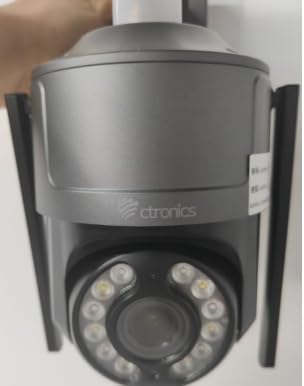
Figure 1: Ctronics 4K Outdoor Security Camera (Model CTIPC-950)
2. Асаблівасці прадукту
- True 4K Ultra HD with Starlight Lens: Experience superior image clarity day and night. Features vivid color night vision up to 30 meters.
- Advanced AI Detection & Auto Tracking: Accurately detects humans, vehicles, and pets. Automatically tracks moving targets to minimize false alarms.
- Powerful Red & Blue Strobe Light with Siren Alarm: Deters intruders effectively with visual and audible alerts.
- 8 Preset Positions & 4 Custom Detection Zones: Configure specific camera positions for quick patrols and define areas for focused surveillance.
- Privacy Masking Feature: Protect sensitive areas by masking them from surveillance.
- Flexible Installation & Multi-Device Remote Access: Supports wall or ceiling mounting. Manage up to 36 cameras via the Ctronics app on mobile or PC, with split-screen viewing, group management, and multi-user sharing.
- Двухдыяпазонны Wi-Fi: Supports both 2.4GHz and 5GHz Wi-Fi for reliable and stable connection.
- IP66 Воданепранікальнасць: Durable metal construction ensures reliable operation in various outdoor conditions.
3. Змесціва ўпакоўкі
Праверце наяўнасць усіх прадметаў у камплекце:
- Ctronics 4K Security Camera (CTIPC-950 / 950C-4KB)
- Інструкцыя па эксплуатацыі (гэты дакумент)
- Мантажныя шрубы і дзюбелі
- Адаптар сілкавання
4. Настройка
4.1 Пачатковае ўключэнне і канфігурацыя сеткі
- Падключыце харчаванне: Plug the power adapter into the camera's power jack and then into a power outlet. The camera will power on and perform a self-test.
- Download the Ctronics App: Пошук "Ctronics" in your mobile device's app store (iOS or Android) and download the official application.
- Рэгістрацыя/Уваход: Адкрыйце праграму і стварыце новы ўліковы запіс або ўвайдзіце з дапамогай існуючага.
- Дадаць камеру: Tap the "+" icon in the app to add a new device. Select "Wireless Installation" or scan the QR code located on the camera body.
- Падключыцеся да Wi-Fi: Follow the on-screen prompts to connect the camera to your home's dual-band (2.4GHz or 5GHz) Wi-Fi network. Ensure your phone's volume is turned up to maximum during sound-based configuration.
Video 1: Wi-Fi Setting via Sound (S20-G model, similar process for CTIPC-950)
This video demonstrates the Wi-Fi setup process using sound configuration, which is applicable to various Ctronics camera models including the CTIPC-950. It shows how to power on the camera, open the rubber cover, and use the mobile app to connect to your home Wi-Fi network by entering the password and allowing the phone to transmit sound signals to the camera for configuration.
5. Ўстаноўка
5.1 Месца мацавання
Choose a suitable outdoor location for mounting. The camera supports both wall and ceiling installation. Ensure the chosen spot provides a clear view of the area you wish to monitor and has access to a power source.
5.2 Этапы мантажу
- Пазначце адтуліны для свідравання: Use the provided mounting template or the camera's base to mark the positions for drilling on the wall or ceiling.
- Свідраваць адтуліны: Drill pilot holes at the marked positions. Insert wall plugs if mounting on masonry or concrete.
- Абараніце базу: Attach the camera's mounting base to the wall or ceiling using the provided screws.
- Прымацаваць камеру: Securely attach the camera unit to the mounted base.
6. Інструкцыя па эксплуатацыі
6.1 У прамым эфіры View і кіраванне панарамаваннем/нахілам
Access the live feed through the Ctronics app. Use the on-screen controls to pan the camera horizontally up to 355° and tilt vertically up to 90° to adjust the viewкут нахілу.
Video 2: Ctronics 4K Security Camera Overview (Model 930C, similar features for CTIPC-950)
Гэта відэа забяспечвае завяршэннеview of a Ctronics 4K security camera, highlighting its 355° pan and 90° tilt capabilities, 4K UHD resolution, starlight lens for night vision, AI detection for humans, pets, and vehicles, and the red and blue alarm light with siren. It also shows the metal body, IP67 weatherproof rating, 24/7 recording, dual-band Wi-Fi, and cloud/SD card storage options.
6.2 AI Detection and Auto Tracking
The camera's advanced AI can differentiate between humans, vehicles, and pets. When motion is detected, the camera can automatically track the moving object and send real-time notifications to your linked devices.
6.3 Рэжымы начнога бачання
The camera offers multiple night vision options:
- Каляровы начны бачанне: Utilizes the starlight lens to provide full-color images in low-light conditions up to 30 meters.
- Інфрачырвонае (ІЧ) начное бачанне: Provides clear black-and-white images in complete darkness.
6.4 функцый сігналізацыі
Upon detection of an intruder, the camera can activate its red and blue strobe lights and a loud siren to deter unwanted visitors. You will also receive instant alerts on your mobile device.
6.5 Preset Positions and Detection Zones
Configure up to 8 preset camera positions for quick navigation to frequently monitored areas. Define up to 4 customizable motion detection zones to focus surveillance on critical areas and reduce irrelevant alerts.
6.6 Двухбаковае аўдыё
Use the built-in microphone and speaker to communicate with visitors or deter intruders directly through the app.
7. Тэхнічныя характарыстыкі
| Асаблівасць | Апісанне |
|---|---|
| Назва мадэлі | CTIPC-950 (950C-4KB) |
| Выкарыстанне ў памяшканні/на вуліцы | На адкрытым паветры |
| Дазвол відэазахопу | 3840 (4K UHD) |
| Эфектыўнае рашэнне | 8 МП |
| Дыяпазон начнога бачання | 50 Meters (Color Night Vision up to 30m) |
| Тэхналогія падлучэння | Wireless (Dual-Band Wi-Fi: 2.4GHz, 5GHz), Ethernet, ONVIF, RTSP |
| Крыніца харчавання | Электрычны шнур (12 вольт, 12 ваты) |
| Тып кантролера | Ctronics APP |
| Тып мацавання | Насценнае мацаванне, мацаванне на столі |
| Міжнародны рэйтынг абароны | IP66 (атмасфератрывалы) |
| Матэрыял | Метал |
| Памеры прадмета (Д х Ш х У) | 5.91 х 5.91 х 5.91 цалі |
| Вага прадмета | 2.2 фунта |
| Параметры захоўвання | Micro SD (up to 256GB), FTP, NAS, Cloud Storage |
8. Тэхнічнае абслугоўванне
- Рэгулярная ўборка: Перыядычна чысціце аб'ектыў і корпус камеры мяккай губкайamp тканінай, каб забяспечыць выразную якасць выявы. Не выкарыстоўвайце агрэсіўныя хімічныя рэчывы.
- Абнаўленні прашыўкі: Check the Ctronics app regularly for firmware updates to ensure optimal performance and security.
- Праверка крыніцы харчавання: Ensure the power adapter and cable are free from damage and properly connected.
- Стабільнасць сеткі: Verify your Wi-Fi network is stable to maintain continuous camera operation.
9. Выпраўленне непаладак
- Камера не падключаецца да Wi-Fi:
- Пераканайцеся, што камера знаходзіцца ў зоне дзеяння вашага Wi-Fi маршрутызатара.
- Праверце правільны пароль Wi-Fi.
- Паспрабуйце перазагрузіць камеру і маршрутызатар.
- Ensure your router supports 2.4GHz or 5GHz bands and that the camera is attempting to connect to the correct band.
- Дрэнная якасць выявы:
- Ачысціце аб'ектыў камеры.
- Check your network connection speed. A slow connection can affect streaming quality.
- Пераканайцеся, што няма перашкод, якія блакавалі камеру view.
- Ілжывыя трывогі:
- Adjust the sensitivity settings for motion detection in the app.
- Configure detection zones to exclude areas with frequent irrelevant motion (e.g., moving trees).
- Ensure AI detection for humans/vehicles/pets is enabled to filter out other movements.
- Няма харчавання:
- Check if the power adapter is securely plugged into both the camera and the power outlet.
- Праверце разетку з дапамогай іншай прылады, каб пераканацца ў яе працаздольнасці.
10. Гарантыя і падтрымка
Your Ctronics 4K Outdoor Security Camera is covered by a manufacturer's warranty. For specific warranty terms and conditions, please refer to the documentation included with your purchase or visit the official Ctronics website. For technical support, troubleshooting assistance, or any product-related inquiries, please contact Ctronics customer service through the contact information provided on their webна сайце або ў дадатку Ctronics.