
1. Уводзіны
This manual provides essential information for setting up, operating, and maintaining your NIMO 15.6-inch FHD Laptop. Please read this guide thoroughly to ensure optimal performance and longevity of your device. Keep this manual for future reference.
2. Што ў скрынцы
- 1 x NIMO N155 Laptop
- 1 x Type-C 65W PD Fast Charger
- 1 х Кіраўніцтва карыстальніка
- Windows 11 Home (Pre-installed)
- 2 Years Warranty, 90 Days Return Information
3. Прадукт скончыўсяview
The NIMO 15.6-inch FHD Laptop is designed for efficiency and convenience, featuring a robust AMD Ryzen 5 processor, ample memory, and fast storage. Its sleek design and comprehensive connectivity options make it suitable for various tasks.
3.1. Камплектуючыя ноўтбука

Figure 1: NIMO 15.6-inch FHD Laptop (Rose Gold variant)
This image displays the NIMO 15.6-inch FHD Laptop in Rose Gold, showcasing its full-size keyboard, large touchpad, and the vibrant display. Key features like fingerprint sensor, Type-C PD charger, and backlit keyboard are highlighted on the screen.
3.2. Парты і раздымы

Figure 2: NIMO Laptop Ports Diagram
This diagram illustrates the available ports on the NIMO laptop, including Micro SD card reader, USB 2.0, USB 3.2 Gen1, Audio Jack, Kensington Lock on one side, and Type-C, USB 3.2 Gen1 Full-function, HDMI 1.4, and a Charge LED on the other side.
- Порты USB 3.0: For high-speed data transfer and connecting peripherals.
- Порт USB 2.0: Для падлучэння стандартных USB-прылад.
- Порт тыпу C: Supports 65W Power Delivery (PD) for fast charging and data transfer.
- HDMI 1.4: Для падлучэння да знешніх дысплеяў.
- Прылада для чытання карт Micro SD: Для пашырэння сховішча або пераносу files з карт памяці.
- Аўдыёраз'ём: Для падлучэння навушнікаў або знешніх дынамікаў.
- Слот замка Kensington: For physical security of the device.
4. Настройка
4.1. Пачатковае ўключэнне
- Дастаньце ноўтбук і ўсе аксэсуары з скрынкі.
- Connect the 65W Type-C PD Fast Charger to the laptop's Type-C port and a power outlet.
- Open the laptop lid. The laptop may power on automatically. If not, press the power button located on the top right of the keyboard.
- Выконвайце інструкцыі на экране, каб завяршыць наладу Windows 11 Home, у тым ліку мову, рэгіён, сеткавае падключэнне і стварэнне ўліковага запісу карыстальніка.
4.2. Падключэнне да сеткі
During the initial setup or at any time, you can connect your NIMO laptop to a Wi-Fi network:
- Націсніце на значок Wi-Fi у сістэмным трэі (правы ніжні кут экрана).
- Выберыце патрэбную сетку Wi-Fi са спісу.
- Увядзіце пароль сеткі, калі будзе прапанавана, і націсніце «Падключыцца».
5. Інструкцыя па эксплуатацыі
5.1. Кіраванне харчаваннем
- Уключэнне: Націсніце кнопку харчавання.
- Рэжым сну: Зачыніце вечка або коратка націсніце кнопку харчавання.
- Выключыць: Націсніце кнопку «Пуск», затым «Харчаванне» > «Выключыць сістэму».
- Перазапуск: Націсніце кнопку «Пуск», затым «Харчаванне» > «Перазагрузка».
5.2. Клавіятура і сэнсарная панэль
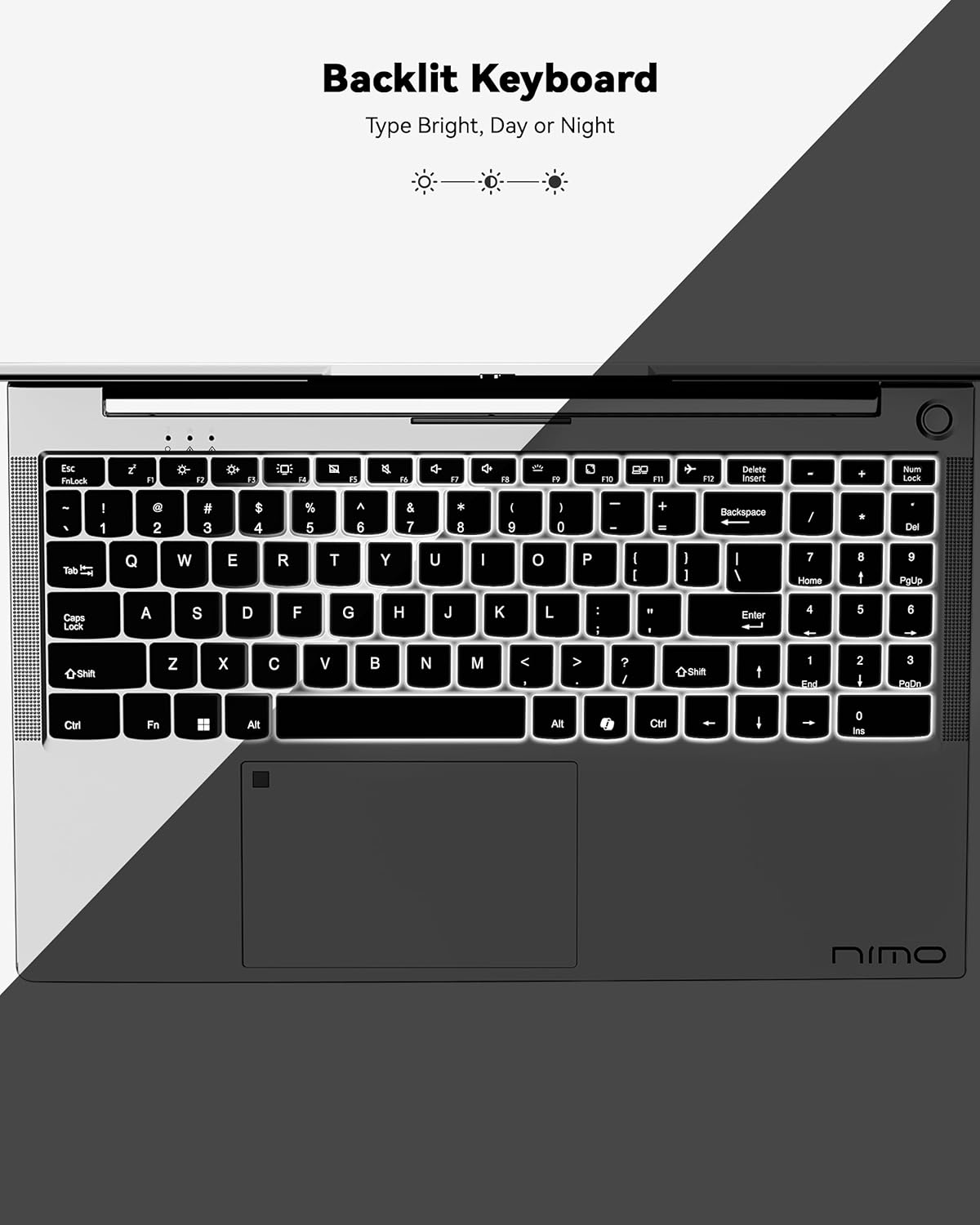
Figure 3: Backlit Keyboard
This image highlights the backlit keyboard feature of the NIMO laptop, demonstrating how the keys illuminate for typing in low-light conditions.
- Клавіятура з падсветкай: Прэса Fn + F5 (or the key with the keyboard backlight icon) to toggle the backlight on/off or adjust brightness.
- Сэнсарная панэль: Supports multi-touch gestures for scrolling, zooming, and navigation. Refer to Windows settings for customization.
- Датчык адбіткаў пальцаў: Located on the touchpad for secure and instant login. Set up your fingerprint in Windows Settings > Accounts > Sign-in options.

Figure 4: Fingerprint Sensor on Touchpad
This image shows a close-up of the NIMO laptop's touchpad, clearly indicating the integrated fingerprint sensor for quick and secure access.
5.3. Webкамера
The laptop features a 2MP webcam for video calls and conferences. Ensure proper lighting for best image quality.
5.4. Audio
The integrated speakers provide clear audio. You can also connect headphones or external speakers via the audio jack.
6. Асноўныя магчымасці
- Vivid 15.6" Full HD Display: Enjoy stunning visuals with the 15.6" Full HD (1920x1080) IPS anti-glare display, featuring an 85% screen-to-body ratio and micro-edge design.
- Высокая прадукцыйнасць: Equipped with an AMD Ryzen 5 processor, 16GB DDR4 RAM, and a 1TB PCIe SSD for fast boot-ups, seamless multitasking, and efficient handling of applications.
- Мадэрнізаваныя кампаненты: The RAM and SSD slots are expandable, allowing for future memory and storage upgrades.
- 65W USB-C PD Fast Charger: The included charger provides rapid power delivery, offering 2 hours of use from just 15 minutes of charging. It is also versatile for charging other compatible devices.
- Secure & Instant Login: Integrated fingerprint reader on the touchpad ensures quick and secure access to your device.
- Ergonomic Backlit Keyboard: Work comfortably in any environment with the backlit keyboard, featuring adjustable brightness.
- Бесперашкоднае падключэнне: Features Wi-Fi 6 and Bluetooth 5.2 for stable, high-speed wireless connections, along with multiple USB 3.0 ports and HDMI for versatile peripheral connections.
Video 1: NIMO Laptop - Perfect for Work and Study, Anytime, Anywhere
This video demonstrates the NIMO laptop's versatility for various tasks, highlighting its portability and performance for work, study, and entertainment in different settings.
Video 2: NIMO 15.6 FHD Laptop for Students Home Work
This video showcases the NIMO 15.6 FHD laptop as an ideal device for students, home users, and professionals, emphasizing its suitability for educational and work-related tasks.
7. Тэхнічнае абслугоўванне
- Уборка: Выкарыстоўвайце мяккую тканіну без ворса для чысткі экрана і вонкавага выгляду. Пазбягайце выкарыстання агрэсіўных хімічных рэчываў.
- Сыход за батарэяй: Каб падоўжыць тэрмін службы батарэі, пазбягайце частай поўнай разрадкі батарэі. Захоўвайце ноўтбук у прахалодным, сухім месцы.
- Абнаўленні праграмнага забеспячэння: Рэгулярна абнаўляйце аперацыйную сістэму Windows і драйверы, каб забяспечыць аптымальную прадукцыйнасць і бяспеку.
- Вентыляцыя: Ensure the laptop's ventilation openings are not blocked to prevent overheating. Use on a hard, flat surface.
8. Выпраўленне непаладак
- Ноўтбук не ўключаецца: Ensure the charger is securely connected and the battery has sufficient charge. Try a different power outlet.
- Экран пусты: Connect to an external monitor to check if the display is the issue. Restart the laptop.
- Праблемы з падключэннем да Wi-Fi: Restart your router and the laptop. Check Wi-Fi settings and ensure airplane mode is off.
- Павольная прадукцыйнасць: Close unnecessary applications, check for malware, and ensure sufficient free storage space. Consider upgrading RAM or SSD if performance remains an issue.
- Клавіятура або сэнсарная панэль не рэагуюць: Перазагрузіце ноўтбук. Праверце наяўнасць абнаўленняў драйвераў у дыспетчары прылад.
For persistent issues, please refer to the support section or contact NIMO customer service.
9. Тэхнічныя характарыстыкі
| Асаблівасць | Спецыфікацыя |
|---|---|
| Памер пастаяннага экрана | 15.6 цалі |
| Дазвол экрана | 1920 x 1080 пікселяў (Full HD) |
| Працэсар | AMD Ryzen 5 (3.7 GHz) |
| АЗП | 16 GB DDR4 (Upgradable) |
| Хуткасць памяці | 4800 МГц |
| Жорсткі дыск | 1024 GB SSD (Upgradable) |
| Графічны супрацэсар | AMD Integrated graphics |
| Аперацыйная сістэма | Windows 11 хатняя |
| Бесправадны тып | 802.11a/b/g/n/ac (Wi-Fi 6) |
| Bluetooth | Bluetooth 5.2 |
| Колькасць партоў USB 2.0 | 1 |
| Колькасць партоў USB 3.0 | 3 |
| Сярэдні тэрмін службы батарэі | 9 гадзін |
| Вага прадмета | 5 фунта |
| Памеры прадукту | 14.07 х 8.98 х 0.76 цалі |
| Тыл WebДазвол камеры | 2 МП |
| Асаблівасці | Падсветленая клавіятура, счытвальнік адбіткаў пальцаў, HD-аўдыё, лічбавая клавіятура |
10. Гарантыя і падтрымка
Your NIMO laptop comes with a 2-гадовая гарантыя вытворцы. Additionally, NIMO offers a 90-day hassle-free return and exchange policy. Our dedicated support team is available to assist with any issues or replacements.
10.1. Звярніцеся ў службу падтрымкі
- For product-related questions or technical assistance, please contact NIMO customer service via their official webсайт, электронная пошта або тэлефон.
- Contact information can typically be found on the NIMO official webсайт або старонка прадукту.
11. Інфармацыя па бяспецы
- Use only original chargers and regularly inspect cables for damage.
- Handle the laptop by its base and consider using a protective case. Avoid placing heavy objects on it.
- Place the laptop on a hard, flat surface to ensure proper ventilation and prevent overheating. Keep it away from extreme temperatures and moisture.
- Do not overcharge the battery. Discontinue use if the battery swells or shows signs of damage.
- Set strong passwords, keep software updated, use antivirus protection, and regularly back up your data.
- In case of liquid spills, immediately unplug the laptop and allow it to dry completely before attempting to power it on.
- For any technical issues, consult qualified professionals. Do not attempt to disassemble or repair the device yourself.
12. Адмова ад адказнасці
This laptop is provided "as is," with no express or implied warranties except for the manufacturer's limited warranty (if applicable). Implied warranties of merchantability or fitness for a specific purpose are disclaimed. NIMO is not liable for damages resulting from misuse (e.g., non-approved chargers, unauthorized repairs), physical damage, or failure to follow safety guidelines, including data loss or business interruption. Users are responsible for regularly backing up their data. This disclaimer does not exclude liability for manufacturing defects or violations of mandatory local laws. By using the NIMO laptop, you accept these terms, which are governed by applicable jurisdiction laws.