
Уводзіны
This manual provides detailed instructions for the assembly, operation, and maintenance of your FLEXISPOT One-Piece Standing Desk with Rattan Drawers. Please read this manual thoroughly before installation and use to ensure proper function and safety. Keep this manual for future reference.

Image: The FLEXISPOT One-Piece Standing Desk in black with rattan drawers, featuring a monitor shelf and an integrated control panel.
Важная інфармацыя па бяспецы
Каб пазбегнуць траўмаў або пашкоджання вырабу, выконвайце наступныя правілы бяспекі:
- Заўсёды ўважліва выконвайце інструкцыі па зборцы.
- Трымайце дзяцей і хатніх жывёл далей ад зоны збору.
- Use appropriate tools and safety gear during assembly.
- Перад тым, як пачаць працаваць са сталом, пераканайцеся, што ўсе злучэнні надзейныя.
- Do not overload the desk. The maximum weight capacity is 110 lbs.
- Падчас рэгулявання вышыні трымайце рукі і прадметы далей ад рухомых частак.
Змест пакета
Verify that all components are present before beginning assembly. The desk ships in two separate packages.
- Desktop with integrated monitor shelf and rattan drawers
- Desk frame and legs
- Панэль кіравання
- Адаптар харчавання і кабелі
- Зборныя вырабы (шрубы, балты, інструменты)
- Кіраўніцтва карыстальніка

Image: A diagram illustrating the dimensions of the desk components and indicating that the product ships in two separate packages.
Інструкцыя па зборцы
Assembly typically takes approximately one hour. Refer to the separate detailed assembly guide included in your package for step-by-step instructions and diagrams. Ensure all fasteners are correctly identified and used in their designated locations.
- Распакуйце ўсе кампаненты і звярніцеся да спісу змесціва ўпакоўкі.
- Attach the desk legs to the desktop frame using the provided hardware.
- Connect the control panel and motor cables as instructed.
- Secure any cable management components.
- Place the desk in its desired location.
Настройка
After assembly, connect the desk to a power source.
- Plug the power adapter into the desk's control box.
- Падключыце шнур сілкавання да звычайнай электрычнай разеткі.
- The desk is now ready for initial use.
Інструкцыя па эксплуатацыі
Рэгуляванне вышыні
The desk features an electric motor system for smooth height transitions.
- Націсніце Стрэлка ўверх кнопка, каб падняць стол.
- Націсніце Стрэлка ўніз кнопка, каб апусціць стол.
- The desk can adjust between 28.9 inches (minimum) and 46.5 inches (maximum).
- The motor operates quietly, typically below 50dB.

Image: The desk shown at its minimum (28.9") and maximum (46.5") adjustable heights.
Налады памяці
Program up to three preferred height settings for quick adjustments.
- Адрэгулюйце стол на патрэбную вам вышыню.
- Націсніце M button, then press one of the numbered preset buttons (1, 2, або 3) на працягу 3 секунд, каб захаваць бягучую вышыню.
- Каб выклікаць захаваную вышыню, проста націсніце адпаведную нумараваную кнопку загадзя ўсталяванай вышыні.

Выява: буйны план view of the desk's control panel, highlighting the up/down arrows and memory preset buttons.
Паліца для манітора
The integrated monitor shelf is designed to elevate screens to an ergonomic eye level.
- Place your monitor(s) on the shelf to reduce neck and back strain.
- This helps maintain proper posture during extended work sessions.

Image: Visual comparison of poor posture versus ergonomic sitting and standing postures facilitated by the adjustable desk.
Rattan Drawers
The desk includes both sliding-door desktop compartments and an under-desk drawer for organized storage.
- Use the desktop compartments (47.2"x8.7"x5.5") for easy access to frequently used items.
- The under-desk drawer (23.6"x11.8"x3.9") provides discreet storage for documents or books.
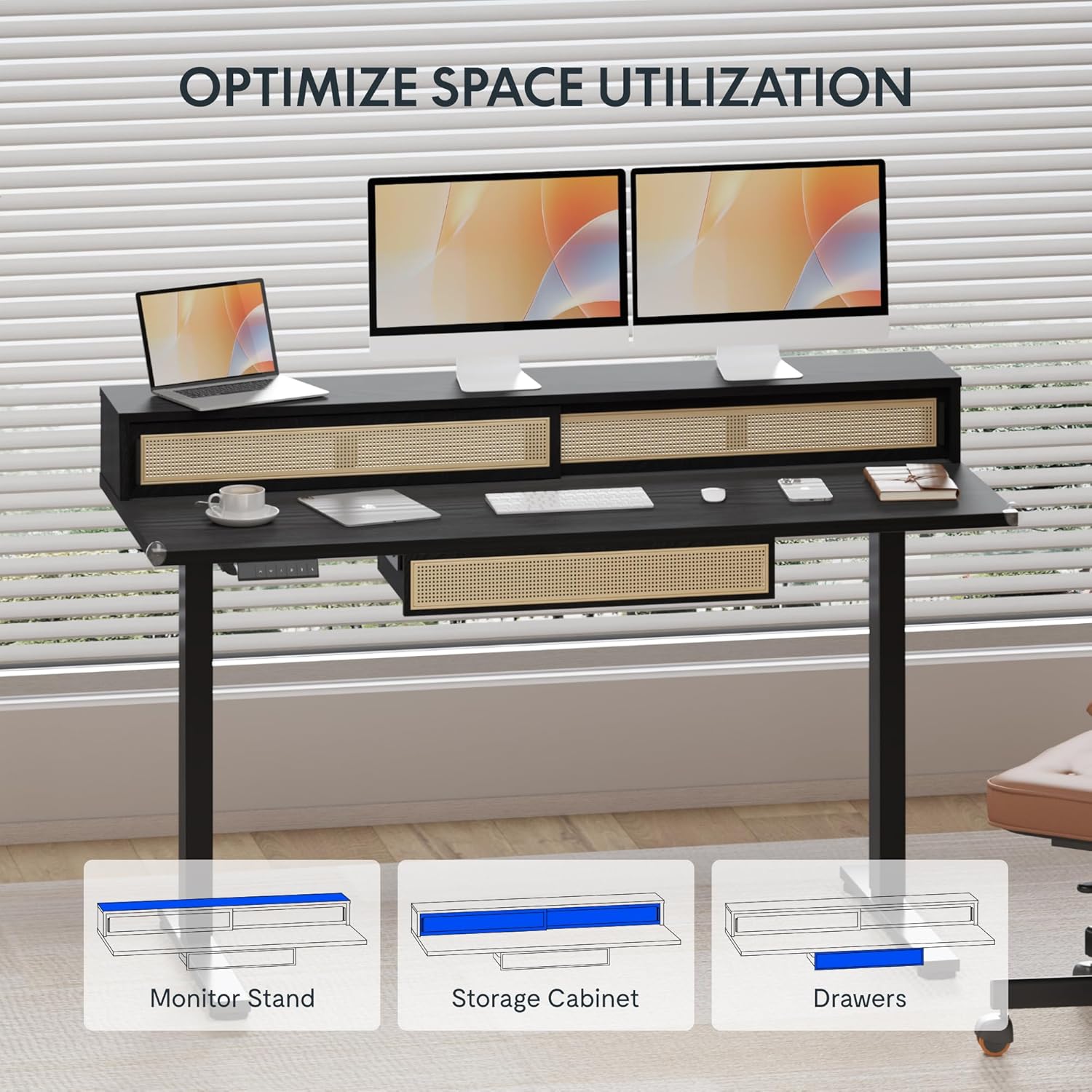
Image: An illustration demonstrating the various storage options, including the monitor stand, storage cabinet, and drawers, for optimal space utilization.
Тэхнічнае абслугоўванне
Рэгулярнае абслугоўванне забяспечвае даўгавечнасць і аптымальную прадукцыйнасць вашага стала.
- Уборка: Працірайце паверхні стала мяккай губкайamp тканіна. Пазбягайце абразіўных ачышчальнікаў або агрэсіўных хімікатаў, якія могуць пашкодзіць пакрыццё.
- агляд: Перыядычна правярайце ўсе шрубы і балты, каб пераканацца, што яны зацягнуты. Пры неабходнасці падцягвайце.
- Кабельнае кіраванне: Ensure cables are neatly organized and not interfering with the desk's movement.
Ліквідацыю непаладак
Калі ў вас узніклі праблемы са сталом, звярніцеся да наступных распаўсюджаных рашэнняў:
| праблема | Магчымая прычына | Рашэнне |
|---|---|---|
| Стол не рухаецца і не рэагуе на элементы кіравання. | Power connection issue, cable disconnected, motor error. | Check power cord connection to outlet and desk. Ensure all motor cables are securely connected. Unplug and replug the power for 10 seconds to reset. |
| Стол рухаецца няроўна або выдае незвычайныя гукі. | Uneven load, loose connections, obstruction. | Ensure weight is evenly distributed. Check for any obstructions under the desk. Verify all assembly screws are tight. |
| Memory presets are not working. | Прэсеты захаваны няправільна. | Re-save the desired height settings by pressing 'M' then the preset number within 3 seconds. |
Тэхнічныя характарыстыкі
| Асаблівасць | Дэталь |
|---|---|
| Марка | ФЛЕКСІСПОТ |
| Памеры прадукту (Д х Ш х У) | 23.6"D x 47.2"W x 29"H (at lowest point) |
| Колер | Чорны |
| Базавы матэрыял | Легаваная сталь |
| Верхні тып матэрыялу | Вуд |
| Мінімальная вышыня | 28.9 цалі |
| Максімальная вышыня | 46.5 цалі |
| Колькасць скрынь | 1 (under-desk) |
| Enclosed Shelves | 2 (sliding-door desktop compartments) |
| Асаблівасць | Corded electric height adjustment, Memory Presets |
| Неабходная зборка | так |
Гарантыя і падтрымка
FLEXISPOT provides comprehensive warranty coverage for your standing desk:
- Frame and Motor: 5-year coverage.
- Электроніка: 2-year coverage.
This warranty ensures lasting security for your workspace investment. For customer support, technical assistance, or warranty claims, please refer to the contact information provided in your product packaging or visit the official FLEXISPOT webсайт.