
1. Уводзіны
Thank you for choosing the SOBATTY 2.1 Channel Home Audio Ampліфікатар. Гэта amplifier is designed to provide high-quality stereo audio with a dedicated subwoofer output, Bluetooth 5.0 connectivity, USB playback, and multiple input options including RCA and Coaxial. It also features two microphone inputs with echo control, making it suitable for home entertainment, karaoke, and theater speaker systems. Please read this manual carefully before operation to ensure proper use and to maximize the performance of your device.
2. Інфармацыя па бяспецы
- крыніца харчавання: Забяспечце amplifier is connected to a power source matching the specified voltagе (110 В/60 Гц).
- Вентыляцыя: Не блакуйце вентыляцыйныя адтуліны. Забяспечце дастатковую цыркуляцыю паветра вакол прылады, каб прадухіліць перагрэў.
- Вільготнасць: Трымайце amplifier away from water, moisture, and high humidity environments.
- Крыніцы цяпла: Пазбягайце размяшчэння прылады побач з крыніцамі цяпла, такімі як радыятары, абагравальнікі, пліты або іншыя прыборы, якія выпрацоўваюць цяпло.
- Абслугоўванне: Не спрабуйце самастойна абслугоўваць гэты прадукт. Звярніцеся да ўсіх абслугоўванняў кваліфікаванага абслуговага персаналу.
- Супраціў дынаміка: Connect speakers with an impedance of 4-16 Ohms. Connecting speakers outside this range may damage the ampзадымнік.
3. Што ў скрынцы
- SOBATTY 2.1 Channel Home Audio AmpLifier (x1)
- Пульт дыстанцыйнага кіравання (x1)
- Кіраўніцтва па эксплуатацыі (x1)
Note: Wireless microphones and their receiver, if included with your specific package (e.g., '2.1CH +UHF MIC' variant), will be separate items. Please check your packaging contents.
4. Прадукт скончыўсяview
4.1 Элементы кіравання пярэдняй панэлі
This image displays the front panel of the amplifier, highlighting the various knobs, buttons, and ports for user interaction. Key controls include master volume, microphone volume, music volume, input selection, and tone adjustments.
- ГУЧ МІКРАНА: Adjusts the overall volume of the connected microphones.
- УХОД: Selects the audio input source (e.g., Bluetooth, USB, RCA, Coaxial).
- P/P (Play/Pause): Controls playback for USB or Bluetooth audio.
- PREV (Previous): Skips to the previous track for USB or Bluetooth audio.
- ДАЛЕЙ: Skips to the next track for USB or Bluetooth audio.
- МУЗЫКА VOL: Adjusts the overall volume of the music playback.
- Магутнасць: Галоўны выключальнік харчавання для ampзадымнік.
- ECHO.VOL: Adjusts the echo effect level for microphones.
- МІКРАФ.БАС: Adjusts the bass level for microphones.
- МІКРАФОН ВЫСОКАСЦІ: Adjusts the treble level for microphones.
- MIC1 / MIC2: 6.35mm jack inputs for wired microphones.
- MUSIC.BASS: Adjusts the bass level for music playback.
- MUSIC.TREBLE: Adjusts the treble level for music playback.
- SUB.VOL: Adjusts the volume level of the subwoofer output.
- USB: USB port for playing audio files з USB-дыска.
- Экран дысплея: Shows current input mode, track information, or Bluetooth status.
4.2 Злучэнні задняй панэлі

This image illustrates the rear panel of the amplifier, detailing the various audio input and output connections, speaker terminals, and power input. A wireless microphone receiver unit is also shown connected on top.
- кааксіяльны: Лічбавы аўдыёўваход.
- УВАХОД (RCA): Analog audio input (Left/Right).
- ВЫХАД (RCA): Analog audio output (Left/Right).
- Double Bass (RCA): Dedicated output for enhanced bass signal.
- Speaker Connect (4-16 Ohms): Screw terminals for connecting passive speakers (Left/Right).
- Sub-woofer OUT: Выхад RCA для падлучэння актыўнага сабвуфера.
- POWER (~110V/60Hz): Уваход пераменнага току.
- Wireless Mic Receiver (ANT-A, ANT-B): Antenna connections for wireless microphones.
- Wireless Mic Receiver (MIC-A+B OUTPUT): Audio output from the wireless microphone receiver to the ampзадымнік.
- Wireless Mic Receiver (POWER): DC power input for the wireless microphone receiver.
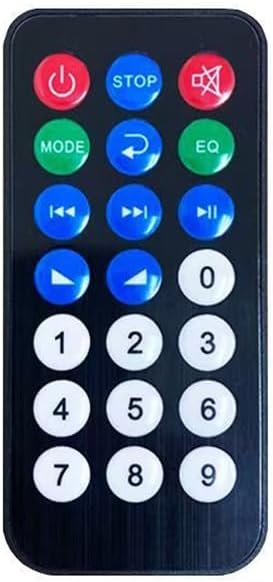
4.3 Пульт дыстанцыйнага кіравання

The remote control provides convenient access to various functions of the ampліфіер на адлегласці.
- Кнопка харчавання: Ператварае ampуключае або выключае пад'ёмнік.
- СТОП: Спыняе прайграванне.
- МУК: Выключэнне або ўключэнне гуку.
- Рэжым: Пераключае крыніцы ўваходнага сігналу.
- Return/EQ: Returns to previous menu or cycles through equalizer presets.
- Папярэдні/Наступны: Прапускае трэкі.
- Прайграванне/Паўза: Прайграе або прыпыняе аўдыё.
- Павялічыць/паменшыць гучнасць: Рэгулюе асноўную гучнасць.
- Лічбавая клавіятура (0-9): For direct track selection (if supported by media).
5. Інструкцыі па ўсталёўцы
5.1 Падключэнне дынамікаў
- Забяспечце ampLifier выключаны.
- Connect your passive stereo speakers (4-16 Ohms impedance) to the "Speaker Connect" terminals on the rear panel.
- Супастаўце станоўчы (+) кантакт amplifier to the positive (+) terminal of your speaker, and the negative (-) terminal of the amplifier да адмоўнай (-) клемы вашага дынаміка.
- Пераканайцеся, што ўсе злучэнні надзейныя, каб пазбегнуць кароткага замыкання.
5.2 Connecting a Subwoofer
- If you have an active subwoofer, connect its RCA input to the "Sub-woofer OUT" port on the ampзадняя панэль выратавальнага прыбора.
- Adjust the subwoofer's volume and crossover frequency directly on the subwoofer unit, and fine-tune its level using the "SUB.VOL" knob on the ampпярэдняя панэль выратавальніка.
5.3 Падключэнне аўдыёкрыніц
- Уваход RCA: Connect devices like DVD players, CD players, or TVs using RCA cables to the "INPUT (RCA)" ports.
- Кааксіяльны ўваход: Connect devices with a coaxial digital audio output (e.g., some TVs, Blu-ray players) to the "COAXIAL" port.
- USB ўвод: Insert a USB flash drive into the "USB" port on the front panel for direct audio playback.
5.4 Connecting Wireless Microphones (If Applicable)
- Connect the wireless microphone receiver's audio output (e.g., MIC-A+B OUTPUT) to one of the amplifier's RCA INPUT ports using an appropriate cable.
- Connect the power adapter to the wireless microphone receiver's power input.
- Ensure the antennas (ANT-A, ANT-B) are securely attached to the receiver for optimal signal reception.
5.5 Падключэнне харчавання
- Пасля таго, як усе аўдыё і дынамікі будуць падключаны, падключыце amplifier's power cord to a standard 110V/60Hz AC outlet.
- Уключыце amplifier using the "POWER" switch on the front panel.
6. Інструкцыя па эксплуатацыі
6.1 Уключэнне/выключэнне сілкавання
Press the "POWER" switch on the front panel to turn the amplifier on or off. The display screen will illuminate when the unit is powered on.
6.2 Выбар уводу
Press the "INPUT" button on the front panel or the "MODE" button on the remote control to cycle through available audio sources: Bluetooth, USB, RCA, Coaxial. The selected input will be shown on the display.
6.3 Спалучэнне па Bluetooth
- Select "Bluetooth" as the input source. The display will show "BLUE" and typically flash, indicating it's in pairing mode.
- На мабільнай прыладзе (смартфоне, планшэце і г.д.) уключыце Bluetooth і знайдзіце даступныя прылады.
- Select "SOBATTY" (or similar name) from the list of devices.
- Once paired, the display will show a steady "BLUE" indicator, and you can play audio from your device through the ampзадымнік.
6.4 Прайграванне з USB
- Устаўце USB-назапашвальнік з аўдыя files into the front "USB" port.
- Select "USB" as the input source. The amplifier аўтаматычна пачне прайграваць аўдыё files.
- Use the "P/P", "PREV", and "NEXT" buttons on the front panel or remote control to manage playback.
6.5 Volume and Tone Adjustment
- МУЗЫКА VOL: Рэгулюе гучнасць асноўнай музыкі.
- ГУЧ МІКРАНА: Рэгулюе гучнасць мікрафона.
- SUB.VOL: Adjusts the subwoofer output volume.
- MUSIC.BASS / MUSIC.TREBLE: Adjusts the bass and treble frequencies for music playback.
- MIC.BASS / MIC.TREBLE: Adjusts the bass and treble frequencies for microphone input.
- ECHO.VOL: Controls the intensity of the echo effect for microphones.
6.6 Выкарыстанне мікрафона
Connect wired microphones to the MIC1 or MIC2 jacks on the front panel, or ensure your wireless microphone receiver is properly connected and powered on. Adjust "MIC VOL", "MIC.BASS", "MIC.TREBLE", and "ECHO.VOL" to achieve desired sound.
7. Тэхнічнае абслугоўванне
- Уборка: Выкарыстоўвайце мяккую сухую тканіну для ачысткі вонкавага боку ampНе выкарыстоўвайце вадкія ачышчальнікі або аэразолі.
- захоўванне: When not in use for extended periods, disconnect the power cord and store the unit in a cool, dry place.
- Вентыляцыя: Рэгулярна правярайце вентыляцыйныя адтуліны на наяўнасць пылу і смецця.
8. Выпраўленне непаладак
| праблема | Магчымая прычына | Рашэнне |
|---|---|---|
| Няма ўлады | Power cord not connected; Power switch off; Outlet malfunction | Ensure power cord is securely plugged in; Turn on power switch; Test outlet with another device. |
| Няма выхаду гуку | Incorrect input selected; Volume too low; Speaker connections loose; Mute function active | Select correct input source; Increase MUSIC VOL; Check speaker wiring; Deactivate MUTE. |
| Скажоны гук | Volume too high; Poor audio source quality; Speaker impedance mismatch | Reduce volume; Try a different audio source; Ensure speakers are 4-16 Ohms. |
| Weak Bluetooth signal or disconnections | Прылада занадта далёка; перашкоды; перашкоды | Перамясціце прыладу Bluetooth бліжэй да amplifier; Remove obstructions; Avoid other wireless devices. |
| Не працуе мікрафон | Microphone not connected; MIC VOL too low; Wireless mic receiver off/unpaired | Ensure microphone is plugged in; Increase MIC VOL; Check wireless mic receiver power and pairing. |
9. Тэхнічныя характарыстыкі
| Асаблівасць | Дэталь |
|---|---|
| Памеры прадукту | 8.86" Г х 13" Ш х 2.75" В (22.5 х 33 х 7 см) |
| Вага прадмета | 6.38 фунта (2.89 кг) |
| Нумар мадэлі | NS-21K-0TP8D |
| Марка | SOBATTY |
| Тэхналогія падлучэння | Bluetooth 5.0, USB |
| Тып кантролера | Пульт дыстанцыйнага кіравання |
| Асаблівасць | Убудаваны Bluetooth |
| Сумяшчальныя прылады | Television, Personal Computer, Tablet, Smartphone |
| Тып раздыма | Coaxial, Optical (via adapter if needed), RCA, USB |
| Рэжым выхаду гуку | Стэрэа (2.1-канал) |
| Канфігурацыя канала аб'ёмнага гуку | 3 (Implies 2.1 channel with subwoofer) |
| Электразабеспячэнне | ~ 110 В / 60 Гц |
| Намінальная магутнасць | 100W (as per product image) |
10. Гарантыя і падтрымка
For warranty information and technical support, please refer to the documentation provided with your purchase or contact SOBATTY customer service through the retailer where the product was purchased. Keep your proof of purchase for warranty claims.