
1. Уводзіны
This manual provides essential information for the proper setup, operation, and maintenance of your FUNYET FUNPAD 10-inch Android Tablet. Please read this guide thoroughly before using your device to ensure optimal performance and longevity.
2. Што ў скрынцы
Праверце наяўнасць усіх прадметаў у камплекце:
- FUNYET FUNPAD 10-inch Android Tablet
- Адаптар сілкавання
3. Прадукт скончыўсяview
The FUNYET FUNPAD is a 10-inch Android tablet featuring an Octa-Core processor, 8GB RAM, 128GB storage, and a metal shell design. It is equipped with dual cameras, Wi-Fi 5, and Bluetooth 5.0 for versatile use.
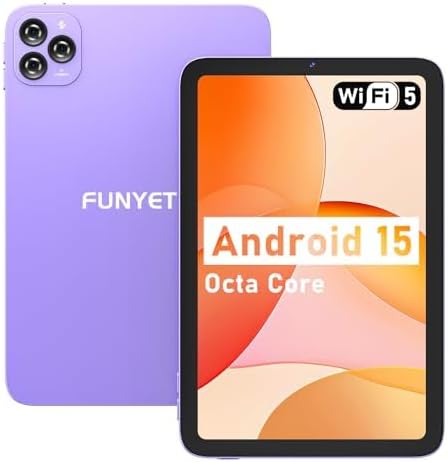
Выява: спераду і ззаду view of the FUNYET FUNPAD 10-inch Android Tablet, showcasing its purple metal shell and camera module.
3.1 Кампанента і кампаненты прылады

Image: Diagram illustrating the various ports and buttons on the FUNYET FUNPAD tablet. This includes the Micro SD Slot, Power On/Off button, Volume buttons, Type-C (Full Function) port, Auto Focus 8MP Rear Camera, Fixed Focus 2MP Front Camera, Flashlight, and Dual Speakers.
- Кнопка харчавання: Located on the side, used to power the device on/off or put it to sleep.
- Кнопкі гучнасці: Адрэгулюйце ўзровень гукавога вываду.
- Порт тыпу C: Для зарадкі і перадачы дадзеных.
- Слот Micro SD: Insert a Micro SD card for expandable storage.
- Пярэдняя камера: 2MP camera for video calls and selfies.
- Задняя камера: 8MP autofocus camera with flashlight for capturing photos and videos.
- Падвойныя дынамікі: Забяспечыць выхад гуку.
4. Настройка
4.1 Першапачатковая зарадка
Before first use, fully charge the tablet using the provided power adapter and Type-C cable. The battery indicator on the screen will show charging status.
4.2 Уключэнне/выключэнне
- Каб уключыць: Press and hold the Power button until the FUNYET logo appears.
- Каб выключыць: Націсніце і ўтрымлівайце кнопку харчавання, затым абярыце «Выключыць харчаванне» з опцый на экране.
- Каб перазапусціць: Націсніце і ўтрымлівайце кнопку харчавання, затым абярыце з опцый «Перазагрузка».
4.3 Майстар пачатковай налады
Пры першым уключэнні планшэт правядзе вас праз працэс пачатковай налады. Выконвайце падказкі на экране, каб:
- Выберыце сваю мову.
- Падключыцеся да сеткі Wi-Fi.
- Set up your Google account (optional, but recommended for app downloads).
- Наладзьце дату і час.
5. Інструкцыя па эксплуатацыі
5.1 Асноўная навігацыя
The FUNYET FUNPAD features an In-cell multi-touch display. Use standard Android gestures:
- Націсніце: Выберыце элемент або адкрыйце праграму.
- Правядзіце пальцам: Пракручваць экраны або спісы.
- Дробка: Павялічваць або памяншаць маштаб малюнкаў і web старонкі.
- Доўгі націск: Доступ да кантэкстных меню або перамяшчэнне значкоў.
5.2 Падключэнне да Wi-Fi
Каб падключыцца да сеткі Wi-Fi:
- Перайсці да Налады > Сетка і інтэрнэт > Wi-Fi.
- Уключыць/выключыць Wi-Fi On.
- Выберыце патрэбную сетку са спісу.
- Увядзіце пароль, калі будзе прапанавана, а затым націсніце Злучыцца.
5.3 Спалучэнне па Bluetooth
Каб падключыцца да прылады Bluetooth (напрыклад, навушнікаў, дынамікаў):
- Перайсці да Налады > Падключаныя прылады > Bluetooth.
- Пераключыць Bluetooth On.
- Пераканайцеся, што ваша прылада Bluetooth знаходзіцца ў рэжыме спалучэння.
- Выберыце сваю прыладу са спісу даступных прылад і выконвайце падказкі на экране, каб завяршыць спалучэнне.
5.4 Выкарыстанне камеры
The tablet features an 8MP autofocus rear camera and a 2MP fixed-focus front camera.

Image: Visual representation of the FUNYET FUNPAD tablet's camera capabilities, highlighting the 8MP rear camera with autofocus and flashlight, and the 2MP front camera. Example photos are displayed.
- Адкрыйце Камера дадатак.
- Націсніце на значок камеры, каб пераключыцца паміж пярэдняй і задняй камерамі.
- Націсніце кнопку спуску засаўкі, каб зрабіць фотаздымак або пачаць/спыніць відэазапіс.
5.5 Кіраванне сховішчам
The tablet comes with 128GB of internal storage. You can expand this by inserting a Micro SD card (up to 1TB capacity).

Image: The FUNYET FUNPAD tablet screen showing icons for 128GB ROM, 8GB RAM, and 1TB Micro SD expansion, indicating ample storage and expandability.
To manage storage:
- Перайсці да Налады > Захоўванне.
- View выкарыстанне ўнутранай памяці і кіраванне ёю files.
- Insert a Micro SD card into the designated slot to expand storage.
5.6 Кіраванне батарэяй
The tablet is equipped with a 6000mAh battery for extended usage.

Image: The FUNYET FUNPAD tablet being used for various activities like watching videos and video calls, illustrating its long-lasting 6000mAh battery.
- To check battery status, go to Налады > акумулятар.
- For optimal battery life, avoid extreme temperatures and use the provided charger.
5.7 GPS-навігацыя
The tablet supports GPS, GLONASS, and BDS for accurate location services. Ensure location services are enabled in Налады > Размяшчэнне for navigation apps to function correctly.
6. Тэхнічнае абслугоўванне
6.1 Ачыстка прылады
- Для чысткі экрана і корпуса выкарыстоўвайце мяккую тканіну без ворса.
- Пазбягайце выкарыстання агрэсіўных хімікатаў або абразіўных матэрыялаў.
- Не распыляйце ачышчальнікі непасрэдна на экран.
6.2 Абнаўленне праграмнага забеспячэння
Regularly check for and install software updates to ensure your tablet has the latest features and security enhancements. Go to Налады > сістэма > Абнаўленне сістэмы.
6.3 Сыход за акумулятарам
- Пазбягайце частай поўнай разрадкі акумулятара.
- Do not expose the tablet to extreme heat or cold.
- If the tablet will not be used for an extended period, charge it to about 50% before storing.
7. Выпраўленне непаладак
If you encounter issues with your FUNYET FUNPAD, refer to the following common solutions:
| праблема | Магчымае рашэнне |
|---|---|
| Планшэт не ўключаецца | Ensure the battery is charged. Connect the tablet to the charger for at least 30 minutes, then try powering on again. |
| Праблемы з падключэннем да Wi-Fi | Перазагрузіце планшэт і маршрутызатар Wi-Fi. Забудзьцеся пра сетку ў наладах Wi-Fi і падключыцеся зноў. Пераканайцеся, што вы знаходзіцеся ў зоне дзеяння сеткі. |
| Павольная праца або завісанне | Close unnecessary background apps. Clear cache for problematic apps. Restart the tablet. Check for available storage space. |
| Экран не рэагуе | Perform a forced restart by holding the Power button for approximately 10-15 seconds. If the issue persists, consider a factory reset (data will be lost). |
| Device reboots unexpectedly | Ensure the device is updated to the latest software. Check for conflicting apps. If the issue persists, a factory reset may be necessary. |
7.1 Скід да заводскіх налад
A factory reset will erase all data from your tablet and restore it to its original factory settings. This should be considered a last resort for persistent software issues.
- Зрабіце рэзервовую копію ўсіх важных дадзеных.
- Перайсці да Налады > сістэма > Скінуць параметры > Сцерці ўсе даныя (скід да заводскіх налад).
- Пацвердзіце свой выбар і выконвайце інструкцыі на экране.
8. Тэхнічныя характарыстыкі
Key technical specifications for the FUNYET FUNPAD 10-inch Android Tablet:
| Асаблівасць | Спецыфікацыя |
|---|---|
| Памер экрана | 10 цалі |
| Дазвол экрана | 800x1280 пікселяў |
| Працэсар | 1.6 GHz Octa-Core (Spreadtrum T606) |
| Графічны супрацэсар | Малі-G57 |
| АЗП | 8 ГБ |
| Унутраная памяць | 128 ГБ |
| Сховішча з магчымасцю пашырэння | Micro SD (да 1 ТБ) |
| Аперацыйная сістэма | Android |
| Бесправадны тып | 802.11ac (Wi-Fi 5) |
| Bluetooth | Bluetooth 5.0 |
| Задняя камера | 8MP аўтафокус |
| Пярэдняя камера | 2 МП з фіксаваным фокусам |
| акумулятар | 6000 мАг |
| Вага прадмета | 1.74 фунта |
| Памеры прадукту | 9.48 х 6.28 х 0.3 цалі |
9. Гарантыя і падтрымка
FUNYET is dedicated to providing quality electronic products. We offer a 30-day free exchange policy and a 1-year free repair service for all our products.
If you have any questions or require assistance with your FUNYET FUNPAD tablet, please contact FUNYET support. We aim to reply to all inquiries within 24 hours.
For further information or to explore other products, visit the official FUNYET store: FUNYET Store on Amazon