
1. Прадукт скончыўсяview
The ZWP GYKQ-78 is a direct replacement remote control designed for a range of Pioneer Diamante Air Conditioner models. This remote offers full functionality without the need for complex programming, providing a convenient solution for controlling your air conditioning unit.

Image 1.1: The ZWP GYKQ-78 replacement remote control, showcasing its ergonomic design and clear button layout.
Асноўныя характарыстыкі:
- Праграмаванне не патрабуецца: Ready to use directly after battery installation.
- Трывалая канструкцыя: Made from high-quality, wear-resistant ABS material for long-lasting use.
- Эрганамічны дызайн: Зручна трымаць у руках і працаваць.
- Шырокая сумяшчальнасць: Compatible with numerous Pioneer Diamante Air Conditioner models.
Compatible Air Conditioner Models:
- WYT020GLHI22M2
- WYT012GLFI19RL
- WYT009ALFI19RL
- WYT009GLFI19RL
- WYT012ALFI19RL
- WYT018GLFI19RL
- WYT024GLFI19RL
- WYT036GLFI19RL
- WYT009ALFI22RL
- WYT009GLFI22RL
- WYT024GLFI22RL
- WYT012GLFI22RL
- WYT012ALFI22RL
- WYT030GLHI22M3
2. Усталёўка і ўстаноўка батарэі
The ZWP GYKQ-78 remote control requires two AAA batteries (not included) for operation. No programming or pairing is necessary; simply install the batteries, and the remote is ready for use.
- Адкрыйце батарэйны адсек: Знайдзіце вечка батарэйнага адсека на задняй панэлі пульта дыстанцыйнага кіравання. Зрушце вечка ўніз або націсніце на зашчапку і падніміце яго, каб адкрыць.
- Устаўце батарэі: Insert two new AAA batteries into the compartment, ensuring the positive (+) and negative (-) terminals align correctly with the markings inside the compartment.
- Зачыніце батарэйны адсек: Устаўце вечка батарэйнага блока на месца, зрушыўшы яе назад да шчоўкнення.

Image 2.1: Illustration showing the battery compartment and the requirement for two AAA batteries (not included).
Important: Ensure correct battery polarity. Remove batteries if the remote will not be used for an extended period to prevent leakage.
3. Інструкцыя па эксплуатацыі
This section details the functions of the buttons on your ZWP GYKQ-78 remote control. The remote features an LED luminous display for clear visibility, even in low light conditions.

Image 3.1: The remote control's LED luminous display, which ensures buttons and screen are clearly visible without needing external light.
3.1 Функцыі кнопак
| Кнопка | Функцыя |
|---|---|
| УЛАДА () | Уключае або выключае кандыцыянер. |
| РЭЖЫМ | Cycles through operating modes: Cool, Heat, Dry, Fan, Auto, Sleep, ECO. |
| ТЭМП () | Рэгулюе патрэбны тэмпературны рэжым. |
| ТУРБА | Activates or deactivates the Turbo function for rapid cooling or heating. |
| FAN | Рэгулюе хуткасць вентылятара (нізкая, сярэдняя, высокая, аўтаматычная). |
| АРЭЛІ | Controls the vertical louver swing function. |
| МУК | Mutes or unmutes the air conditioner's operational sounds. |
| ЭКА | Activates or deactivates the energy-saving ECO mode. |
| ТАЙМЕР | Усталёўвае таймер уключэння/выключэння кандыцыянера. |
| СПАЦЬ | Activates or deactivates the Sleep mode for comfortable nighttime operation. |
| Я АДЧУВАЮ | Актывуе функцыю «I Feel», якая вымярае тэмпературу ў месцы знаходжання пульта дыстанцыйнага кіравання. |
| ДЫСПЛЕЙ | Turns the air conditioner's display ON or OFF. |
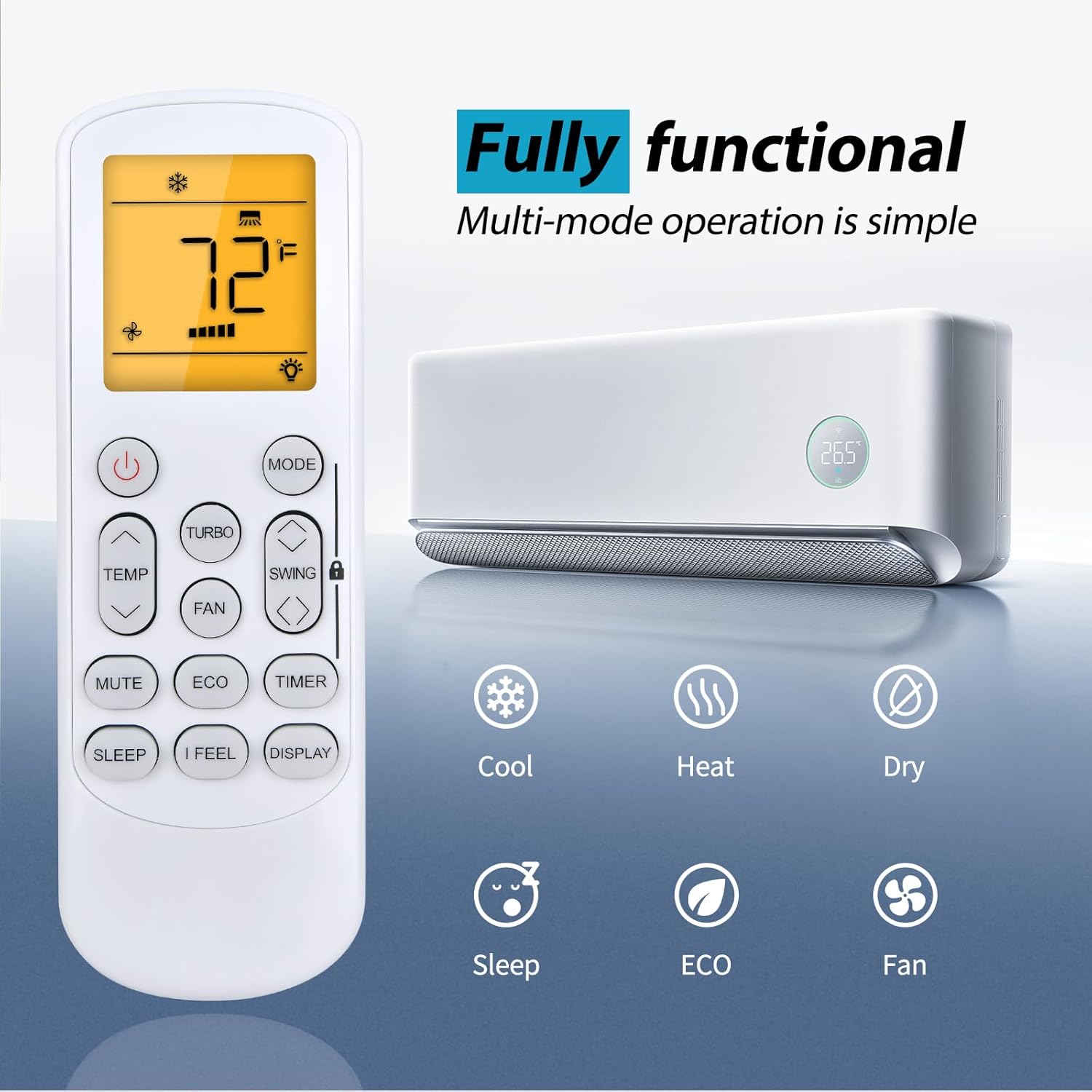
Image 3.2: The remote control displaying various functional modes such as Cool, Heat, Dry, Sleep, ECO, and Fan.
3.2 Дыяпазон пульта дыстанцыйнага кіравання
The ZWP GYKQ-78 remote control is designed for sensitive and precise control from a distance. It operates effectively up to 40 feet (approximately 12 meters) with a 180-degree multi-angle range, allowing flexible control within your room.

Image 3.3: Illustration demonstrating the remote control's effective operating range of up to 40 feet and 180-degree angle.
4. Тэхнічнае абслугоўванне
To ensure the longevity and optimal performance of your ZWP GYKQ-78 remote control, follow these maintenance guidelines:
- Уборка: Wipe the remote control with a soft, dry cloth. Do not use liquid cleaners, abrasive materials, or chemical solvents, as these can damage the surface or internal components.
- Замена батарэі: Replace batteries promptly when the remote's performance degrades or the display becomes dim. Always replace both batteries at the same time with new ones of the same type (AAA).
- захоўванне: If the remote control will not be used for an extended period (e.g., more than one month), remove the batteries to prevent potential leakage and damage to the remote. Store the remote in a cool, dry place away from direct sunlight and extreme temperatures.
- Пазбягайце падзенняў і ўдараў: Protect the remote from physical shocks, as internal components can be sensitive to damage from drops.
5. Выпраўленне непаладак
If you encounter issues with your ZWP GYKQ-78 remote control, refer to the following common troubleshooting steps:
- Пульт не адказвае:
- Праверце, ці правільна ўстаўлены батарэйкі з захаваннем палярнасці (+/-).
- Замяніце старыя батарэйкі новымі батарэйкамі тыпу ААА.
- Пераканайцеся, што паміж пультам дыстанцыйнага кіравання і прымачом кандыцыянера няма перашкод.
- Confirm you are within the effective operating range (up to 40 feet).
- Дысплей цьмяны або пусты:
- Звычайна гэта сведчыць аб нізкім узроўні зараду батарэі. Заменіце батарэі.
- Air Conditioner Not Responding to Specific Functions:
- Ensure the remote is pointed directly at the air conditioner.
- Some functions may be specific to certain air conditioner models or operating modes. Refer to your air conditioner's manual for specific feature compatibility.
5.1 Advanced Reset Functions (Refer to original AC manual for full details)
The back of the remote control may contain small text indicating advanced reset or pairing functions. These are typically for specific air conditioner models or diagnostic purposes. For the GYKQ-78, the following combinations are noted:
- Прэсінг "FAN" and "MUTE" together for over 3 seconds.
- Прэсінг "SWING" and "SWING" together for over 3 seconds.
- Прэсінг "SLEEP" and "DISPLAY" together for over 3 seconds.
Note: These combinations are for reference. Consult your specific Pioneer Diamante Air Conditioner user manual for detailed instructions on their use and potential effects.

Малюнак 5.1: ззаду view of the remote control, showing product dimensions and small text detailing advanced button combinations for specific functions or resets.
6. Тэхнічныя характарыстыкі
| Асаблівасць | Дэталь |
|---|---|
| Нумар мадэлі | GYKQ-78 |
| Марка | ЗВП |
| Сумяшчальныя прылады | Pioneer Diamante Air Conditioners (various models) |
| Крыніца харчавання | 2 х ААА батарэі (не ўключаны) |
| Колер | Чорны |
| Асаблівасць | Эрганамічны дызайн |
| Максімальная колькасць падтрымоўваных прылад | 1 |
| Вага прадмета | 2.24 унцыі (прыблізна 63.5 грамаў) |
| Памеры ўпакоўкі | 6.8 х 2.2 х 1.1 цалі (прыблізна 17.3 х 5.6 х 2.8 см) |
7. Гарантыя і падтрымка
For any questions or concerns regarding your ZWP GYKQ-78 replacement remote control, please contact the seller directly. While specific warranty details are not provided in this manual, the manufacturer aims to ensure customer satisfaction.
If you experience any issues, please reach out to the seller before leaving feedback. They are committed to assisting you with resolution.