
1. Уводзіны
This manual provides detailed instructions for the installation, operation, and maintenance of your Diyeeni B75 LGA1155 Motherboard. This Micro ATX motherboard is designed to support 2nd and 3rd generation Intel Core i3, i5, i7, E3/V2 series, Celeron G series, and Pentium G series processors. It features DDR3 memory support, PCIe 3.0, NVME M.2, SATA3.0 6Gbs, VGA, HDMI, and 10 Mbps LAN connectivity.
2. Прадукт скончыўсяview
The Diyeeni B75 motherboard offers a robust platform for building a reliable computer system. Below are some key features and a visual overview прадукту.
Відэа 1: Прадукт скончаныview - This video provides a general overview of the Diyeeni B75 LGA1155 Motherboard, highlighting its design and key components.
Відэа 2: Дэманстрацыя прадукту - This video demonstrates various aspects of the motherboard, offering a closer look at its features and functionality.

Figure 1: B75 Motherboard with M.2 Interface. The B75 desktop motherboard features a high-speed M.2 interface, complete with jumper support for double mode NVME and NGFF connections, allowing users to switch between PCIe and ATA3.0 (6GB/s) channels for optimal storage performance.

Figure 2: Double Channel 2x8GB DDR3 Memory Slots. This motherboard supports two 240-pin DDR3 SDRAM slots, allowing for a maximum capacity of 16GB in a double channel architecture, with effective frequencies of 1066, 1333, and 1600 MHz, enhancing performance for gaming and multitasking needs.

Figure 3: Support for Various Processors. The LGA 1155 motherboard utilizes the B75 chipset, supporting 2nd and 3rd generation Intel Core i3, i5, i7, E3/V2 series, Celeron G series, and Pentium G series processors, including popular models like E3 1280 V2 and Core i7 3770K.
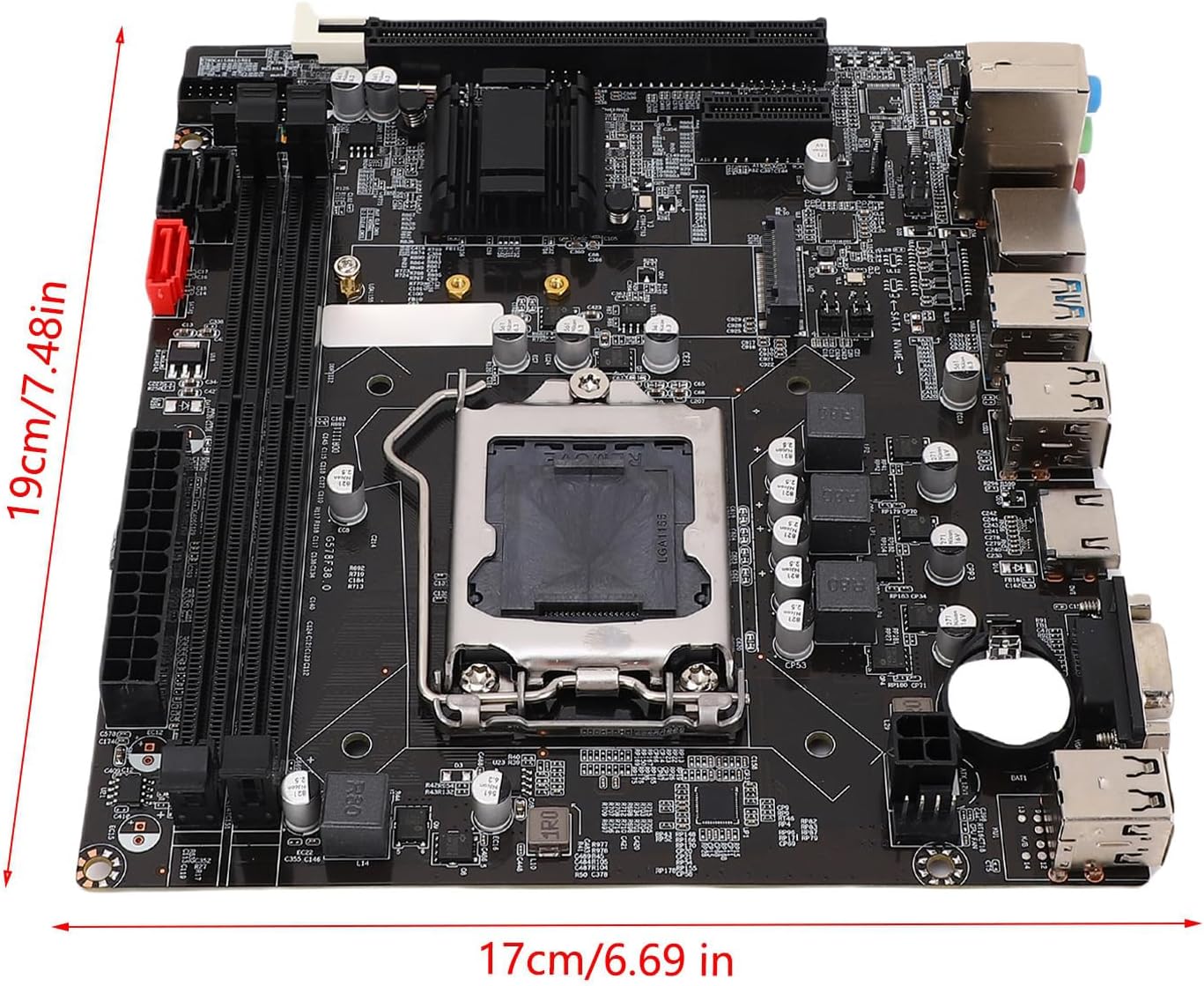
Figure 4: Motherboard Dimensions. The motherboard features an M-ATX architecture with approximate dimensions of 17 x 19 cm (6.69 x 7.48 inches).

Figure 5: LGA1155 Socket Close-up. Падрабязны view of the LGA1155 CPU socket, designed for compatible Intel processors.

Малюнак 6: Задняя панэль уводу/вываду. This image shows the various input/output ports available on the rear of the motherboard, including USB, video outputs, and audio jacks.
3. Настройка
3.1 Усталёўка працэсара
Follow these steps carefully to install your CPU into the LGA1155 socket:
- Press down on the lever next to the CPU socket and lift it.
- Open the CPU cover.
- Align the triangle symbols on the CPU and the socket, then gently place the CPU into the socket.
- Remove the CPU plastic cover.
- Align the groove with the screw hole and lower the lever to secure the CPU.
Меркаванні па ўсталёўцы:
- Do not touch CPU contacts with your hands.
- Do not touch CPU pins on the motherboard.

Figure 7: CPU Installation Steps. A visual guide for correctly installing the CPU into the motherboard socket.
3.2 Устаноўка памяці
The motherboard features two 240-pin DDR3 SDRAM slots. It supports dual-channel DDR3 memory at speeds of 1066/1333/1600 MHz, with a maximum capacity of 16GB. Ensure memory modules are installed in matching slots for dual-channel operation.
3.3 Усталёўка сховішча
- Дыскі SATA: Connect SATA 2.0 (3Gb/s) or SATA 3.0 (6Gb/s) drives to the available ports. The motherboard includes two ATA2.0 ports and one ATA3.0 port.
- Цвёрдацельны назапашвальнік NVME M.2: The high-speed M.2 interface supports both NVME and NGFF connections. Use the provided jumper to switch between PCIe and ATA3.0 (6GB/s) channels as needed for your M.2 SSD.
3.4 Падключэнне сілкавання
Connect the main 24-pin ATX power connector and the 4-pin ATX 12V power connector from your power supply to the corresponding ports on the motherboard. Ensure connections are firm to maintain circuit reliability.
3.5 Карты пашырэння
The motherboard provides one PCI Express x16 slot for a graphics card and one PCI Express x1 slot for other expansion cards.
4. Аперацыйная
4.1 Пачатковая загрузка і канфігурацыя BIOS
Upon initial power-on, the system will perform a Power-On Self-Test (POST). You may need to enter the BIOS/UEFI setup to configure boot order, system time, and other settings. Refer to your CPU and memory documentation for optimal settings.
4.2 Integrated Graphics Output
The motherboard supports 1080P HD video output via VGA and High Definition Multimedia Interface (HDMI) ports. To utilize these interfaces, your CPU must support integrated graphics.

Figure 8: VGA and HD Multimedia Outputs. This motherboard enables 1080P HD video output without requiring a dedicated graphics card. Your CPU must support integrated graphics to utilize these two interfaces effectively for high-definition display.
4.3 Падключэнне да сеткі
The motherboard features an onboard Realtek 10/100 Mbps LAN port for wired network connections.
5. Тэхнічнае абслугоўванне
5.1 Генеральная ўборка
Regularly clean your computer's interior to prevent dust buildup, which can lead to overheating and performance issues. Use compressed air to remove dust from fans, heatsinks, and other components. Ensure the system is powered off and unplugged before cleaning.
5.2 Абнаўленне BIOS
Перыядычна правярайце інфармацыю вытворцы website for BIOS updates. BIOS updates can improve system stability, add support for new hardware, or fix bugs. Follow the instructions provided by the manufacturer carefully when performing a BIOS update.
6. Выпраўленне непаладак
6.1 Няма вываду на дысплей
- Ensure all power cables (24-pin ATX, 4-pin ATX 12V) are securely connected.
- Verify that the monitor cable is connected to the correct video output port (VGA or HDMI) on the motherboard or dedicated graphics card.
- If using integrated graphics, confirm your CPU supports it.
- Reseat the memory modules and any installed expansion cards.
6.2 System Fails to Boot
- Check all power connections to the motherboard, CPU, and storage devices.
- Пераканайцеся, што працэсар правільна ўсталяваны ў разетку.
- Verify that memory modules are properly installed.
- Disconnect all non-essential peripherals and try booting again.
6.3 Unstable System / Random Crashes
- Праверце тэмпературу працэсара і відэакарты, каб пераканацца, што яна знаходзіцца ў бяспечных працоўных межах.
- Пераканайцеся, што ўсе драйверы абноўленыя.
- Запусціце інструменты дыягностыкі памяці, каб праверыць наяўнасць няспраўных аператыўных прылад.
- Verify that the power supply is sufficient for all components.
7. Тэхнічныя характарыстыкі
| Асаблівасць | Спецыфікацыя |
|---|---|
| Тып прадмета | Матчына плата кампутара |
| мадэль | B75 |
| Матэрыял | друкаваная плата |
| акумулятар | CR2032 (Built-in), Capacity: 240mAh |
| Разетка | LGA1155 Socket |
| Падтрымка працэсара | 2nd or 3rd gen Intel Core i3/i5/i7, E3/V2 series, Celeron G series, and Pentium G series processors |
| Памяць | 2 x 240 pin DDR3 SDRAM slots, Max 16GB, Dual channel DDR3 1066/1333/1600 MHz |
| Захоўванне | 2 x ATA2.0 (3Gb/s) ports + 1 x ATA3.0 (6Gb/s) port, NVME M.2 interface (jumper support for double mode NVME and NGFF) |
| Інтэграваная лакальная сетка | Onboard Realtek 10/100 Mbps LAN |
| Слоты пашырэння | 1 слот PCI Express x16, 1 слот PCI Express x1 |
| Інтэграваны гук | Onboard Realtek ALC 6 channel HD sound codec, Front sound interface, Front stereo microphone interface |
| Інтэрфейсы ўводу-вываду | 4 x USB 2.0, 2 x USB 3.0, 1 x VGA port, 1 x High Definition Multimedia Interface port, 1 x RJ45 port, 1 x 3-in-1 sound port (sound input/sound output/Microphone input) |
| Інтэрфейсы харчавання | 1 x 24 pin ATX power port, 1 x 4 pin ATX 12V power port |
| Памер прадукту | M-ATX architecture (Approx. 17 x 19cm / 6.69 x 7.48in) |
8. Гарантыя і падтрымка
This product comes with a standard manufacturer's warranty. For specific warranty terms and conditions, please refer to the documentation included with your purchase or contact Diyeeni customer support. For technical assistance, please visit the official Diyeeni webсайт або звярніцеся да іх каналаў падтрымкі.