
1. паview
The Roku Select Series HD TV provides a streamlined entertainment experience. This 32-inch 720p HD television integrates the Roku operating system for easy access to streaming content, live TV, and various applications. It features a voice remote for convenient control and includes technologies like Bluetooth Headphone Mode and Dolby Audio for enhanced sound.
Асноўныя характарыстыкі
- Бесперабойная трансляцыя: Fast Wi-Fi and quick app launches for immediate entertainment access.
- Пашыраны змест: Access to thousands of streaming apps, free movies, shows, and live TV channels.
- Наладжвальны галоўны экран: Organize apps and content for personalized viewінж.
- Аўтаматычныя абнаўленні праграмнага забеспячэння: Ensures access to the latest features and applications.
- Інтэграцыя разумнага дома: Compatible with Roku Voice, Siri, Alexa, and Google Assistant for voice control. Supports Apple AirPlay for content sharing.
- Clear HD Picture: 720p HD resolution with Roku Smart Picture technology for optimized visuals.
- Галасавы пульт: Search, play, and control streaming with voice commands.
- Палепшанае аўдыя: Designed for clear speech and louder sound with Dolby Audio technology.
- Рэжым Bluetooth-навушнікаў: Private listening with wireless headphones.

Image: Roku 32-inch Select Series HD Smart TV with included remote control.
2. Што ў скрынцы
Перад тым, як працягнуць наладу, пераканайцеся, што ўсе кампаненты наяўныя.
- Roku Select Series 32" HD TV
- Стойкі і шрубы
- Roku Voice Remote with batteries (2 AAA)
- Сілавы кабель
- Кіраўніцтва карыстальніка (гэты дакумент)

Image: Contents of the Roku Select Series TV packaging.
3. Настройка
3.1 Распакаванне
Carefully remove the TV and all accessories from the packaging. Retain the packaging for future transport or service needs.
3.2 Прымацаванне падстаўкі
- Пакладзеце тэлевізар экранам уніз на мяккую, чыстую паверхню, каб пазбегнуць драпін.
- Сумесціце падстаўкі для тэлевізара з адтулінамі для шруб у ніжняй частцы тэлевізара.
- Замацуйце падстаўкі з дапамогай прадугледжаных шруб. Пераканайцеся, што яны надзейна зацягнуты.
3.3 Падключэнне перыферыйных прылад
Падключыце прылады да адпаведных партоў на задняй панэлі тэлевізара.
- HDMI: Connect up to three HDMI devices (e.g., cable box, gaming console, Blu-ray player) to the HDMI ports.
- USB: Use the USB port for media playback or connecting compatible accessories.
- Аптычны (S/PDIF): Для падлучэння да знешняй аўдыёсістэмы.
- Сілавы кабель: Падключыце кабель харчавання да тэлевізара, а затым да разеткі.
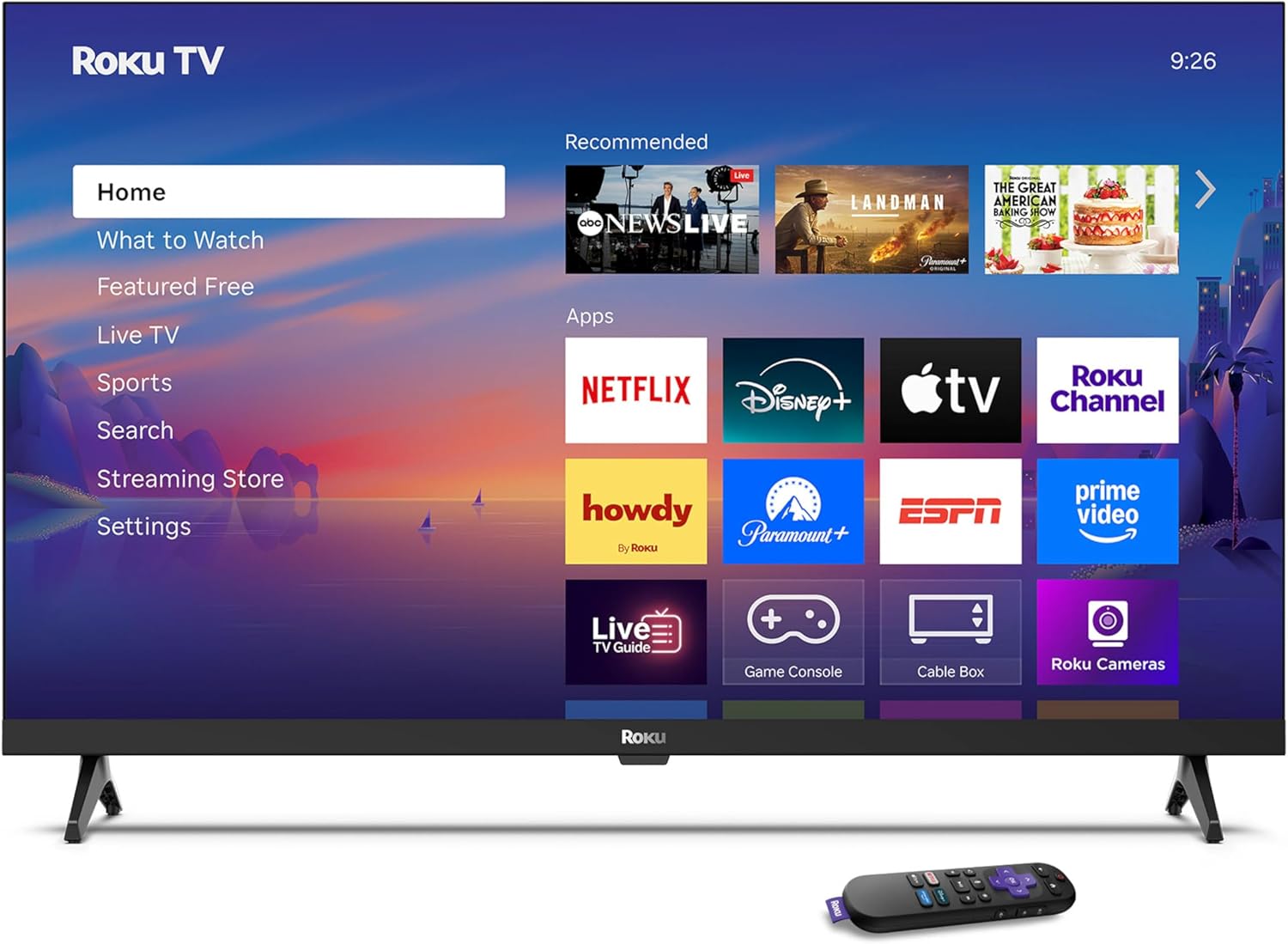
Image: Rear panel connections including HDMI, USB, and optical ports.
3.4 Пачатковае ўключэнне і падключэнне да сеткі
- Plug in the TV and press the power button on the remote or TV.
- Выконвайце інструкцыі на экране, каб выбраць мову і падключыцца да сеткі Wi-Fi.
- Activate your Roku account or create a new one.
Відэа: Оверview of the Roku TV operating system, demonstrating its user interface and features. This video is provided by Roku, Inc.
4. Інструкцыя па эксплуатацыі
4.1 Выкарыстанне галасавога пульта дыстанцыйнага кіравання
The Roku Voice Remote allows for intuitive control of your TV and streaming content.
- Галасавы пошук: Press and hold the voice button and speak your command to search for content, launch apps, or control playback.
- Навігацыя: Use the directional pad to move through menus and select items.
- Ярлыкі праграм: Dedicated buttons provide quick access to popular streaming services.

Image: Features of the Roku Voice Remote, highlighting voice control and shortcut buttons.
4.2 Navigating the Home Screen
The Roku Home Screen provides access to all your installed apps, inputs, and settings.
- Дом: Returns you to the main home screen.
- Што паглядзець: Discover recommended content.
- ТБ у прамым эфіры: Access free live television channels.
- Крама струменевай музыкі: Праглядзіце і дадайце новыя струменевыя каналы.
- Налады: Adjust TV and system preferences.

Image: The Roku TV home screen interface.
4.3 Adjusting Picture and Sound Settings
Наладзьце свой viewгук і ўражанні ад праслухоўвання праз меню налад.
- Рэжым малюнка: Select from predefined modes like Standard, Vivid, Sports, or Movie. Roku Smart Picture automatically optimizes settings.
- Рэжым гуку: Выберыце Sound Profiles or enable features like Night Mode for reduced volume fluctuations.
- Рэжым Bluetooth-навушнікаў: Pair your wireless headphones for private audio.

Image: Picture mode settings on the Roku TV.

Image: Bluetooth Headphone Mode in use.

Image: Dolby Audio technology for clear sound.
5. Тэхнічнае абслугоўванне
5.1 Ачыстка экрана
To clean the TV screen, gently wipe it with a soft, dry, lint-free cloth. For stubborn marks, lightly dampПрацярыце тканіну вадой або бяспечным для экрана ачышчальным растворам. Пазбягайце выкарыстання агрэсіўных хімічных рэчываў або абразіўных матэрыялаў.
5.2 Абнаўленне праграмнага забеспячэння
Your Roku TV automatically receives software updates when connected to the internet. These updates provide new features, performance improvements, and bug fixes. Ensure your TV remains connected to the internet for optimal performance.
6. Выпраўленне непаладак
If you encounter issues with your Roku TV, refer to the following common solutions:
- Няма харчавання: Пераканайцеся, што кабель сілкавання надзейна падключаны як да тэлевізара, так і да спраўнай электрычнай разеткі. Паспрабуйце іншую разетку.
- Няма выявы/гуку: Verify that the correct input source is selected. Check all cable connections (HDMI, audio). Restart the TV by unplugging it for 30 seconds and plugging it back in.
- Пульт не працуе: Replace the AAA batteries in the remote. Ensure there are no obstructions between the remote and the TV. For voice remote issues, re-pair the remote if necessary (refer to Roku support for specific steps).
- Праблемы з падключэннем да сеткі: Restart your Wi-Fi router and modem. Go to the TV's settings menu, then Network, and try reconnecting to your Wi-Fi network.
- Праграма не загружаецца/выходзіць з ладу: Try restarting the app. If the issue persists, remove the app from the home screen, restart the TV, and then re-add the app from the Streaming Store.
7. Тэхнічныя характарыстыкі
| Асаблівасць | Дэталь |
|---|---|
| Памер экрана | 32 цалі |
| Тэхналогія адлюстравання | святлодыёд |
| дазвол | 720p |
| Частата абнаўлення | 60 Гц |
| Асаблівасці | Bluetooth Headphone Mode, Dolby Audio, Voice Remote |
| Тэхналогія падлучэння | Bluetooth, WiFi |
| Усяго партоў HDMI | 3 |
| Усяго партоў USB | 1 |
| Аўдыё ўваход | HDMI |
| Аперацыйная сістэма | Roku OS |
| Тып мацавання | Настольнае мацаванне, насценнае мацаванне |
| Стандарт мацавання VESA | 200 х 200 мм |
| Памеры прадукту (Д х Ш х У) | 7" Г x 28.3" Ш x 18.3" У |
| Вага прадмета | 7.5 фунта |
| Нумар мадэлі | 32R2D5 |
| UPC | 829610008974 |
8. Інфармацыя аб гарантыі
8.1 Абмежаваная гарантыя
Roku warrants the hardware against defects in materials and workmanship under normal use for a period of one (1) year from the date of purchase ("Warranty Period"). If Roku determines that the device’s hardware is defective during the Warranty Period, Roku’s sole obligation, and your exclusive remedy, will be to either repair or replace the unit with either a new or rebuilt device, at its option. This warranty applies if the product is used in accordance with the provided documentation.
8.2 Палітыка вяртання
You may return a device for any reason:
- Within thirty (30) days from the date of purchase from Roku.
- Within the applicable return period if purchased from an authorized reseller or distributor.
Additional details regarding product returns can be found on the Roku support site.
9. Падтрымка
For further assistance, troubleshooting guides, and frequently asked questions, please visit the official Roku support webсайт: