
1. Прадукт скончыўсяview
The Spedal AL851 is a versatile 3-in-1 portable display audio system designed for vehicles. It integrates wireless Apple CarPlay and Android Auto, along with direct video streaming capabilities for popular services like YouTube and Netflix. The device features a 10.26-inch 2.5D curved touchscreen, dual Wi-Fi, dual Bluetooth, and supports various audio output methods. It also includes a 1080P backup camera for enhanced safety.

Image: The Spedal AL851 portable display audio system, showcasing its main interface with icons for navigation, music, and video streaming applications.
2. Змесціва ўпакоўкі
Калі ласка, пераканайцеся, што ўсе прадметы прысутнічаюць у камплекце:
- Spedal AL851 Main Unit
- 1.2m AUX Audio Cable
- 6m Backup Camera Cable
- 3.5m Cigarette Lighter Socket Charger
- Клейкая мацаванне
- Задняя камера
- Кіраўніцтва карыстальніка (гэты дакумент)

Image: A visual representation of the Spedal AL851's dimensions and a clear display of all components included in the product package, such as the main unit, cables, charger, and mount.
3. Настройка і ўстаноўка
3.1 Мантаж прылады
Use the provided adhesive mount to securely attach the Spedal AL851 to your vehicle's dashboard. Ensure the mounting surface is clean and dry for optimal adhesion. Position the device so it does not obstruct your view падчас руху.
3.2 Падключэнне харчавання
Connect the device to your vehicle's cigarette lighter socket using the 3.5m charger. The system supports DC12-24V, making it compatible with various vehicle types including sedans, SUVs, and trucks.
3.3 Усталёўка камеры задняга віду
The 1080P backup camera is IP67 waterproof and can be installed outside the vehicle. Connect the camera to the main unit using the 6m cable. For automatic parking assist display, connect the camera's red trigger wire to your vehicle's reverse light circuit. When the vehicle is put into reverse, the display will automatically switch to the camera view.

Image: A diagram showing how to connect the backup camera to the Spedal AL851 system, including the trigger wire connection to the reverse light for automatic activation.
4. Інструкцыя па эксплуатацыі
4.1 Пачатковае ўключэнне і інтэрфейс
Once powered on, the device will display its main interface. The system runs on a closed Android OS with pre-installed applications. New applications cannot be installed beyond the pre-existing selection, which includes Disney+, YouTube, Prime Video, Spotify, TikTok Lite, U-NEXT, and TVer.

Image: The Spedal AL851's home screen, displaying a grid of pre-installed entertainment and navigation applications.
4.2 Бесправадное падключэнне CarPlay і Android Auto
The device supports wireless Apple CarPlay (iOS 10 or later) and Android Auto (Android 11 or later). It is not compatible with Xiaomi and AQUOS smartphones.
- Пераканайцеся, што Bluetooth і Wi-Fi уключаны на вашым смартфоне.
- On the AL851, navigate to the CarPlay or Android Auto section.
- Pair your smartphone with the AL851 via Bluetooth. Follow the on-screen prompts on both devices to confirm the connection.
- Once paired, the system will automatically establish a Wi-Fi connection for CarPlay or Android Auto functionality.

Image: A visual guide detailing the steps to connect an iPhone to the Spedal AL851 for CarPlay functionality, showing phone and device screens.
Image: A visual guide detailing the steps to connect an Android phone to the Spedal AL851 for Android Auto functionality, showing phone and device screens.
4.3 Dual Wi-Fi and Split Screen Functionality
The AL851 features a dual Wi-Fi module, allowing you to use CarPlay/Android Auto and stream video content (e.g., YouTube, Netflix) simultaneously without disconnecting CarPlay. The split-screen function divides the display into two areas.
- To activate split-screen, tap the dedicated split-screen button on the interface.
- To return to full-screen mode, slide the central split button.
- The side menu can be adjusted to appear on the left or right via the settings.
- Note: CarPlay will automatically reconnect within a few seconds when switching between split-screen and full-screen modes.
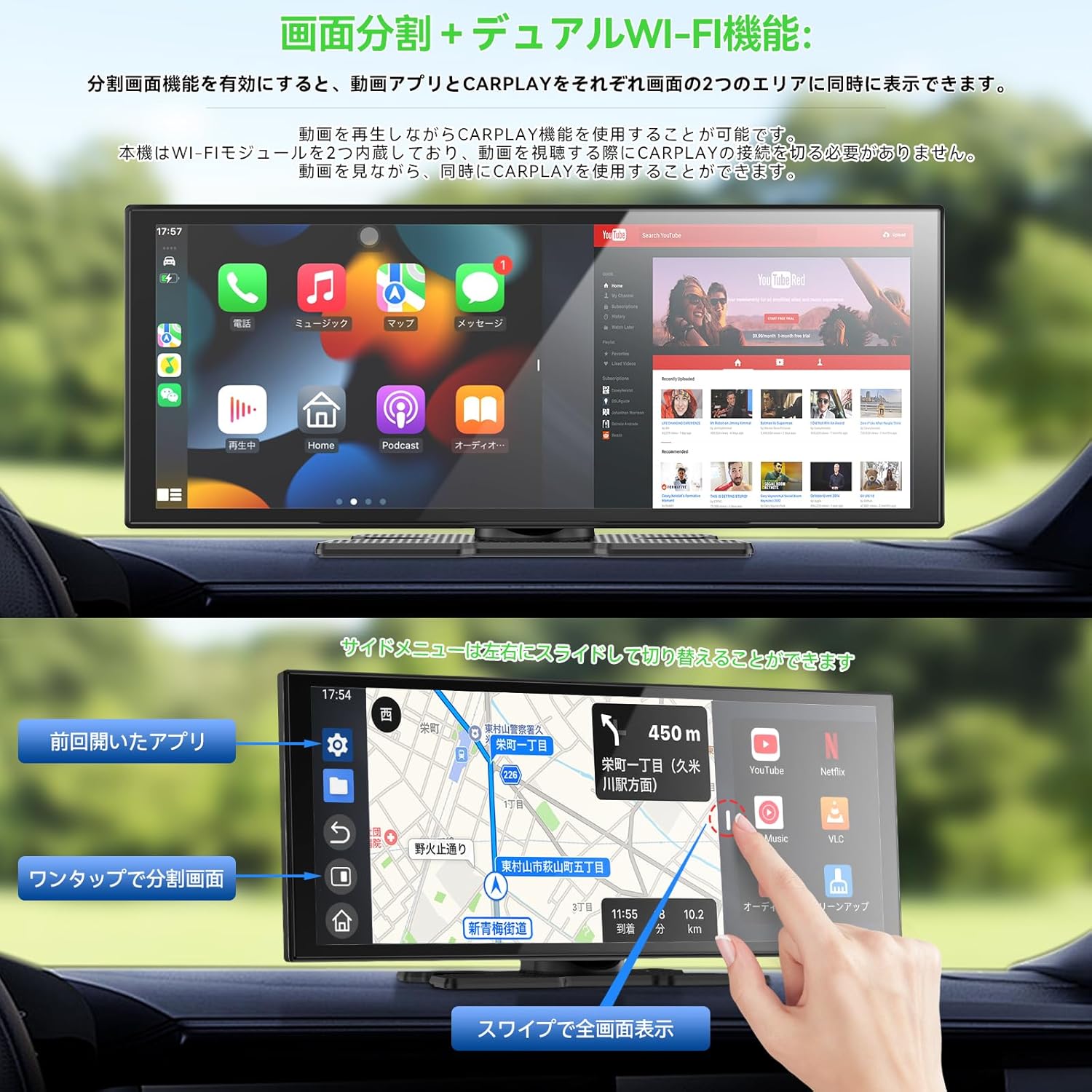
Image: The Spedal AL851 screen in split-screen mode, demonstrating simultaneous display of a video streaming application and a CarPlay navigation map.
4.4 Audio Output Methods
The AL851 offers four ways to output audio:
- Убудаваны дынамік: Audio is played directly through the device's integrated speaker.
- Злучэнне Bluetooth: When using CarPlay or Android Auto, connect your smartphone to your vehicle's Bluetooth system. Audio will then play through your vehicle's speakers. The AL851's dual Bluetooth channels allow simultaneous connection of your smartphone (input) and your car's audio system (output).
- FM-перадатчык: Activate the FM function on the AL851 and set a frequency. Tune your car radio to the same FM frequency, and audio will be transmitted to your vehicle's speakers.
- AUX выхад: Connect the provided AUX audio cable from the AL851 to your vehicle's AUX port. Audio will then play through your vehicle's speakers.
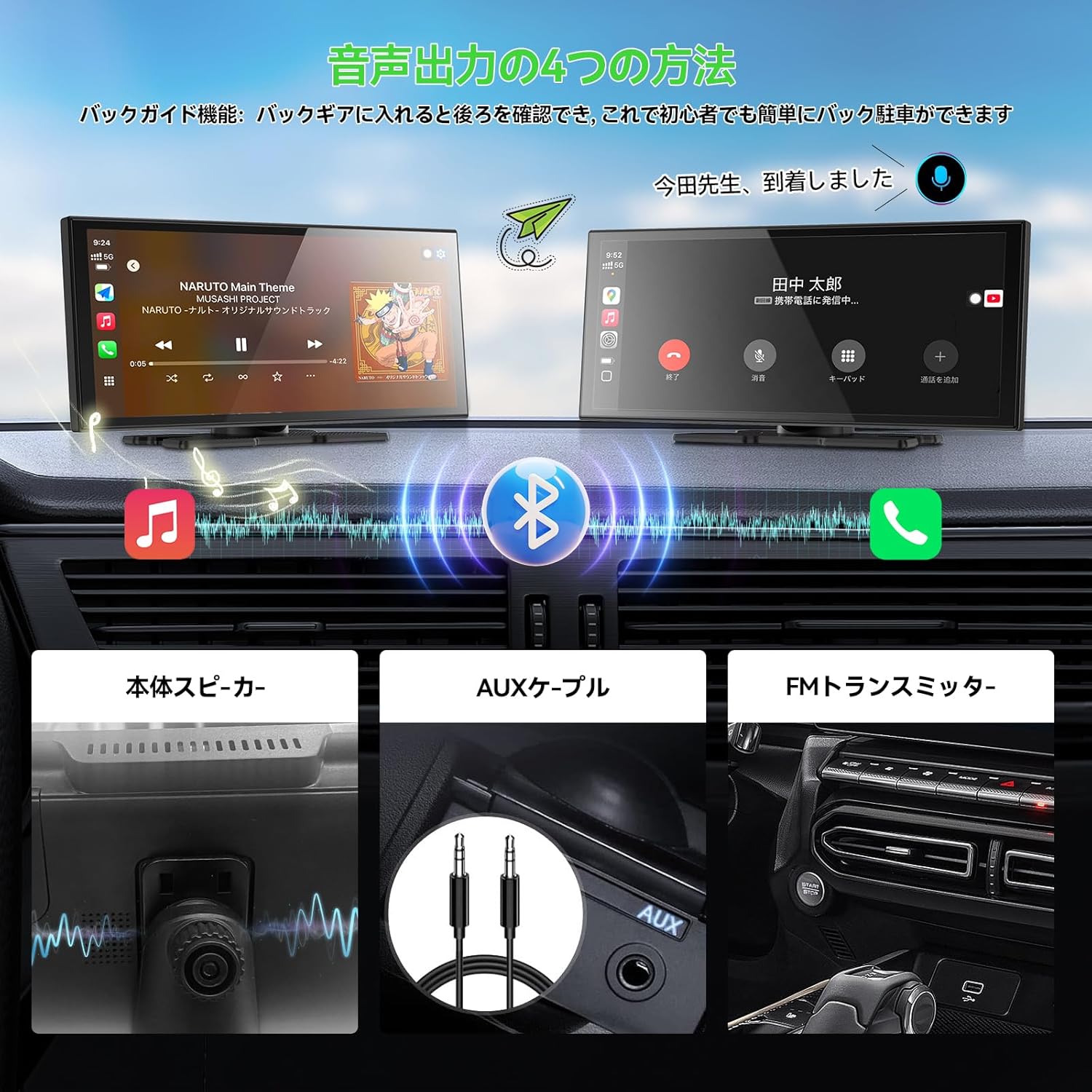
Image: A visual explanation of the four audio output options available on the Spedal AL851, showing connections for built-in speaker, Bluetooth, FM transmitter, and AUX cable.
4.5 Функцыя медыяплэера
The device can play music and video files stored on a Micro SD card (not included). Supported formats include:
- Video Formats (VLC Player): MP4, AVI, MKV, FLV, 3GP, MOV, WMV
- Разрозненні відэа: 720P, 1080P, 2K
- Аўдыё фарматы: MP3, WAV, DVAudio, Wavpack

Image: The Spedal AL851's media player interface, demonstrating its capability to play various media types from a Micro SD card.
5. Тэхнічнае абслугоўванне
5.1 Абнаўленні праграмнага забеспячэння (OTA)
The AL851 supports Over-The-Air (OTA) updates. You can check for and perform updates directly from the device's settings screen. Connect the device to a shared hotspot or a Wi-Fi network to initiate a one-click update. This method is faster and more convenient than traditional TF card updates.

Image: A graphic illustrating the OTA (Over-The-Air) update process for the Spedal AL851, emphasizing its ease and speed.
6. Выпраўленне непаладак
6.1 Агульныя праблемы і рашэнні
- Няма харчавання: Ensure the cigarette lighter charger is securely connected and the vehicle's power outlet is functioning.
- CarPlay/Android Auto не падключаецца: Verify your smartphone's Bluetooth and Wi-Fi are on. Check compatibility (iOS 10+ for iPhone, Android 11+ for Android; not compatible with Xiaomi/AQUOS). Try restarting both the device and your phone.
- Няма аўдыявыхаду: Check the selected audio output method (built-in speaker, Bluetooth, FM transmitter, AUX). Ensure volume levels are adequate on both the AL851 and your car's audio system. For FM transmitter, confirm the frequencies match. For AUX, ensure the cable is properly connected.
- Не адлюстроўваецца камера задняга віду: Confirm the camera is properly connected to the main unit and the trigger wire is correctly wired to the reverse light.
- Split Screen Reconnection Delay: It is normal for CarPlay to automatically reconnect within a few seconds when switching between split-screen and full-screen modes.
7. Тэхнічныя характарыстыкі
| Марка | Спедаль |
| Нумар мадэлі | AL851 |
| Памер дысплея | 10.26 цаляў |
| Дазвол дысплея | 1280 х 720 пікселяў |
| Тып сэнсарнага экрана | Capacitive 2.5D Curved |
| АЗП | 2 ГБ |
| ПЗУ | 32 ГБ |
| Падтрымка Wi-Fi | 2.4GHz / 5GHz (Dual Wi-Fi) |
| Версія Bluetooth | 5.0 (Dual Bluetooth) |
| CarPlay/Android Auto | Wireless (iOS 10+, Android 11+) |
| Камера рэзервовага капіравання | 1080P Full HD, 120° FOV, IP67 Waterproof |
| Увод магутнасці | DC12-24V |
| Памеры прадукту (Д х Ш х У) | 28 х 5 х 10 см |
| Колер | Чорны |
| Краіна паходжання | Кітай |

Image: A detailed diagram illustrating the physical dimensions of the Spedal AL851 display unit.
8. Гарантыя і падтрымка
8.1 Інфармацыя аб гарантыі
Гэты прадукт пастаўляецца з a Гарантыя 1 год from the date of purchase. Please retain your proof of purchase for warranty claims. The warranty covers manufacturing defects and malfunctions under normal use.
8.2 Падтрымка кліентаў
For technical assistance, troubleshooting, or warranty inquiries, please contact Spedal customer support through the retailer where you purchased the product or visit the official Spedal webсайт для кантактнай інфармацыі.
9. Важныя заўвагі
- The Android system on this device is restricted; new applications cannot be installed beyond the pre-installed ones.
- Not compatible with Xiaomi and AQUOS smartphones for CarPlay/Android Auto.
- A Micro SD card is required for media playback and is not included with the product.
- The device does not include a dashcam (drive recorder) function.
10. Відэакіраўніцтва па прадукце
Watch this video for a visual guide on connecting your smartphone, using the split-screen feature, and playing media files on the Spedal AL851.
Video: A demonstration of the Spedal AL851's key features, including wireless CarPlay/Android Auto connection, split-screen functionality, and media playback from a USB drive.