
1. Уводзіны
Thank you for choosing the Camtro M6 Outdoor Security Camera. This battery-powered wireless camera is designed to provide reliable outdoor surveillance with features such as 1080p video resolution, color night vision, two-way audio, and smart AI motion detection. This manual provides essential information for setting up, operating, and maintaining your camera to ensure optimal performance.
2. Змесціва ўпакоўкі
Калі ласка, пераканайцеся, што ўсе прадметы прысутнічаюць у вашай упакоўцы:
- Camtro M6 Outdoor Security Camera
- Кіраўніцтва па эксплуатацыі
- Крапежныя шрубы
3. Прадукт скончыўсяview
Familiarize yourself with the components of your Camtro M6 camera.

Малюнак 3.1: Фронт view of the Camtro M6 Outdoor Security Camera, showing the lens, light, and motion sensor.
The Camtro M6 features a durable, weather-resistant design suitable for outdoor use. Key components include:
- Аб'ектыў камеры: Запісвае відэа высокай выразнасці 1080p.
- Infrared LED / Spotlight: Provides illumination for night vision and color night vision.
- Датчык руху: Detects movement for smart alerts.
- Мікрафон: Для двухбаковай гукавой сувязі.
- Дакладчык: Для двухбаковай гукавой сувязі і абвестак.
- Мантажная аснова: For secure installation on walls or other surfaces.

Малюнак 3.2: Скончанаview of Camtro M6 features including AI Human Detection, Color Night Vision, Two-way Talk, and Cloud Storage.
4. Настройка
Follow these steps to set up your Camtro M6 camera:
- Зарадзіць камеру: Before initial use, fully charge the camera battery using the provided charging cable. A full charge ensures optimal battery life.
- Спампаваць прыкладанне: Пошук the official Camtro security camera app on your smartphone's app store (iOS or Android) and install it.
- Стварыць уліковы запіс: Адкрыйце праграму і выконвайце інструкцыі на экране, каб стварыць новы ўліковы запіс карыстальніка.
- Дадаць прыладу: In the app, select the option to add a new device. Follow the prompts to connect your camera to your 2.4GHz Wi-Fi. Ensure your phone is connected to a 2.4GHz network during setup. 5GHz Wi-Fi is not supported.
- Устанавіце камеру: Choose a suitable outdoor location for mounting. Use the included mounting screws to securely attach the camera to a wall or other stable surface. Ensure the camera has a clear field of view and is within range of your Wi-Fi signal.
5. Інструкцыя па эксплуатацыі
Once set up, you can access and control your camera through the mobile app.
5.1 У прамым эфіры View
Адкрыйце праграму і абярыце камеру, каб view the live feed. This allows you to monitor your property in real-time from anywhere.
5.2 Двухбаковае аўдыё

Малюнак 5.1: Illustration of the two-way audio function, allowing communication through the camera.
Націсніце на значок мікрафона ў прамым эфіры view to enable two-way audio. You can speak through your phone, and your voice will be projected through the camera's speaker. Similarly, you can hear audio from the camera's location.
5.3 Smart AI Motion Detection

Малюнак 5.2: The camera's AI Human Detection feature distinguishing between human movement and other objects.
The camera features AI-powered motion detection that can distinguish between humans, animals, and other moving objects. This reduces false alarms. You will receive push notifications on your smartphone when motion is detected. Adjust sensitivity settings within the app.
5.4 Каляровы начны бачанне
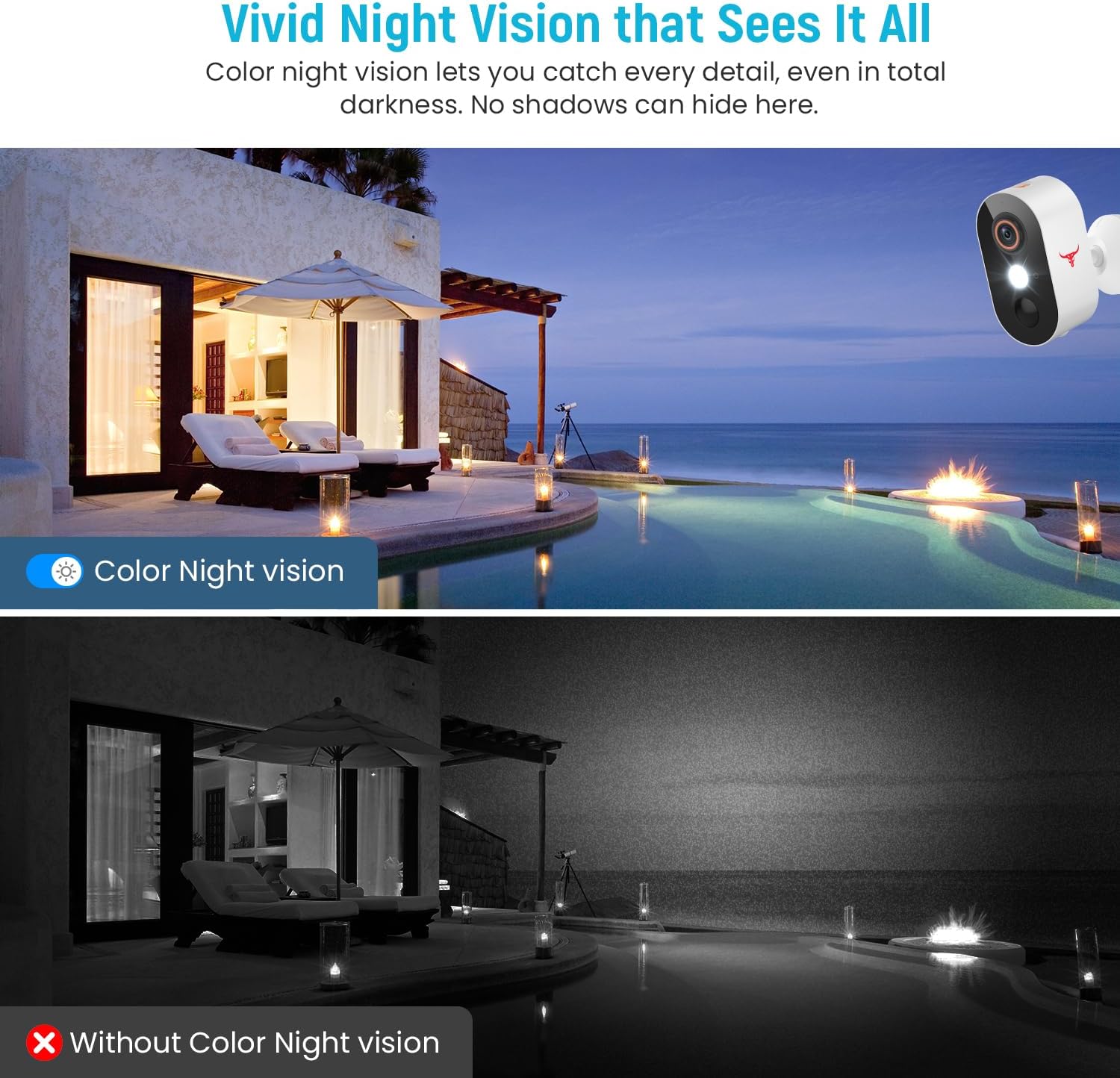
Малюнак 5.3: Comparison of color night vision and standard black and white night vision.
The Camtro M6 provides vivid color night vision, allowing you to see details in low-light conditions. The camera automatically switches to night vision mode when ambient light is insufficient.
5.5 Воблачнае сховішча

Малюнак 5.4: Visual representation of cloud storage for recorded video events.
The camera supports cloud storage for recording and reviewing video events. A subscription is required to access recorded footage. Please refer to the app for subscription options and details.
6. Тэхнічнае абслугоўванне
Рэгулярнае тэхнічнае абслугоўванне забяспечвае даўгавечнасць і аптымальную працу вашай камеры.
- Зарадка акумулятара: The camera is battery-powered. Monitor the battery level in the app and recharge the camera as needed. Battery life can vary based on usage and environmental factors.
- Уборка: Перыядычна чысціце аб'ектыў і корпус камеры мяккай губкайamp тканінай, каб выдаліць пыл і смецце. Не выкарыстоўвайце агрэсіўныя хімікаты.
- Абнаўленні прашыўкі: Keep the camera's firmware updated through the app to access new features and improvements.

Малюнак 6.1: The Camtro M6 camera demonstrating its weather resistance against shine, rain, snow, and dust.
The camera is designed to withstand various weather conditions, operating effectively in temperatures ranging from 14°F to 140°F.
7. Выпраўленне непаладак
If you encounter issues with your Camtro M6 camera, refer to the following common problems and solutions:
| праблема | Магчымая прычына | Рашэнне |
|---|---|---|
| Камера не падключаецца да Wi-Fi | Incorrect Wi-Fi password, 5GHz Wi-Fi network, weak signal | Ensure correct 2.4GHz Wi-Fi password. Confirm your router is broadcasting a 2.4GHz network. Move camera closer to the router. |
| Дрэнная якасць відэа | Weak Wi-Fi signal, dirty lens | Палепшыце сігнал Wi-Fi. Ачысціце аб'ектыў камеры. |
| Датчык руху не працуе або занадта шмат ілжывых спрацоўванняў | Incorrect sensitivity settings, camera placement | Adjust motion detection sensitivity in the app. Ensure camera is positioned to avoid unnecessary triggers (e.g., swaying branches). |
| Акумулятар хутка разраджаецца | Frequent motion events, continuous live view, low temperature | Reduce motion detection sensitivity. Limit continuous live viewing. Ensure camera is fully charged. |
| Незразумелы двухбаковы гук | Weak Wi-Fi signal, microphone/speaker obstruction | Check Wi-Fi connection. Ensure microphone and speaker are clear of obstructions. |
8. Тэхнічныя характарыстыкі
Detailed technical specifications for the Camtro M6 Outdoor Security Camera:
- мадэль: M6
- Выкарыстанне ў памяшканні/на вуліцы: На адкрытым паветры
- Сумяшчальныя прылады: Смартфон (iOS, Android)
- Крыніца харчавання: Харчаванне ад батарэі
- Пратакол падлучэння: Wi-Fi (толькі 2.4 ГГц)
- Тып мацавання: Насценнае мацаванне
- Дазвол відэазахопу: 1080p
- Памеры прадмета (Д х Ш х У): 2.8 х 1.7 х 3.4 цалі
- Вага прадмета: 6.6 унцыі (0.41 фунта)
- батарэі: 2 нестандартная батарэя (у камплекце)
- Фармат захопу відэа: MP4
- асаблівасць: Motion Sensor, Color Night Vision, 2-Way Audio
- Рэкамендуемае выкарыстанне для прадукту: Ахова на адкрытым паветры
9. Гарантыя і падтрымка
For warranty information and technical support, please refer to the contact details provided with your purchase or visit the official Camtro webсайт. Наша служба падтрымкі кліентаў гатова дапамагчы вам з любымі пытаннямі або праблемамі, з якімі вы можаце сутыкнуцца.


