
1. Уводзіны
This manual provides essential information for setting up, operating, maintaining, and troubleshooting your MINIX NR774 Mini PC. Please read this guide thoroughly before using the device to ensure proper functionality and longevity.

Выява 1.1: Спераду view of the MINIX NR774 Mini PC, showcasing its compact design and accessible front ports.
2. Змесціва ўпакоўкі
Праверце, ці ўсе пералічаныя ніжэй прадметы ўваходзяць у вашу ўпакоўку:
- 1 x MINIX NGC NR774 Mini PC
- 1 х мацаванне VESA з шрубамі
- 1 x Power Adapter with US/EU/UK Plug
- 1 х Кіраўніцтва карыстальніка (гэты дакумент)
3. Прадукт скончыўсяview
The MINIX NR774 Mini PC is a compact desktop computer designed for various applications, from home office tasks to gaming and multimedia. It features a robust AMD Ryzen 7 8745HS processor, 32GB DDR5 RAM, and a 1TB PCIe 4.0 SSD, running on Windows 11 Pro.
3.1. Схема размяшчэння партоў
Familiarize yourself with the available ports for connecting peripherals and network devices.

Image 3.1: Detailed diagram illustrating the front and rear port configurations of the MINIX NR774 Mini PC.
- Пярэднія порты: Power Button, USB-A 3.2 Gen2 (x2), USB-C 4.0/PD 3.0 (x2), 3.5mm Audio Input/Output Combo Jack, Reset Hole.
- Заднія парты: DC IN Port, USB-A 2.0 (x2), HDMI, DP (DisplayPort), 2.5G RJ-45 Ethernet Port (x2).
4. Кіраўніцтва па наладцы
Follow these steps for initial setup of your Mini PC.
4.1. Падключэнне перыферыйных прылад
- Падключэнне дысплея: Use an HDMI or DisplayPort cable to connect your monitor to the corresponding port on the rear of the Mini PC. For 8K resolution, ensure your monitor and cable support 8K@60Hz and connect via a single USB-C 4.0 port.
- Падключэнне клавіятуры і мышы: Plug your USB keyboard and mouse into any available USB-A ports.
- Падключыце харчаванне: Connect the power adapter to the DC IN port on the rear of the Mini PC, then plug the adapter into a power outlet.
4.2. Уключэнне
Press the power button located on the front of the Mini PC. The device will boot up, and the operating system will begin loading.
4.3. Пачатковая ўстаноўка Windows 11 Pro
Upon first boot, you will be guided through the Windows 11 Pro setup process. Follow the on-screen instructions to configure language, region, network, and user accounts.
4.4. Канфігурацыя некалькіх дысплеяў
The MINIX NR774 supports up to four displays simultaneously via HDMI, DisplayPort, and two USB-C 4.0 ports. To configure multiple displays:
- Connect additional monitors to the available video output ports.
- Once connected, right-click on the desktop and select 'Display settings' (Windows).
- From the display settings, you can arrange your monitors, set their resolution, and choose display modes (e.g., Extend, Duplicate).
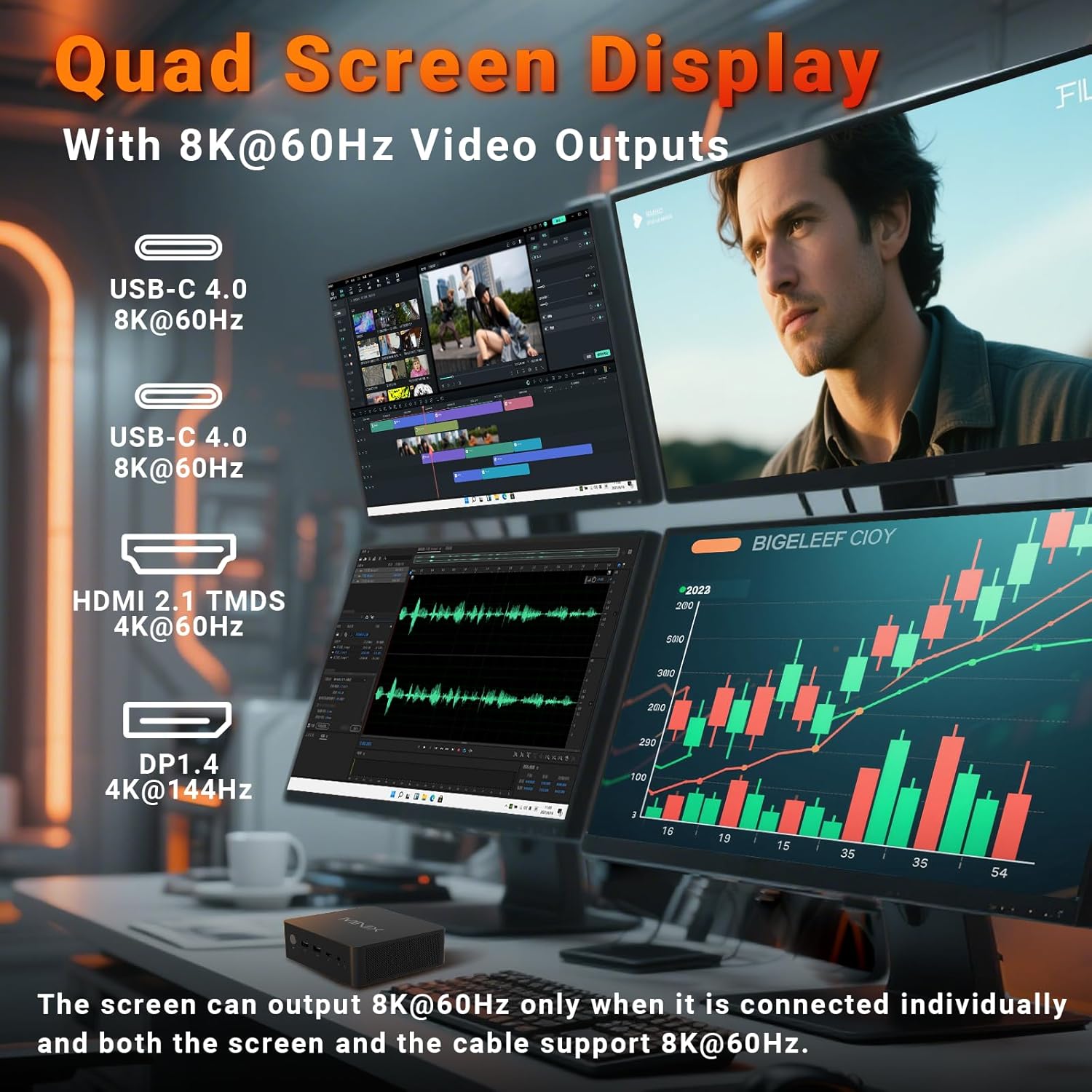
Image 4.1: The Mini PC supporting a quad-display setup, demonstrating its capability for enhanced productivity and immersive viewперажыванні.
5. Інструкцыя па эксплуатацыі
5.1. Асноўная аперацыя
The MINIX NR774 functions as a standard Windows 11 Pro desktop computer. Utilize the connected keyboard and mouse for navigation and interaction with the operating system and applications.
5.2. Падключэнне да сеткі
- Wi-Fi 6E: For wireless internet access, connect to your Wi-Fi network through Windows settings. The device supports 2.4GHz, 5GHz, and 6GHz bands for high-speed wireless communication.
- Dual 2.5G LAN: For wired network connections, plug Ethernet cables into the two 2.5G RJ-45 ports on the rear. This provides stable and high-speed multi-gigabit networking.
- Bluetooth 5.2: Pair Bluetooth devices such as headphones, speakers, or game controllers through Windows Bluetooth settings.

Малюнак 5.1: ззаду view of the Mini PC highlighting the dual 2.5G Ethernet ports, alongside other connectivity options.
5.3. USB4.0 Functionality
The two USB-C 4.0 ports on the front support data transfer speeds up to 40Gbps and can be used for external GPUs, high-speed storage, or additional display output (up to 8K@60Hz).
5.4. Diverse Applications
The MINIX NR774 is suitable for various uses, including:
- офісная праца: Efficiently handle productivity applications and multitasking.
- хатні кінатэатр: Enjoy high-resolution streaming and media playback.
- Рэдагаванне відэа: Process and render video content with its powerful processor and ampпамяць.
- Гульні: Capable of running many games, especially at 1080p or 720p resolutions with appropriate settings.

Image 5.2: A user engaged in gaming, demonstrating the Mini PC's capability for entertainment.
6. Тэхнічнае абслугоўванне
Regular maintenance helps ensure the optimal performance and longevity of your Mini PC.
6.1. Агульны догляд
- Захоўвайце прыладу ў чыстым, сухім месцы, удалечыні ад прамых сонечных прамянёў і экстрэмальных тэмператур.
- Avoid blocking the ventilation holes to ensure proper airflow.
- Працірайце вонкавыя паверхні мяккай сухой тканінай. Не выкарыстоўвайце вадкія ачышчальнікі.
6.2. Storage and Memory Upgrades
The Mini PC supports upgrades for both RAM and SSD. It features two M.2 slots for storage and two DDR5 memory slots.
- Аператыўная памяць: The device comes with 32GB DDR5 memory and can be upgraded up to 256GB (not included). For optimal performance, especially in gaming, ensure dual-channel memory configuration.
- SSD: A 1TB PCIe 4.0 SSD is pre-installed. Storage can be expanded up to 8TB (not included) using additional M.2 PCIe 4.0 SSDs.
Consult a qualified technician for hardware upgrades to avoid damaging the device or voiding the warranty.

Малюнак 6.1: Унутраная частка view of the Mini PC, illustrating the dual DDR5 RAM slots and M.2 PCIe 4.0 SSD slots for potential upgrades.
6.3. Сістэма астуджэння
The Mini PC incorporates an advanced dual-fan cooling system with a heatsink to maintain optimal operating temperatures and minimize noise.

Image 6.2: Diagram showcasing the active cooling design of the Mini PC, featuring dual fans for efficient heat dissipation.
7. Выпраўленне непаладак
If you encounter issues with your MINIX NR774 Mini PC, refer to the following common solutions:
- Няма дысплея:
- Пераканайцеся, што манітор уключаны і выбрана правільная крыніца ўваходнага сігналу.
- Check that video cables (HDMI, DisplayPort, USB-C) are securely connected to both the Mini PC and the monitor.
- Паспрабуйце іншы відэакабель або манітор, каб выключыць няспраўнае абсталяванне.
- Няма харчавання:
- Verify the power adapter is correctly plugged into the Mini PC and a working power outlet.
- Пераканайцеся, што кнопка сілкавання моцна націснута.
- Праблемы з падключэннем да сеткі:
- For Wi-Fi, check if the Wi-Fi adapter is enabled in Windows settings and ensure you are connected to the correct network.
- For wired LAN, ensure Ethernet cables are properly connected and your router/modem is functioning.
- Перазагрузіце маршрутызатар/мадэм і міні-ПК.
- Windows Not Loading/Operating System Issues:
- If Windows fails to load, try restarting the device.
- If issues persist, consider using Windows recovery options (accessible during boot by pressing F8 or Shift + Restart).
- Пераканайцеся, што ўсе драйверы абноўленыя.
- Перагрэў:
- Ensure the Mini PC's ventilation holes are clear and not obstructed.
- Эксплуатуйце прыладу ў добра вентыляваным памяшканні.
If these steps do not resolve the issue, please contact MINIX customer support.
8. Тэхнічныя характарыстыкі
Detailed technical specifications for the MINIX NR774 Mini PC.
| Асаблівасць | Спецыфікацыя |
|---|---|
| Марка | МІНІКС |
| Нумар мадэлі | NGC NR774 |
| Аперацыйная сістэма | Windows 11 Pro |
| Працэсар | AMD Ryzen 7 8745HS (8 ядраў/16 патокаў, да 4.9 ГГц) |
| Графічны супрацэсар | AMD Radeon 780M (інтэграваная) |
| АЗП | 32 ГБ DDR5 (пашырэнне да 256 ГБ) |
| Жорсткі дыск | 1TB PCIe 4.0 SSD (Expandable up to 8TB) |
| Максімальны дазвол экрана | 7680x4320 (8K) |
| Бесправадны тып | Wi-Fi 6E (802.11ax), Bluetooth 5.2 |
| Ethernet | Двайны 2.5G LAN |
| Парты USB | 2x USB-A 3.0, 2x USB-A 2.0, 2x USB-C 4.0 |
| Відэавыхад | HDMI, DisplayPort, 2x USB-C 4.0 (Quad Display Support) |
| Вага прадмета | 1.62 фунта |
| Памеры прадукту | 5.45 х 5.17 х 2.05 цалі |
9. Інфармацыя аб гарантыі
MINIX products typically come with a standard manufacturer's warranty. For specific details regarding the warranty period and terms for your MINIX NR774 Mini PC, please refer to the warranty card included in your product packaging or visit the official MINIX webсайт. Захоўвайце пацвярджэнне пакупкі для прэтэнзій па гарантыі.
10. Падтрымка кліентаў
For technical assistance, troubleshooting, or any inquiries regarding your MINIX NR774 Mini PC, please use the following contact methods:
- Інтэрнэт-падтрымка: Log in to your Amazon account, navigate to 'Your Orders', and select 'Ask Product Question' for the MINIX NR774.
- Афіцыйны Webсайт: Visit the official MINIX website for offline maintenance services and additional support resources.


