
1. Уводзіны
Thank you for choosing the javiscam 4G LTE Dual 2K Dash Cam. This device is designed to provide comprehensive vehicle monitoring and security, featuring dual 2K cameras for front and interior recording, 4G LTE connectivity for remote access, 24/7 parking protection, and various smart features. This manual will guide you through the setup, operation, and maintenance of your dash cam to ensure optimal performance and peace of mind.

The javiscam 4G LTE Dual 2K Dash Cam, showcasing its compact design, included 64GB SD card, and a smartphone displaying the live view інтэрфейс.
2. Змесціва ўпакоўкі
Калі ласка, пераканайцеся, што ўсе пералічаныя ніжэй прадметы ўваходзяць у ваш пакет:
- 4G Dash Camera with 64GB Memory Card
- OBD кабель
- Інструмент ўстаноўкі
- Кароткае кіраўніцтва
- Кіраўніцтва карыстальніка
- Кабельныя заціскі (5 шт.)
- Пластыкавы прыбор
- Electrostatic Films (2 pieces)
- SIM-карта
- Пін карты
An illustration of all items included in the product package, such as the dash cam, OBD cable, tools, and documentation.
3. Прадукт скончыўсяview
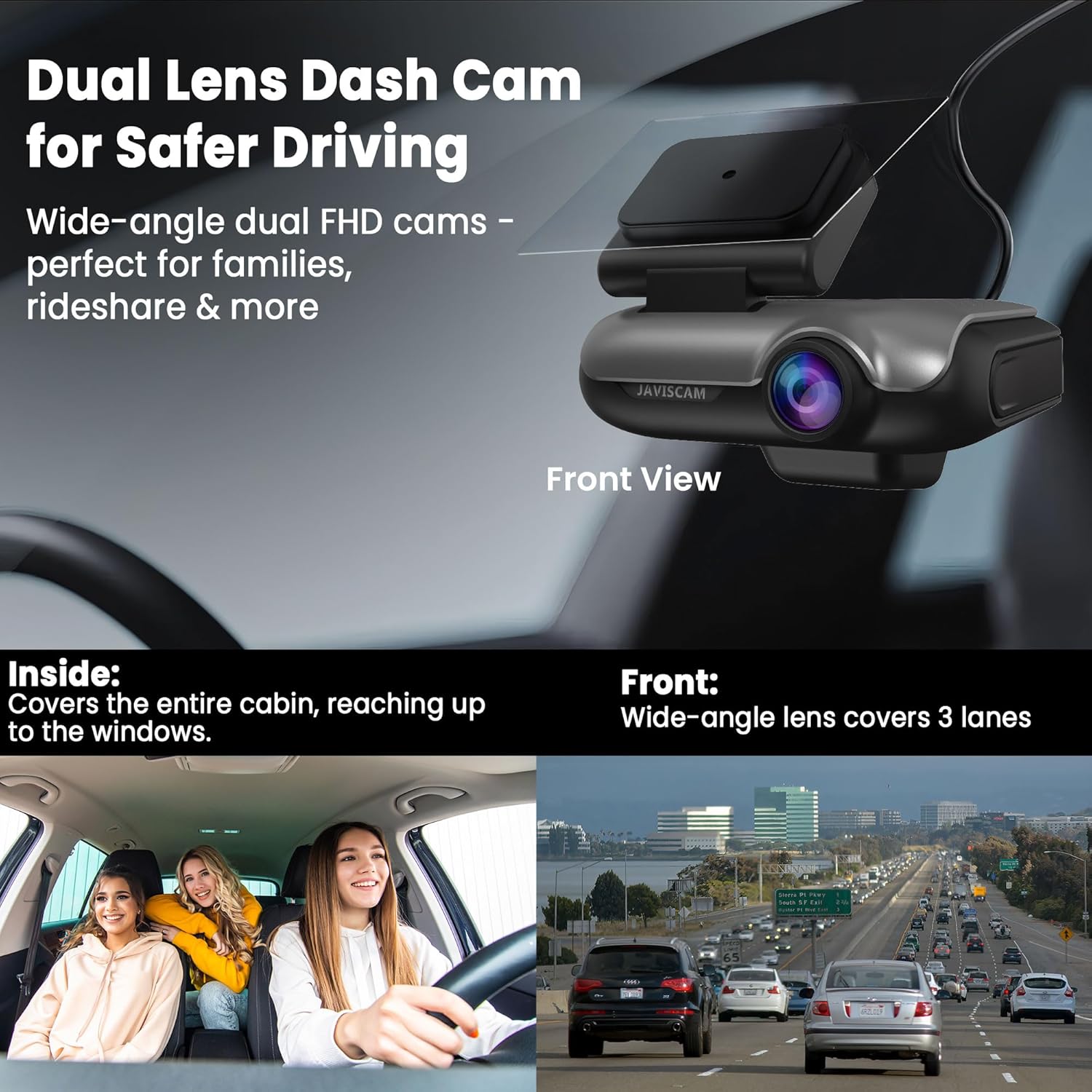
The javiscam dash cam features a compact design with integrated front and interior cameras, a GPS module, and control buttons for easy operation. Key components include:
- Пярэдняя камера: Captures a wide-angle view дарогі наперадзе.
- Камера салона: Records the vehicle's cabin, equipped with 4 infrared lights for enhanced night vision.
- Модуль GPS: Provides accurate location tracking and speed data.
- PM Button: Activates Privacy Mode to disable the interior camera and microphone.
- AP Button: Locks the current video clip to prevent overwriting and uploads it to the cloud (if activated).
- Святлодыёдныя індыкатары: Display device status, network connectivity, and recording status.
- Слот для карты MicroSD: Для лакальнага захоўвання запісаў.
- Порт USB-C: For power connection during initial setup.

The dash cam mounted on a windshield, illustrating its dual lens design for both front and interior recording.
4. Настройка і ўстаноўка
4.1 Пачатковая налада
- Use a 5V 2A adapter with the included Type-C cable to power on the dash cam for initial setup.
- Запампуйце мабільнае прыкладанне з крамы прыкладанняў вашай прылады.
- Follow the in-app instructions to pair your dash cam. If app pairing fails, scan the QR code located on the bottom of the device.
- If issues persist, reset the device as per the manual's instructions and attempt pairing again.
4.2 Installation in Vehicle
The dash cam is designed for windshield mounting. Ensure a clear line of sight for both cameras and the GPS module.
- Старанна ачысціце выбраную вобласць лабавога шкла.
- Apply the electrostatic film to the windshield before attaching the dash cam mount for easier removal and repositioning.
- Securely attach the dash cam to the windshield using its adhesive mount.
- Connect the provided OBD cable to the dash cam and route it discreetly along the vehicle's interior trim to the OBD-II port.
- Plug the OBD cable into your vehicle's OBD-II port.
- If the OBD light does not illuminate after pairing, start the engine and switch the 'V' button on the OBD cable to 11.6V or 23.6V, then reconnect.

A visual guide demonstrating the proper placement of the dash cam on the windshield and the routing of the OBD cable for power.
5. Рэжымы працы
5.1 Driving Mode: Continuous Recording
When your vehicle is in operation, the dash cam automatically enters Driving Mode, continuously recording footage from both front and interior cameras. The G-sensor detects sudden impacts or events, automatically locking and protecting relevant video segments from being overwritten.

The dash cam actively recording while the vehicle is in motion, capturing both external and internal views.
5.2 Parking Mode: 24/7 Sentry Protection
Once your vehicle is parked and the engine is off, the dash cam transitions to Sentry Mode. In this mode, radar and motion sensors activate, monitoring for suspicious activity. If motion or impact is detected, the camera will automatically record and send real-time alerts to your connected app, providing evidence of theft, hit-and-runs, or vandalism.
Note: If false alarms occur frequently, access the live view in the app, go to Settings > Activity Detection > False Alarm Detection, and select "Human Detection" to limit alerts to nearby human movement only.

The dash cam actively monitoring the vehicle while parked, with illustrations of motion detection zones.
5.3 Рэжым прыватнасці
For moments when you desire privacy within the vehicle, you can disable the interior camera and microphone. Simply press and hold the PM button on the dash cam for 3 seconds to activate Privacy Mode. This will stop the interior camera from recording and mute the internal microphone.
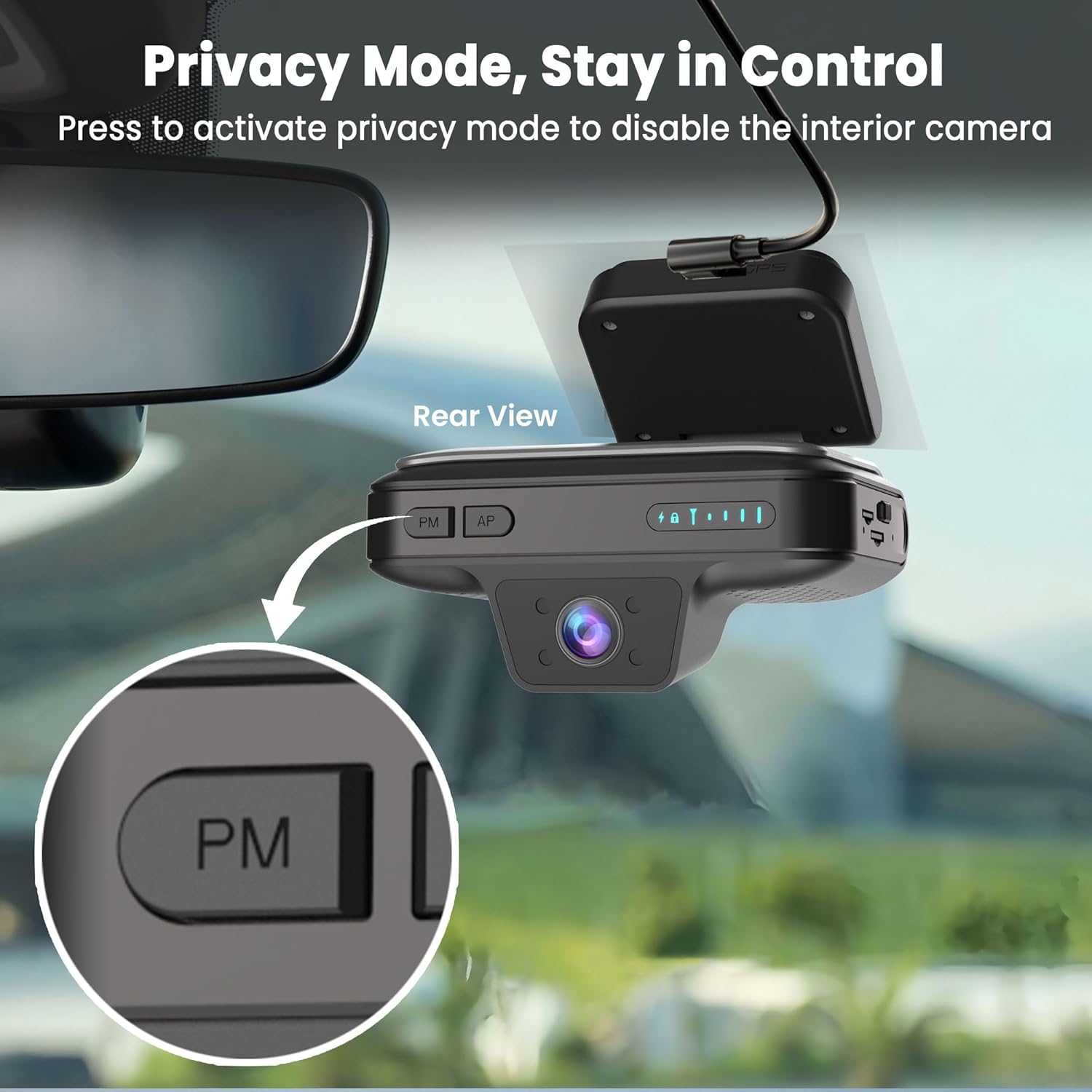
Падрабязны view of the dash cam's PM (Privacy Mode) button, indicating its function to disable the interior camera.
5.4 Двухбаковае аўдыё
The dash cam supports two-way audio communication, allowing you to speak with occupants in your vehicle remotely via the app. This feature is useful for checking in with family members or communicating with ride-share passengers.

An image depicting the two-way audio feature, showing a person communicating with someone in the car via the dash cam.
5.5 GPS-адсочванне
With built-in GPS, you can pinpoint your vehicle's exact location in real-time through the companion app. This feature provides enhanced security and peace of mind, allowing you to track your car anytime, anywhere.

A smartphone screen showing the real-time GPS location of a vehicle on a map.
5.6 Варыянты захоўвання
The javiscam dash cam offers flexible storage solutions:
- Local Storage (SD Card): An included 64GB SD card provides ample local storage for continuous loop recording. The memory card supports saving all videos recorded while driving and parked.
- Воблачнае сховішча: For added security, the dash cam can automatically back up detected recordings (collision events, manually locked videos, motion-detected footage) to the cloud. This ensures your footage is safe even if the camera is lost or damaged. A 30-day free cloud trial is included.

A visual representation of the two available storage options: local storage via an SD card (64GB included) and cloud storage with a 30-day free trial.

An image illustrating the cloud backup feature, where collision events and important footage are automatically uploaded to the cloud for secure access.
6. Асаблівасці прыкладання
The companion mobile application provides comprehensive control and monitoring capabilities:
- Аддаленая трансляцыя View: Access real-time video feeds from your dash cam anytime, anywhere.
- Абвесткі ў рэжыме рэальнага часу: Receive instant notifications on your phone for detected motion, impacts, or suspicious activity.
- Прайграванне і загрузка відэа: Review запісана footage and download important clips directly to your device.
- Кіраванне наладамі: Adjust dash cam settings, including sensitivity, recording preferences, and privacy options.
- Сумеснае выкарыстанне прылады: Share access to your dash cam's live view and features with trusted family members via the app.

A smartphone screen showing the javiscam app's real-time monitoring interface, allowing users to view their vehicle remotely.

An illustration of real-time notifications received on a smartphone when a collision or activity is detected by the dash cam.

An image showing how the dash cam device can be shared with family members through the mobile application.
7. Data Plans
A 4G data plan is required to utilize remote monitoring, live view, two-way talk, and app notifications. Cloud storage is optional and available through separate subscription plans. The device includes a trial data plan, with options to subscribe affordably or unlock your own SIM card.

A table outlining the various 4G data plans and cloud service options available for the dash cam, including pricing and features.
8. Выпраўленне непаладак
- App Pairing Failure: Ensure you are using a 5V 2A adapter with the included Type-C cable for setup. If pairing fails, scan the QR code on the device bottom. If still not working, reset the device per the manual and try again.
- OBD Light Not On: After pairing, if the OBD light doesn’t turn on, start the engine and switch the "V" button on the OBD cable to 11.6V or 23.6V, then reconnect.
- Low Resolution Live View/Downloaded Video: Калі жыць view or downloaded video appears low resolution, use a card reader to view the original video files directly from the SD card. The app's live view may display a lower resolution stream for faster transmission.
- Frequent False Alarms in Parking Mode: Ідзі жыць view > settings > Activity Detection > False Alarm Detection, and select "Human Detection" to limit alerts to nearby human movement only.
9. Тэхнічныя характарыстыкі
| Асаблівасць | Апісанне |
|---|---|
| Памеры прадукту | 3 х 4 х 2.6 цалі |
| Вага прадмета | 5 унцыі |
| Тэхналогія падлучэння | Wireless (4G LTE) |
| Асаблівасць | Dual FHD Cameras, Remote Live View, 24/7 Sentry Mode, GPS, IR Night Vision, Two-Way Audio, App Alerts, Cloud/SD Storage |
| Дазвол відэазахопу | 2K |
| Уключаныя кампаненты | 4G Dash Camera with 64GB Memory Card, Installation Tool, OBD Cable, Quick Guide, User Manual |
| Тып мацавання | Мацаванне лабавога шкла |
| Метад кантролю | дадатак |
| Колер | Касмічны шэры |
| Арыентацыя | Front & Inside |
| Тып абслугоўвання аўтамабіля | MPV, Ride-hailing car, SUV, Sedan, Taxi/Cab |
10. Падтрымка і гарантыя
javiscam is committed to providing reliable customer support. If you encounter any issues with setup, operation, or troubleshooting, please refer to the contact information provided in the physical user manual included with your product. Our team is dedicated to resolving your concerns quickly and professionally.
For information regarding product warranty, please consult the warranty card or contact our customer support team directly using the contact details in your manual.