
1. Уводзіны
This manual provides essential information for the safe and effective use of your Mibro GS Pro2 Multisport Smartwatch. Please read this manual thoroughly before using the device and retain it for future reference.
Прадукт скончаныview
The Mibro GS Pro2 is a versatile multisport smartwatch designed for various activities, featuring a 1.43-inch AMOLED display, Bi-Band GNSS for precise positioning, and extensive health and fitness tracking capabilities.

Image 1.1: Mibro GS Pro2 Smartwatch. This image displays the Mibro GS Pro2 smartwatch from an angled perspective, showcasing its round dark gray casing, black silicone strap, and the digital watch face with various data points like time, date, and weather.
2. Настройка
2.1 Першапачатковая зарадка
Before first use, fully charge your Mibro GS Pro2 smartwatch. Connect the magnetic charging cable to the charging contacts on the back of the watch and plug the USB end into a standard USB power adapter (not included).
- Поўная зарадка звычайна займае каля 2.5 гадзін.
- The watch will display a charging indicator on the screen.
2.2 Спалучэнне са смартфонам
To unlock the full functionality of your Mibro GS Pro2, pair it with your smartphone via the dedicated Mibro Fit application.
- Спампаваць прыкладанне: Пошук "Mibro Fit" in your smartphone's app store (iOS or Android) and install it.
- Стварыць уліковы запіс: Open the Mibro Fit app and follow the on-screen instructions to create an account or log in.
- Уключыць Bluetooth: Пераканайцеся, што Bluetooth уключаны на вашым смартфоне.
- Дадаць прыладу: In the Mibro Fit app, navigate to the "Device" or "Add Device" section.
- Выберыце гадзіннік: Select "Mibro GS Pro2" from the list of available devices.
- Пацвердзіць спалучэнне: A pairing request will appear on both your watch and smartphone. Confirm the pairing on both devices.
Once paired, the watch will synchronize data with the app, and you can customize settings, receive notifications, and view detailed activity reports.
3. Эксплуатацыя прылады
3.1 Асноўная навігацыя
The Mibro GS Pro2 features a responsive touchscreen and physical buttons for navigation.
- Сэнсарны экран: Swipe up, down, left, or right to navigate through menus and widgets. Tap to select items.
- Бакавыя кнопкі: Use the physical buttons on the side of the watch to access specific functions (e.g., power on/off, return to home screen, quick access to sports modes). Refer to the watch's on-screen prompts for specific button assignments.
3.2 Уключэнне/выключэнне сілкавання
- Уключэнне: Press and hold the power button (usually the top right button) until the Mibro logo appears.
- Выключэнне: Press and hold the power button, then select "Power Off" from the options displayed on the screen.
3.3 Здзяйсненне і прыём выклікаў
When connected to your smartphone, the Mibro GS Pro2 allows you to manage calls directly from your wrist.
- Прыём званкоў: When a call comes in, the watch will display the caller ID. You can tap the green icon to answer or the red icon to reject the call.
- Здзяйсненне званкоў: Access the call function on your watch (usually through the phone icon or a dedicated widget) to dial numbers or select contacts from your synced phonebook.
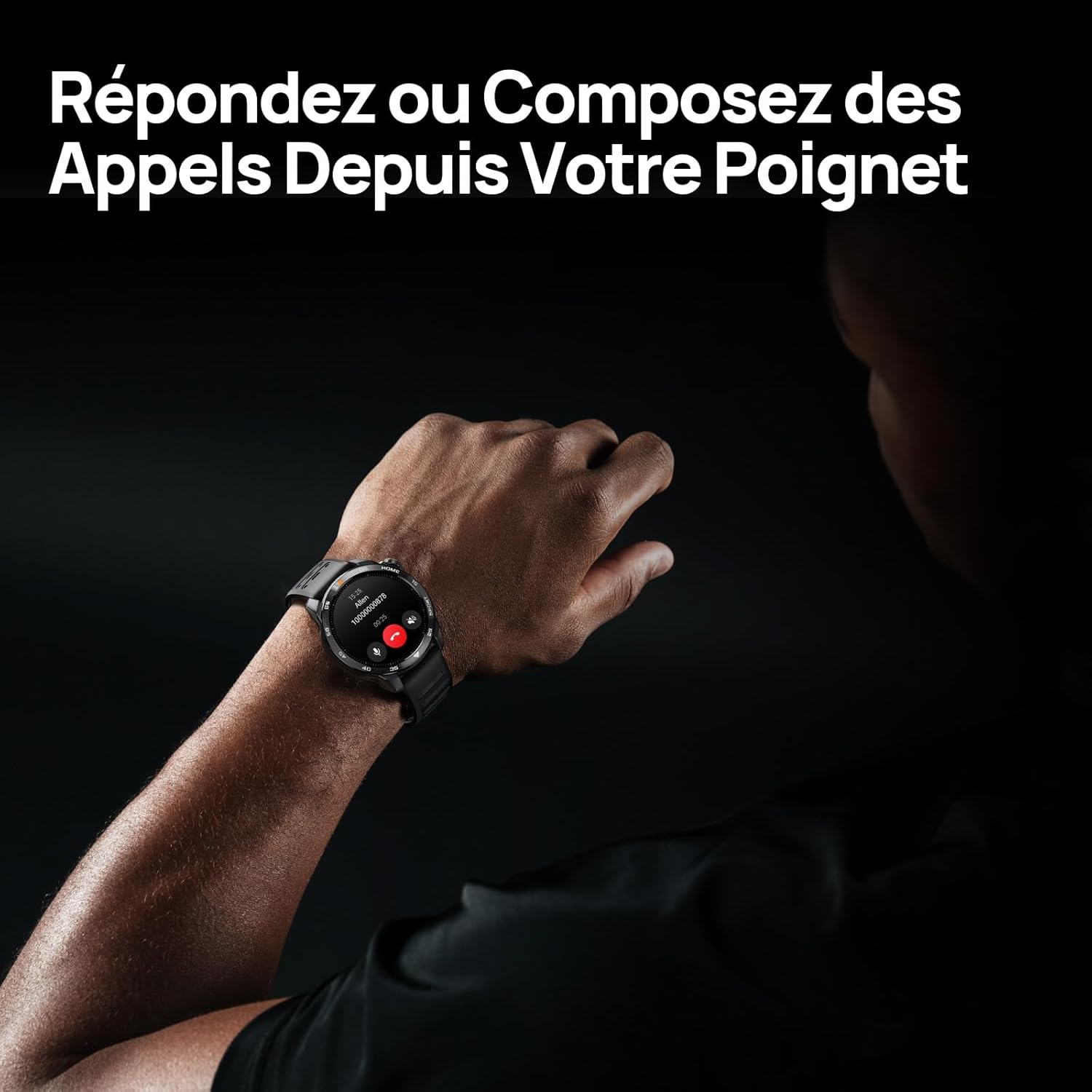
Image 3.1: Responding to calls on the Mibro GS Pro2. This image shows a person's wrist with the Mibro GS Pro2 smartwatch displaying an incoming call notification, illustrating the ability to answer or decline calls directly from the watch.
4. Асаблівасці
4.1 Дысплей
The Mibro GS Pro2 features a vibrant 1.43-inch AMOLED display, offering clear visibility even in bright outdoor conditions.
- Памер: 1.43 цаляў
- Тып: AMOLED
- дазвол: 466x466 пікселяў
- Яркасць: Пікавая яркасць да 1200 ніт
- Асаблівасці: Touchscreen, Anti-fingerprint coating.

Image 4.1: Mibro GS Pro2 1.43" AMOLED High Brightness Screen. This image highlights the smartwatch's display specifications, including 1200 nits peak brightness, 466x466 resolution, and 60 fps refresh rate, demonstrating its clarity and responsiveness.
4.2 Multisport Modes
The watch supports over 150 sports modes, providing tailored data analysis for each activity. This includes intelligent transitions for multi-discipline events like triathlons.
- Aquatic Sports: Suitable for open water swimming and pool swimming, calculating parameters such as distance, pace, and trajectory. The watch is 5ATM water resistant.
- Веласпорт: Tracks various cycling metrics, including outdoor cycling, indoor cycling, mountain biking, and short-distance modes.
- Запуск: Offers professional running algorithms, including running dynamics, performance index, and physical analysis based on real-time data. It records trajectories and provides long-term training plans.
- Other Sports: Includes modes for hiking, skiing, padel, and many more.

Image 4.2: Mibro GS Pro2 with 150+ Sports Modes. This image shows the smartwatch displaying various sports icons, indicating its extensive support for over 150 different physical activities, including swimming, cycling, and running.

Image 4.3: Mibro GS Pro2 5ATM Water Resistant. This image depicts a swimmer wearing the Mibro GS Pro2 smartwatch, with on-screen data showing swimming metrics like distance, stroke count, and calories burned, highlighting its water resistance and aquatic sport tracking capabilities.
4.3 GPS and Outdoor Navigation
The smartwatch features precise dual-frequency geolocation (Bi-Band GNSS) with real-time deviation alerts. It provides accurate route data and altitude variation measurements for outdoor activities like cycling tours or hiking.
- Dynamically adjust start/end points directly on the watch.
- Store up to 10 backup routes for navigation in areas without signal.
- Includes Barometer and Altimeter functions for environmental data.

Image 4.4: Mibro GS Pro2 Dual-Frequency GPS for Precise Outdoor Navigation. This image shows the smartwatch displaying a map and route tracking, alongside a smartphone app showing a detailed outdoor run trajectory, emphasizing its accurate GPS capabilities for outdoor activities.

Image 4.5: Mibro GS Pro2 Barometer and Altimeter. This image displays the watch showing barometric pressure, a compass, and altitude readings, with a person climbing in the background, illustrating its environmental sensing capabilities.
4.4 Маніторынг здароўя
The Mibro GS Pro2 provides comprehensive health tracking features to help you monitor your well-being.
- Маніторынг сардэчнага рытму: Бесперапыннае адсочванне пульса.
- Маніторынг кіслароду ў крыві (SpO2): Вымярае ўзровень насычэння крыві кіслародам.
- Адсочванне сну: Маніторы снуtages (light, deep, REM) and provides a sleep score.
- Маніторынг стрэсу: Адсочвае ўзровень стрэсу на працягу дня.
- VO2 Max & Recovery Time: Professional metrics for training optimization.
- Адсочванне актыўнасці: Records calories burned, total distance, and steps taken.

Image 4.6: Mibro GS Pro2 VO2 Max & Recovery Time. This image shows the smartwatch displaying VO2 Max percentage and recovery time recommendations, along with training effect metrics, aiding in professional workout analysis.

Image 4.7: Mibro GS Pro2 Blood Oxygen (SpO2) Monitoring. This image illustrates the watch's ability to track blood oxygen saturation levels over a 24-hour period, displayed as a graph on the watch face.

Image 4.8: Mibro GS Pro2 Sleep Tracking. This image shows the smartwatch displaying sleep quality metrics (Good, BPM, Stress) and a breakdown of sleep stages (Awake, Light Sleep, Deep Sleep), with a person sleeping in the background.
4.5 Тэрмін службы батарэі
The Mibro GS Pro2 offers extended battery life to support prolonged use.
- Штодзённы рэжым: Прыкладна 20 дні.
- Рэжым GPS: Прыкладна 20 гадзін.
- Рэжым энергазберажэння: Up to 50+ days.

Image 4.9: Mibro GS Pro2 Ultra-Long Battery Life and Fast Charging. This image illustrates the watch's battery performance, showing 2.5 hours for a full charge and estimated usage times for daily mode (20+ days), power-saving mode (50+ days), and GPS mode (20 hours).
4.6 Інтэлектуальныя функцыі
Beyond fitness tracking, the Mibro GS Pro2 integrates seamlessly with your digital life.
- Апавяшчэнні аб паведамленнях: Receive alerts for calls, SMS, and app notifications (e.g., TikTok, WhatsApp, Telegram, Instagram, Facebook, Snapchat).
- Кіраванне музыкай: Кіруйце прайграваннем музыкі на смартфоне непасрэдна з гадзінніка.
- Знайсці мой тэлефон: Locate your paired smartphone using the watch.
- Наладжвальныя цыферблаты: Personalize your watch with various watch face designs.

Image 4.10: Mibro GS Pro2 New Daily Health & Well-being Features. This image shows icons representing sleep tracking, wake-up reminders, music control, and 'find my phone' functionality, indicating the watch's smart features for daily use.

Image 4.11: Mibro GS Pro2 Message Push Notifications. This image shows the smartwatch displaying a message notification, surrounded by logos of popular social media and messaging apps, illustrating its capability to receive alerts from various platforms.

Image 4.12: Mibro GS Pro2 Personalized Watch Faces. This image displays a variety of digital watch faces, showcasing the customization options available to users for personalizing their smartwatch display.
5. Тэхнічнае абслугоўванне
5.1 Чыстка разумнага гадзінніка
- Regularly clean the watch casing and strap with a soft, damp тканіна.
- Для выдалення ўстойлівага бруду выкарыстоўвайце мяккі мыльны раствор і старанна прамыйце чыстай вадой.
- Перад зарадкай пераканайцеся, што кантакты зараднай прылады чыстыя і сухія, каб прадухіліць карозію.
- Пазбягайце выкарыстання агрэсіўных хімікатаў, абразіўных ачышчальнікаў або растваральнікаў, бо яны могуць пашкодзіць пакрыццё і ўшчыльняльнікі гадзінніка.
5.2 Воданепранікальнасць
The Mibro GS Pro2 is 5ATM water resistant, meaning it can withstand pressures equivalent to a depth of 50 meters. This makes it suitable for swimming and showering. However, it is not recommended for diving or high-pressure water activities.
- Не выкарыстоўвайце кнопкі пад вадой.
- Пасля кантакту з салёнай вадой прамыйце гадзіннік прэснай вадой і старанна высушыце.
5.3 Сыход за акумулятарам
- Пазбягайце частай поўнай разрадкі акумулятара.
- Захоўвайце гадзіннік у прахалодным, сухім месцы, калі ён не выкарыстоўваецца працяглы час.
- Выкарыстоўвайце толькі кабель для зарадкі, які ўваходзіць у камплект.
6. Выпраўленне непаладак
6.1 Гадзіннік не ўключаецца
- Пераканайцеся, што гадзіннік цалкам зараджаны. Падключыце яго да зараднай прылады як мінімум на 30 хвілін.
- Націсніце і ўтрымлівайце кнопку харчавання на працягу 10-15 секунд, каб паспрабаваць прымусова перазагрузіць кампутар.
6.2 Не ўдаецца падключыцца да смартфона
- Пераканайцеся, што Bluetooth уключаны на вашым смартфоне і гадзінніку.
- Пераканайцеся, што гадзіннік знаходзіцца ў зоне дзеяння Bluetooth вашага тэлефона.
- Перазагрузіце смартфон і гадзіннік.
- Ачысціце кэш Bluetooth на тэлефоне (калі ёсць) і паспрабуйце зноў падключыць прыладу.
- Ensure the Mibro Fit app is updated to the latest version.
6.3 Inaccurate GPS Readings
- Пераканайцеся, што вы знаходзіцеся на адкрытай прасторы з чыстым view неба.
- Wait for the watch to acquire a stable GPS signal before starting your activity.
- Ensure the watch's firmware is up to date via the Mibro Fit app.
6.4 Апавяшчэнні не з'яўляюцца
- Check notification settings in the Mibro Fit app to ensure they are enabled for desired applications.
- Verify that your phone's notification permissions are granted to the Mibro Fit app.
- Пераканайцеся, што гадзіннік падключаны да тэлефона праз Bluetooth.
7. Тэхнічныя характарыстыкі
| Асаблівасць | Дэталь |
|---|---|
| Марка | Mibro |
| Нумар мадэлі | GS Pro2 |
| Памер дысплея | 1.43 цаляў |
| Тып дысплея | AMOLED |
| Аперацыйная сістэма | АСРВ |
| Сувязь | Bluetooth |
| Асаблівасці | Touchscreen, Water Resistant (5ATM), Bi-Band GNSS, Health Monitoring |
| Сумяшчальныя прылады | Смартфон |
| Склад батарэі | Літый-іённы |
| Тэрмін службы батарэі (штодзённы рэжым) | Прыбл. 20 дзён |
| Тэрмін службы батарэі (рэжым GPS) | Прыбл. 20 гадзіны |
| Воданепранікальнасць | 5АТМ |
| Памеры (корпус гадзінніка) | 48 мм (дыяметр) х 12 мм (таўшчыня) |
| Даўжыня раменьчыка | 265 мм |
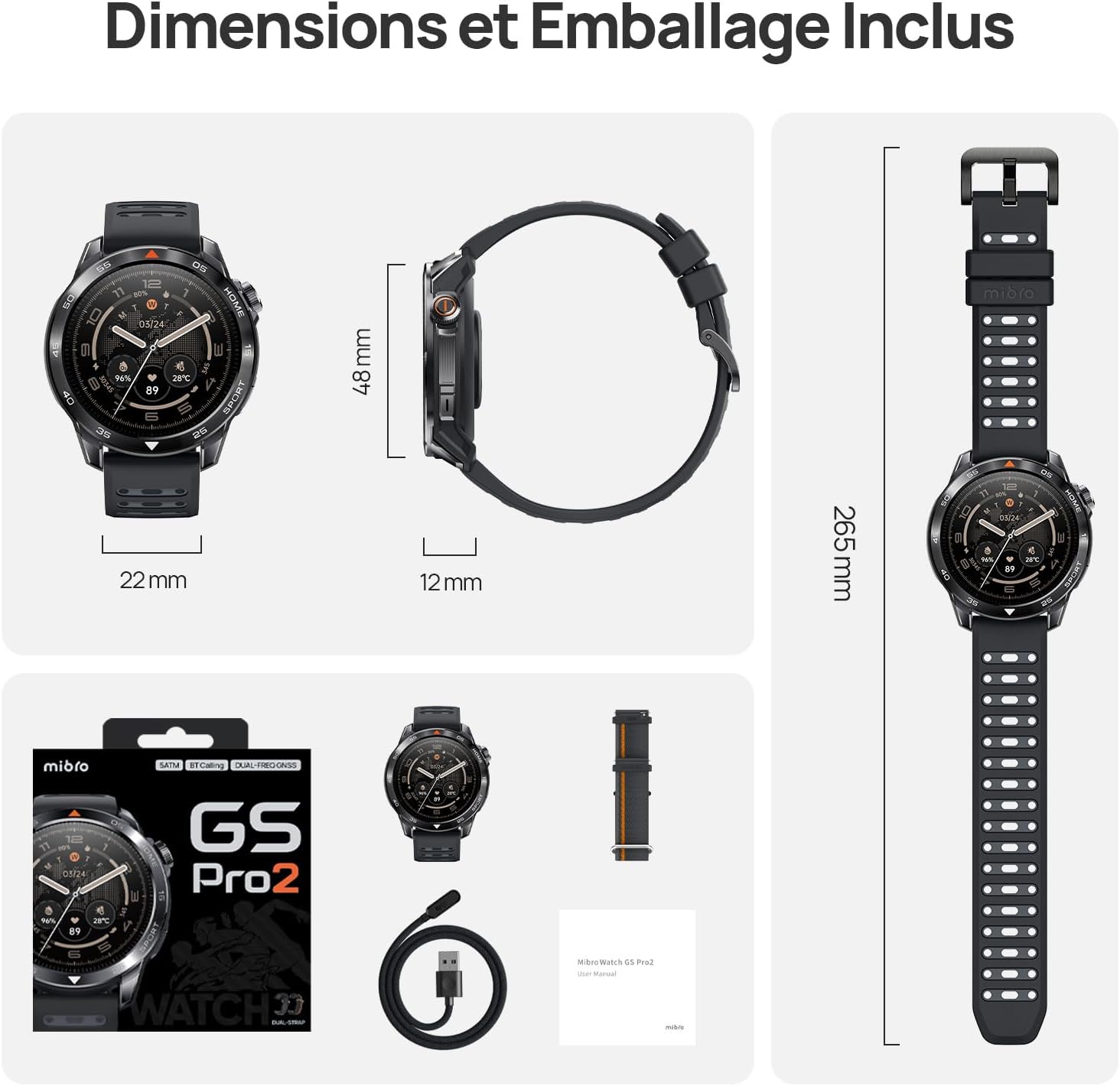
Image 7.1: Mibro GS Pro2 Dimensions and Included Packaging. This image provides a visual representation of the watch's dimensions (48mm diameter, 12mm thickness, 265mm strap length) and shows the contents of the product packaging, including the watch, charging cable, and user manual.
8. Гарантыя і падтрымка
8.1 Гарантыя вытворцы
The Mibro GS Pro2 comes with a 1-гадовая гарантыя вытворцыГэтая гарантыя распаўсюджваецца на дэфекты матэрыялаў і вырабу пры нармальным выкарыстанні. Калі ласка, захавайце пацвярджэнне пакупкі для прэтэнзій па гарантыі.
Гарантыя не распаўсюджваецца на пашкоджанні, выкліканыя няправільным выкарыстаннем, аварыямі, несанкцыянаванымі мадыфікацыямі або звычайным зносам.
8.2 Падтрымка кліентаў
For technical assistance, troubleshooting, or warranty inquiries, please refer to the official Mibro website or contact their customer support channels. Specific contact details may be found on the product packaging or the official Mibro webсайт.