
1. Інфармацыя па бяспецы
Please read all instructions carefully before installation and use. Improper installation or operation may cause damage to the device or vehicle, and may void the warranty. Always prioritize safe driving practices. Do not operate the device in a way that distracts you from the road.
- Рэкамендуецца прафесійная ўстаноўка: З-за складанасці электрычных сістэм аўтамабіля настойліва рэкамендуецца прафесійная ўстаноўка.
- крыніца харчавання: Ensure the device is connected to a 12V DC power supply with negative grounding.
- Праводка: Double-check all wiring connections before powering on the unit to prevent short circuits or damage.
- Працоўная тэмпература: Не падвяргайце прыладу ўздзеянню экстрэмальных тэмператур або прамых сонечных прамянёў на працягу доўгага часу.
2. Прадукт скончыўсяview
The JOYING JY-TT158N4 is a 9-inch Android car stereo designed for Toyota Land Cruiser Prado 120 and Lexus GX470 models from 2004-2009. It features a high-resolution touchscreen, integrated CarPlay and Android Auto, a physical volume knob, and robust hardware for an enhanced in-car experience.

Малюнак 2.1: Спераду view of the JOYING JY-TT158N4 car stereo.
Асноўныя характарыстыкі:
- Сумяшчальнасць з аўтамабілем: Specifically designed for Toyota Land Cruiser Prado 120 & Lexus GX470 (2004-2009), compatible with JBL amplifier and factory steering wheel controls.
- Хуткая загрузка: Quick startup, entering the user interface in approximately 2 seconds after the initial boot.
- Аўдыявыхад: Optical Fiber and Coaxial Digital Output for high-quality sound with external ampасаднікі.
- Built-in 4G Module: Supports SIM card for internet access (data only, no calls/SMS).
- GPS-навігацыя: Precise GPS with included antenna, supporting offline maps and synchronization with phone map data via CarPlay/Android Auto.
- CarPlay і Android Auto: Built-in support for seamless smartphone integration via USB or Bluetooth.
- Персаналізаваныя налады: Customizable car boot logos, wallpapers, and button colors.
- Сістэма астуджэння: Dual heat sink design with automatic fan control to prevent overheating.
3. Што ў скрынцы
У пакет уваходзяць наступныя кампаненты:
- 9" radio unit (x1)
- Single Din Cage (x1)
- Left & Right Bracket (x1)
- WiFi Antenna (x1)
- GPS Antenna (x1)
- Антэна 4G (x2)
- External Mic (x1)
- Кабель USB (x2)
- AR Cable (x1)
- Screen Ribbon Cable (x1)
- Кабель харчавання (x1)
- Кіраўніцтва карыстальніка (x1)

Figure 3.1: Visual representation of included components.
4. Ўстаноўка
The JOYING JY-TT158N4 is designed for plug-and-play installation in compatible Toyota Land Cruiser Prado 120 and Lexus GX470 models (2004-2009). No cutting of factory cables is required. Ensure the vehicle's power is disconnected before beginning installation.
4.1. Праверка сумяшчальнасці транспартных сродкаў
Verify that your vehicle's dashboard matches the compatible models to ensure proper fitment.
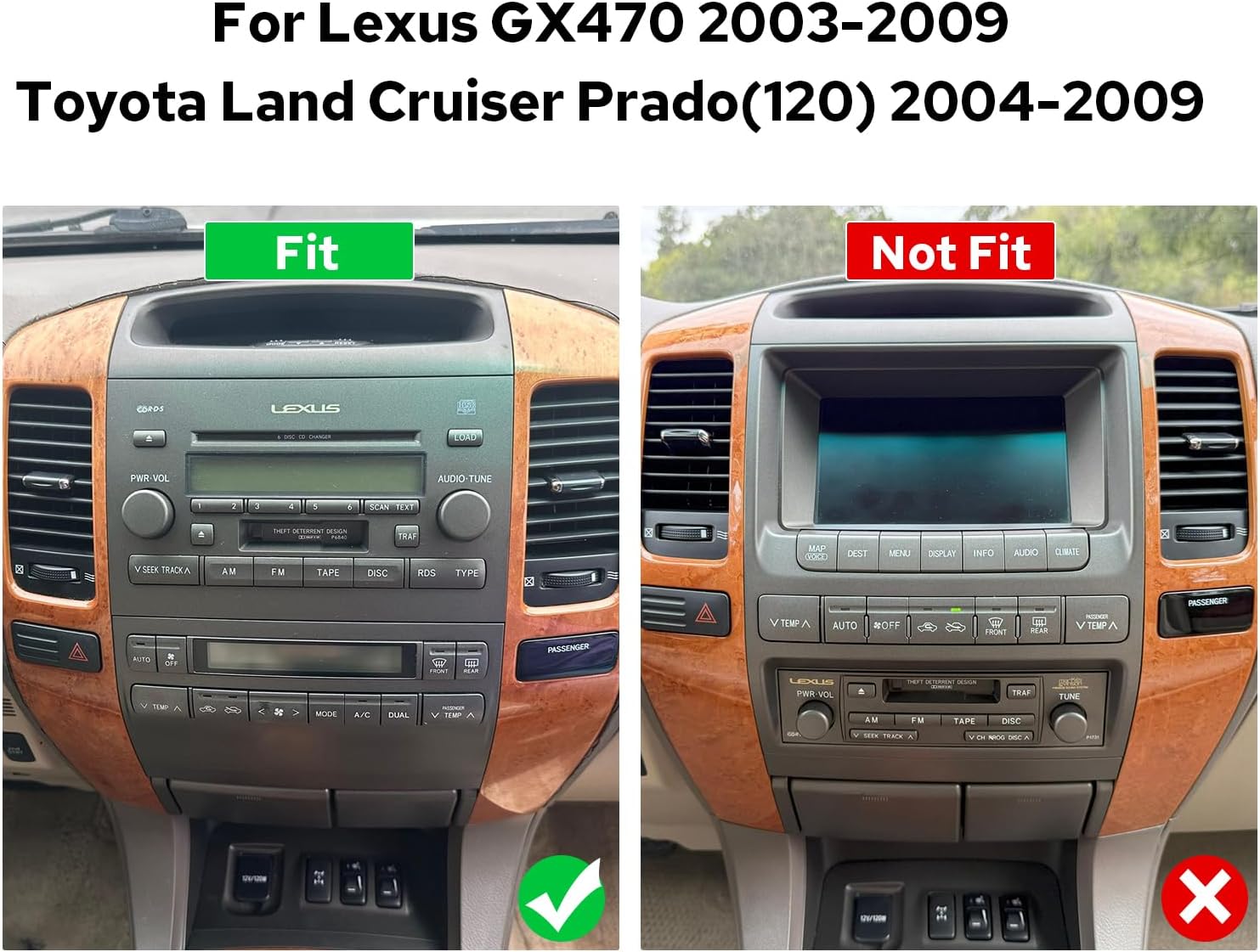
Figure 4.1: Comparison of compatible and incompatible dashboards.
4.2. Падключэнне правадоў
Connect the provided cables to the corresponding ports on the car stereo and your vehicle's wiring harness. Ensure all connections are secure.

Малюнак 4.2: Задняя частка view of the car stereo with various ports and connections.
4.3. AR Camera Connection
For connecting AR (Augmented Reality) front and reverse cameras, follow the specific wiring instructions. This typically involves connecting the camera's power cable and video input to the head unit.
Video 4.1: Detailed guide on connecting AR (Front and Reverse) cameras to the head unit.
5. Пачатковая налада
5.1. Першы запуск
The first boot-up may take 30-40 seconds. Subsequent startups will be faster, typically within 2 seconds.
5.2. Спарванне Bluetooth
To enable hands-free calling and audio streaming, pair your smartphone via Bluetooth. Navigate to the Bluetooth settings on the car stereo and your phone, then select 'Car BTo' or a similar device name to connect.
Video 5.1: Demonstration of Bluetooth pairing and CarPlay/Android Auto connection.
5.3. CarPlay & Android Auto Connection
Connect your mobile phone to the car radio via USB cable or Bluetooth to use CarPlay or Android Auto. This allows access to navigation, phone calls, and music on the larger screen.

Figure 5.1: Display showing CarPlay and Android Auto interfaces.
6. Інструкцыя па эксплуатацыі
6.1. Навігацыя па інтэрфейсе карыстальніка
The system features an intuitive Android interface. Swipe left or right to access different home screens and applications. Tap icons to launch apps like Radio, Music, Video, Navigation, and Settings.

Figure 6.1: Car stereo displaying the main user interface with various application icons.
6.2. Audio and Equalizer Settings
Adjust audio settings and utilize the 48-band graphic equalizer (TDA7851 DSP chip) for optimal sound quality. Preset EQ modes are available, or you can customize your own.

Figure 6.2: Illustration of high-quality sound features and equalizer interface.
6.3. Галасавое кіраванне
Utilize voice commands to control various functions, enhancing driving intelligence and security. This allows for hands-free operation of features like radio, navigation, and calls.
Video 6.1: Demonstration of voice control features, including opening FM radio and hands-free calling.
6.4. Функцыянальнасць падвойнага экрана
The system supports dual-screen operation, allowing two applications to run simultaneously. For example, you can have navigation on one side and music playback on the other.
Video 6.2: Shows dual screen functionality with FM radio and phone dialer running concurrently.
6.5. Выхад HDMI
The unit features an HDMI output, allowing you to send uncompressed audio and video signals to external displays, such as headrest monitors, for passenger entertainment.
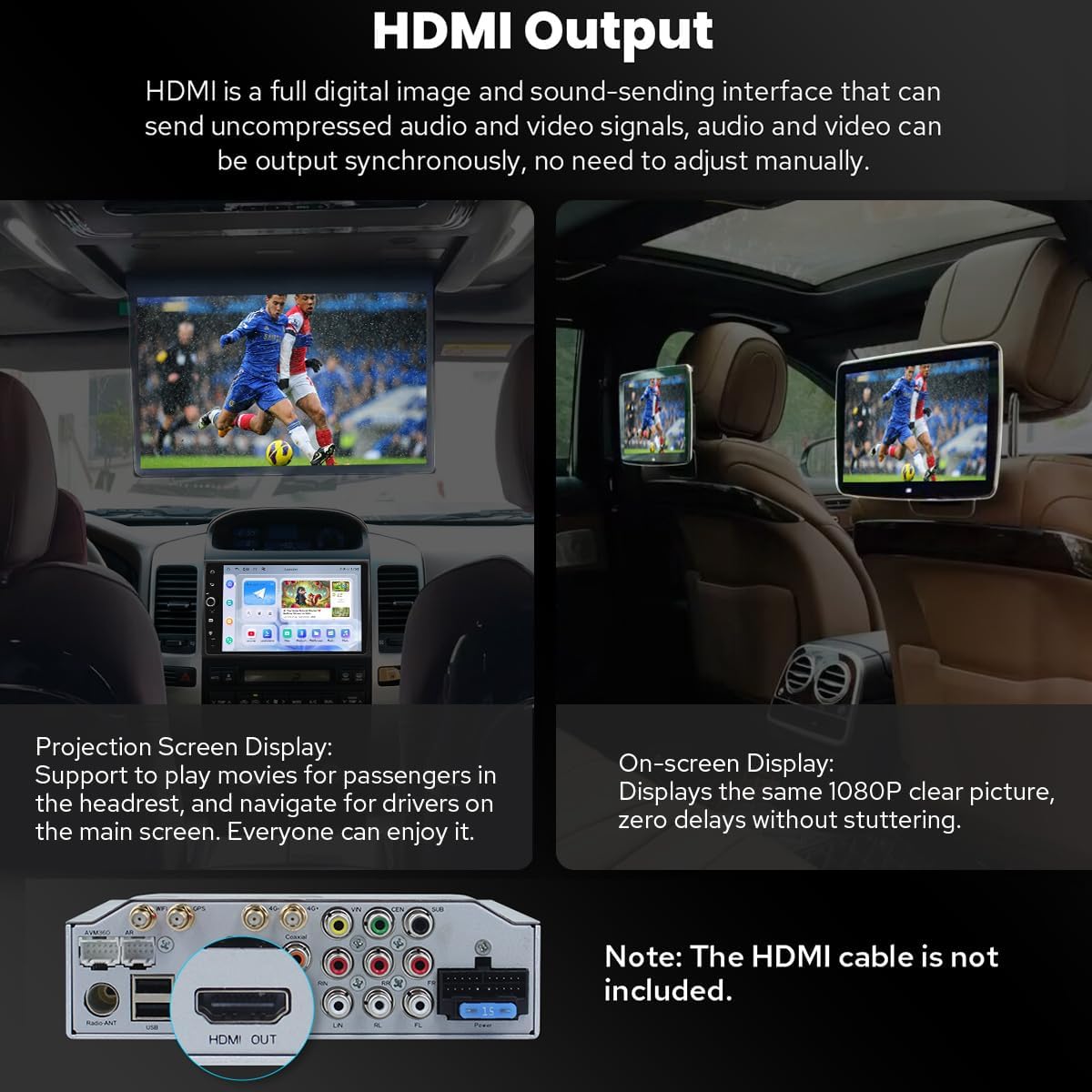
Figure 6.3: Diagram illustrating HDMI output connection to external screens.
7. Дадатковыя магчымасці
7.1. Personalized Settings
Customize your car stereo experience with changeable button colors, car boot logos, and a variety of wallpapers.
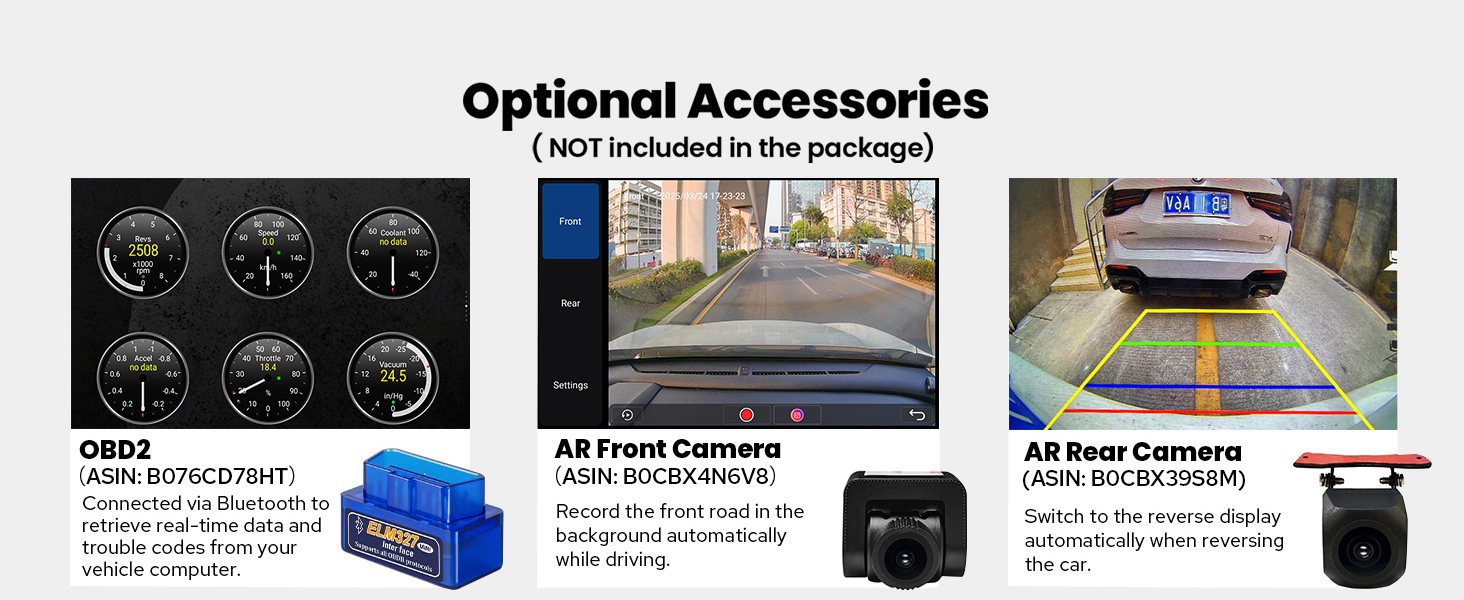
Figure 7.1: Options for customizing UI elements like button colors and wallpapers.
7.2. Сувязь
The unit offers enhanced connectivity with upgraded WiFi signal via an independent antenna for stable and fast internet access, and a built-in 4G module for SIM card data.

Figure 7.2: Illustration of the independent WiFi antenna for improved signal.
7.3. Сістэма астуджэння
A dual heat sink design ensures superior heat dissipation and improved temperature control, enhancing performance stability. The fan automatically activates if the CPU temperature or radio volume exceeds a set warning value.

Figure 7.3: Diagram showing the dual heat sink design and fan control interface.
7.4. Дадатковыя аксэсуары
Enhance your experience with optional accessories such as OBD2 scanners, AR front cameras, and AR rear cameras (sold separately).

Малюнак 7.4: Закончанаview of optional accessories for the car stereo.
8. Тэхнічныя характарыстыкі
| Асаблівасць | Дэталь |
|---|---|
| Нумар мадэлі тавару | JY-TT158N4 |
| Памер дысплея | 9 цалі |
| Аперацыйная сістэма | Android |
| Асаблівасці | Bluetooth, Touchscreen, Built-in 4G Module, Optical Fiber and Coaxial Digital Output, Fast Boot, GPS Navigation, CarPlay, Android Auto |
| Тэхналогія падлучэння | Bluetooth, Ethernet, USB, Wi-Fi |
| Рэжым выхаду гуку | Стэрэа |
| Тып карты | North America (Offline maps supported) |
| Вага прадмета | 6 фунта |
| Памеры ўпакоўкі | 13 х 9 х 8 цалі |
9. Тэхнічнае абслугоўванне
- Уборка: Для чысткі экрана і вонкавага выгляду выкарыстоўвайце мяккую сухую тканіну. Пазбягайце выкарыстання абразіўных ачышчальнікаў або растваральнікаў.
- Абнаўленні праграмнага забеспячэння: Перыядычна правярайце наяўнасць абнаўленняў праграмнага забеспячэння, каб забяспечыць аптымальную прадукцыйнасць і доступ да новых функцый.
- тэмпература: Не падвяргайце прыладу ўздзеянню экстрэмальных тэмператур.
10. Выпраўленне непаладак
- Няма харчавання: Check all power connections and ensure the vehicle's ignition is on. Verify fuses.
- Няма гуку: Check speaker connections, volume levels, and audio settings (e.g., equalizer, balance). Ensure external amplifiers are powered on if used.
- Праблемы з падключэннем Bluetooth: Ensure Bluetooth is enabled on both the stereo and your phone. Try unpairing and re-pairing the devices.
- CarPlay/Android Auto не падключаецца: Ensure your phone's operating system is up to date. Try a different USB cable. Verify USB debugging settings for Android Auto if connecting via USB.
- Страта сігналу GPS: Пераканайцеся, што антэна GPS правільна ўсталявана і мае выразны сігнал view неба.
11. Гарантыя і падтрымка
Гэты прадукт пастаўляецца з a Гарантыя 2 год. For technical support, troubleshooting assistance, or warranty claims, please contact JOYING customer service through your purchase platform or the official JOYING webсайт.