
1. Уводзіны
This manual provides detailed instructions for the installation, operation, and maintenance of your JOYING Android 13 Car Stereo Head Unit (Model JY-HT145N8). This unit is designed to integrate seamlessly with Honda Civic models from 2016 to 2021, offering advanced features such as CarPlay, Android Auto, GPS navigation, and enhanced audio capabilities.
Please read this manual thoroughly before installation and use to ensure proper functionality and to prevent damage to the unit or your vehicle.

Выява: Зверхуview of the JOYING Android 13 Car Stereo Head Unit highlighting key features.
2. Інфармацыя па бяспецы
- Always ensure the vehicle's ignition is off before performing any installation or wiring.
- Disconnect the vehicle's battery to prevent electrical shorts or damage.
- Калі вы не ўпэўненыя ў якіх-небудзь кроках, звярніцеся да прафесійнага ўсталёўшчыка.
- Не карыстайцеся прыладай такім чынам, каб гэта адцягвала вашу ўвагу ад кіравання аўтамабілем.
- Ensure all connections are secure to prevent intermittent issues or hazards.
3. Змесціва ўпакоўкі
Праверце, ці ўсе пералічаныя ніжэй прадметы ўваходзяць у вашу ўпакоўку:
- 9" radio x1
- Single Din Cage x1
- Left & Right Bracket x1
- Антэна WiFi x1
- GPS антэна x1
- Антэна 4G x2
- Знешні мікрафон x1
- USB-кабель x2
- AR Cable x1
- Screen Ribbon Cable x1
- Кабель харчавання x1
- Кіраўніцтва карыстальніка x1

Image: All components included in the JOYING Android 13 Car Stereo package.
4. Настройка і ўстаноўка
The JOYING head unit is designed for a plug-and-play installation, supporting factory reverse camera, steering wheel controls, USB, and lanewatch camera. Follow these general steps for installation:
- Remove Original Dashboard Components: Carefully remove the side panel trims and the original radio unit from your vehicle's dashboard.
- Connect Wiring Harnesses: Connect the provided wiring harnesses to the new head unit and your vehicle's existing connectors. Ensure all compatible plugs are securely connected. Some plugs may not be used depending on your vehicle's configuration.
- Падключыце антэны: Attach the WiFi, GPS, and 4G antennas to their respective ports on the head unit.
- Падключэнне USB-кабеляў: Plug in the USB cables for data transfer and charging.
- Connect Camera Inputs: Connect your reverse camera to the "CAM IN" port.
- CAN Bus Setting: If your vehicle is equipped with a CAN bus, ensure the communication protocol (white button) on the head unit is set to the right side (CAN).
- Radio Antenna Adapter: For sedan 4-door Honda Civic models, you may need to remove the rear passenger seat panel trim to access and bypass the HD radio box using the included green and gray cables.
- Праверка функцыянальнасці: Before fully reassembling the dashboard, loosely fit the head unit and test all functions (power, audio, navigation, camera, steering wheel controls) to ensure everything is working correctly.
- Збярыце прыборную панэль: Once all functions are verified, carefully reassemble the dashboard components.

Image: JOYING head unit seamlessly integrated into a Honda Civic dashboard.

Image: Purchase guide illustrating different wiring harnesses (A, B, C) based on OEM radio type.

Image: Important note on setting the CAN bus communication protocol.
Відэа ўстаноўкі:
Video: Detailed installation guide for an Android 13 car stereo in a Honda Civic (from Dasaita Offical Store). This video provides comprehensive steps for removing the old unit and connecting the new one.
Video: Installation steps for a new radio in a Honda Civic (from Dasaita Offical Store). This video focuses on the initial removal and wiring process.
Video: Wiring installation guide (from Jingelsye-US). This video demonstrates the connection of various cables to the head unit.
5. Інструкцыя па эксплуатацыі
5.1 Асноўныя функцыі
- Уключэнне/выключэнне харчавання: The unit will typically power on with the vehicle's ignition. A fast boot feature allows it to start in 2 seconds after the initial 30-40 second boot.
- Рэгулятар гучнасці: Use the physical volume knob or on-screen controls to adjust audio levels.
- Android OS Navigation: Navigate through the Android 13 interface using the touchscreen.
5.2 Функцыі падключэння
- CarPlay і Android Auto: Connect your mobile phone via USB cable or Bluetooth to mirror apps, access navigation, make calls, and listen to music on the larger screen.
- Bluetooth 5.0: For hands-free calls and audio streaming.
- Built-in 4G Module: Insert a SIM card for internet access (does not support phone calls or SMS). Supports FDD-LTE: B2/B4/B5/B7/B12/B13/B14/B17/B25/B26/B38/B66/B71 and TDD-LTE: B41.
- Сігнал Wi-Fi: Independent WiFi antenna ensures stable 2.4GHz/5GHz internet access.
- Парты USB: Three USB ports are available for various connections.
- Слот для карты Micro SD: For additional storage.

Image: Demonstration of Built-in CarPlay and Android Auto connectivity.

Image: Illustration of the upgraded WiFi signal with an independent antenna.
5.3 Навігацыя і мультымедыя
- GPS-навігацыя: Precise GPS engines with included GPS antennas for accurate positioning and faster real-time navigation. Supports offline maps.
- FM/AM-радыё: Built-in FM RDS tuner radio for selecting your favorite radio stations.
- DSP Sound: TDA7851 chip, 48-band graphic equalizer, and 4x50W max output power for high-quality sound. Supports aftermarket amplifiers via optical fiber and coaxial digital output.
- Split-screen Multitasking: Адначасова запускайце дзве праграмы на экране.
- Выхад HDMI: Full digital image and sound-sending interface for projection screen display or on-screen display (1080P clear picture, zero delays). HDMI cable not included.

Image: High-quality sound enjoyment features including DSP chip and graphic equalizer.
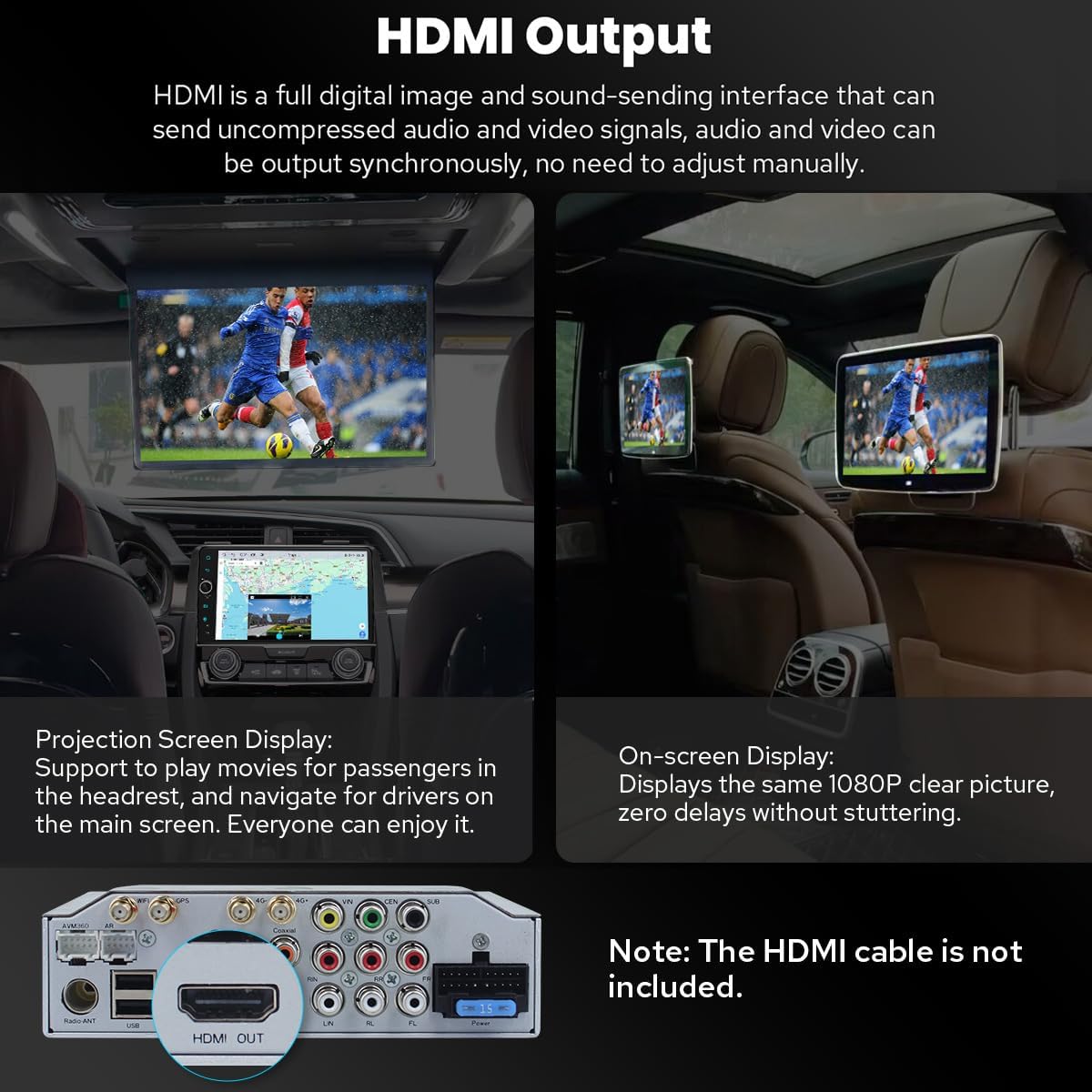
Image: HDMI output for connecting external displays.

Image: Demonstration of split-screen multitasking on the head unit.
5.4 Personalization and Other Features
- Персаналізаваныя налады: Customize car boot logo, wallpapers, and changeable button colors. Adjustable screen brightness.
- Сістэма астуджэння: Dual heat sink design for superior heat dissipation and temperature control. Fan automatically turns on if CPU temperature or radio volume exceeds a warning value.
- Дадатковыя аксэсуары: Supports external OBD2 (for real-time data and trouble codes), AR Front Camera (records front road), and AR Rear Camera (switches automatically when reversing).

Image: Personalized settings for the head unit interface.

Image: Illustration of the upgraded dual heat sink cooling system.

Image: Optional accessories that can be integrated with the head unit.
6. Тэхнічнае абслугоўванне
- Уборка: Для чысткі экрана і прылады выкарыстоўвайце мяккую сухую тканіну. Пазбягайце выкарыстання абразіўных ачышчальнікаў або растваральнікаў.
- Абнаўленні праграмнага забеспячэння: Periodically check for software updates via the system settings. Updates can improve performance and add new features.
- Кантроль тэмпературы: The dual heat sink design helps manage temperature. Ensure proper ventilation around the unit.
7. Выпраўленне непаладак
Калі ў вас узнікнуць праблемы, звярніцеся да наступных распаўсюджаных парад па ліквідацыі непаладак:
- Няма харчавання: Праверце ўсе падключэнні кабеляў харчавання. Пераканайцеся, што запальванне аўтамабіля ўключана.
- Няма гуку: Verify audio cable connections (RR, RL for touring amp). Check volume levels and DSP settings.
- Reverse Camera Not Working: Ensure the "CAM IN" cable is properly connected. Check factory settings for reversing camera (Setting > Factory settings > Others > Prohibit reverse and set "Enable").
- Не працуе кіраванне на рулі: Check factory settings (Setting > Car > Factory settings > Canbus > Canbus Select and choose NO.21).
- Праблемы з сігналам GPS: Пераканайцеся, што антэна GPS надзейна падключана і мае выразны сігнал view неба.
- Wi-Fi/4G Connectivity Problems: Check antenna connections and ensure correct SIM card insertion (for 4G). Verify network settings.
- Нізкая прадукцыйнасць: Ensure the unit's cooling system is functioning. Close unnecessary background applications.
8. Тэхнічныя характарыстыкі
| Вага прадмета | 6 фунта |
| Памеры ўпакоўкі | 12.6 х 9.06 х 7.68 цалі |
| Нумар мадэлі тавару | JY-HT145N8 |
| Памер дысплея | 9 цалі |
| Галасавая каманда | Сэнсарны экран |
| Тып абслугоўвання аўтамабіля | Аўтамабіль |
| Асаблівасць | Bluetooth, сэнсарны экран |
| Тэхналогія падлучэння | Bluetooth, Ethernet, USB, Wi-Fi |
| Тып карты | Паўночная Амерыка |
| Рэжым выхаду гуку | Стэрэа |
| Тып мацавання | Мацаванне прыборнай панэлі |
| Аперацыйная сістэма | Android |
9. Гарантыя і падтрымка
9.1 Інфармацыя аб гарантыі
The JOYING Android 13 Car Stereo Head Unit comes with a 2 гады гарантыіКалі ласка, захавайце пацвярджэнне пакупкі для прэтэнзій па гарантыі.
9.2 Падтрымка прадукту
For technical assistance, troubleshooting, or warranty inquiries, please contact JOYING customer support through the Amazon platform or visit the official JOYING website. Refer to the included warranty card for specific contact details.
Палітыка вяртання: This product is eligible for a 30-day refund/replacement policy from the date of purchase, subject to Amazon's return guidelines.